

Google 検索によるグラウンディング
Google 検索によるグラウンディングは、Gemini モデルをリアルタイムのウェブ コンテンツに接続し、利用可能なすべての言語で機能します。これにより、Gemini はより正確な回答を提供し、ナレッジ カットオフを超えて検証可能なソースを引用できます。
グラウンディングは、次のことができるアプリケーションの構築に役立ちます。
- 事実の正確性を高める: 回答を実世界の情報に基づいて生成することで、モデルのハルシネーションを減らします。
- リアルタイムの情報にアクセスする: 最近の出来事やトピックに関する質問に答えます。
引用を提供する: モデルの主張の出典を示すことで、ユーザーの信頼を築きます。
Python
from google import genai

client = genai.Client()

interaction = client.interactions.create(
    model="gemini-3.5-flash",
    input="Who won the euro 2024?",
    tools=[{"type": "google_search"}]
)

print(interaction.output_text)
JavaScript
import { GoogleGenAI } from "@google/genai";

const client = new GoogleGenAI({});

const interaction = await client.interactions.create({
    model: "gemini-3.5-flash",
    input: "Who won the euro 2024?",
    tools: [{ type: "google_search" }]
});

console.log(interaction.output_text);
REST
curl -X POST "https://generativelanguage.googleapis.com/v1beta/interactions" \
  -H "x-goog-api-key: $GEMINI_API_KEY" \
  -H "Content-Type: application/json" \
  -H "Api-Revision: 2026-05-20" \
  -d '{
    "model": "gemini-3.5-flash",
    "input": "Who won the euro 2024?",
    "tools": [{"type": "google_search"}]
  }'
Google 検索によるグラウンディングの仕組み
google_search ツールを有効にすると、モデルは情報の検索、処理、引用のワークフロー全体を自動的に処理します。
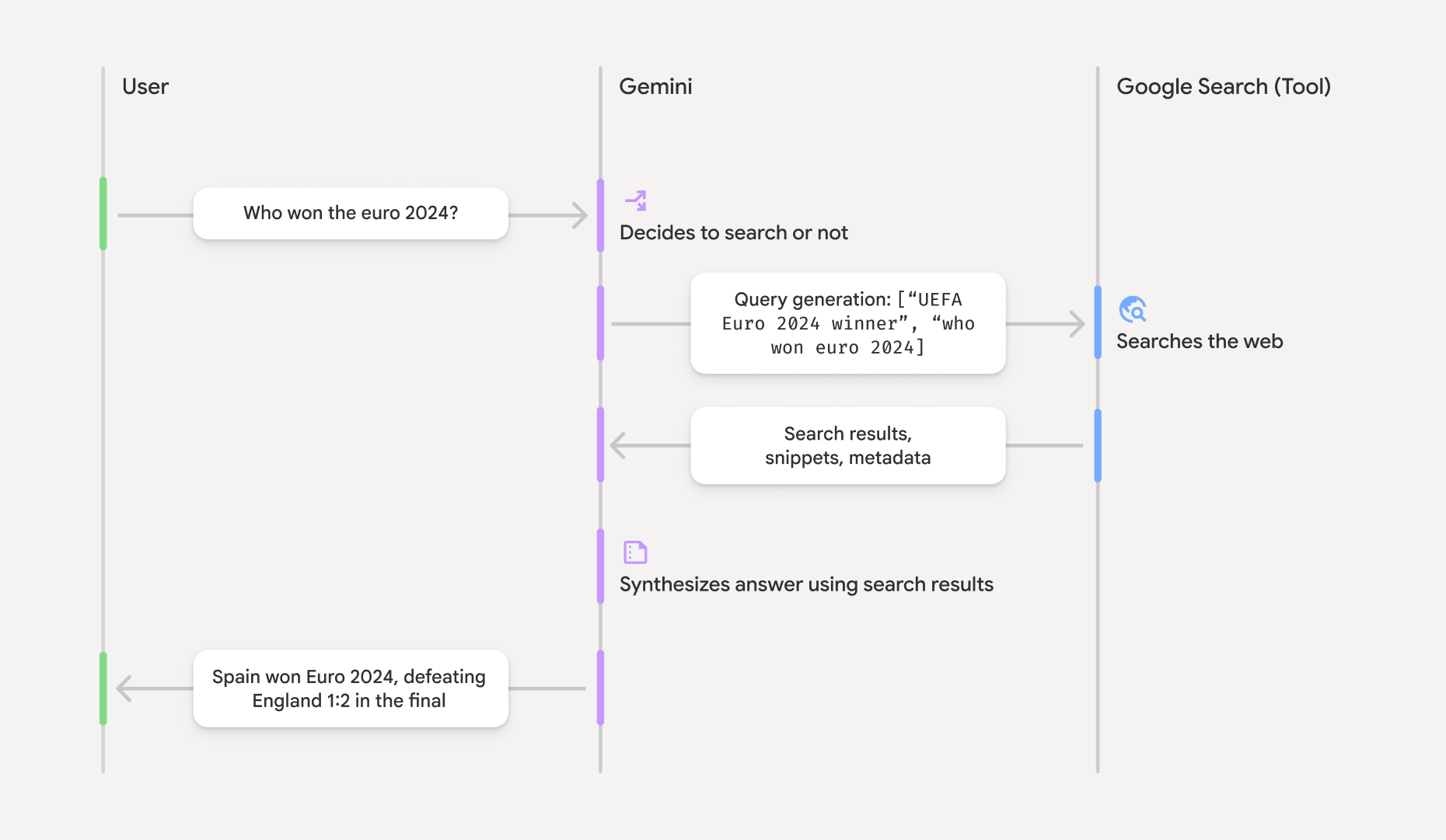
- ユーザー プロンプト: アプリケーションは、
google_searchツールを有効にして、ユーザーのプロンプトを Gemini API に送信します。 - プロンプト分析: モデルがプロンプトを分析し、Google 検索で回答を改善できるかどうかを判断します。
- Google 検索: 必要に応じて、モデルは 1 つ以上の検索クエリを自動的に生成して実行します。
- 検索結果の処理: モデルが検索結果を処理し、情報を合成して回答を生成します。
- グラウンディングされたレスポンス: API は、検索結果に基づいてグラウンディングされた、最終的なユーザー フレンドリーなレスポンスを返します。このレスポンスには、引用を含むインライン
annotationsを含むモデルのテキスト回答と、検索クエリと検索候補を含むgoogle_search_callステップとgoogle_search_resultステップが含まれます。
グラウンディング レスポンスについて
レスポンスが正常にグラウンディングされると、モデルのテキスト出力には、テキスト コンテンツ ブロックに直接インライン annotations が含まれます。これらのアノテーションは、回答の一部をソースにリンクする引用情報を提供します。
{
  "steps": [
    {
      "type": "thought",
      "summary": [
        {
          "type": "text",
          "text": "The user is asking for the winner of Euro 2024. I need to search for the result of the Euro 2024 final."
        }
      ],
      "signature": "CoMDAXLI2nynRYojJIy6B1Jh9os2crpWLfB0..."
    },
    {
      "type": "google_search_call",
      "arguments": {
        "queries": ["UEFA Euro 2024 winner"]
      }
    },
    {
      "type": "google_search_result",
      "call_id": "search_001",
      "result": [
        {
          "search_suggestions": "<!-- HTML and CSS for the search widget -->"
        }
      ]
    },
    {
      "type": "model_output",
      "content": [
        {
          "type": "text",
          "text": "Spain won Euro 2024, defeating England 2-1 in the final. This victory marks Spain's record fourth European Championship title.",
          "annotations": [
            {
              "type": "url_citation",
              "url": "https://www.aljazeera.com/sports/euro-2024-final",
              "title": "aljazeera.com",
              "start_index": 0,
              "end_index": 56
            },
            {
              "type": "url_citation",
              "url": "https://www.uefa.com/euro2024/news/spain-wins-euro-2024",
              "title": "uefa.com",
              "start_index": 57,
              "end_index": 124
            }
          ]
        }
      ]
    }
  ]
}
レスポンスのキー フィールド:
google_search_call: モデルが実行した検索queriesを含みます。google_search_result: UI で検索候補をレンダリングするための HTML スニペットであるsearch_suggestionsを含みます。使用要件の詳細は、利用規約に記載されています。annotationsを含むtext: インライン引用を含むモデルの合成回答。各url_citationアノテーションは、テキスト セグメント(start_indexとend_indexで定義)をソース URL にリンクします。これがインライン引用を作成する鍵となります。
Google 検索によるグラウンディングは、URL コンテキスト ツールと組み合わせて使用することもできます。これにより、一般公開のウェブデータと指定した特定の URL の両方でレスポンスをグラウンディングできます。
インライン引用による出典の明示
API は、テキスト コンテンツ ブロックにインライン url_citation アノテーションを返します。これにより、ユーザー インターフェースでソースを表示する方法を完全に制御できます。各アノテーションには、引用するテキストの部分を識別する start_index と end_index が含まれています。抽出して表示する方法は次のとおりです。
Python
for step in interaction.steps:
    if step.type == "model_output":
        for content_block in step.content:
            if content_block.type == "text":
                print(content_block.text)
                if content_block.annotations:
                    print("\nCitations:")
                    for annotation in content_block.annotations:
                        if annotation.type == "url_citation":
                            cited_text = content_block.text[annotation.start_index:annotation.end_index]
                            print(f"  [{annotation.title}]({annotation.url})")
                            print(f"    Cited text: \"{cited_text}\"")
JavaScript
for (const step of interaction.steps) {
  if (step.type === 'model_output') {
    for (const contentBlock of step.content) {
      if (contentBlock.type === 'text') {
        console.log(contentBlock.text);
        if (contentBlock.annotations) {
          console.log("\nCitations:");
          for (const annotation of contentBlock.annotations) {
            if (annotation.type === 'url_citation') {
              const citedText = contentBlock.text.slice(annotation.startIndex, annotation.endIndex);
              console.log(`  [${annotation.title}](${annotation.url})`);
              console.log(`    Cited text: "${citedText}"`);
            }
          }
        }
      }
    }
  }
}
出力には、テキストとその引用元が表示されます。
Spain won Euro 2024, defeating England 2-1 in the final. This victory marks Spain's record fourth European Championship title.

Citations:
  [aljazeera.com](https://www.aljazeera.com/sports/euro-2024-final)
    Cited text: "Spain won Euro 2024, defeating England 2-1 in the final."
  [uefa.com](https://www.uefa.com/euro2024/news/spain-wins-euro-2024)
    Cited text: "This victory marks Spain's record fourth European Championship title."
料金
Gemini 3 で Google 検索によるグラウンディングを使用すると、モデルが実行すると判断した検索クエリごとにプロジェクトに課金されます。モデルが 1 つのプロンプトに回答するために複数の検索クエリを実行すると判断した場合(たとえば、同じ API 呼び出し内で "UEFA Euro 2024 winner" と "Spain vs England Euro 2024 final
score" を検索する場合)、そのリクエストに対してツールの使用が 2 回課金対象としてカウントされます。請求の目的で、一意のクエリをカウントする際に空のウェブ検索クエリは無視されます。この課金モデルは Gemini 3 モデルにのみ適用されます。Gemini 2.5 以前のモデルで検索グラウンディングを使用する場合、プロジェクトはプロンプトごとに課金されます。
料金の詳細については、Gemini API の料金ページをご覧ください。
サポートされているモデル
全機能については、モデルの概要ページをご覧ください。
| モデル | Google 検索によるグラウンディング |
|---|---|
| Gemini 3.5 Flash | ✔️ |
| Gemini 3.1 Flash Image プレビュー | ✔️ |
| Gemini 3.1 Pro プレビュー版 | ✔️ |
| Gemini 3 Pro Image プレビュー | ✔️ |
| Gemini 3 Flash プレビュー | ✔️ |
| Gemini 2.5 Pro | ✔️ |
| Gemini 2.5 Flash | ✔️ |
| Gemini 2.5 Flash-Lite | ✔️ |
| Gemini 2.0 Flash | ✔️ |
サポートされているツールの組み合わせ
コード実行や URL コンテキストなどの他のツールと Google 検索によるグラウンディングを組み合わせて、より複雑なユースケースに対応できます。
Gemini 3 モデルは、組み込みツール(Google 検索によるグラウンディングなど)とカスタムツール(関数呼び出し)の組み合わせをサポートしています。詳しくは、ツールの組み合わせのページをご覧ください。
次のステップ
- 関数呼び出しなど、その他の利用可能なツールについて学習する。
- URL コンテキスト ツールを使用して、特定の URL でプロンプトを拡張する方法について説明します。