

Google 검색을 사용하는 그라운딩
Google 검색을 사용한 그라운딩은 Gemini 모델을 실시간 웹 콘텐츠에 연결하며, 사용 가능한 모든 언어로 작동합니다. 이를 통해 Gemini는 지식 단절을 넘어 더 정확한 답변을 제공하고 검증 가능한 출처를 인용할 수 있습니다.
그라운딩을 사용하면 다음을 수행할 수 있는 애플리케이션을 빌드할 수 있습니다.
- 사실에 기반한 정확성 향상: 실제 정보를 기반으로 대답하여 모델 할루시네이션을 줄입니다.
- 실시간 정보 액세스: 최근 이벤트 및 주제에 관한 질문에 답합니다.
인용 제공: 모델의 주장에 대한 출처를 표시하여 사용자 신뢰를 구축합니다.
Python
from google import genai

client = genai.Client()

interaction = client.interactions.create(
    model="gemini-3.5-flash",
    input="Who won the euro 2024?",
    tools=[{"type": "google_search"}]
)

print(interaction.output_text)
자바스크립트
import { GoogleGenAI } from "@google/genai";

const client = new GoogleGenAI({});

const interaction = await client.interactions.create({
    model: "gemini-3.5-flash",
    input: "Who won the euro 2024?",
    tools: [{ type: "google_search" }]
});

console.log(interaction.output_text);
REST
curl -X POST "https://generativelanguage.googleapis.com/v1beta/interactions" \
  -H "x-goog-api-key: $GEMINI_API_KEY" \
  -H "Content-Type: application/json" \
  -H "Api-Revision: 2026-05-20" \
  -d '{
    "model": "gemini-3.5-flash",
    "input": "Who won the euro 2024?",
    "tools": [{"type": "google_search"}]
  }'
Google 검색을 사용한 그라운딩 작동 방식
google_search 도구를 사용 설정하면 모델이 정보 검색, 처리, 인용의 전체 워크플로를 자동으로 처리합니다.
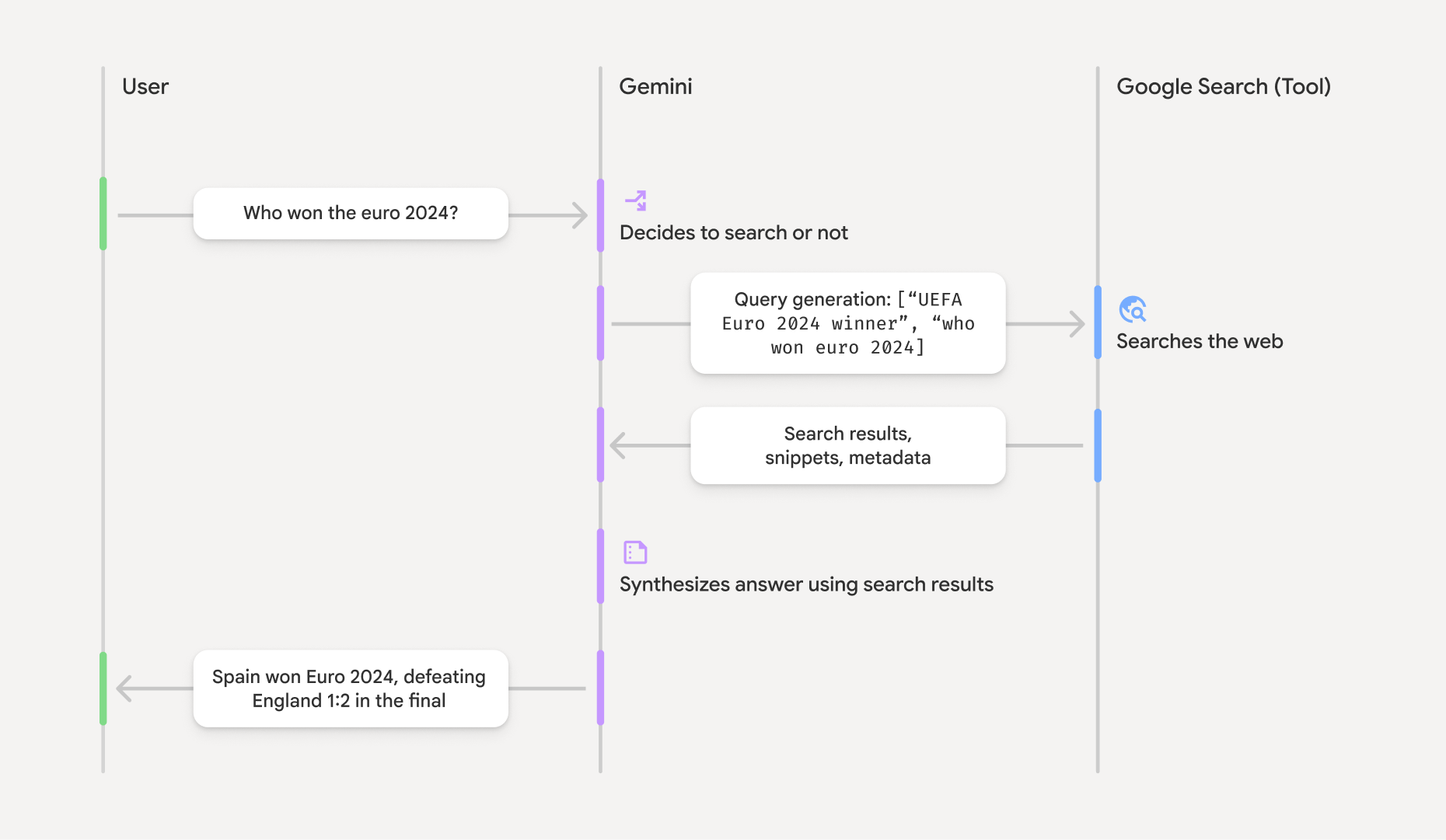
- 사용자 프롬프트: 애플리케이션이
google_search도구가 사용 설정된 상태로 사용자의 프롬프트를 Gemini API에 전송합니다. - 프롬프트 분석: 모델이 프롬프트를 분석하고 Google 검색으로 대답을 개선할 수 있는지 확인합니다.
- Google 검색: 필요한 경우 모델이 하나 이상의 검색어를 자동으로 생성하고 실행합니다.
- 검색 결과 처리: 모델이 검색 결과를 처리하고, 정보를 합성하고, 대답을 구성합니다.
- 그라운딩된 대답: API는 검색 결과를 기반으로 하는 최종적이고 사용자 친화적인 대답을 반환합니다. 이 대답에는 인용이 포함된 인라인
annotations가 포함된 모델의 텍스트 대답과 검색어 및 검색 추천이 포함된google_search_call및google_search_result단계가 포함됩니다.
그라운딩 응답 이해하기
대답이 성공적으로 그라운딩되면 모델의 텍스트 출력에 텍스트 콘텐츠 블록에 직접 인라인 annotations가 포함됩니다. 이러한 주석은 대답의 일부를 소스에 연결하는 인용 정보를 제공합니다.
{
  "steps": [
    {
      "type": "thought",
      "summary": [
        {
          "type": "text",
          "text": "The user is asking for the winner of Euro 2024. I need to search for the result of the Euro 2024 final."
        }
      ],
      "signature": "CoMDAXLI2nynRYojJIy6B1Jh9os2crpWLfB0..."
    },
    {
      "type": "google_search_call",
      "arguments": {
        "queries": ["UEFA Euro 2024 winner"]
      }
    },
    {
      "type": "google_search_result",
      "call_id": "search_001",
      "result": [
        {
          "search_suggestions": "<!-- HTML and CSS for the search widget -->"
        }
      ]
    },
    {
      "type": "model_output",
      "content": [
        {
          "type": "text",
          "text": "Spain won Euro 2024, defeating England 2-1 in the final. This victory marks Spain's record fourth European Championship title.",
          "annotations": [
            {
              "type": "url_citation",
              "url": "https://www.aljazeera.com/sports/euro-2024-final",
              "title": "aljazeera.com",
              "start_index": 0,
              "end_index": 56
            },
            {
              "type": "url_citation",
              "url": "https://www.uefa.com/euro2024/news/spain-wins-euro-2024",
              "title": "uefa.com",
              "start_index": 57,
              "end_index": 124
            }
          ]
        }
      ]
    }
  ]
}
대답의 주요 필드:
google_search_call: 모델이 실행한 검색queries을 포함합니다.google_search_result: UI에서 검색어 추천을 렌더링하기 위한 HTML 스니펫인search_suggestions이 포함되어 있습니다. 전체 사용 요구사항은 서비스 약관에 자세히 설명되어 있습니다.annotations이 포함된text: 인라인 인용이 포함된 모델의 합성된 대답입니다. 각url_citation주석은 텍스트 세그먼트 (start_index및end_index로 정의됨)를 소스 URL에 연결합니다. 인라인 인용을 만드는 데 핵심적인 요소입니다.
Google 검색을 사용한 그라운딩은 URL 컨텍스트 도구와 함께 사용하여 공개 웹 데이터와 사용자가 제공한 특정 URL 모두에서 대답을 그라운딩할 수도 있습니다.
본문 내 인용으로 출처 표시
API는 텍스트 콘텐츠 블록에 인라인 url_citation 주석을 반환하므로 사용자 인터페이스에서 소스를 표시하는 방식을 완전히 제어할 수 있습니다.
각 주석에는 텍스트의 어느 부분을 인용하는지 식별하는 start_index 및 end_index가 포함됩니다. 이를 추출하여 표시하는 방법은 다음과 같습니다.
Python
for step in interaction.steps:
    if step.type == "model_output":
        for content_block in step.content:
            if content_block.type == "text":
                print(content_block.text)
                if content_block.annotations:
                    print("\nCitations:")
                    for annotation in content_block.annotations:
                        if annotation.type == "url_citation":
                            cited_text = content_block.text[annotation.start_index:annotation.end_index]
                            print(f"  [{annotation.title}]({annotation.url})")
                            print(f"    Cited text: \"{cited_text}\"")
자바스크립트
for (const step of interaction.steps) {
  if (step.type === 'model_output') {
    for (const contentBlock of step.content) {
      if (contentBlock.type === 'text') {
        console.log(contentBlock.text);
        if (contentBlock.annotations) {
          console.log("\nCitations:");
          for (const annotation of contentBlock.annotations) {
            if (annotation.type === 'url_citation') {
              const citedText = contentBlock.text.slice(annotation.startIndex, annotation.endIndex);
              console.log(`  [${annotation.title}](${annotation.url})`);
              console.log(`    Cited text: "${citedText}"`);
            }
          }
        }
      }
    }
  }
}
출력에는 텍스트와 인용이 표시됩니다.
Spain won Euro 2024, defeating England 2-1 in the final. This victory marks Spain's record fourth European Championship title.

Citations:
  [aljazeera.com](https://www.aljazeera.com/sports/euro-2024-final)
    Cited text: "Spain won Euro 2024, defeating England 2-1 in the final."
  [uefa.com](https://www.uefa.com/euro2024/news/spain-wins-euro-2024)
    Cited text: "This victory marks Spain's record fourth European Championship title."
가격 책정
Gemini 3에서 Google 검색을 사용한 그라운딩을 사용하면 모델이 실행하기로 결정한 각 검색어에 대해 프로젝트에 요금이 청구됩니다. 모델이 단일 프롬프트에 답변하기 위해 여러 검색어를 실행하기로 결정하는 경우 (예: 동일한 API 호출 내에서 "UEFA Euro 2024 winner" 및 "Spain vs England Euro 2024 final
score" 검색) 해당 요청에 대해 도구의 청구 가능한 사용 2회로 계산됩니다. 결제 목적으로 고유한 쿼리를 계산할 때 빈 웹 검색어는 무시됩니다. 이 청구 모델은 Gemini 3 모델에만 적용됩니다. Gemini 2.5 이하 모델에서 검색 그라운딩을 사용하는 경우 프롬프트당 프로젝트에 요금이 청구됩니다.
자세한 가격 정보는 Gemini API 가격 책정 페이지를 참고하세요.
지원되는 모델
모델 개요 페이지에서 전체 기능을 확인할 수 있습니다.
| 모델 | Google 검색을 사용하는 그라운딩 |
|---|---|
| Gemini 3.5 Flash | ✔️ |
| Gemini 3.1 Flash Image 프리뷰 | ✔️ |
| Gemini 3.1 Pro 프리뷰 | ✔️ |
| Gemini 3 Pro 이미지 프리뷰 | ✔️ |
| Gemini 3 Flash 프리뷰 | ✔️ |
| Gemini 2.5 Pro | ✔️ |
| Gemini 2.5 Flash | ✔️ |
| Gemini 2.5 Flash-Lite | ✔️ |
| Gemini 2.0 Flash | ✔️ |
지원되는 도구 조합
코드 실행, URL 컨텍스트와 같은 다른 도구와 함께 Google 검색을 사용한 그라운딩을 사용하여 더 복잡한 사용 사례를 지원할 수 있습니다.
Gemini 3 모델은 기본 제공 도구 (예: Google 검색을 사용한 그라운딩)와 맞춤 도구 (함수 호출)의 결합을 지원합니다. 도구 조합 페이지에서 자세히 알아보세요.
다음 단계
- 함수 호출과 같은 다른 사용 가능한 도구에 대해 알아봅니다.
- URL 컨텍스트 도구를 사용하여 특정 URL로 프롬프트를 보강하는 방법을 알아보세요.