

ন্যানো কলার ছবি তৈরি
- অথবা নির্দেশিকা থেকে নিজের মতো করে তৈরি করুন:






ন্যানো বানানা ২ দ্বারা তৈরি নির্দেশনা: "একটি চকচকে ম্যাগাজিনের প্রচ্ছদের ছবি। সাদামাটা নীল প্রচ্ছদটিতে বড় ও মোটা অক্ষরে ‘ন্যানো ব্যানানা’ লেখা রয়েছে। লেখাটি সেরিফ ফন্টে লেখা এবং পুরো প্রচ্ছদ জুড়ে রয়েছে। অন্য কোনো লেখা নেই। লেখাটির সামনে একটি মার্জিত ও সাদামাটা পোশাক পরা এক ব্যক্তির প্রতিকৃতি রয়েছে। তিনি খেলাচ্ছলে ২ সংখ্যাটি ধরে আছেন, যা ছবির মূল আকর্ষণ।"
কোণায় বারকোডসহ সংখ্যা নম্বর এবং "ফেব্রুয়ারি ২০২৬" তারিখটি রাখুন। ম্যাগাজিনটি একটি ডিজাইনার স্টোরের ভেতরে, কমলা রঙের প্লাস্টার করা দেয়াল ঘেঁষে একটি তাকে রাখা আছে।ন্যানো বানানা প্রো দ্বারা তৈরি নির্দেশনা: "লন্ডনের একটি স্পষ্ট, ৪৫° টপ-ডাউন আইসোমেট্রিক ক্ষুদ্রাকৃতির ৩ডি কার্টুন দৃশ্য উপস্থাপন করুন, যেখানে এর সবচেয়ে বিখ্যাত ল্যান্ডমার্ক এবং স্থাপত্য উপাদানগুলো থাকবে। বাস্তবসম্মত PBR ম্যাটেরিয়ালসহ নরম, পরিমার্জিত টেক্সচার এবং মৃদু, জীবন্ত আলো ও ছায়া ব্যবহার করুন। একটি নিমগ্নকারী আবহ তৈরি করতে বর্তমান আবহাওয়ার পরিস্থিতি সরাসরি শহরের পরিবেশে অন্তর্ভুক্ত করুন। একটি নরম, একরঙা পটভূমিসহ পরিচ্ছন্ন ও ন্যূনতম কম্পোজিশন ব্যবহার করুন। উপরের কেন্দ্রে, বড় ও মোটা অক্ষরে "লন্ডন" শিরোনামটি রাখুন, তার নিচে একটি সুস্পষ্ট আবহাওয়ার আইকন, তারপর তারিখ (ছোট অক্ষরে) এবং তাপমাত্রা (মাঝারি অক্ষরে) দিন। সমস্ত লেখা অবশ্যই সামঞ্জস্যপূর্ণ ব্যবধানসহ কেন্দ্রে থাকতে হবে এবং তা ভবনগুলোর চূড়ার ওপর সামান্যভাবে ছড়িয়ে থাকতে পারে।"ন্যানো বানানা ২ দ্বারা তৈরি নির্দেশনা: "ইমেজ সার্চ ব্যবহার করে একটি রেসপ্লেন্ডেন্ট কোয়েটজাল পাখির সঠিক ছবি খুঁজুন। এই পাখিটির একটি সুন্দর ৩:২ ওয়ালপেপার তৈরি করুন, যেখানে উপর থেকে নিচে একটি স্বাভাবিক গ্রেডিয়েন্ট এবং ন্যূনতম কম্পোজিশন থাকবে।"
ন্যানো বানানা প্রো দ্বারা তৈরি নির্দেশনা: "কলার সুগন্ধযুক্ত একটি পারফিউমের উচ্চমানের বিজ্ঞাপনে এই লোগোটি ব্যবহার করুন। লোগোটি বোতলের সাথে নিখুঁতভাবে মিশে গেছে।"ন্যানো বানানা প্রো দ্বারা তৈরি নির্দেশনা: "সকালের নাস্তা পরিবেশন করা হচ্ছে এমন একটি ব্যস্ত ক্যাফের দৈনন্দিন দৃশ্যের ছবি। সামনের দিকে নীল চুলের একজন অ্যানিমে পুরুষ, মানুষগুলোর মধ্যে একজন পেন্সিল স্কেচ এবং অন্যজন একটি ক্লেমেশন চরিত্র।"ন্যানো বানানা প্রো দ্বারা তৈরি নির্দেশনা: "জেমিনি ৩ ফ্ল্যাশ-এর উন্মোচন কেমন সাড়া পেয়েছে তা জানতে সার্চ ব্যবহার করুন। এই তথ্য ব্যবহার করে এ বিষয়ে একটি সংক্ষিপ্ত প্রবন্ধ (শিরোনামসহ) লিখুন। ডিজাইন-কেন্দ্রিক কোনো গ্লসি ম্যাগাজিনে প্রকাশিত প্রবন্ধটির একটি ছবি ফেরত দিন। এটি জেমিনি ৩ ফ্ল্যাশ সম্পর্কিত প্রবন্ধটি দেখানো একটিমাত্র ভাঁজ করা পাতার ছবি। একটি প্রধান ছবি থাকবে। শিরোনামটি সেরিফ ফন্টে হবে।"ন্যানো বানানা প্রো দ্বারা তৈরি নির্দেশনা: "একটি সুন্দর কুকুরের আইকন। পটভূমি সাদা। আইকনগুলো রঙিন এবং স্পর্শযোগ্য ত্রিমাত্রিক (3D) শৈলীতে তৈরি করুন। কোনো লেখা থাকবে না।"ন্যানো বানানা ২ দ্বারা তৈরি নির্দেশনা: "একটি নিখুঁত আইসোমেট্রিক ছবি তৈরি করুন। এটি কোনো ক্ষুদ্রাকৃতি ছবি নয়, বরং এমন একটি তোলা ছবি যা ঘটনাক্রমে নিখুঁত আইসোমেট্রিক হয়েছে। এটি একটি সুন্দর আধুনিক বাগানের ছবি। এতে একটি বড় ২ আকৃতির পুল এবং ‘ন্যানো ব্যানানা ২’ লেখাটি রয়েছে।"
ন্যানো ব্যানানা হলো জেমিনির নিজস্ব ইমেজ তৈরির ক্ষমতার নাম। জেমিনি টেক্সট, ছবি বা উভয়ের সংমিশ্রণ ব্যবহার করে কথোপকথনের মতো করে ছবি তৈরি ও প্রসেস করতে পারে। এর ফলে আপনি অভূতপূর্ব নিয়ন্ত্রণের সাথে ভিজ্যুয়াল তৈরি, সম্পাদনা এবং তাতে বারবার পরিবর্তন আনতে পারেন।
ন্যানো ব্যানানা বলতে জেমিনি এপিআই-তে উপলব্ধ দুটি স্বতন্ত্র মডেলকে বোঝায়:
- ন্যানো ব্যানানা ২ : জেমিনি ৩.১ ফ্ল্যাশ ইমেজ মডেল (
gemini-3.1-flash-image)। এই মডেলটি জেমিনি ৩ প্রো ইমেজের উচ্চ-দক্ষতাসম্পন্ন সংস্করণ হিসেবে কাজ করে, যা গতি এবং অধিক পরিমাণে ডেভেলপার ব্যবহারের জন্য বিশেষভাবে তৈরি। - ন্যানো ব্যানানা প্রো : জেমিনি ৩ প্রো ইমেজ মডেল (
gemini-3-pro-image)। এই মডেলটি পেশাদার অ্যাসেট তৈরির জন্য ডিজাইন করা হয়েছে, যা জটিল নির্দেশাবলী অনুসরণ করতে এবং উচ্চ-মানের টেক্সট রেন্ডার করতে উন্নত যুক্তি ("চিন্তা") ব্যবহার করে। - ন্যানো ব্যানানা : জেমিনি ২.৫ ফ্ল্যাশ ইমেজ মডেল (
gemini-2.5-flash-image)। এই মডেলটি গতি এবং দক্ষতার জন্য ডিজাইন করা হয়েছে এবং এটি উচ্চ-পরিমাণ ও স্বল্প-বিলম্বের কাজগুলোর জন্য অপ্টিমাইজ করা হয়েছে।
জেনারেট করা সমস্ত ছবিতে একটি SynthID ওয়াটারমার্ক অন্তর্ভুক্ত থাকে।
ছবি তৈরি (টেক্সট থেকে ছবি)
পাইথন
from google import genai
from PIL import Image
import base64

client = genai.Client()

interaction = client.interactions.create(
    model="gemini-3.1-flash-image",
    input="Create a picture of a nano banana dish in a fancy restaurant with a Gemini theme",
)

with open("generated_image.png", "wb") as f:

    f.write(base64.b64decode(interaction.output_image.data))
জাভাস্ক্রিপ্ট
import { GoogleGenAI } from "@google/genai";
import * as fs from "node:fs";

async function main() {

  const ai = new GoogleGenAI({});

  const prompt =
    "Create a picture of a nano banana dish in a fancy restaurant with a Gemini theme";

  const interaction = await ai.interactions.create({
    model: "gemini-3.1-flash-image",
    input: prompt,
  });
  const generatedImage = interaction.output_image;
  if (generatedImage) {
    const buffer = Buffer.from(generatedImage.data, "base64");
    fs.writeFileSync("gemini-native-image.png", buffer);
    console.log("Image saved as gemini-native-image.png");
  }
}

main();
বিশ্রাম
curl -s -X POST \
  "https://generativelanguage.googleapis.com/v1beta/interactions" \
  -H "x-goog-api-key: $GEMINI_API_KEY" \
  -H "Content-Type: application/json" \
  -d '{
    "model": "gemini-3.1-flash-image",
    "input": [
      {"type": "text", "text": "Create a picture of a nano banana dish in a fancy restaurant with a Gemini theme"}
    ]
  }'
আপনি interaction.output_image প্রপার্টি ব্যবহার করে তৈরি করা ছবির ডেটা পুনরুদ্ধার করতে পারেন, যা সর্বশেষ তৈরি করা ছবির ব্লকটি ফেরত দেয়। সুবিধাজনক প্রপার্টিগুলো সম্পর্কে বিস্তারিত জানতে, ইন্টারঅ্যাকশন ওভারভিউ দেখুন।
ছবি সম্পাদনা (টেক্সট ও ছবি থেকে ছবিতে)
অনুস্মারক : আপনি যে কোনো ছবি আপলোড করছেন, তার জন্য আপনার প্রয়োজনীয় অধিকার আছে কিনা তা নিশ্চিত করুন। এমন কোনো কন্টেন্ট তৈরি করবেন না যা অন্যের অধিকার লঙ্ঘন করে, যার মধ্যে প্রতারণা, হয়রানি বা ক্ষতিসাধনকারী ভিডিও বা ছবি অন্তর্ভুক্ত। এই জেনারেটিভ এআই পরিষেবাটির আপনার ব্যবহার আমাদের নিষিদ্ধ ব্যবহার নীতির অধীন।
একটি ছবি দিন এবং টেক্সট প্রম্পট ব্যবহার করে উপাদান যোগ, অপসারণ বা পরিবর্তন করুন, স্টাইল বদলান, অথবা কালার গ্রেডিং অ্যাডজাস্ট করুন।
নিম্নলিখিত উদাহরণটি base64 এনকোডেড ছবি আপলোড করার পদ্ধতি প্রদর্শন করে। একাধিক ছবি, বৃহত্তর পেলোড এবং সমর্থিত MIME প্রকারের জন্য, 'ছবি বোঝা' পৃষ্ঠাটি দেখুন।
পাইথন
from google import genai
from PIL import Image
import base64

client = genai.Client()

with open("/path/to/cat_image.png", "rb") as f:
    image_bytes = f.read()

interaction = client.interactions.create(
    model="gemini-3.1-flash-image",
    input=[
        {
          "type": "text",
          "text": "Create a picture of a nano banana dish in a fancy restaurant with a Gemini theme"
        },
        {
            "type": "image",
            "data": base64.b64encode(image_bytes).decode('utf-8'),
            "mime_type": "image/png"
        }
    ],
)

with open("generated_image.png", "wb") as f:

    f.write(base64.b64decode(interaction.output_image.data))
জাভাস্ক্রিপ্ট
import { GoogleGenAI } from "@google/genai";
import * as fs from "node:fs";

async function main() {

  const ai = new GoogleGenAI({});

  const imagePath = "path/to/cat_image.png";
  const imageData = fs.readFileSync(imagePath);
  const base64Image = imageData.toString("base64");

  const prompt = [
    { type: "text", text: "Create a picture of my cat eating a nano-banana in a" +
            "fancy restaurant under the Gemini constellation" },
    {
      type: "image",
      mime_type: "image/png",
      data: base64Image
    },
  ];

  const interaction = await ai.interactions.create({
    model: "gemini-3.1-flash-image",
    input: prompt,
  });
  const generatedImage = interaction.output_image;
  if (generatedImage) {
    const buffer = Buffer.from(generatedImage.data, "base64");
    fs.writeFileSync("gemini-native-image.png", buffer);
    console.log("Image saved as gemini-native-image.png");
  }
}

main();
বিশ্রাম
curl -s -X POST \
  "https://generativelanguage.googleapis.com/v1beta/interactions" \
    -H "x-goog-api-key: $GEMINI_API_KEY" \
    -H 'Content-Type: application/json' \
    -d "{
      \"model\": \"gemini-3.1-flash-image\",
      \"input\": [
        {\"type\": \"text\", \"text\": \"Create a picture of my cat eating a nano-banana in a fancy restaurant under the Gemini constellation\"},
        {
          \"type\": \"image\",
          \"mime_type\": \"image/jpeg\",
          \"data\": \"<BASE64_IMAGE_DATA>\"
        }
      ]
    }"
মাল্টি-টার্ন ইমেজ এডিটিং
কথোপকথনের ভঙ্গিতে ছবি তৈরি ও সম্পাদনা করতে থাকুন। ছবির কাজ বারবার করার জন্য একাধিক পালায় আলোচনা করাই হলো প্রস্তাবিত পদ্ধতি। নিচের উদাহরণটিতে সালোকসংশ্লেষণ বিষয়ে একটি ইনফোগ্রাফিক তৈরির নির্দেশ দেখানো হয়েছে।
পাইথন
from google import genai
import base64

client = genai.Client()

interaction = client.interactions.create(
    model="gemini-3.1-flash-image",
    input="Create a vibrant infographic that explains photosynthesis as if it were a recipe for a plant's favorite food. Show the \"ingredients\" (sunlight, water, CO2) and the \"finished dish\" (sugar/energy). The style should be like a page from a colorful kids' cookbook, suitable for a 4th grader.",
    tools=[{"type": "google_search"}],
)

with open("photosynthesis.png", "wb") as f:

    f.write(base64.b64decode(interaction.output_image.data))
জাভাস্ক্রিপ্ট
import { GoogleGenAI } from "@google/genai";
import * as fs from "node:fs";

const ai = new GoogleGenAI({});

async function main() {
  const interaction = await ai.interactions.create({
    model: "gemini-3.1-flash-image",
    input: "Create a vibrant infographic that explains photosynthesis as if it were a recipe for a plant's favorite food. Show the \"ingredients\" (sunlight, water, CO2) and the \"finished dish\" (sugar/energy). The style should be like a page from a colorful kids' cookbook, suitable for a 4th grader.",
    tools: [{"type": "google_search"}],
  });

  const generatedImage = interaction.output_image;
  if (generatedImage) {
    const buffer = Buffer.from(generatedImage.data, "base64");
    fs.writeFileSync("photosynthesis.png", buffer);
    console.log("Image saved as photosynthesis.png");
  }
}

await main();
বিশ্রাম
curl -s -X POST \
  "https://generativelanguage.googleapis.com/v1beta/interactions" \
  -H "x-goog-api-key: $GEMINI_API_KEY" \
  -H "Content-Type: application/json" \
  -d '{
    "model": "gemini-3.1-flash-image",
    "input": [
      {"type": "text", "text": "Create a vibrant infographic that explains photosynthesis as if it were a recipe for a plants favorite food. Show the \"ingredients\" (sunlight, water, CO2) and the \"finished dish\" (sugar/energy). The style should be like a page from a colorful kids cookbook, suitable for a 4th grader."}
    ],
    "tools": [{"type": "google_search"}]
  }'
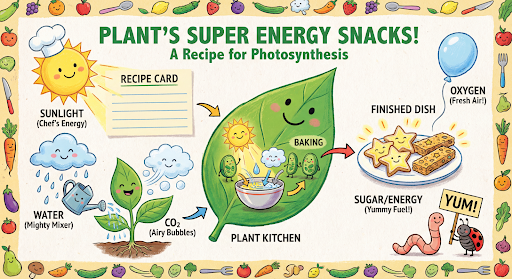
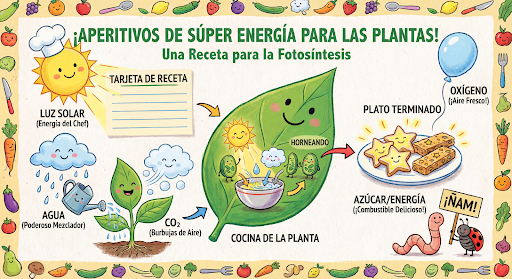
এরপর আপনি previous_interaction_id ব্যবহার করে গ্রাফিকটির ভাষা স্প্যানিশে পরিবর্তন করতে পারবেন।
পাইথন
interaction_2 = client.interactions.create(
    model="gemini-3.1-flash-image",
    input="Update this infographic to be in Spanish. Do not change any other elements of the image.",
    previous_interaction_id=interaction.id,
    response_format={
        "type": "image",
        "mime_type": "image/jpeg",
        "aspect_ratio": "16:9",
        "image_size": "2K"
    },
)

generated_image = interaction_2.output_image
if generated_image:
    with open("photosynthesis_spanish.png", "wb") as f:
        f.write(base64.b64decode(generated_image.data))
জাভাস্ক্রিপ্ট
const interaction2 = await ai.interactions.create({
  model: "gemini-3.1-flash-image",
  input: "Update this infographic to be in Spanish. Do not change any other elements of the image.",
  previous_interaction_id: interaction.id,
  response_format: {
    type: "image",
    mime_type: "image/png",
    aspect_ratio: "16:9",
    image_size: "2K"
  },
});

const generatedImage = interaction2.output_image;
if (generatedImage) {
  const buffer = Buffer.from(generatedImage.data, "base64");
  fs.writeFileSync("photosynthesis_spanish.png", buffer);
}
বিশ্রাম
curl -s -X POST \
  "https://generativelanguage.googleapis.com/v1beta/interactions" \
  -H "x-goog-api-key: $GEMINI_API_KEY" \
  -H 'Content-Type: application/json' \
  -d '{
    "model": "gemini-3.1-flash-image",
    "input": "Update this infographic to be in Spanish. Do not change any other elements of the image.",
    "previous_interaction_id": "<PREVIOUS_INTERACTION_ID>",
    "response_format": {
      "type": "image",
      "mime_type": "image/jpeg",
      "aspect_ratio": "16:9",
      "image_size": "2K"
    }
  }'
জেমিনি ৩ ইমেজ মডেলের সাথে নতুন
জেমিনি ৩ সর্বাধুনিক ইমেজ তৈরি এবং সম্পাদনার মডেল প্রদান করে। জেমিনি ৩.১ ফ্ল্যাশ ইমেজ গতি এবং বিপুল পরিমাণে ব্যবহারের জন্য অপ্টিমাইজ করা হয়েছে, এবং জেমিনি ৩ প্রো ইমেজ পেশাদার অ্যাসেট তৈরির জন্য অপ্টিমাইজ করা হয়েছে। উন্নত যুক্তির মাধ্যমে সবচেয়ে চ্যালেঞ্জিং ওয়ার্কফ্লো মোকাবেলা করার জন্য ডিজাইন করা এই মডেলগুলো জটিল, বহু-ধাপের তৈরি এবং পরিবর্তনের কাজে অত্যন্ত পারদর্শী।
- উচ্চ-রেজোলিউশন আউটপুট : 1K, 2K, এবং 4K ভিজ্যুয়াল তৈরির জন্য অন্তর্নির্মিত সক্ষমতা।
- জেমিনি ৩.১ ফ্ল্যাশ ইমেজ আরও ছোট ৫১২ পিক্সেল (০.৫কে) রেজোলিউশন যোগ করে।
- উন্নত টেক্সট রেন্ডারিং : ইনফোগ্রাফিক, মেনু, ডায়াগ্রাম এবং মার্কেটিং অ্যাসেটের জন্য সুস্পষ্ট ও শৈল্পিক টেক্সট তৈরি করতে সক্ষম।
- গুগল সার্চের মাধ্যমে ভিত্তি স্থাপন : মডেলটি তথ্য যাচাই করতে এবং রিয়েল-টাইম ডেটার (যেমন, বর্তমান আবহাওয়ার মানচিত্র, স্টক চার্ট, সাম্প্রতিক ঘটনা) উপর ভিত্তি করে চিত্র তৈরি করতে একটি টুল হিসেবে গুগল সার্চ ব্যবহার করতে পারে।
- জেমিনি ৩.১ ফ্ল্যাশ ইমেজ-এ ওয়েব সার্চের পাশাপাশি গুগল ইমেজ সার্চ গ্রাউন্ডিং-এর ইন্টিগ্রেশন যুক্ত করা হয়েছে।
- চিন্তন মোড : মডেলটি জটিল নির্দেশাবলী নিয়ে যুক্তি দিয়ে চিন্তা করার জন্য একটি 'চিন্তা' প্রক্রিয়া ব্যবহার করে। চূড়ান্ত উচ্চ-মানের আউটপুট তৈরি করার আগে, এটি গঠনটিকে পরিমার্জন করার জন্য অন্তর্বর্তীকালীন 'চিন্তা চিত্র' (যা ব্যাকএন্ডে দেখা যায় কিন্তু চার্জ করা হয় না) তৈরি করে।
- সর্বোচ্চ ১৪টি রেফারেন্স ইমেজ : আপনি এখন চূড়ান্ত ছবিটি তৈরি করার জন্য সর্বোচ্চ ১৪টি রেফারেন্স ইমেজ মিশ্রিত করতে পারবেন।
- নতুন অ্যাস্পেক্ট রেশিও : জেমিনি ৩.১ ফ্ল্যাশ ইমেজে ১:৪, ৪:১, ১:৮, এবং ৮:১ অ্যাস্পেক্ট রেশিও যুক্ত করা হয়েছে।
সর্বোচ্চ ১৪টি রেফারেন্স ছবি ব্যবহার করুন
জেমিনি ৩ ইমেজ মডেল আপনাকে সর্বোচ্চ ১৪টি রেফারেন্স ইমেজ মিশ্রিত করার সুযোগ দেয়। এই ১৪টি ইমেজের মধ্যে নিম্নলিখিতগুলো অন্তর্ভুক্ত থাকতে পারে:
| জেমিনি ৩.১ ফ্ল্যাশ ইমেজ | জেমিনি ৩ প্রো ইমেজ |
|---|---|
| চূড়ান্ত ছবিতে অন্তর্ভুক্ত করার জন্য বস্তুর ১০টি পর্যন্ত উচ্চ মানের ছবি। | চূড়ান্ত ছবিতে অন্তর্ভুক্ত করার জন্য বস্তুসমূহের সর্বোচ্চ ৬টি উচ্চ মানের ছবি। |
| চরিত্রের সামঞ্জস্য বজায় রাখতে সর্বোচ্চ ৪টি চরিত্রের ছবি ব্যবহার করা যাবে। | চরিত্রের সামঞ্জস্য বজায় রাখতে সর্বাধিক ৫টি চরিত্রের ছবি ব্যবহার করা যাবে। |
| প্রযোজ্য নয় | স্টাইল রেফারেন্স হিসেবে সর্বোচ্চ ৩টি ছবি ব্যবহার করা যাবে। |
পাইথন
from google import genai
from google.genai import types
from PIL import Image
import base64

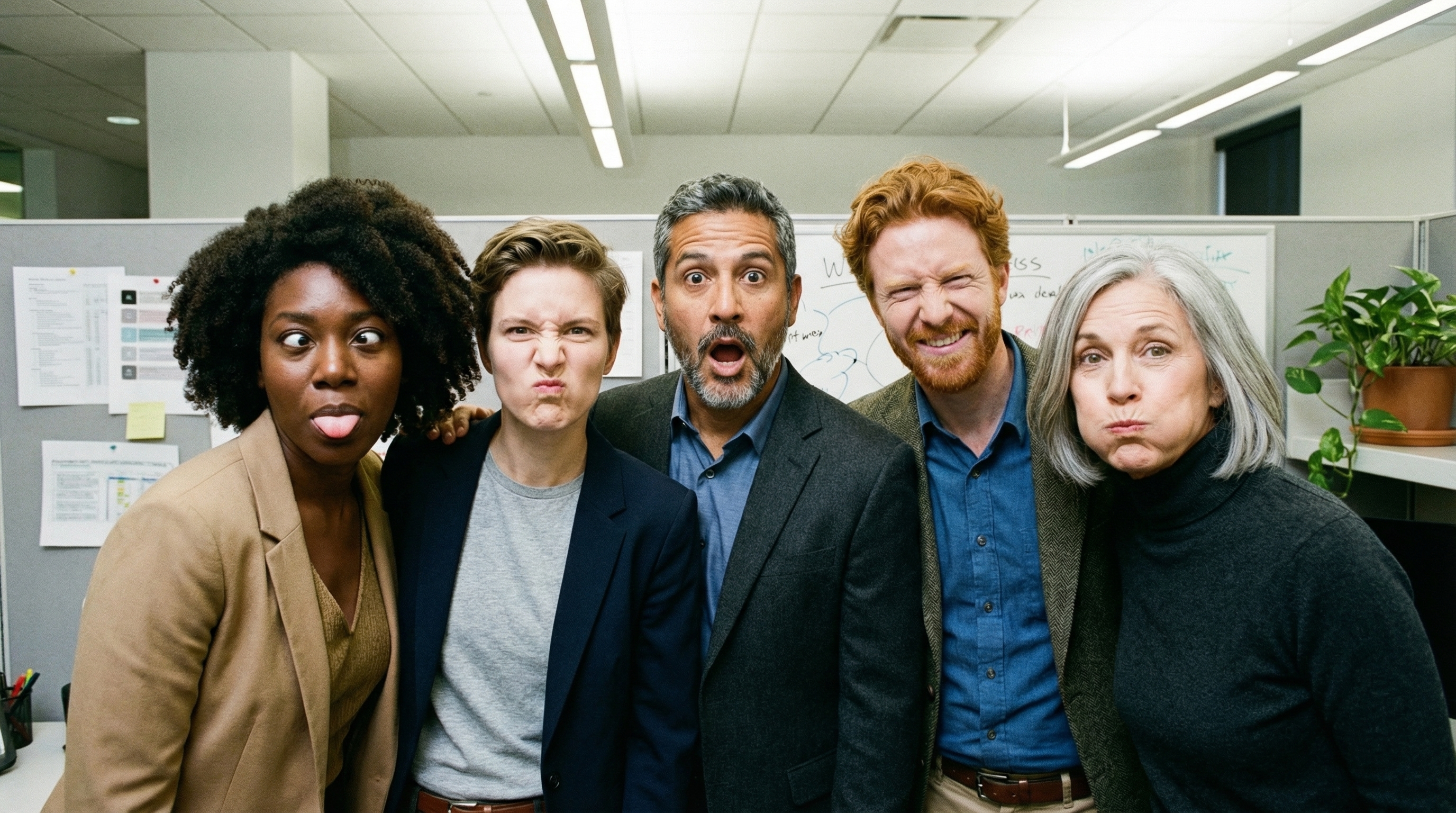
prompt = "An office group photo of these people, they are making funny faces."

client = genai.Client()

interaction = client.interactions.create(
    model="gemini-3.1-flash-image",
    input=[
        {
            "type": "text",
            "text": prompt,
        },
        {
            "type": "image",
            "data": base64.b64encode(image_bytes).decode('utf-8'),
            "mime_type": "image/png"
        },
        {
            "type": "image",
            "data": base64.b64encode(image_bytes).decode('utf-8'),
            "mime_type": "image/png"
        },
        {
            "type": "image",
            "data": base64.b64encode(image_bytes).decode('utf-8'),
            "mime_type": "image/png"
        },
        {
            "type": "image",
            "data": base64.b64encode(image_bytes).decode('utf-8'),
            "mime_type": "image/png"
        },
        {
            "type": "image",
            "data": base64.b64encode(image_bytes).decode('utf-8'),
            "mime_type": "image/png"
        },
    ],
    response_format={
        "type": "image",
        "aspect_ratio": "5:4",
        "image_size": "2K"
    },
)

with open("office.png", "wb") as f:

    f.write(base64.b64decode(interaction.output_image.data))
জাভাস্ক্রিপ্ট
import { GoogleGenAI } from "@google/genai";
import * as fs from "node:fs";

async function main() {
  const ai = new GoogleGenAI({});

  const input = [
    {
      type: "text",
      text: "An office group photo of these people, they are making funny faces.",
    },
    { type: "image", mime_type: "image/jpeg", data: base64ImageFile1 },
    { type: "image", mime_type: "image/jpeg", data: base64ImageFile2 },
    { type: "image", mime_type: "image/jpeg", data: base64ImageFile3 },
    { type: "image", mime_type: "image/jpeg", data: base64ImageFile4 },
    { type: "image", mime_type: "image/jpeg", data: base64ImageFile5 },
  ];

  const interaction = await ai.interactions.create({
    model: "gemini-3.1-flash-image",
    input: input,
    response_format: {
      type: "image",
      aspect_ratio: "5:4",
      image_size: "2K",
    },
  });

  const buffer = Buffer.from(interaction.output_image.data, 'base64');

  fs.writeFileSync('office.png', buffer);
}

main();
বিশ্রাম
curl -s -X POST \
  "https://generativelanguage.googleapis.com/v1beta/interactions" \
    -H "x-goog-api-key: $GEMINI_API_KEY" \
    -H 'Content-Type: application/json' \
    -d "{
      \"model\": \"gemini-3.1-flash-image\",
      \"input\": [
        {\"type\": \"text\", \"text\": \"An office group photo of these people, they are making funny faces.\"},
        {\"type\": \"image\", \"mime_type\": \"image/png\", \"data\": \"<BASE64_DATA_IMG_1>\"},
        {\"type\": \"image\", \"mime_type\": \"image/png\", \"data\": \"<BASE64_DATA_IMG_2>\"},
        {\"type\": \"image\", \"mime_type\": \"image/png\", \"data\": \"<BASE64_DATA_IMG_3>\"},
        {\"type\": \"image\", \"mime_type\": \"image/png\", \"data\": \"<BASE64_DATA_IMG_4>\"},
        {\"type\": \"image\", \"mime_type\": \"image/png\", \"data\": \"<BASE64_DATA_IMG_5>\"}
      ],
      \"response_format\": {
        \"type\": \"image\",
        \"aspect_ratio\": \"5:4\",
        \"image_size\": \"2K\"
      }
    }"
গুগল সার্চের মাধ্যমে গ্রাউন্ডিং
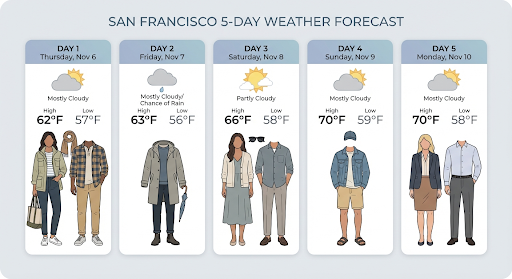
আবহাওয়ার পূর্বাভাস, স্টক চার্ট বা সাম্প্রতিক ঘটনার মতো রিয়েল-টাইম তথ্যের উপর ভিত্তি করে ছবি তৈরি করতে গুগল সার্চ টুল ব্যবহার করুন।
উল্লেখ্য যে, ইমেজ জেনারেশনের সাথে গ্রাউন্ডিং উইথ গুগল সার্চ ব্যবহার করার সময়, ইমেজ-ভিত্তিক সার্চ রেজাল্টগুলো জেনারেশন মডেলে পাঠানো হয় না এবং রেসপন্স থেকে বাদ দেওয়া হয় (দেখুন গ্রাউন্ডিং উইথ গুগল ইমেজ সার্চ )।
পাইথন
from google import genai
from google.genai import types
import base64
prompt = "Visualize the current weather forecast for the next 5 days in San Francisco as a clean, modern weather chart. Add a visual on what I should wear each day"

client = genai.Client()

interaction = client.interactions.create(
    model="gemini-3.1-flash-image",
    input=prompt,
    tools=[{"type": "google_search"}],
    response_format={
        "type": "image",
        "mime_type": "image/jpeg",
        "aspect_ratio": "16:9"
    },
)

with open("weather.png", "wb") as f:

    f.write(base64.b64decode(interaction.output_image.data))
জাভাস্ক্রিপ্ট
import { GoogleGenAI } from "@google/genai";
import * as fs from "node:fs";

async function main() {
  const ai = new GoogleGenAI({});

  const interaction = await ai.interactions.create({
    model: "gemini-3.1-flash-image",
    input: "Visualize the current weather forecast for the next 5 days in San Francisco as a clean, modern weather chart. Add a visual on what I should wear each day",
    tools: [{"type": "google_search"}],
    response_format: {
      type: "image",
      mime_type: "image/png",
      aspect_ratio: "16:9",
      image_size: "2K"
    },
  });

  const buffer = Buffer.from(interaction.output_image.data, 'base64');

  fs.writeFileSync('weather.png', buffer);
}

main();
বিশ্রাম
curl -s -X POST \
  "https://generativelanguage.googleapis.com/v1beta/interactions" \
  -H "x-goog-api-key: $GEMINI_API_KEY" \
  -H "Content-Type: application/json" \
  -d '{
    "model": "gemini-3.1-flash-image",
    "input": [
      {"type": "text", "text": "Visualize the current weather forecast for the next 5 days in San Francisco as a clean, modern weather chart. Add a visual on what I should wear each day"}
    ],
    "tools": [{"type": "google_search"}],
    "response_format": {
      "type": "image",
      "mime_type": "image/jpeg",
      "aspect_ratio": "16:9"
    }
  }'
প্রতিক্রিয়াটিতে google_search_call এবং google_search_result ধাপগুলোর পাশাপাশি টেক্সট ধাপে ইনলাইন url_citation টীকা অন্তর্ভুক্ত রয়েছে:
-
google_search_result: এতেsearch_suggestionsথাকে, যা আপনার UI-তে অনুসন্ধানের পরামর্শ দেখানোর জন্য একটি HTML কোড। -
url_citationannotations : মূল লেখার মধ্যে থাকা ইনলাইন উদ্ধৃতি, যা উত্তরের বিভিন্ন অংশকে তাদের ওয়েব উৎসের সাথে সংযুক্ত করে।
ছবির জন্য গুগল সার্চের মাধ্যমে প্রাথমিক ধারণা (৩.১ ফ্ল্যাশ)
গ্রাউন্ডিং উইথ গুগল ইমেজ সার্চ মডেলদেরকে ইমেজ তৈরির জন্য ভিজ্যুয়াল কনটেক্সট হিসেবে গুগল ইমেজ সার্চের মাধ্যমে প্রাপ্ত ওয়েব ইমেজ ব্যবহার করার সুযোগ দেয়। ইমেজ সার্চ হলো বিদ্যমান গ্রাউন্ডিং উইথ গুগল সার্চ টুলের অন্তর্ভুক্ত একটি নতুন ধরনের সার্চ, যা স্ট্যান্ডার্ড ওয়েব সার্চের পাশাপাশি কাজ করে।
ইমেজ সার্চ চালু করতে, আপনার API অনুরোধে google_search টুলটি কনফিগার করুন এবং search_types অ্যারের মধ্যে image_search উল্লেখ করুন। ইমেজ সার্চ স্বাধীনভাবে অথবা ওয়েব সার্চের সাথে একত্রে ব্যবহার করা যেতে পারে।
পাইথন
from google import genai

client = genai.Client()

interaction = client.interactions.create(
    model="gemini-3.1-flash-image",
    input="A detailed painting of a Timareta butterfly resting on a flower",
    tools=[{
      "type": "google_search",
      "search_types": ["web_search", "image_search"]
    }]
)
জাভাস্ক্রিপ্ট
import { GoogleGenAI } from "@google/genai";

async function main() {
  const ai = new GoogleGenAI({});

  const interaction = await ai.interactions.create({
    model: "gemini-3.1-flash-image",
    input: "A detailed painting of a Timareta butterfly resting on a flower",
    tools: [{
      "type": "google_search",
      "search_types": ["web_search", "image_search"]
    }]
  });
}

main();
বিশ্রাম
curl -s -X POST \
  "https://generativelanguage.googleapis.com/v1beta/interactions" \
  -H "x-goog-api-key: $GEMINI_API_KEY" \
  -H "Content-Type: application/json" \
  -d '{
    "model": "gemini-3.1-flash-image",
    "input": "A detailed painting of a Timareta butterfly resting on a flower",
    "tools": [{"type": "google_search", "search_types": ["web_search", "image_search"]}]
  }'
প্রদর্শনের প্রয়োজনীয়তা
আপনি যখন গ্রাউন্ডিং-এর মধ্যে গুগল সার্চ সহ ইমেজ সার্চ ব্যবহার করেন, তখন আপনাকে অবশ্যই google_search_result ধাপ থেকে search_suggestions প্রদর্শন করতে হবে। ব্যবহারের সম্পূর্ণ শর্তাবলী পরিষেবার শর্তাবলীতে বিস্তারিতভাবে উল্লেখ করা আছে।
প্রতিক্রিয়া
ইমেজ সার্চ ব্যবহার করে প্রদত্ত গ্রাউন্ডেড রেসপন্সের ক্ষেত্রে, এপিআই রেসপন্স স্টেপগুলোর অংশ হিসেবে ইনলাইন সাইটেশন এবং অ্যাট্রিবিউশন মেটাডেটা রিটার্ন করে:
url_citationannotations :model_outputভেতরের টেক্সট কন্টেন্ট ব্লকে থাকা ইনলাইন সাইটেশন, যা তৈরি হওয়া কন্টেন্টকে তার উৎসের সাথে সংযুক্ত করে।google_search_result: এতেsearch_suggestionsথাকে, যা আপনার UI-তে অনুসন্ধানের পরামর্শ দেখানোর জন্য একটি HTML কোড।
ভিডিও থেকে চিত্র তৈরি (৩.১ ফ্ল্যাশ)
ভিডিও থেকে ছবি তৈরির সুবিধাটি আপনাকে একটি ভিডিওর প্রেক্ষাপটকে মাল্টিমোডাল রেফারেন্স হিসেবে ব্যবহার করে নতুন ছবি তৈরি করতে দেয়। এটি উচ্চ-মানের ভিডিও থাম্বনেইল, সিনেম্যাটিক পোস্টার, সারসংক্ষেপমূলক ইনফোগ্রাফিক বা কোনো ভিডিও দৃশ্য থেকে অনুপ্রাণিত নতুন শিল্পকর্ম তৈরির জন্য উপযোগী।
জেনারেশনের সময়, মডেলটি ভিজ্যুয়াল থিম এবং মূল ঘটনাগুলো বের করার জন্য ভিডিও ফ্রেমগুলোকে তাদের প্রেক্ষাপটে বিশ্লেষণ করে, তারপর আপনার টেক্সট প্রম্পটের সাথে সেগুলোকে ব্যবহার করে আউটপুট ছবিটি সংশ্লেষণ করে।
আপনি আপনার এপিআই অনুরোধে সরাসরি পাবলিক ইউটিউব ইউআরএল দিতে পারেন অথবা ফাইলস এপিআই ব্যবহার করে স্থানীয় ভিডিও ফাইল আপলোড করতে পারেন।
পাইথন
from google import genai
from google.genai import types
import base64

client = genai.Client()

interaction = client.interactions.create(
    model="gemini-3.1-flash-image",
    input=[
        {
            "type": "video",
            "uri": "https://www.youtube.com/watch?v=UTdfxFyOQTI",
            "mime_type": "video/mp4"
        },
        {"type": "text", "text": "Generate a poster image that captures the key themes of this video."}
    ],
    response_format={"type": "image", "aspect_ratio": "16:9"}
)

# Save the generated image part
for step in interaction.steps:
    if step.type == "model_output":
        for content_block in step.content:
            if content_block.type == "text":
                print(content_block.text)
            elif content_block.type == "image":
                with open("video_poster.png", "wb") as f:
                    f.write(base64.b64decode(content_block.data))
                print("Image saved as video_poster.png")
জাভাস্ক্রিপ্ট
import { GoogleGenAI } from "@google/genai";
import * as fs from "node:fs";

async function main() {
  const ai = new GoogleGenAI({});

  const interaction = await ai.interactions.create({
    model: "gemini-3.1-flash-image",
    input: [
      {
        type: "video",
        uri: "https://www.youtube.com/watch?v=UTdfxFyOQTI",
        mime_type: "video/mp4"
      },
      { type: "text", text: "Generate a poster image that captures the key themes of this video." }
    ],
    response_format: {
      type: "image",
      aspect_ratio: "16:9"
    }
  });

  for (const step of interaction.steps) {
    if (step.type === "model_output") {
      for (const contentBlock of step.content) {
        if (contentBlock.type === "text") {
          console.log(contentBlock.text);
        } else if (contentBlock.type === "image") {
          const buffer = Buffer.from(contentBlock.data, "base64");
          fs.writeFileSync("video_poster.png", buffer);
          console.log("Image saved as video_poster.png");
        }
      }
    }
  }
}

main();
বিশ্রাম
curl -s -X POST \
  "https://generativelanguage.googleapis.com/v1beta/interactions" \
  -H "x-goog-api-key: $GEMINI_API_KEY" \
  -H 'Content-Type: application/json' \
  -d '{
    "model": "gemini-3.1-flash-image",
    "input": [
      {
        "type": "video",
        "uri": "https://www.youtube.com/watch?v=UTdfxFyOQTI",
        "mime_type": "video/mp4"
      },
      {
        "type": "text",
        "text": "Generate a poster image that captures the key themes of this video."
      }
    ],
    "response_format": {
      "type": "image",
      "aspect_ratio": "16:9"
    }
  }'
4K রেজোলিউশন পর্যন্ত ছবি তৈরি করুন
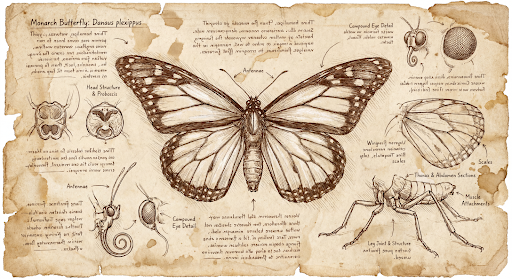
জেমিনি ৩ ইমেজ মডেলগুলো ডিফল্টভাবে ১কে (1K) ইমেজ তৈরি করে, তবে এটি ২কে (2K), ৪কে (4K), এবং ৫১২ পিক্সেল (০৫.কে) (শুধুমাত্র জেমিনি ৩.১ ফ্ল্যাশ ইমেজের জন্য) ইমেজও আউটপুট করতে পারে। উচ্চতর রেজোলিউশনের অ্যাসেট তৈরি করতে, response_format এ image_size উল্লেখ করুন।
আপনাকে অবশ্যই বড় হাতের 'K' ব্যবহার করতে হবে (যেমন 512px (05.K), 1K, 2K, 4K)। ছোট হাতের অক্ষরে লেখা প্যারামিটার (যেমন, 1k) বাতিল করা হবে।
পাইথন
from google import genai
from google.genai import types
import base64

prompt = "Da Vinci style anatomical sketch of a dissected Monarch butterfly. Detailed drawings of the head, wings, and legs on textured parchment with notes in English."

client = genai.Client()

interaction = client.interactions.create(
    model="gemini-3.1-flash-image",
    input=prompt,
    response_format={
        "type": "image",
        "mime_type": "image/jpeg",
        "aspect_ratio": "1:1",
        "image_size": "1K"
    },
)

print(interaction.output_text)

with open("butterfly.png", "wb") as f:

    f.write(base64.b64decode(interaction.output_image.data))
জাভাস্ক্রিপ্ট
import { GoogleGenAI } from "@google/genai";
import * as fs from "node:fs";

async function main() {
  const ai = new GoogleGenAI({});

  const interaction = await ai.interactions.create({
    model: "gemini-3.1-flash-image",
    input: "Da Vinci style anatomical sketch of a dissected Monarch butterfly. Detailed drawings of the head, wings, and legs on textured parchment with notes in English.",
    response_format: {
      type: "image",
      mime_type: "image/png",
      aspect_ratio: "1:1",
      image_size: "1K",
    },
  });

  console.log(interaction.output_text);

  const buffer = Buffer.from(interaction.output_image.data, 'base64');

  fs.writeFileSync('butterfly.png', buffer);
}

main();
বিশ্রাম
curl -s -X POST \
  "https://generativelanguage.googleapis.com/v1beta/interactions" \
  -H "x-goog-api-key: $GEMINI_API_KEY" \
  -H "Content-Type: application/json" \
  -d '{
    "model": "gemini-3.1-flash-image",
    "input": "Da Vinci style anatomical sketch of a dissected Monarch butterfly. Detailed drawings of the head, wings, and legs on textured parchment with notes in English.",
    "response_format": {
      "type": "image",
      "mime_type": "image/jpeg",
      "aspect_ratio": "1:1",
      "image_size": "1K"
    }
  }'
নিম্নলিখিতটি এই প্রম্পট থেকে তৈরি একটি উদাহরণ চিত্র:
চিন্তন প্রক্রিয়া
জেমিনি ৩ ইমেজ মডেল হলো এমন চিন্তাশীল মডেল যা জটিল নির্দেশনার জন্য একটি যুক্তি প্রক্রিয়া ("চিন্তা") ব্যবহার করে। এই বৈশিষ্ট্যটি ডিফল্টরূপে সক্রিয় থাকে এবং এপিআই-তে এটি নিষ্ক্রিয় করা যায় না। চিন্তা প্রক্রিয়া সম্পর্কে আরও জানতে, জেমিনি থিঙ্কিং গাইডটি দেখুন।
মডেলটি কম্পোজিশন ও লজিক পরীক্ষা করার জন্য সর্বোচ্চ দুটি অন্তর্বর্তীকালীন ছবি তৈরি করে। ‘থিংকিং’-এর ভেতরের শেষ ছবিটিই হলো চূড়ান্ত রেন্ডার করা ছবি।
চূড়ান্ত ছবিটি তৈরির পেছনের ভাবনাগুলো আপনি যাচাই করে দেখতে পারেন।
পাইথন
for step in interaction.steps:
    if step.type == "thought":
        for content_block in step.summary:
            if content_block.type == "text":
                print(content_block.text)
            elif content_block.type == "image":
                image = Image.open(io.BytesIO(base64.b64decode(content_block.data)))
                image.show()
জাভাস্ক্রিপ্ট
for (const step of interaction.steps) {
  if (step.type === "thought") {
    for (const contentBlock of step.summary) {
      if (contentBlock.type === "text") {
        console.log(contentBlock.text);
      } else if (contentBlock.type === "image") {
        const buffer = Buffer.from(contentBlock.data, 'base64');
        fs.writeFileSync('thought_image.png', buffer);
      }
    }
  }
}
আন্তঃসংযুক্ত পাঠ্য এবং ছবি
যদিও সাধারণ ইমেজ জেনারেশন মডেলগুলো শুধু ছবি আউটপুট করে, কিছু উন্নত জেমিনি ৩ মডেল (যেমন gemini-3-pro-image ) একই রেসপন্সের মধ্যে টেক্সট ব্লক এবং ইলাস্ট্রেশন উভয়ই ধারণকারী গল্প বা নির্দেশনামূলক গাইডের মতো ইন্টারলিভড কন্টেন্ট তৈরি করতে পারে।
যেহেতু আউটপুটটি জটিল এবং পরস্পর মিশ্রিত, তাই .output_image বা .output_text এর মতো সুবিধাজনক প্রোপার্টিগুলো সম্পূর্ণ ক্রমটি ধারণ করতে পারে না। এই মিশ্রিত কন্টেন্ট অ্যাক্সেস এবং সেভ করার জন্য, আপনাকে ম্যানুয়ালি steps অনুসরণ করতে হবে।
পাইথন
interaction = client.interactions.create(
    model="gemini-3-pro-image",
    input="Write the story of the lifecycle of a monarch butterfly, interleave illustrations",
)

image_counter = 1
for step in interaction.steps:
    if step.type == "model_output":
        for content_block in step.content:
            if content_block.type == "text":
                print(content_block.text)
            elif content_block.type == "image":
                filename = f"butterfly_lifecycle_{image_counter}.png"
                with open(filename, "wb") as f:
                    f.write(base64.b64decode(content_block.data))
                print(f"\n[Saved illustration: {filename}]\n")
                image_counter += 1
জাভাস্ক্রিপ্ট
const interaction = await ai.interactions.create({
    model: "gemini-3-pro-image",
    input: "Write the story of the lifecycle of a monarch butterfly, interleave illustrations",
});

let imageCounter = 1;
for (const step of interaction.steps) {
  if (step.type === "model_output") {
    for (const contentBlock of step.content) {
      if (contentBlock.type === "text") {
        console.log(contentBlock.text);
      } else if (contentBlock.type === "image") {
        const buffer = Buffer.from(contentBlock.data, "base64");
        const filename = `butterfly_lifecycle_${imageCounter}.png`;
        fs.writeFileSync(filename, buffer);
        console.log(`\n[Saved illustration: ${filename}]\n`);
        imageCounter++;
      }
    }
  }
}
চিন্তার স্তর নিয়ন্ত্রণ করা
জেমিনি ৩.১ ফ্ল্যাশ ইমেজের সাহায্যে, আপনি কোয়ালিটি এবং ল্যাটেন্সির মধ্যে ভারসাম্য বজায় রাখতে মডেলটির থিঙ্কিং লেভেল নিয়ন্ত্রণ করতে পারেন। ডিফল্ট thinking_level হলো minimal , এবং সমর্থিত লেভেলগুলো হলো minimal ও high ।
পাইথন
from google import genai
from PIL import Image
import base64
import io

client = genai.Client()

interaction = client.interactions.create(
    model="gemini-3.1-flash-image",
    input="A futuristic city built inside a giant glass bottle floating in space",
    generation_config={"thinking_level": "high"},
)

print(interaction.output_text)

image = Image.open(io.BytesIO(base64.b64decode(interaction.output_image.data)))

image.show()
জাভাস্ক্রিপ্ট
import { GoogleGenAI } from "@google/genai";
import * as fs from "node:fs";

async function main() {
  const ai = new GoogleGenAI({});

  const interaction = await ai.interactions.create({
    model: "gemini-3.1-flash-image",
    input: "A futuristic city built inside a giant glass bottle floating in space",
    generation_config: { thinking_level: "high" },
  });

  console.log(interaction.output_text);

  const buffer = Buffer.from(interaction.output_image.data, 'base64');

  fs.writeFileSync('image.png', buffer);
}
main();
বিশ্রাম
curl -s -X POST \
  "https://generativelanguage.googleapis.com/v1beta/interactions" \
  -H "x-goog-api-key: $GEMINI_API_KEY" \
  -H "Content-Type: application/json" \
  -d '{
    "model": "gemini-3.1-flash-image",
    "input": "A futuristic city built inside a giant glass bottle floating in space",
    "generation_config": {
      "thinking_level": "high"
    }
  }'
উল্লেখ্য যে, থিঙ্কিং মডেলের জন্য ডিফল্টরূপে থিঙ্কিং টোকেনের বিল করা হয়, কারণ আপনি প্রক্রিয়াটি দেখুন বা না দেখুন, চিন্তন প্রক্রিয়াটি ডিফল্টরূপে সর্বদা ঘটে থাকে।
অন্যান্য ছবি তৈরির মোড
যদিও বেশিরভাগ ব্যবহারের ক্ষেত্রে ন্যানো ব্যানানা ইমেজ জেনারেশন মডেলগুলো সুপারিশ করা হয়, আপনি বিশেষায়িত ইমেজ জেনারেশন মডেলগুলোও দেখতে পারেন:
- Imagen : উচ্চ-মানের ছবি তৈরির জন্য অপ্টিমাইজ করা গুগলের টেক্সট-টু-ইমেজ মডেল।
- Veo : গুগলের ভিডিও তৈরির মডেল।
ব্যাচে ছবি তৈরি করুন
এই পৃষ্ঠায় বর্ণিত সমস্ত ইমেজ তৈরির ক্ষমতা ব্যাচ এপিআই (Batch API) ব্যবহার করে ব্যাচ জব হিসেবেও চালানো যেতে পারে।
প্রম্পটিং গাইড এবং কৌশল
এই বিভাগে সাধারণ ইমেজ তৈরি এবং সম্পাদনার ওয়ার্কফ্লো-এর জন্য প্রম্পট উদাহরণ এবং টেমপ্লেট দেওয়া হয়েছে। প্রতিটি উদাহরণে একটি পুনঃব্যবহারযোগ্য টেমপ্লেট এবং ইন্টারঅ্যাকশনস এপিআই (Interactions API)-এর জন্য একটি নমুনা প্রম্পট অন্তর্ভুক্ত রয়েছে।
ছবি তৈরির জন্য নির্দেশিকা
নিম্নলিখিত উদাহরণগুলিতে দেখানো হয়েছে কীভাবে টেক্সট প্রম্পট ব্যবহার করে বিভিন্ন ধরণের ছবি তৈরি করা যায়।
১. আলোকচিত্রের মতো বাস্তবসম্মত দৃশ্য
একটি দৃশ্য বিশদভাবে বর্ণনা করুন। আপনি যত সুনির্দিষ্ট হবেন, ফলাফলের উপর আপনার নিয়ন্ত্রণ তত বেশি থাকবে।
টেমপ্লেট
A photorealistic [type of shot] of a [subject description] in a [setting
description]. [Description of the light]. Shot from a [camera angle]
with a [lens type].
প্রম্পট
A photorealistic wide-angle shot of a vibrant coral reef teeming with tropical fish. Crystal-clear turquoise water with sunbeams filtering down from the surface, illuminating a sea turtle gliding gracefully over the coral. Shot from a low perspective with a wide-angle lens. Aspect ratio 16:9.
পাইথন
from google import genai
from google.genai import types
import base64

client = genai.Client()

interaction = client.interactions.create(
    model="gemini-3.1-flash-image",
    input="A photorealistic wide-angle shot of a vibrant coral reef teeming with tropical fish. Crystal-clear turquoise water with sunbeams filtering down from the surface, illuminating a sea turtle gliding gracefully over the coral. Shot from a low perspective with a wide-angle lens. Aspect ratio 16:9.",
    response_format=[
        {
            "type": "image",
            "mime_type": "image/jpeg",
            "aspect_ratio": "16:9",
        }
    ],
)

print(interaction.output_text)

with open("coral_reef.png", "wb") as f:

    f.write(base64.b64decode(interaction.output_image.data))
জাভাস্ক্রিপ্ট
import { GoogleGenAI } from "@google/genai";
import * as fs from "node:fs";

async function main() {
  const ai = new GoogleGenAI({});

  const interaction = await ai.interactions.create({
    model: "gemini-3.1-flash-image",
    input: "A photorealistic wide-angle shot of a vibrant coral reef teeming with tropical fish. Crystal-clear turquoise water with sunbeams filtering down from the surface, illuminating a sea turtle gliding gracefully over the coral. Shot from a low perspective with a wide-angle lens. Aspect ratio 16:9.",
    response_format: [
      {
        type: "image",
        mime_type: "image/jpeg",
        aspect_ratio: "16:9",
      }
    ],
  });
  console.log(interaction.output_text);

  const buffer = Buffer.from(interaction.output_image.data, 'base64');

  fs.writeFileSync('coral_reef.png', buffer);
}

main();
বিশ্রাম
curl -s -X POST \
  "https://generativelanguage.googleapis.com/v1beta/interactions" \
  -H "x-goog-api-key: $GEMINI_API_KEY" \
  -H "Content-Type: application/json" \
  -d '{
    "model": "gemini-3.1-flash-image",
    "input": "A photorealistic wide-angle shot of a vibrant coral reef teeming with tropical fish. Crystal-clear turquoise water with sunbeams filtering down from the surface, illuminating a sea turtle gliding gracefully over the coral. Shot from a low perspective with a wide-angle lens. Aspect ratio 16:9.",
    "response_format": {
      "type": "image",
      "mime_type": "image/png",
      "aspect_ratio": "16:9"
    }
  }'

২. শৈল্পিক চিত্র ও স্টিকার
শৈল্পিক শৈলী, বিষয়বস্তু এবং মাধ্যম বর্ণনা করুন। সামঞ্জস্যপূর্ণ ফলাফলের জন্য দৃশ্যগত বিবরণ (যেমন: গাঢ় রেখা, রঙ ইত্যাদি) সম্পর্কে সুনির্দিষ্টভাবে উল্লেখ করুন।
টেমপ্লেট
A [style] of a [subject, with details about accessories or actions]
doing [activity]. The design features [visual qualities, e.g., bold outlines,
cel-shading, etc.] and [color/background preference].
প্রম্পট
A kawaii-style sticker of a happy red panda wearing a tiny bamboo hat. It's munching on a green bamboo leaf. The design features bold, clean outlines, simple cel-shading, and a vibrant color palette. The background must be white.
পাইথন
from google import genai
import base64

client = genai.Client()

interaction = client.interactions.create(
    model="gemini-3.1-flash-image",
    input="A kawaii-style sticker of a happy red panda wearing a tiny bamboo hat. It's munching on a green bamboo leaf. The design features bold, clean outlines, simple cel-shading, and a vibrant color palette. The background must be white.",
)

for step in interaction.steps:
    if step.type == "model_output":
        for content_block in step.content:
            if content_block.type == "text":
                print(content_block.text)
            elif content_block.type == "image":
                with open("red_panda_sticker.png", "wb") as f:
                    f.write(base64.b64decode(content_block.data))
জাভাস্ক্রিপ্ট
import { GoogleGenAI } from "@google/genai";
import * as fs from "node:fs";

async function main() {
  const ai = new GoogleGenAI({});

  const interaction = await ai.interactions.create({
    model: "gemini-3.1-flash-image",
    input: "A kawaii-style sticker of a happy red panda wearing a tiny bamboo hat. It's munching on a green bamboo leaf. The design features bold, clean outlines, simple cel-shading, and a vibrant color palette. The background must be white.",
  });
  for (const step of interaction.steps) {
    if (step.type === "model_output") {
      for (const contentBlock of step.content) {
        if (contentBlock.type === "text") {
          console.log(contentBlock.text);
        } else if (contentBlock.type === "image") {
          const buffer = Buffer.from(contentBlock.data, "base64");
          fs.writeFileSync("red_panda_sticker.png", buffer);
        }
      }
    }
  }
}

main();
বিশ্রাম
curl -s -X POST \
  "https://generativelanguage.googleapis.com/v1beta/interactions" \
  -H "x-goog-api-key: $GEMINI_API_KEY" \
  -H "Content-Type: application/json" \
  -d '{
    "model": "gemini-3.1-flash-image",
    "input": "A kawaii-style sticker of a happy red panda wearing a tiny bamboo hat. It is munching on a green bamboo leaf. The design features bold, clean outlines, simple cel-shading, and a vibrant color palette. The background must be white."
  }'

৩. ছবিতে সঠিক লেখা
জেমিনি টেক্সট রেন্ডার করার ক্ষেত্রে অত্যন্ত পারদর্শী। টেক্সট, ফন্ট স্টাইল (বর্ণনামূলকভাবে) এবং সামগ্রিক ডিজাইন সম্পর্কে স্পষ্ট ধারণা রাখুন। পেশাদার অ্যাসেট তৈরির জন্য জেমিনি ৩ প্রো ইমেজ ব্যবহার করুন।
টেমপ্লেট
Create a [image type] for [brand/concept] with the text "[text to render]"
in a [font style]. The design should be [style description], with a
[color scheme].
প্রম্পট
Create a modern, minimalist logo for a coffee shop called 'The Daily Grind'. The text should be in a clean, bold, sans-serif font. The color scheme is black and white. Put the logo in a circle. Use a coffee bean in a clever way.
পাইথন
from google import genai
import base64

client = genai.Client()

interaction = client.interactions.create(
    model="gemini-3.1-flash-image",
    input="Create a modern, minimalist logo for a coffee shop called 'The Daily Grind'. The text should be in a clean, bold, sans-serif font. The color scheme is black and white. Put the logo in a circle. Use a coffee bean in a clever way.",
    response_format={"type": "image", "aspect_ratio": "1:1"},
)

for step in interaction.steps:
    if step.type == "model_output":
        for content_block in step.content:
            if content_block.type == "text":
                print(content_block.text)
            elif content_block.type == "image":
                with open("logo_example.jpg", "wb") as f:
                    f.write(base64.b64decode(content_block.data))
জাভাস্ক্রিপ্ট
import { GoogleGenAI } from "@google/genai";
import * as fs from "node:fs";

async function main() {
  const ai = new GoogleGenAI({});

  const interaction = await ai.interactions.create({
    model: "gemini-3.1-flash-image",
    input: "Create a modern, minimalist logo for a coffee shop called 'The Daily Grind'. The text should be in a clean, bold, sans-serif font. The color scheme is black and white. Put the logo in a circle. Use a coffee bean in a clever way.",
    response_format: { type: "image", aspect_ratio: "1:1" },
  });
  for (const step of interaction.steps) {
    if (step.type === "model_output") {
      for (const contentBlock of step.content) {
        if (contentBlock.type === "text") {
          console.log(contentBlock.text);
        } else if (contentBlock.type === "image") {
          const buffer = Buffer.from(contentBlock.data, "base64");
          fs.writeFileSync("logo_example.jpg", buffer);
        }
      }
    }
  }
}

main();
বিশ্রাম
curl -s -X POST \
  "https://generativelanguage.googleapis.com/v1beta/interactions" \
  -H "x-goog-api-key: $GEMINI_API_KEY" \
  -H "Content-Type: application/json" \
  -d '{
    "model": "gemini-3.1-flash-image",
    "input": "Create a modern, minimalist logo for a coffee shop called The Daily Grind. The text should be in a clean, bold, sans-serif font. The color scheme is black and white. Put the logo in a circle. Use a coffee bean in a clever way.",
    "response_format": {
      "type": "image",
      "aspect_ratio": "1:1"
    }
  }'

৪. পণ্যের মকআপ ও বাণিজ্যিক ফটোগ্রাফি
ই-কমার্স, বিজ্ঞাপন বা ব্র্যান্ডিংয়ের জন্য পরিচ্ছন্ন ও পেশাদার মানের পণ্যের ছবি তোলার জন্য এটি নিখুঁত।
টেমপ্লেট
A high-resolution, studio-lit product photograph of a [product description]
on a [background surface/description]. The lighting is a [lighting setup,
e.g., three-point softbox setup] to [lighting purpose]. The camera angle is
a [angle type] to showcase [specific feature]. Ultra-realistic, with sharp
focus on [key detail]. [Aspect ratio].
প্রম্পট
A high-resolution, studio-lit product photograph of a minimalist ceramic
coffee mug in matte black, presented on a polished concrete surface. The
lighting is a three-point softbox setup designed to create soft, diffused
highlights and eliminate harsh shadows. The camera angle is a slightly
elevated 45-degree shot to showcase its clean lines. Ultra-realistic, with
sharp focus on the steam rising from the coffee. Square image.
পাইথন
from google import genai
import base64

client = genai.Client()

interaction = client.interactions.create(
    model="gemini-3.1-flash-image",
    input="A high-resolution, studio-lit product photograph of a minimalist ceramic coffee mug in matte black, presented on a polished concrete surface. The lighting is a three-point softbox setup designed to create soft, diffused highlights and eliminate harsh shadows. The camera angle is a slightly elevated 45-degree shot to showcase its clean lines. Ultra-realistic, with sharp focus on the steam rising from the coffee. Square image.",
)

for step in interaction.steps:
    if step.type == "model_output":
        for content_block in step.content:
            if content_block.type == "text":
                print(content_block.text)
            elif content_block.type == "image":
                with open("product_mockup.png", "wb") as f:
                    f.write(base64.b64decode(content_block.data))
জাভাস্ক্রিপ্ট
import { GoogleGenAI } from "@google/genai";
import * as fs from "node:fs";

async function main() {
  const ai = new GoogleGenAI({});

  const interaction = await ai.interactions.create({
    model: "gemini-3.1-flash-image",
    input: "A high-resolution, studio-lit product photograph of a minimalist ceramic coffee mug in matte black, presented on a polished concrete surface. The lighting is a three-point softbox setup designed to create soft, diffused highlights and eliminate harsh shadows. The camera angle is a slightly elevated 45-degree shot to showcase its clean lines. Ultra-realistic, with sharp focus on the steam rising from the coffee. Square image.",
  });
  for (const step of interaction.steps) {
    if (step.type === "model_output") {
      for (const contentBlock of step.content) {
        if (contentBlock.type === "text") {
          console.log(contentBlock.text);
        } else if (contentBlock.type === "image") {
          const buffer = Buffer.from(contentBlock.data, "base64");
          fs.writeFileSync("product_mockup.png", buffer);
        }
      }
    }
  }
}

main();
বিশ্রাম
curl -s -X POST \
  "https://generativelanguage.googleapis.com/v1beta/interactions" \
  -H "x-goog-api-key: $GEMINI_API_KEY" \
  -H "Content-Type: application/json" \
  -d '{
    "model": "gemini-3.1-flash-image",
    "input": "A high-resolution, studio-lit product photograph of a minimalist ceramic coffee mug in matte black, presented on a polished concrete surface. The lighting is a three-point softbox setup designed to create soft, diffused highlights and eliminate harsh shadows. The camera angle is a slightly elevated 45-degree shot to showcase its clean lines. Ultra-realistic, with sharp focus on the steam rising from the coffee. Square image."
  }'

৫. ন্যূনতমবাদী ও নেতিবাচক স্থান নকশা
ওয়েবসাইট, প্রেজেন্টেশন বা মার্কেটিং উপকরণের ব্যাকগ্রাউন্ড তৈরির জন্য এটি চমৎকার, যেখানে টেক্সট যুক্ত করা হবে।
টেমপ্লেট
A minimalist composition featuring a single [subject] positioned in the
[bottom-right/top-left/etc.] of the frame. The background is a vast, empty
[color] canvas, creating significant negative space. Soft, subtle lighting.
[Aspect ratio].
প্রম্পট
A minimalist composition featuring a single, delicate red maple leaf
positioned in the bottom-right of the frame. The background is a vast, empty
off-white canvas, creating significant negative space for text. Soft,
diffused lighting from the top left. Square image.
পাইথন
from google import genai
import base64

client = genai.Client()

interaction = client.interactions.create(
    model="gemini-3.1-flash-image",
    input="A minimalist composition featuring a single, delicate red maple leaf positioned in the bottom-right of the frame. The background is a vast, empty off-white canvas, creating significant negative space for text. Soft, diffused lighting from the top left. Square image.",
)

for step in interaction.steps:
    if step.type == "model_output":
        for content_block in step.content:
            if content_block.type == "text":
                print(content_block.text)
            elif content_block.type == "image":
                with open("minimalist_design.png", "wb") as f:
                    f.write(base64.b64decode(content_block.data))
জাভাস্ক্রিপ্ট
import { GoogleGenAI } from "@google/genai";
import * as fs from "node:fs";

async function main() {
  const ai = new GoogleGenAI({});

  const interaction = await ai.interactions.create({
    model: "gemini-3.1-flash-image",
    input: "A minimalist composition featuring a single, delicate red maple leaf positioned in the bottom-right of the frame. The background is a vast, empty off-white canvas, creating significant negative space for text. Soft, diffused lighting from the top left. Square image.",
  });
  for (const step of interaction.steps) {
    if (step.type === "model_output") {
      for (const contentBlock of step.content) {
        if (contentBlock.type === "text") {
          console.log(contentBlock.text);
        } else if (contentBlock.type === "image") {
          const buffer = Buffer.from(contentBlock.data, "base64");
          fs.writeFileSync("minimalist_design.png", buffer);
        }
      }
    }
  }
}

main();
বিশ্রাম
curl -s -X POST \
  "https://generativelanguage.googleapis.com/v1beta/interactions" \
  -H "x-goog-api-key: $GEMINI_API_KEY" \
  -H "Content-Type: application/json" \
  -d '{
    "model": "gemini-3.1-flash-image",
    "input": "A minimalist composition featuring a single, delicate red maple leaf positioned in the bottom-right of the frame. The background is a vast, empty off-white canvas, creating significant negative space for text. Soft, diffused lighting from the top left. Square image."
  }'

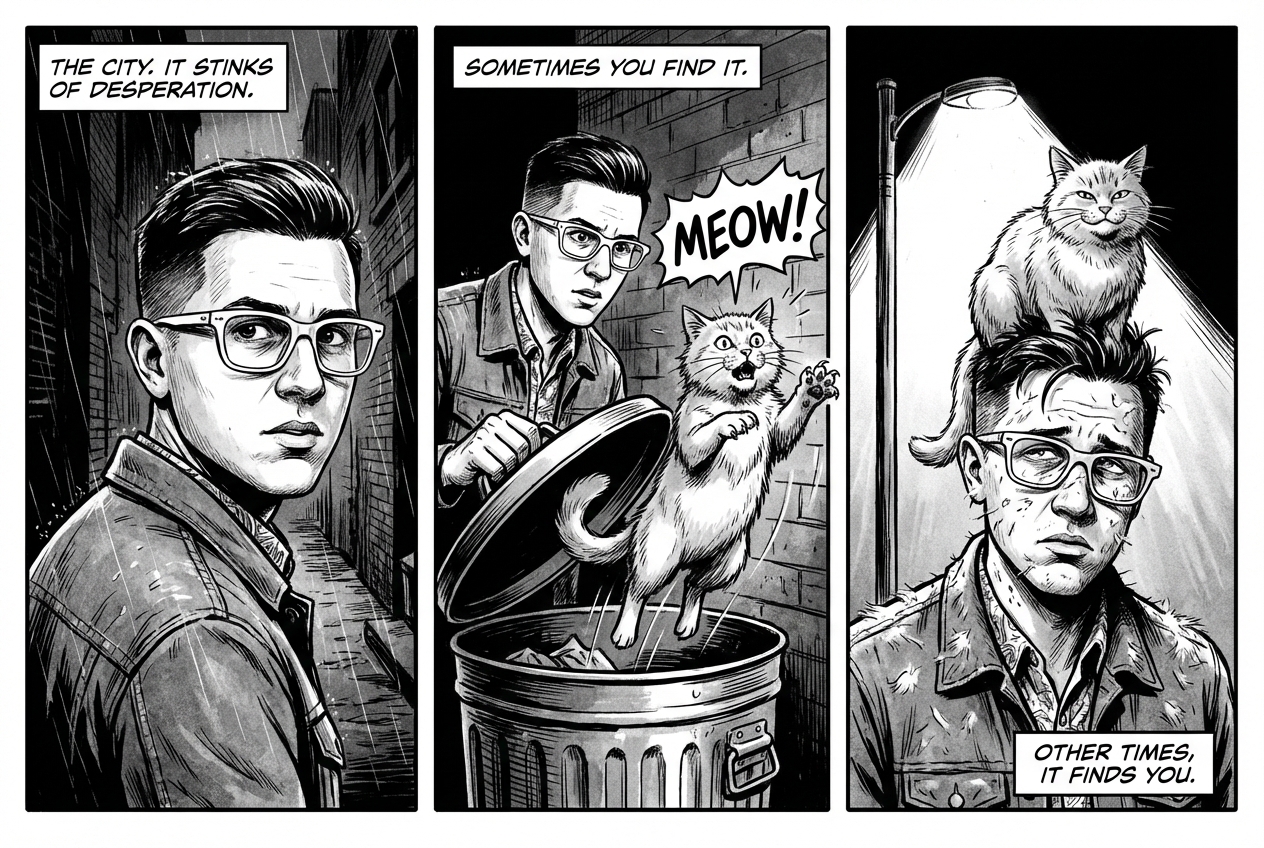
৬. ক্রমিক শিল্প (কমিক প্যানেল / স্টোরিবোর্ড)
চরিত্রের সামঞ্জস্য এবং দৃশ্যের বর্ণনার উপর ভিত্তি করে ভিজ্যুয়াল স্টোরিটেলিং-এর জন্য প্যানেল তৈরি করে। টেক্সটের নির্ভুলতা এবং গল্প বলার ক্ষমতার জন্য, এই প্রম্পটগুলি Gemini 3 Pro এবং Gemini 3.1 Flash Image-এর সাথে সবচেয়ে ভালোভাবে কাজ করে।
টেমপ্লেট
Make a 3 panel comic in a [style]. Put the character in a [type of scene].
প্রম্পট
Make a 3 panel comic in a gritty, noir art style with high-contrast black and white inks. Put the character in a humurous scene.
পাইথন
from google import genai
from PIL import Image
import base64

client = genai.Client()

with open('/path/to/your/man_in_white_glasses.jpg', 'rb') as f:
    image_bytes = f.read()
text_input = "Make a 3 panel comic in a gritty, noir art style with high-contrast black and white inks. Put the character in a humurous scene."

interaction = client.interactions.create(
    model="gemini-3.1-flash-image",
    input=[
        {"type": "text", "text": text_input},
        {
            "type": "image",
            "data": base64.b64encode(image_bytes).decode('utf-8'),
            "mime_type": "image/jpeg"
        }
    ],
)

for step in interaction.steps:
    if step.type == "model_output":
        for content_block in step.content:
            if content_block.type == "text":
                print(content_block.text)
            elif content_block.type == "image":
                with open("comic_panel.jpg", "wb") as f:
                    f.write(base64.b64decode(content_block.data))
জাভাস্ক্রিপ্ট
import { GoogleGenAI } from "@google/genai";
import * as fs from "node:fs";

async function main() {
  const ai = new GoogleGenAI({});

  const imagePath = "/path/to/your/man_in_white_glasses.jpg";
  const imageData = fs.readFileSync(imagePath);
  const base64Image = imageData.toString("base64");

  const input = [
    { type: "text", text: "Make a 3 panel comic in a gritty, noir art style with high-contrast black and white inks. Put the character in a humurous scene." },
    {
      type: "image",
      mime_type: "image/jpeg",
      data: base64Image
    },
  ];

  const interaction = await ai.interactions.create({
    model: "gemini-3.1-flash-image",
    input: input,
  });
  for (const step of interaction.steps) {
    if (step.type === "model_output") {
      for (const contentBlock of step.content) {
        if (contentBlock.type === "text") {
          console.log(contentBlock.text);
        } else if (contentBlock.type === "image") {
          const buffer = Buffer.from(contentBlock.data, "base64");
          fs.writeFileSync("comic_panel.jpg", buffer);
        }
      }
    }
  }
}

main();
বিশ্রাম
curl -s -X POST \
  "https://generativelanguage.googleapis.com/v1beta/interactions" \
  -H "x-goog-api-key: $GEMINI_API_KEY" \
  -H "Content-Type: application/json" \
  -d '{
    "model": "gemini-3.1-flash-image",
    "input": [
      {"type": "text", "text": "Make a 3 panel comic in a gritty, noir art style with high-contrast black and white inks. Put the character in a humurous scene."},
      {"type": "image", "data": "<BASE64_IMAGE_DATA>", "mime_type": "image/jpeg"}
    ]
  }'
ইনপুট | আউটপুট |
 |  |
৭. গুগল সার্চের মাধ্যমে ভিত্তি স্থাপন
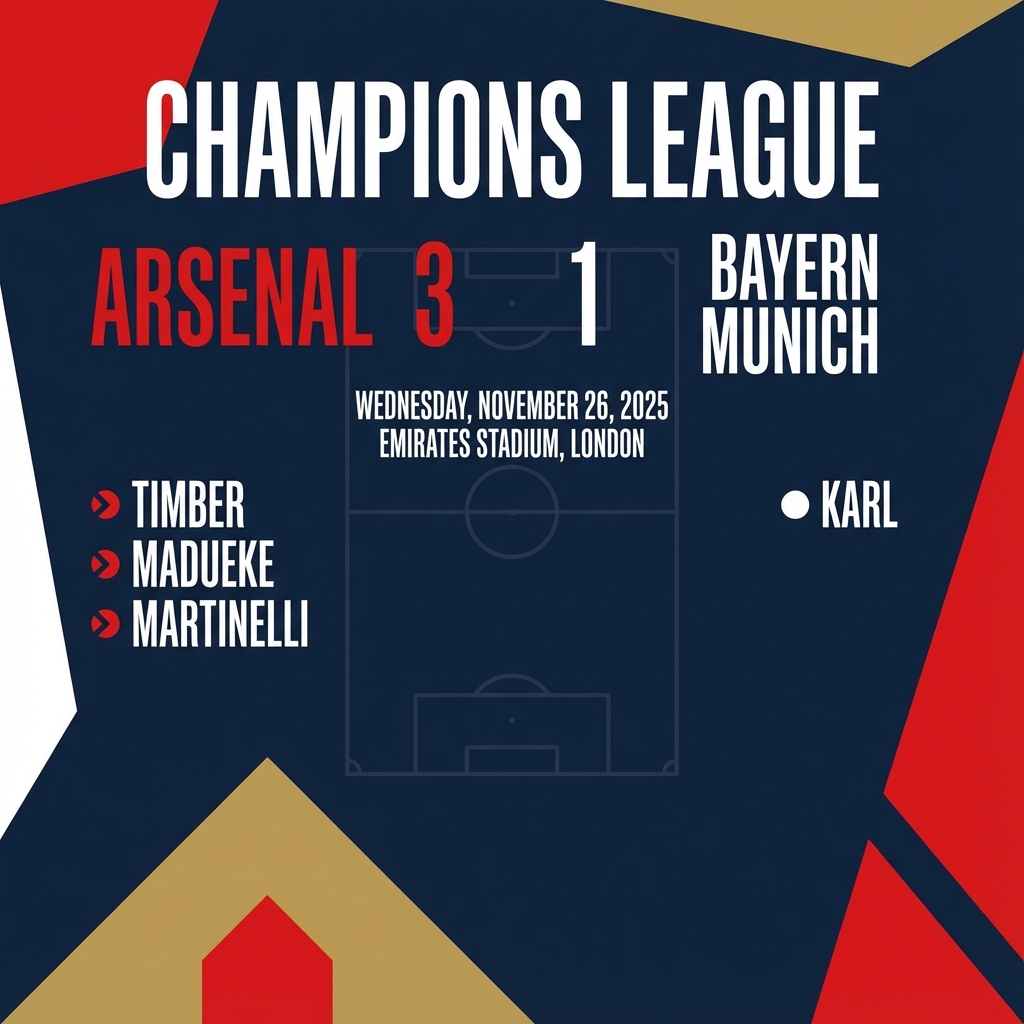
সাম্প্রতিক বা রিয়েল-টাইম তথ্যের ভিত্তিতে ছবি তৈরি করতে গুগল সার্চ ব্যবহার করুন। এটি সংবাদ, আবহাওয়া এবং অন্যান্য জরুরি বিষয়ের জন্য উপযোগী।
প্রম্পট
Make a simple but stylish graphic of last night's Arsenal game in the Champion's League
পাইথন
from google import genai
from google.genai import types
import base64

client = genai.Client()

interaction = client.interactions.create(
    model="gemini-3.1-flash-image",
    input="Make a simple but stylish graphic of last night's Arsenal game in the Champion's League",
    tools=[{"type": "google_search"}],
    response_format={"type": "image", "aspect_ratio": "16:9"},
)

for step in interaction.steps:
    if step.type == "model_output":
        for content_block in step.content:
            if content_block.type == "text":
                print(content_block.text)
            elif content_block.type == "image":
                with open("football-score.jpg", "wb") as f:
                    f.write(base64.b64decode(content_block.data))
জাভাস্ক্রিপ্ট
import { GoogleGenAI } from "@google/genai";
import * as fs from "node:fs";

async function main() {
  const ai = new GoogleGenAI({});

  const interaction = await ai.interactions.create({
    model: "gemini-3.1-flash-image",
    input: "Make a simple but stylish graphic of last night's Arsenal game in the Champion's League",
    tools: [{ type: "google_search" }],
    response_format: { type: "image", aspect_ratio: "16:9", image_size: "2K" },
  });

  for (const step of interaction.steps) {
    if (step.type === "model_output") {
      for (const contentBlock of step.content) {
        if (contentBlock.type === "text") {
          console.log(contentBlock.text);
        } else if (contentBlock.type === "image") {
          const buffer = Buffer.from(contentBlock.data, "base64");
          fs.writeFileSync("football-score.jpg", buffer);
        }
      }
    }
  }
}

main();
বিশ্রাম
curl -s -X POST \
  "https://generativelanguage.googleapis.com/v1beta/interactions" \
  -H "x-goog-api-key: $GEMINI_API_KEY" \
  -H "Content-Type: application/json" \
  -d '{
    "model": "gemini-3.1-flash-image",
    "input": "Make a simple but stylish graphic of last nights Arsenal game in the Champions League",
    "tools": [{"type": "google_search"}],
    "response_format": {
      "type": "image",
      "aspect_ratio": "16:9"
    }
  }'
ছবি সম্পাদনার জন্য নির্দেশিকা
এই উদাহরণগুলো দেখায় কীভাবে সম্পাদনা, বিন্যাস এবং শৈলী স্থানান্তরের জন্য আপনার পাঠ্য নির্দেশনার পাশাপাশি ছবি যুক্ত করতে হয়।
১. উপাদান যোগ করা এবং অপসারণ করা
একটি ছবি দিন এবং আপনার পরিবর্তনটি বর্ণনা করুন। মডেলটিকে মূল ছবির শৈলী, আলো এবং দৃষ্টিকোণের সাথে মিলতে হবে।
টেমপ্লেট
Using the provided image of [subject], please [add/remove/modify] [element]
to/from the scene. Ensure the change is [description of how the change should
integrate].
প্রম্পট
"Using the provided image of my cat, please add a small, knitted wizard hat
on its head. Make it look like it's sitting comfortably and matches the soft
lighting of the photo."
পাইথন
from google import genai
from PIL import Image
import base64

client = genai.Client()

with open('/path/to/your/cat_photo.png', 'rb') as f:
    image_bytes = f.read()
text_input = """Using the provided image of my cat, please add a small, knitted wizard hat on its head. Make it look like it's sitting comfortably and not falling off."""

interaction = client.interactions.create(
    model="gemini-3.1-flash-image",
    input=[
        {"type": "text", "text": text_input},
        {
            "type": "image",
            "data": base64.b64encode(image_bytes).decode('utf-8'),
            "mime_type": "image/png"
        }
    ],
)

for step in interaction.steps:
    if step.type == "model_output":
        for content_block in step.content:
            if content_block.type == "text":
                print(content_block.text)
            elif content_block.type == "image":
                with open("cat_with_hat.png", "wb") as f:
                    f.write(base64.b64decode(content_block.data))
জাভাস্ক্রিপ্ট
import { GoogleGenAI } from "@google/genai";
import * as fs from "node:fs";

async function main() {
  const ai = new GoogleGenAI({});

  const imagePath = "/path/to/your/cat_photo.png";
  const imageData = fs.readFileSync(imagePath);
  const base64Image = imageData.toString("base64");

  const input = [
    { type: "text", text: "Using the provided image of my cat, please add a small, knitted wizard hat on its head. Make it look like it's sitting comfortably and not falling off." },
    {
      type: "image",
      mime_type: "image/png",
      data: base64Image
    },
  ];

  const interaction = await ai.interactions.create({
    model: "gemini-3.1-flash-image",
    input: input,
  });
  for (const step of interaction.steps) {
    if (step.type === "model_output") {
      for (const contentBlock of step.content) {
        if (contentBlock.type === "text") {
          console.log(contentBlock.text);
        } else if (contentBlock.type === "image") {
          const buffer = Buffer.from(contentBlock.data, "base64");
          fs.writeFileSync("cat_with_hat.png", buffer);
        }
      }
    }
  }
}

main();
বিশ্রাম
curl -s -X POST \
  "https://generativelanguage.googleapis.com/v1beta/interactions" \
    -H "x-goog-api-key: $GEMINI_API_KEY" \
    -H 'Content-Type: application/json' \
    -d "{
      \"model\": \"gemini-3.1-flash-image\",
      \"input\": [
            {\"type\": \"text\", \"text\": \"Using the provided image of my cat, please add a small, knitted wizard hat on its head. Make it look like it's sitting comfortably and not falling off.\"},
            {\"type\": \"image\", \"mime_type\":\"image/png\", \"data\": \"<BASE64_IMAGE_DATA>\"}
        ]
    }"
ইনপুট | আউটপুট |
 |  |
২. ইনপেইন্টিং (সিমান্টিক মাস্কিং)
ছবির বাকি অংশ অপরিবর্তিত রেখে একটি নির্দিষ্ট অংশ সম্পাদনা করার জন্য কথোপকথনের সময় একটি 'মাস্ক' নির্ধারণ করুন।
টেমপ্লেট
Using the provided image, change only the [specific element] to [new
element/description]. Keep everything else in the image exactly the same,
preserving the original style, lighting, and composition.
প্রম্পট
"Using the provided image of a living room, change only the blue sofa to be
a vintage, brown leather chesterfield sofa. Keep the rest of the room,
including the pillows on the sofa and the lighting, unchanged."
পাইথন
from google import genai
from PIL import Image
import base64

client = genai.Client()

with open('/path/to/your/living_room.png', 'rb') as f:
    image_bytes = f.read()
text_input = """Using the provided image of a living room, change only the blue sofa to be a vintage, brown leather chesterfield sofa. Keep the rest of the room, including the pillows on the sofa and the lighting, unchanged."""

interaction = client.interactions.create(
    model="gemini-3.1-flash-image",
    input=[
        {
            "type": "image",
            "data": base64.b64encode(image_bytes).decode('utf-8'),
            "mime_type": "image/png"
        },
        {"type": "text", "text": text_input}
    ],
)

for step in interaction.steps:
    if step.type == "model_output":
        for content_block in step.content:
            if content_block.type == "text":
                print(content_block.text)
            elif content_block.type == "image":
                with open("living_room_edited.png", "wb") as f:
                    f.write(base64.b64decode(content_block.data))
জাভাস্ক্রিপ্ট
import { GoogleGenAI } from "@google/genai";
import * as fs from "node:fs";

async function main() {
  const ai = new GoogleGenAI({});

  const imagePath = "/path/to/your/living_room.png";
  const imageData = fs.readFileSync(imagePath);
  const base64Image = imageData.toString("base64");

  const input = [
    {
      type: "image",
      mime_type: "image/png",
      data: base64Image
    },
    { type: "text", text: "Using the provided image of a living room, change only the blue sofa to be a vintage, brown leather chesterfield sofa. Keep the rest of the room, including the pillows on the sofa and the lighting, unchanged." },
  ];

  const interaction = await ai.interactions.create({
    model: "gemini-3.1-flash-image",
    input: input,
  });
  for (const step of interaction.steps) {
    if (step.type === "model_output") {
      for (const contentBlock of step.content) {
        if (contentBlock.type === "text") {
          console.log(contentBlock.text);
        } else if (contentBlock.type === "image") {
          const buffer = Buffer.from(contentBlock.data, "base64");
          fs.writeFileSync("living_room_edited.png", buffer);
        }
      }
    }
  }
}

main();
বিশ্রাম
curl -s -X POST \
  "https://generativelanguage.googleapis.com/v1beta/interactions" \
    -H "x-goog-api-key: $GEMINI_API_KEY" \
    -H 'Content-Type: application/json' \
    -d "{
      \"model\": \"gemini-3.1-flash-image\",
      \"input\": [
        {\"type\": \"image\", \"mime_type\":\"image/png\", \"data\": \"<BASE64_IMAGE_DATA>\"},
        {\"type\": \"text\", \"text\": \"Using the provided image of a living room, change only the blue sofa to be a vintage, brown leather chesterfield sofa. Keep the rest of the room, including the pillows on the sofa and the lighting, unchanged.\"}
      ]
    }"
ইনপুট | আউটপুট |
 |  |
৩. শৈলী স্থানান্তর
একটি ছবি দিন এবং মডেলকে সেটির বিষয়বস্তু ভিন্ন শৈলীতে পুনরায় তৈরি করতে বলুন।
টেমপ্লেট
Transform the provided photograph of [subject] into the artistic style of [artist/art style]. Preserve the original composition but render it with [description of stylistic elements].
প্রম্পট
"Transform the provided photograph of a modern city street at night into the artistic style of Vincent van Gogh's 'Starry Night'. Preserve the original composition of buildings and cars, but render all elements with swirling, impasto brushstrokes and a dramatic palette of deep blues and bright yellows."
পাইথন
from google import genai
from PIL import Image
import base64

client = genai.Client()

with open('/path/to/your/city.png', 'rb') as f:
    image_bytes = f.read()
text_input = """Transform the provided photograph of a modern city street at night into the artistic style of Vincent van Gogh's 'Starry Night'. Preserve the original composition of buildings and cars, but render all elements with swirling, impasto brushstrokes and a dramatic palette of deep blues and bright yellows."""

interaction = client.interactions.create(
    model="gemini-3.1-flash-image",
    input=[
        {
            "type": "image",
            "data": base64.b64encode(image_bytes).decode('utf-8'),
            "mime_type": "image/png"
        },
        {"type": "text", "text": text_input}
    ],
)

for step in interaction.steps:
    if step.type == "model_output":
        for content_block in step.content:
            if content_block.type == "text":
                print(content_block.text)
            elif content_block.type == "image":
                with open("city_style_transfer.png", "wb") as f:
                    f.write(base64.b64decode(content_block.data))
জাভাস্ক্রিপ্ট
import { GoogleGenAI } from "@google/genai";
import * as fs from "node:fs";

async function main() {
  const ai = new GoogleGenAI({});
  const imageData = fs.readFileSync("/path/to/your/city.png");
  const base64Image = imageData.toString("base64");

  const interaction = await ai.interactions.create({
    model: "gemini-3.1-flash-image",
    input: [
      {
        type: "image",
        mime_type: "image/png",
        data: base64Image
      },
      { type: "text", text: "Transform the provided photograph of a modern city street at night into the artistic style of Vincent van Gogh's 'Starry Night'. Preserve the original composition of buildings and cars, but render all elements with swirling, impasto brushstrokes and a dramatic palette of deep blues and bright yellows." },
    ],
  });
  for (const step of interaction.steps) {
    if (step.type === "model_output") {
      for (const contentBlock of step.content) {
        if (contentBlock.type === "text") {
          console.log(contentBlock.text);
        } else if (contentBlock.type === "image") {
          const buffer = Buffer.from(contentBlock.data, "base64");
          fs.writeFileSync("city_style_transfer.png", buffer);
        }
      }
    }
  }
}

main();
বিশ্রাম
curl -s -X POST \
  "https://generativelanguage.googleapis.com/v1beta/interactions" \
    -H "x-goog-api-key: $GEMINI_API_KEY" \
    -H 'Content-Type: application/json' \
    -d "{
      \"model\": \"gemini-3.1-flash-image\",
      \"input\": [
        {\"type\": \"image\", \"mime_type\":\"image/png\", \"data\": \"<BASE64_IMAGE_DATA>\"},
        {\"type\": \"text\", \"text\": \"Transform the provided photograph of a modern city street at night into the artistic style of Vincent van Gogh's 'Starry Night'. Preserve the original composition of buildings and cars, but render all elements with swirling, impasto brushstrokes and a dramatic palette of deep blues and bright yellows.\"}
      ]
    }"
ইনপুট | আউটপুট |
 |  |
৪. উন্নত কম্পোজিশন: একাধিক ছবির সমন্বয়
একটি নতুন, যৌগিক দৃশ্য তৈরি করতে প্রেক্ষাপট হিসেবে একাধিক ছবি ব্যবহার করুন। এটি পণ্যের মকআপ বা সৃজনশীল কোলাজের জন্য আদর্শ।
টেমপ্লেট
Create a new image by combining the elements from the provided images. Take
the [element from image 1] and place it with/on the [element from image 2].
The final image should be a [description of the final scene].
প্রম্পট
"Create a professional e-commerce fashion photo. Take the blue floral dress
from the first image and let the woman from the second image wear it.
Generate a realistic, full-body shot of the woman wearing the dress, with
the lighting and shadows adjusted to match the outdoor environment."
পাইথন
from google import genai
from PIL import Image
import base64

client = genai.Client()

with open('/path/to/your/dress.png', 'rb') as f:
    dress_bytes = f.read()
with open('/path/to/your/model.png', 'rb') as f:
    model_bytes = f.read()
text_input = """Create a professional e-commerce fashion photo. Take the blue floral dress from the first image and let the woman from the second image wear it. Generate a realistic, full-body shot of the woman wearing the dress, with the lighting and shadows adjusted to match the outdoor environment."""

interaction = client.interactions.create(
    model="gemini-3.1-flash-image",
    input=[
        {
            "type": "image",
            "data": base64.b64encode(dress_bytes).decode('utf-8'),
            "mime_type": "image/png"
        },
        {
            "type": "image",
            "data": base64.b64encode(model_bytes).decode('utf-8'),
            "mime_type": "image/png"
        },
        {"type": "text", "text": text_input}
    ],
)

for step in interaction.steps:
    if step.type == "model_output":
        for content_block in step.content:
            if content_block.type == "text":
                print(content_block.text)
            elif content_block.type == "image":
                with open("fashion_ecommerce_shot.png", "wb") as f:
                    f.write(base64.b64decode(content_block.data))
জাভাস্ক্রিপ্ট
import { GoogleGenAI } from "@google/genai";
import * as fs from "node:fs";

async function main() {
  const ai = new GoogleGenAI({});

  const imagePath1 = "/path/to/your/dress.png";
  const imageData1 = fs.readFileSync(imagePath1);
  const base64Image1 = imageData1.toString("base64");
  const imagePath2 = "/path/to/your/model.png";
  const imageData2 = fs.readFileSync(imagePath2);
  const base64Image2 = imageData2.toString("base64");

  const input = [
    {
      type: "image",
      mime_type: "image/png",
      data: base64Image1
    },
    {
      type: "image",
      mime_type: "image/png",
      data: base64Image2
    },
    { type: "text", text: "Create a professional e-commerce fashion photo. Take the blue floral dress from the first image and let the woman from the second image wear it. Generate a realistic, full-body shot of the woman wearing the dress, with the lighting and shadows adjusted to match the outdoor environment." },
  ];

  const interaction = await ai.interactions.create({
    model: "gemini-3.1-flash-image",
    input: input,
  });
  for (const step of interaction.steps) {
    if (step.type === "model_output") {
      for (const contentBlock of step.content) {
        if (contentBlock.type === "text") {
          console.log(contentBlock.text);
        } else if (contentBlock.type === "image") {
          const buffer = Buffer.from(contentBlock.data, "base64");
          fs.writeFileSync("fashion_ecommerce_shot.png", buffer);
        }
      }
    }
  }
}

main();
বিশ্রাম
curl -s -X POST \
  "https://generativelanguage.googleapis.com/v1beta/interactions" \
    -H "x-goog-api-key: $GEMINI_API_KEY" \
    -H 'Content-Type: application/json' \
    -d "{
      \"model\": \"gemini-3.1-flash-image\",
      \"input\": [
            {\"type\": \"image\", \"mime_type\":\"image/png\", \"data\": \"<BASE64_IMAGE_DATA_1>\"},
            {\"type\": \"image\", \"mime_type\":\"image/png\", \"data\": \"<BASE64_IMAGE_DATA_2>\"},
            {\"type\": \"text\", \"text\": \"Create a professional e-commerce fashion photo. Take the blue floral dress from the first image and let the woman from the second image wear it. Generate a realistic, full-body shot of the woman wearing the dress, with the lighting and shadows adjusted to match the outdoor environment.\"}
      }]
    }"
ইনপুট ১ | ইনপুট ২ | আউটপুট |
 |  |  |
৫. উচ্চ মানের বিশদ বিবরণ সংরক্ষণ
সম্পাদনার সময় গুরুত্বপূর্ণ বিবরণ (যেমন মুখ বা লোগো) যাতে অক্ষুণ্ণ থাকে, তা নিশ্চিত করতে আপনার সম্পাদনার অনুরোধের সাথে সেগুলোর বিশদ বর্ণনা দিন।
টেমপ্লেট
Using the provided images, place [element from image 2] onto [element from
image 1]. Ensure that the features of [element from image 1] remain
completely unchanged. The added element should [description of how the
element should integrate].
প্রম্পট
"Take the first image of the woman with brown hair, blue eyes, and a neutral
expression. Add the logo from the second image onto her black t-shirt.
Ensure the woman's face and features remain completely unchanged. The logo
should look like it's naturally printed on the fabric, following the folds
of the shirt."
পাইথন
from google import genai
from PIL import Image
import base64

client = genai.Client()

with open('/path/to/your/woman.png', 'rb') as f:
    woman_bytes = f.read()
with open('/path/to/your/logo.png', 'rb') as f:
    logo_bytes = f.read()
text_input = """Take the first image of the woman with brown hair, blue eyes, and a neutral expression. Add the logo from the second image onto her black t-shirt. Ensure the woman's face and features remain completely unchanged. The logo should look like it's naturally printed on the fabric, following the folds of the shirt."""

interaction = client.interactions.create(
    model="gemini-3.1-flash-image",
    input=[
      {"type": "image", "mime_type":"image/png", "data": base64.b64encode(woman_bytes).decode('utf-8')},
      {"type": "image", "mime_type":"image/png", "data": base64.b64encode(logo_bytes).decode('utf-8')},
      {"type": "text", "text": text_input}
    ],
)

for step in interaction.steps:
    if step.type == "model_output":
        for content_block in step.content:
            if content_block.type == "text":
                print(content_block.text)
            elif content_block.type == "image":
                with open("woman_with_logo.png", "wb") as f:
                    f.write(base64.b64decode(content_block.data))
জাভাস্ক্রিপ্ট
import { GoogleGenAI } from "@google/genai";
import * as fs from "node:fs";

async function main() {
  const ai = new GoogleGenAI({});

  const imagePath1 = "/path/to/your/woman.png";
  const imageData1 = fs.readFileSync(imagePath1);
  const base64Image1 = imageData1.toString("base64");
  const imagePath2 = "/path/to/your/logo.png";
  const imageData2 = fs.readFileSync(imagePath2);
  const base64Image2 = imageData2.toString("base64");

  const input = [
    {"type": "image", "mime_type":"image/png", "data": base64Image1},
    {"type": "image", "mime_type":"image/png", "data": base64Image2},
    {"type": "text", "text": "Take the first image of the woman with brown hair, blue eyes, and a neutral expression. Add the logo from the second image onto her black t-shirt. Ensure the woman's face and features remain completely unchanged. The logo should look like it's naturally printed on the fabric, following the folds of the shirt."},
  ];

  const interaction = await ai.interactions.create({
    model: "gemini-3.1-flash-image",
    input: input,
  });
  for (const step of interaction.steps) {
    if (step.type === "model_output") {
      for (const contentBlock of step.content) {
        if (contentBlock.type === "text") {
          console.log(contentBlock.text);
        } else if (contentBlock.type === "image") {
          const buffer = Buffer.from(contentBlock.data, "base64");
          fs.writeFileSync("woman_with_logo.png", buffer);
        }
      }
    }
  }
}

main();
বিশ্রাম
curl -s -X POST \
  "https://generativelanguage.googleapis.com/v1beta/interactions" \
    -H "x-goog-api-key: $GEMINI_API_KEY" \
    -H 'Content-Type: application/json' \
    -d "{
      \"model\": \"gemini-3.1-flash-image\",
      \"input\": [
        {\"type\": \"image\", \"mime_type\":\"image/png\", \"data\": \"<BASE64_IMAGE_DATA_1>\"},
        {\"type\": \"image\", \"mime_type\":\"image/png\", \"data\": \"<BASE64_IMAGE_DATA_2>\"},
        {\"type\": \"text\", \"text\": \"Take the first image of the woman with brown hair, blue eyes, and a neutral expression. Add the logo from the second image onto her black t-shirt. Ensure the woman's face and features remain completely unchanged. The logo should look like it's naturally printed on the fabric, following the folds of the shirt.\"}
      ]
    }"
ইনপুট ১ | ইনপুট ২ | আউটপুট |
 |  |  |
৬. কোনো কিছুকে প্রাণবন্ত করে তোলা
একটি প্রাথমিক স্কেচ বা অঙ্কন আপলোড করুন এবং মডেলকে সেটিকে পরিমার্জন করে একটি সম্পূর্ণ ছবিতে পরিণত করতে বলুন।
টেমপ্লেট
Turn this rough [medium] sketch of a [subject] into a [style description]
photo. Keep the [specific features] from the sketch but add [new details/materials].
প্রম্পট
"Turn this rough pencil sketch of a futuristic car into a polished photo of the finished concept car in a showroom. Keep the sleek lines and low profile from the sketch but add metallic blue paint and neon rim lighting."
পাইথন
from google import genai
from PIL import Image
import base64

client = genai.Client()

with open('/path/to/your/car_sketch.png', 'rb') as f:
    sketch_bytes = f.read()
text_input = """Turn this rough pencil sketch of a futuristic car into a polished photo of the finished concept car in a showroom. Keep the sleek lines and low profile from the sketch but add metallic blue paint and neon rim lighting."""

interaction = client.interactions.create(
    model="gemini-3.1-flash-image",
    input=[
      {"type": "image", "mime_type":"image/png", "data": base64.b64encode(sketch_bytes).decode('utf-8')},
      {"type": "text", "text": text_input}
    ],
)

for step in interaction.steps:
    if step.type == "model_output":
        for content_block in step.content:
            if content_block.type == "text":
                print(content_block.text)
            elif content_block.type == "image":
                with open("car_photo.png", "wb") as f:
                    f.write(base64.b64decode(content_block.data))
জাভাস্ক্রিপ্ট
import { GoogleGenAI } from "@google/genai";
import * as fs from "node:fs";

async function main() {
  const ai = new GoogleGenAI({});

  const imagePath = "/path/to/your/car_sketch.png";
  const imageData = fs.readFileSync(imagePath);
  const base64Image = imageData.toString("base64");

  const input = [
    {"type": "image", "mime_type":"image/png", "data": base64Image},
    {"type": "text", "text": "Turn this rough pencil sketch of a futuristic car into a polished photo of the finished concept car in a showroom. Keep the sleek lines and low profile from the sketch but add metallic blue paint and neon rim lighting."},
  ];

  const interaction = await ai.interactions.create({
    model: "gemini-3.1-flash-image",
    input: input,
  });
  for (const step of interaction.steps) {
    if (step.type === "model_output") {
      for (const contentBlock of step.content) {
        if (contentBlock.type === "text") {
          console.log(contentBlock.text);
        } else if (contentBlock.type === "image") {
          const buffer = Buffer.from(contentBlock.data, "base64");
          fs.writeFileSync("car_photo.png", buffer);
        }
      }
    }
  }
}

main();
বিশ্রাম
curl -s -X POST \
  "https://generativelanguage.googleapis.com/v1beta/interactions" \
    -H "x-goog-api-key: $GEMINI_API_KEY" \
    -H 'Content-Type: application/json' \
    -d "{
      \"model\": \"gemini-3.1-flash-image\",
      \"input\": [
        {\"type\": \"image\", \"mime_type\":\"image/png\", \"data\": \"<BASE64_IMAGE_DATA>\"},
        {\"type\": \"text\", \"text\": \"Turn this rough pencil sketch of a futuristic car into a polished photo of the finished concept car in a showroom. Keep the sleek lines and low profile from the sketch but add metallic blue paint and neon rim lighting.\"}
      ]
    }"
ইনপুট | আউটপুট |
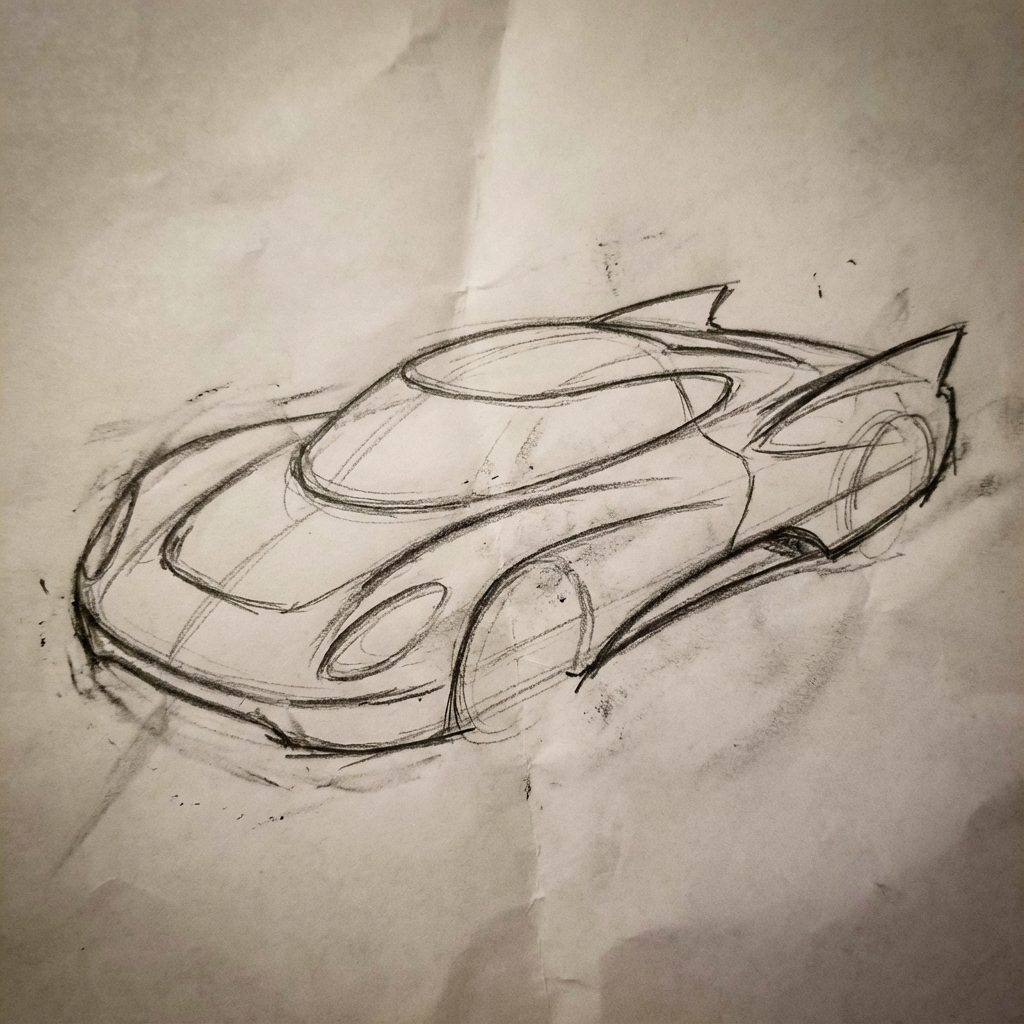 | 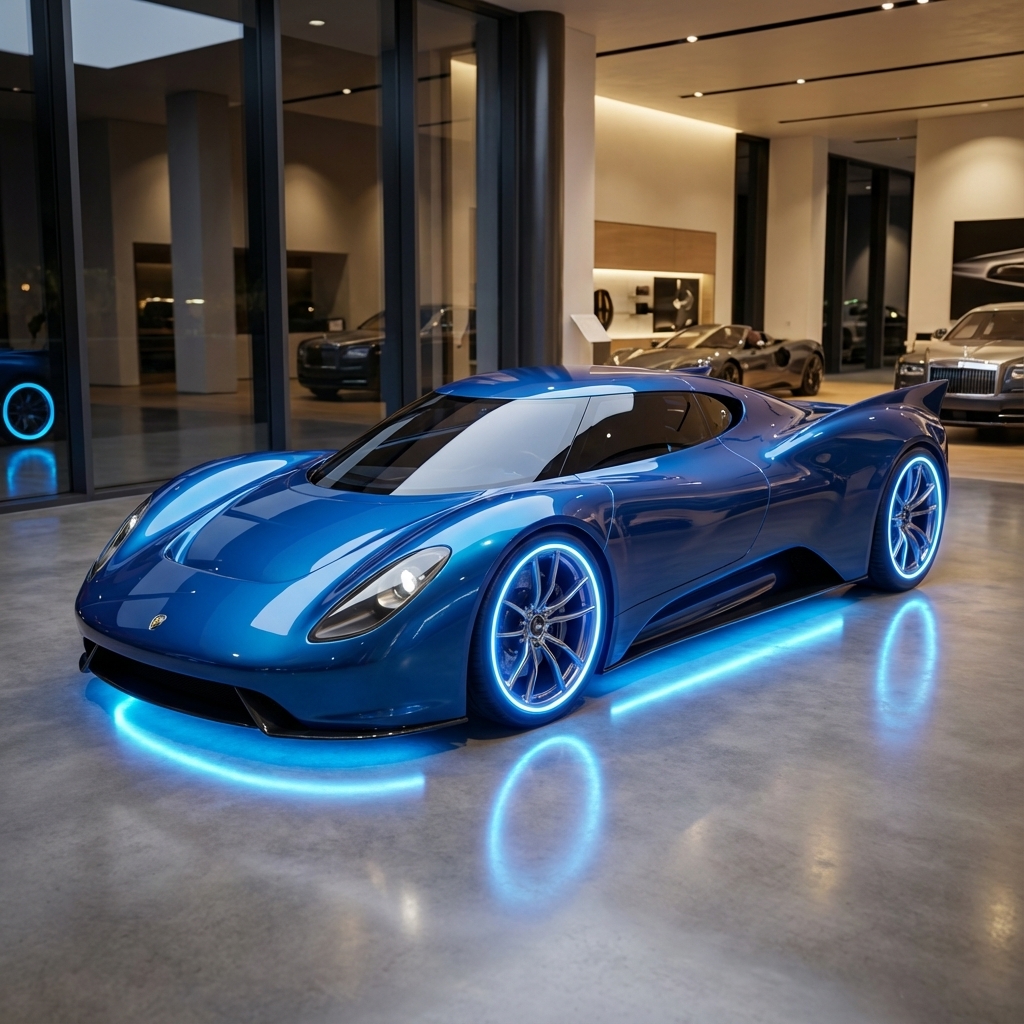 |
৭. অক্ষরের সামঞ্জস্য: ৩৬০ ডিগ্রি দৃশ্য
বারবার বিভিন্ন অ্যাঙ্গেলের জন্য অনুরোধ করে আপনি একটি চরিত্রের ৩৬০-ডিগ্রি ভিউ তৈরি করতে পারেন। সেরা ফলাফলের জন্য, সামঞ্জস্য বজায় রাখতে পরবর্তী অনুরোধগুলোতে পূর্বে তৈরি করা ছবিগুলো অন্তর্ভুক্ত করুন। জটিল ভঙ্গির ক্ষেত্রে, নির্বাচিত ভঙ্গিটির একটি রেফারেন্স ছবি অন্তর্ভুক্ত করুন।
টেমপ্লেট
A studio portrait of [person] against [background], [looking forward/in profile looking right/etc.]
প্রম্পট
A studio portrait of this man against white, in profile looking right
পাইথন
from google import genai
from PIL import Image
import base64

client = genai.Client()

with open('/path/to/your/man_in_white_glasses.jpg', 'rb') as f:
    image_bytes = f.read()
text_input = """A studio portrait of this man against white, in profile looking right"""

interaction = client.interactions.create(
    model="gemini-3.1-flash-image",
    input={
      {"type": "text", "text": text_input},
      {"type": "image", "mime_type":"image/png", "data": base64.b64encode(image_bytes).decode('utf-8')}
    },
)

for step in interaction.steps:
    if step.type == "model_output":
        for content_block in step.content:
            if content_block.type == "text":
                print(content_block.text)
            elif content_block.type == "image":
                with open("man_right_profile.png", "wb") as f:
                    f.write(base64.b64decode(content_block.data))
ইনপুট | আউটপুট ১ | আউটপুট ২ |
| 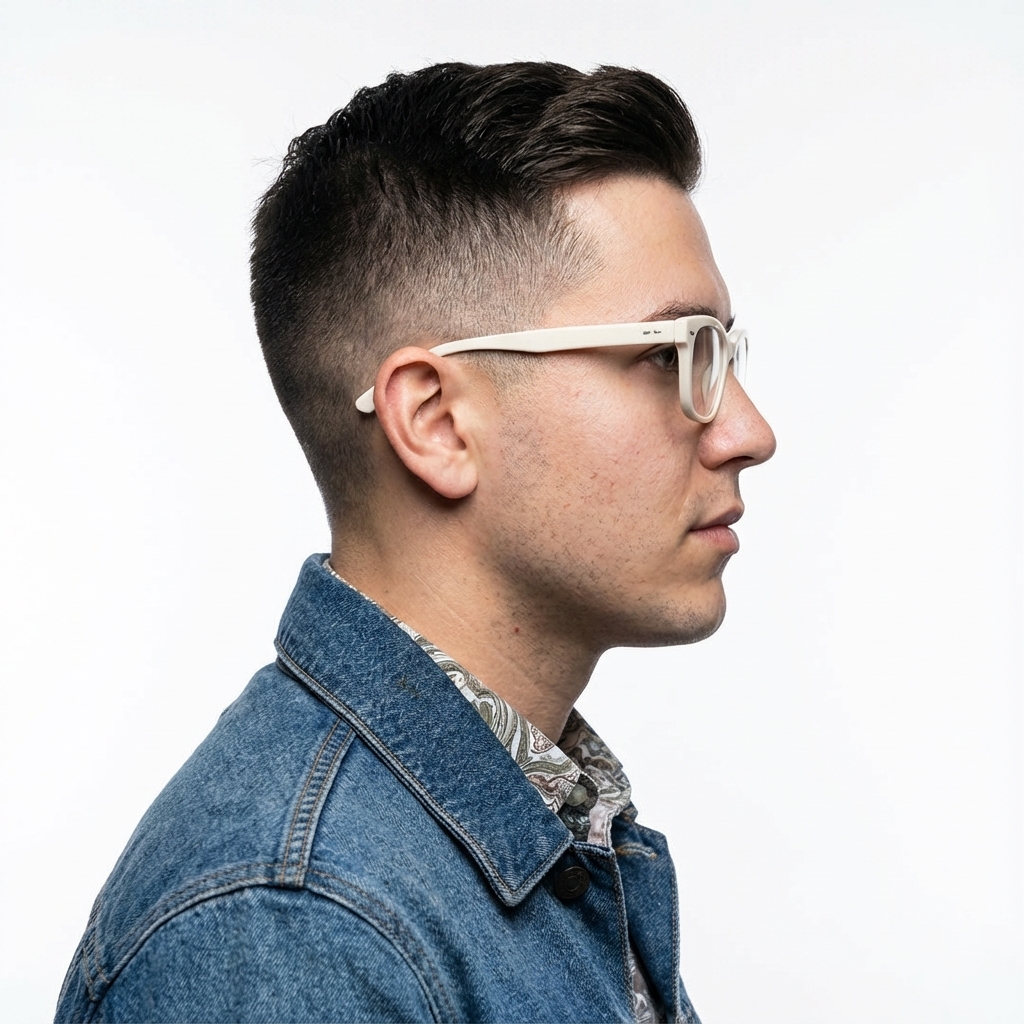 |  |
সর্বোত্তম অনুশীলন
আপনার ফলাফলকে ভালো থেকে চমৎকার পর্যায়ে উন্নীত করতে, এই পেশাদার কৌশলগুলো আপনার কর্মপ্রবাহে অন্তর্ভুক্ত করুন।
- অত্যন্ত সুনির্দিষ্ট হোন: আপনি যত বেশি বিবরণ দেবেন, আপনার নিয়ন্ত্রণ তত বেশি থাকবে। ‘কাল্পনিক বর্ম’ বলার পরিবর্তে এর বর্ণনা দিন: “রূপালী পাতার নকশায় খোদাই করা জমকালো এলভেন প্লেট আর্মার, যার একটি উঁচু কলার এবং বাজপাখির ডানার মতো আকৃতির কাঁধের বর্ম রয়েছে।”
- প্রসঙ্গ ও উদ্দেশ্য প্রদান করুন: ছবিটির উদ্দেশ্য ব্যাখ্যা করুন। প্রসঙ্গ সম্পর্কে মডেলের ধারণা চূড়ান্ত ফলাফলের উপর প্রভাব ফেলবে। উদাহরণস্বরূপ, শুধু "একটি লোগো তৈরি করুন" বলার চেয়ে "একটি উচ্চমানের, মিনিমালিস্ট স্কিনকেয়ার ব্র্যান্ডের জন্য একটি লোগো তৈরি করুন" বললে ভালো ফল পাওয়া যাবে।
- পুনরাবৃত্তি করুন এবং পরিমার্জন করুন: প্রথম চেষ্টাতেই নিখুঁত ছবি আশা করবেন না। মডেলের কথোপকথনমূলক স্বভাবকে কাজে লাগিয়ে ছোটখাটো পরিবর্তন আনুন। এরপর তাকে বলুন, "এটা দারুণ হয়েছে, কিন্তু আলোটা কি আরেকটু উষ্ণ করতে পারবেন?" অথবা "সবকিছু একই রাখুন, কিন্তু চরিত্রটির অভিব্যক্তি আরও গম্ভীর করুন।"
- ধাপে ধাপে নির্দেশাবলী ব্যবহার করুন: অনেক উপাদান সহ জটিল দৃশ্যের জন্য, আপনার নির্দেশনাটিকে কয়েকটি ধাপে ভাগ করুন। "প্রথমে, ভোরের একটি শান্ত, কুয়াশাচ্ছন্ন বনের পটভূমি তৈরি করুন। তারপর, সম্মুখভাগে, শ্যাওলা-ঢাকা একটি প্রাচীন পাথরের বেদি যোগ করুন। সবশেষে, বেদিটির উপরে একটিমাত্র, উজ্জ্বল তরবারি রাখুন।"
- ‘অর্থগত নেতিবাচক ইঙ্গিত’ ব্যবহার করুন: ‘কোনো গাড়ি নেই’ বলার পরিবর্তে, উদ্দিষ্ট দৃশ্যটি ইতিবাচকভাবে বর্ণনা করুন: ‘যানবাহনের কোনো চিহ্ন ছাড়াই একটি খালি, জনশূন্য রাস্তা।’
- ক্যামেরা নিয়ন্ত্রণ করুন: কম্পোজিশন নিয়ন্ত্রণে ফটোগ্রাফিক ও সিনেমাটিক পরিভাষা ব্যবহার করুন। যেমন—
wide-angle shot,macro shot,low-angle perspective।
সীমাবদ্ধতা
- সর্বোত্তম পারফরম্যান্সের জন্য, নিম্নলিখিত ভাষাগুলি ব্যবহার করুন: EN, ar-EG, de-DE, es-MX, fr-FR, hi-IN, id-ID, it-IT, ja-JP, ko-KR, pt-BR, ru-RU, ua-UA, vi-VN, zh-CN।
- ইমেজ জেনারেশনে অডিও ইনপুট সাপোর্ট করে না। ভিডিও ইনপুট শুধুমাত্র জেমিনি ৩.১ ফ্ল্যাশ ইমেজের জন্য সমর্থিত।
- মডেলটি ব্যবহারকারীর স্পষ্টভাবে অনুরোধ করা ছবির সঠিক সংখ্যা সবসময় অনুসরণ করবে না।
-
gemini-2.5-flash-imageইনপুট হিসেবে সর্বোচ্চ ৩টি ছবির সাথে সবচেয়ে ভালোভাবে কাজ করে, যেখানেgemini-3-pro-imageউচ্চ বিশ্বস্ততার সাথে ৫টি ছবি এবং মোট ১৪টি পর্যন্ত ছবি সমর্থন করে।gemini-3.1-flash-imageএকটি একক ওয়ার্কফ্লোতে সর্বোচ্চ ৪টি অক্ষরের সাদৃশ্য এবং সর্বোচ্চ ১০টি বস্তুর বিশ্বস্ততা সমর্থন করে। - কোনো ছবির জন্য টেক্সট তৈরি করার ক্ষেত্রে, জেমিনি সবচেয়ে ভালোভাবে কাজ করে যদি আপনি প্রথমে টেক্সটটি তৈরি করেন এবং তারপর সেই টেক্সটসহ একটি ছবির জন্য অনুরোধ করেন।
-
gemini-3.1-flash-imageGrounding with Google Search বর্তমানে ওয়েব সার্চ থেকে প্রাপ্ত বাস্তব মানুষের ছবি ব্যবহার সমর্থন করে না। - জেনারেট করা সমস্ত ছবিতে একটি SynthID ওয়াটারমার্ক অন্তর্ভুক্ত থাকে।
ঐচ্ছিক কনফিগারেশন
আপনি চাইলে response_format প্যারামিটার ব্যবহার করে আউটপুট ফরম্যাট, অ্যাসপেক্ট রেশিও এবং ছবির আকার নির্ধারণ করতে পারেন।
আউটপুট ফরম্যাট
মডেলটি ডিফল্টরূপে টেক্সট এবং ইমেজ উভয় ধরনের প্রতিক্রিয়া প্রদান করে। আপনি response_format প্যারামিটারে একটি ইমেজ ফরম্যাট নির্দিষ্ট করে শুধুমাত্র তৈরি করা ইমেজগুলো (কথোপকথনের টেক্সট বাদ দিয়ে) ফেরত দেওয়ার জন্য প্রতিক্রিয়াটি কনফিগার করতে পারেন।
একাধিক মোডালিটির (যেমন, টেক্সট এবং তৈরি করা ছবি উভয়ই) অনুরোধ করতে, এর পরিবর্তে response_format এ ফরম্যাট এন্ট্রিগুলোর একটি অ্যারে পাস করুন।
পাইথন
interaction = client.interactions.create(
    model="gemini-3.1-flash-image",
    input="Write a short poem about a starry night and generate an image of it.",
    response_format=[
        {"type": "text"},
        {"type": "image"},
    ],
)
জাভাস্ক্রিপ্ট
const interaction = await ai.interactions.create({
  model: "gemini-3.1-flash-image",
  input: "Write a short poem about a starry night and generate an image of it.",
  response_format: [
    { type: "text" },
    { type: "image" },
  ],
});
বিশ্রাম
curl -s -X POST \
  "https://generativelanguage.googleapis.com/v1beta/interactions" \
  -H "x-goog-api-key: $GEMINI_API_KEY" \
  -H 'Content-Type: application/json' \
  -d '{
    "model": "gemini-3.1-flash-image",
    "input": "Write a short poem about a starry night and generate an image of it.",
    "response_format": [
      { "type": "text" },
      { "type": "image" }
    ]
  }'
অ্যাস্পেক্ট রেশিও এবং ছবির আকার
ডিফল্টরূপে, মডেলটি আউটপুট ছবির আকার আপনার ইনপুট ছবির আকারের সাথে মিলিয়ে নেয়, অথবা অন্যথায় ১:১ বর্গক্ষেত্র তৈরি করে। যখন type "image" হিসেবে সেট করা থাকে, তখন আপনি response_format অধীনে থাকা aspect_ratio এবং image_size ফিল্ড ব্যবহার করে আউটপুট ছবির অ্যাস্পেক্ট রেশিও এবং আকার নিয়ন্ত্রণ করতে পারেন।
পাইথন
interaction = client.interactions.create(
    model="gemini-3.1-flash-image",
    input=prompt,
    response_format={
        "type": "image",
        "aspect_ratio": "16:9",
        "image_size": "2K",
    },
)
জাভাস্ক্রিপ্ট
const interaction = await ai.interactions.create({
    model: "gemini-3.1-flash-image",
    input: prompt,
    response_format: {
      type: "image",
      aspect_ratio: "16:9",
      image_size: "2K",
    },
  });
বিশ্রাম
curl -s -X POST \
  "https://generativelanguage.googleapis.com/v1beta/interactions" \
  -H "x-goog-api-key: $GEMINI_API_KEY" \
  -H 'Content-Type: application/json' \
  -d '{
    "model": "gemini-3.1-flash-image",
    "input": "Create a picture of a nano banana dish in a fancy restaurant with a Gemini theme",
    "response_format": {
      "type": "image",
      "aspect_ratio": "16:9",
      "image_size": "2K"
    }
  }'
উপলব্ধ বিভিন্ন অনুপাত এবং উৎপন্ন ছবির আকার নিম্নলিখিত সারণিগুলিতে তালিকাভুক্ত করা হয়েছে:
৩.১ ফ্ল্যাশ ইমেজ
| আকৃতির অনুপাত | ৫১২ পিক্সেল রেজোলিউশন | ০.৫ হাজার টোকেন | ১কে রেজোলিউশন | ১ হাজার টোকেন | ২কে রেজোলিউশন | ২কে টোকেন | ৪কে রেজোলিউশন | ৪ হাজার টোকেন |
|---|---|---|---|---|---|---|---|---|
| ১:১ | ৫১২x৫১২ | ৭৪৭ | ১০২৪x১০২৪ | ১১২০ | ২০৪৮x২০৪৮ | ১১২০ | ৪০৯৬x৪০৯৬ | ২০০০ |
| ১:৪ | ২৫৬x১০২৪ | ৭৪৭ | ৫১২x২০৪৮ | ১১২০ | ১০২৪x৪০৯৬ | ১১২০ | ২০৪৮x৮১৯২ | ২০০০ |
| ১:৮ | ১৯২x১৫৩৬ | ৭৪৭ | ৩৮৪x৩০৭২ | ১১২০ | ৭৬৮x৬১৪৪ | ১১২০ | ১৫৩৬x১২২৮৮ | ২০০০ |
| ২:৩ | ৪২৪x৬৩২ | ৭৪৭ | ৮৪৮x১২৬৪ | ১১২০ | ১৬৯৬x২৫২৮ | ১১২০ | ৩৩৯২x৫০৫৬ | ২০০০ |
| ৩:২ | ৬৩২x৪২৪ | ৭৪৭ | ১২৬৪x৮৪৮ | ১১২০ | ২৫২৮x১৬৯৬ | ১১২০ | ৫০৫৬x৩৩৯২ | ২০০০ |
| ৩:৪ | ৪৪৮x৬০০ | ৭৪৭ | ৮৯৬x১২০০ | ১১২০ | ১৭৯২x২৪০০ | ১১২০ | ৩৫৮৪x৪৮০০ | ২০০০ |
| ৪:১ | ১০২৪x২৫৬ | ৭৪৭ | ২০৪৮x৫১২ | ১১২০ | ৪০৯৬x১০২৪ | ১১২০ | ৮১৯২x২০৪৮ | ২০০০ |
| ৪:৩ | ৬০০x৪৪৮ | ৭৪৭ | ১২০০x৮৯৬ | ১১২০ | ২৪০০x১৭৯২ | ১১২০ | ৪৮০০x৩৫৮৪ | ২০০০ |
| ৪:৫ | ৪৬৪x৫৭৬ | ৭৪৭ | ৯২৮x১১৫২ | ১১২০ | ১৮৫৬x২৩০৪ | ১১২০ | ৩৭১২x৪৬০৮ | ২০০০ |
| ৫:৪ | ৫৭৬x৪৬৪ | ৭৪৭ | ১১৫২x৯২৮ | ১১২০ | ২৩০৪x১৮৫৬ | ১১২০ | ৪৬০৮x৩৭১২ | ২০০০ |
| ৮:১ | ১৫৩৬x১৯২ | ৭৪৭ | ৩০৭২x৩৮৪ | ১১২০ | ৬১৪৪x৭৬৮ | ১১২০ | ১২২৮৮x১৫৩৬ | ২০০০ |
| ৯:১৬ | ৩৮৪x৬৮৮ | ৭৪৭ | ৭৬৮x১৩৭৬ | ১১২০ | ১৫৩৬x২৭৫২ | ১১২০ | ৩০৭২x৫৫০৪ | ২০০০ |
| ১৬:৯ | ৬৮৮x৩৮৪ | ৭৪৭ | ১৩৭৬x৭৬৮ | ১১২০ | ২৭৫২x১৫৩৬ | ১১২০ | ৫৫০৪x৩০৭২ | ২০০০ |
| ২১:৯ | ৭৯২x১৬৮ | ৭৪৭ | ১৫৮৪x৬৭২ | ১১২০ | ৩১৬৮x১৩৪৪ | ১১২০ | ৬৩৩৬x২৬৮৮ | ২০০০ |
৩ প্রো ইমেজ
| আকৃতির অনুপাত | ১কে রেজোলিউশন | ১ হাজার টোকেন | ২কে রেজোলিউশন | ২কে টোকেন | ৪কে রেজোলিউশন | ৪ হাজার টোকেন |
|---|---|---|---|---|---|---|
| ১:১ | ১০২৪x১০২৪ | ১১২০ | ২০৪৮x২০৪৮ | ১১২০ | ৪০৯৬x৪০৯৬ | ২০০০ |
| ২:৩ | ৮৪৮x১২৬৪ | ১১২০ | ১৬৯৬x২৫২৮ | ১১২০ | ৩৩৯২x৫০৫৬ | ২০০০ |
| ৩:২ | ১২৬৪x৮৪৮ | ১১২০ | ২৫২৮x১৬৯৬ | ১১২০ | ৫০৫৬x৩৩৯২ | ২০০০ |
| ৩:৪ | ৮৯৬x১২০০ | ১১২০ | ১৭৯২x২৪০০ | ১১২০ | ৩৫৮৪x৪৮০০ | ২০০০ |
| ৪:৩ | ১২০০x৮৯৬ | ১১২০ | ২৪০০x১৭৯২ | ১১২০ | ৪৮০০x৩৫৮৪ | ২০০০ |
| ৪:৫ | ৯২৮x১১৫২ | ১১২০ | ১৮৫৬x২৩০৪ | ১১২০ | ৩৭১২x৪৬০৮ | ২০০০ |
| ৫:৪ | ১১৫২x৯২৮ | ১১২০ | ২৩০৪x১৮৫৬ | ১১২০ | ৪৬০৮x৩৭১২ | ২০০০ |
| ৯:১৬ | ৭৬৮x১৩৭৬ | ১১২০ | ১৫৩৬x২৭৫২ | ১১২০ | ৩০৭২x৫৫০৪ | ২০০০ |
| ১৬:৯ | ১৩৭৬x৭৬৮ | ১১২০ | ২৭৫২x১৫৩৬ | ১১২০ | ৫৫০৪x৩০৭২ | ২০০০ |
| ২১:৯ | ১৫৮৪x৬৭২ | ১১২০ | ৩১৬৮x১৩৪৪ | ১১২০ | ৬৩৩৬x২৬৮৮ | ২০০০ |
জেমিনি ২.৫ ফ্ল্যাশ ইমেজ
| আকৃতির অনুপাত | সমাধান | টোকেন |
|---|---|---|
| ১:১ | ১০২৪x১০২৪ | ১২৯০ |
| ২:৩ | ৮৩২x১২৪৮ | ১২৯০ |
| ৩:২ | ১২৪৮x৮৩২ | ১২৯০ |
| ৩:৪ | ৮৬৪x১১৮৪ | ১২৯০ |
| ৪:৩ | ১১৮৪x৮৬৪ | ১২৯০ |
| ৪:৫ | ৮৯৬x১১৫২ | ১২৯০ |
| ৫:৪ | ১১৫২x৮৯৬ | ১২৯০ |
| ৯:১৬ | ৭৬৮x১৩৪৪ | ১২৯০ |
| ১৬:৯ | ১৩৪৪x৭৬৮ | ১২৯০ |
| ২১:৯ | ১৫৩৬x৬৭২ | ১২৯০ |
মডেল নির্বাচন
আপনার নির্দিষ্ট ব্যবহারের জন্য সবচেয়ে উপযুক্ত মডেলটি বেছে নিন।
জেমিনি ৩.১ ফ্ল্যাশ ইমেজ (ন্যানো ব্যানানা ২) আপনার ইমেজ তৈরির জন্য সেরা মডেল হওয়া উচিত, কারণ এটি খরচ ও ল্যাটেন্সির তুলনায় সার্বিকভাবে সেরা পারফরম্যান্স এবং ইন্টেলিজেন্স প্রদান করে। আরও বিস্তারিত জানতে মডেলটির মূল্য এবং সক্ষমতা পেজটি দেখুন।
জেমিনি ৩ প্রো ইমেজ (ন্যানো ব্যানানা প্রো) পেশাদার অ্যাসেট প্রোডাকশন এবং জটিল নির্দেশাবলীর জন্য ডিজাইন করা হয়েছে। এই মডেলে গুগল সার্চ ব্যবহার করে বাস্তব জগতের উপর ভিত্তি করে কাজ করার সুবিধা, একটি ডিফল্ট "থিংকিং" প্রক্রিয়া রয়েছে যা ছবি তৈরির আগে কম্পোজিশনকে আরও উন্নত করে, এবং এটি ৪কে রেজোলিউশন পর্যন্ত ছবি তৈরি করতে পারে। আরও বিস্তারিত জানতে মডেলটির মূল্য এবং সক্ষমতা পেজটি দেখুন।
জেমিনি ২.৫ ফ্ল্যাশ ইমেজ (ন্যানো ব্যানানা) গতি এবং দক্ষতার জন্য ডিজাইন করা হয়েছে। এই মডেলটি অধিক পরিমাণে ও কম ল্যাটেন্সির কাজের জন্য অপ্টিমাইজ করা হয়েছে এবং এটি ১০২৪ পিক্সেল রেজোলিউশনে ছবি তৈরি করে। আরও বিস্তারিত জানতে মডেলটির মূল্য এবং সক্ষমতা পেজটি দেখুন।
কখন ইমাজেন ব্যবহার করবেন
জেমিনির অন্তর্নির্মিত ইমেজ তৈরির ক্ষমতা ব্যবহারের পাশাপাশি, আপনি জেমিনি এপিআই (Gemini API)-এর মাধ্যমে আমাদের বিশেষায়িত ইমেজ তৈরির মডেল ‘ইমাজেন’ (Imagen) -ও অ্যাক্সেস করতে পারবেন। বন্ধের তারিখের আগেই মাইগ্রেট করার পরিকল্পনা করুন।
এরপর কী?
- জেমিনি এপিআই ব্যবহার করে কীভাবে ভিডিও তৈরি করতে হয়, তা জানতে ভিও গাইডটি দেখুন।
- জেমিনি মডেল সম্পর্কে আরও জানতে, জেমিনি মডেল দেখুন।