

تولید تصویر نانو موز
- یا از روی دستورالعملها، خودتان بسازید:






تولید شده توسط نانو موز ۲ نکته: «عکسی از جلد یک مجله براق، روی جلد آبی مینیمال، کلمات بزرگ و پررنگ Nano Banana نوشته شده است. متن با فونت serif نوشته شده و تمام صفحه را پر کرده است. هیچ متن دیگری وجود ندارد. جلوی متن، پرترهای از شخصی با لباسی شیک و مینیمال وجود دارد. او با حالتی بازیگوشانه عدد ۲ را که نقطه کانونی است، در دست گرفته است.
شماره شماره و تاریخ «فوریه ۲۰۲۶» را به همراه یک بارکد در گوشه قرار دهید. مجله روی قفسهای روبروی دیوار گچکاری شده نارنجی، در یک فروشگاه طراحان مد است.تولید شده توسط نانو موز پرو پیشنهاد: «یک صحنه کارتونی سه بعدی مینیاتوری ایزومتریک با زاویه دید ۴۵ درجه از بالا به پایین از لندن ارائه دهید که نمادینترین بناهای تاریخی و عناصر معماری آن را به نمایش میگذارد. از بافتهای نرم و اصلاحشده با مواد PBR واقعگرایانه و نورپردازی و سایههای ملایم و زنده استفاده کنید. شرایط آب و هوایی فعلی را مستقیماً در محیط شهر ادغام کنید تا حال و هوای فراگیری ایجاد شود. از یک ترکیببندی تمیز و مینیمالیستی با پسزمینهای نرم و تکرنگ استفاده کنید. در مرکز بالا، عنوان «لندن» را با متن بزرگ و پررنگ، یک نماد آب و هوای برجسته در زیر آن، سپس تاریخ (متن کوچک) و دما (متن متوسط) قرار دهید. تمام متن باید با فاصله ثابت در مرکز قرار گیرد و میتواند به طور نامحسوسی با بالای ساختمانها همپوشانی داشته باشد.»تولید شده توسط نانو موز ۲ پیشنهاد: «از جستجوی تصویر برای یافتن تصاویر دقیق از یک پرندهی باشکوه quetzal استفاده کنید. یک تصویر زمینهی زیبا با نسبت تصویر ۳:۲ از این پرنده، با یک گرادیان طبیعی از بالا به پایین و ترکیببندی مینیمال، ایجاد کنید.»
تولید شده توسط نانو موز پرو پیشنهاد: «این لوگو را روی یک تبلیغ گرانقیمت برای یک عطر با رایحه موز قرار دهید. لوگو کاملاً با بطری ادغام شده است.»تولید شده توسط نانو موز پرو پیشنهاد: «عکسی از یک صحنه روزمره در یک کافه شلوغ که صبحانه سرو میکند. در پیشزمینه یک مرد انیمهای با موهای آبی دیده میشود، یکی از افراد یک طرح مدادی است و دیگری یک هنرمند خمیربازی است.»تولید شده توسط نانو موز پرو درخواست: «از جستجو برای یافتن بازخوردهای مربوط به عرضه Gemini 3 Flash استفاده کنید. از این اطلاعات برای نوشتن یک مقاله کوتاه در مورد آن (همراه با سرتیترها) استفاده کنید. عکسی از مقاله را همانطور که در یک مجله براق با محوریت طراحی منتشر شده است، برگردانید. این عکسی از یک صفحه تا شده است که مقاله مربوط به Gemini 3 Flash را نشان میدهد. یک عکس اصلی. تیتر با حروف سریف.تولید شده توسط نانو موز پرو پیشنهاد: «آیکونی که نمایانگر یک سگ بامزه است. پسزمینه سفید است. آیکنها را به سبک سهبعدی رنگارنگ و لمسی طراحی کنید. بدون متن.»تولید شده توسط نانو موز ۲ سوال: «عکسی بگیرید که کاملاً ایزومتریک باشد. این یک عکس مینیاتوری نیست، بلکه عکسی است که اتفاقاً کاملاً ایزومتریک گرفته شده است. این عکسی از یک باغ مدرن زیبا است. یک استخر بزرگ دو شکل وجود دارد و روی آن نوشته شده است: نانو موز ۲.»
نانو موز نام قابلیتهای تولید تصویر بومی Gemini است. Gemini میتواند تصاویر را به صورت محاورهای با متن، تصاویر یا ترکیبی از هر دو تولید و پردازش کند. این به شما امکان میدهد تا با کنترل بیسابقهای، تصاویر را ایجاد، ویرایش و تکرار کنید.
نانو موز به دو مدل مجزای موجود در Gemini API اشاره دارد:
- نانو موز ۲ : مدل Gemini 3.1 Flash Image (
gemini-3.1-flash-image). این مدل به عنوان همتای پربازده Gemini 3 Pro Image عمل میکند و برای سرعت و موارد استفاده توسعهدهندگان با حجم بالا بهینه شده است. - نانو موز پرو : مدل تصویر Gemini 3 Pro (
gemini-3-pro-image). این مدل برای تولید حرفهای دارایی طراحی شده است و از استدلال پیشرفته ("تفکر") برای دنبال کردن دستورالعملهای پیچیده و ارائه متن با وضوح بالا استفاده میکند. - نانو موز : مدل Gemini 2.5 Flash Image (
gemini-2.5-flash-image). این مدل برای سرعت و کارایی طراحی شده و برای کارهای با حجم بالا و تأخیر کم بهینه شده است.
تمام تصاویر تولید شده شامل واترمارک SynthID هستند.
تولید تصویر (تبدیل متن به تصویر)
پایتون
from google import genai
from PIL import Image
import base64

client = genai.Client()

interaction = client.interactions.create(
    model="gemini-3.1-flash-image",
    input="Create a picture of a nano banana dish in a fancy restaurant with a Gemini theme",
)

with open("generated_image.png", "wb") as f:

    f.write(base64.b64decode(interaction.output_image.data))
جاوا اسکریپت
import { GoogleGenAI } from "@google/genai";
import * as fs from "node:fs";

async function main() {

  const ai = new GoogleGenAI({});

  const prompt =
    "Create a picture of a nano banana dish in a fancy restaurant with a Gemini theme";

  const interaction = await ai.interactions.create({
    model: "gemini-3.1-flash-image",
    input: prompt,
  });
  const generatedImage = interaction.output_image;
  if (generatedImage) {
    const buffer = Buffer.from(generatedImage.data, "base64");
    fs.writeFileSync("gemini-native-image.png", buffer);
    console.log("Image saved as gemini-native-image.png");
  }
}

main();
استراحت
curl -s -X POST \
  "https://generativelanguage.googleapis.com/v1beta/interactions" \
  -H "x-goog-api-key: $GEMINI_API_KEY" \
  -H "Content-Type: application/json" \
  -d '{
    "model": "gemini-3.1-flash-image",
    "input": [
      {"type": "text", "text": "Create a picture of a nano banana dish in a fancy restaurant with a Gemini theme"}
    ]
  }'
شما میتوانید دادههای تصویر تولید شده را با استفاده از ویژگی interaction.output_image بازیابی کنید، که آخرین بلوک تصویر تولید شده را برمیگرداند. برای جزئیات بیشتر در مورد ویژگیهای مناسب، به نمای کلی Interactions مراجعه کنید.
ویرایش تصویر (تبدیل متن و تصویر به تصویر)
یادآوری : مطمئن شوید که از حقوق لازم برای هر تصویری که آپلود میکنید، برخوردار هستید. محتوایی تولید نکنید که حقوق دیگران را نقض کند، از جمله ویدیوها یا تصاویری که فریب، آزار یا آسیب میرسانند. استفاده شما از این سرویس هوش مصنوعی مولد، تابع سیاست استفاده ممنوعه ما است.
یک تصویر ارائه دهید و از متنهای راهنما برای اضافه کردن، حذف کردن یا تغییر عناصر، تغییر سبک یا تنظیم درجهبندی رنگ استفاده کنید.
مثال زیر آپلود تصاویر کدگذاری شده با base64 را نشان میدهد. برای تصاویر متعدد، بارهای داده بزرگتر و انواع MIME پشتیبانی شده، صفحه درک تصویر را بررسی کنید.
پایتون
from google import genai
from PIL import Image
import base64

client = genai.Client()

with open("/path/to/cat_image.png", "rb") as f:
    image_bytes = f.read()

interaction = client.interactions.create(
    model="gemini-3.1-flash-image",
    input=[
        {
          "type": "text",
          "text": "Create a picture of a nano banana dish in a fancy restaurant with a Gemini theme"
        },
        {
            "type": "image",
            "data": base64.b64encode(image_bytes).decode('utf-8'),
            "mime_type": "image/png"
        }
    ],
)

with open("generated_image.png", "wb") as f:

    f.write(base64.b64decode(interaction.output_image.data))
جاوا اسکریپت
import { GoogleGenAI } from "@google/genai";
import * as fs from "node:fs";

async function main() {

  const ai = new GoogleGenAI({});

  const imagePath = "path/to/cat_image.png";
  const imageData = fs.readFileSync(imagePath);
  const base64Image = imageData.toString("base64");

  const prompt = [
    { type: "text", text: "Create a picture of my cat eating a nano-banana in a" +
            "fancy restaurant under the Gemini constellation" },
    {
      type: "image",
      mime_type: "image/png",
      data: base64Image
    },
  ];

  const interaction = await ai.interactions.create({
    model: "gemini-3.1-flash-image",
    input: prompt,
  });
  const generatedImage = interaction.output_image;
  if (generatedImage) {
    const buffer = Buffer.from(generatedImage.data, "base64");
    fs.writeFileSync("gemini-native-image.png", buffer);
    console.log("Image saved as gemini-native-image.png");
  }
}

main();
استراحت
curl -s -X POST \
  "https://generativelanguage.googleapis.com/v1beta/interactions" \
    -H "x-goog-api-key: $GEMINI_API_KEY" \
    -H 'Content-Type: application/json' \
    -d "{
      \"model\": \"gemini-3.1-flash-image\",
      \"input\": [
        {\"type\": \"text\", \"text\": \"Create a picture of my cat eating a nano-banana in a fancy restaurant under the Gemini constellation\"},
        {
          \"type\": \"image\",
          \"mime_type\": \"image/jpeg\",
          \"data\": \"<BASE64_IMAGE_DATA>\"
        }
      ]
    }"
ویرایش تصویر چند مرحلهای
به تولید و ویرایش تصاویر به صورت محاورهای ادامه دهید. مکالمه چند نوبتی روش پیشنهادی برای تکرار روی تصاویر است. مثال زیر درخواستی برای تولید یک اینفوگرافیک در مورد فتوسنتز را نشان میدهد.
پایتون
from google import genai
import base64

client = genai.Client()

interaction = client.interactions.create(
    model="gemini-3.1-flash-image",
    input="Create a vibrant infographic that explains photosynthesis as if it were a recipe for a plant's favorite food. Show the \"ingredients\" (sunlight, water, CO2) and the \"finished dish\" (sugar/energy). The style should be like a page from a colorful kids' cookbook, suitable for a 4th grader.",
    tools=[{"type": "google_search"}],
)

with open("photosynthesis.png", "wb") as f:

    f.write(base64.b64decode(interaction.output_image.data))
جاوا اسکریپت
import { GoogleGenAI } from "@google/genai";
import * as fs from "node:fs";

const ai = new GoogleGenAI({});

async function main() {
  const interaction = await ai.interactions.create({
    model: "gemini-3.1-flash-image",
    input: "Create a vibrant infographic that explains photosynthesis as if it were a recipe for a plant's favorite food. Show the \"ingredients\" (sunlight, water, CO2) and the \"finished dish\" (sugar/energy). The style should be like a page from a colorful kids' cookbook, suitable for a 4th grader.",
    tools: [{"type": "google_search"}],
  });

  const generatedImage = interaction.output_image;
  if (generatedImage) {
    const buffer = Buffer.from(generatedImage.data, "base64");
    fs.writeFileSync("photosynthesis.png", buffer);
    console.log("Image saved as photosynthesis.png");
  }
}

await main();
استراحت
curl -s -X POST \
  "https://generativelanguage.googleapis.com/v1beta/interactions" \
  -H "x-goog-api-key: $GEMINI_API_KEY" \
  -H "Content-Type: application/json" \
  -d '{
    "model": "gemini-3.1-flash-image",
    "input": [
      {"type": "text", "text": "Create a vibrant infographic that explains photosynthesis as if it were a recipe for a plants favorite food. Show the \"ingredients\" (sunlight, water, CO2) and the \"finished dish\" (sugar/energy). The style should be like a page from a colorful kids cookbook, suitable for a 4th grader."}
    ],
    "tools": [{"type": "google_search"}]
  }'
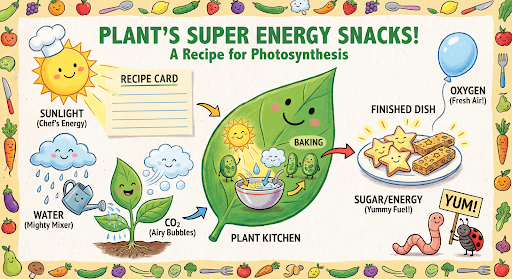
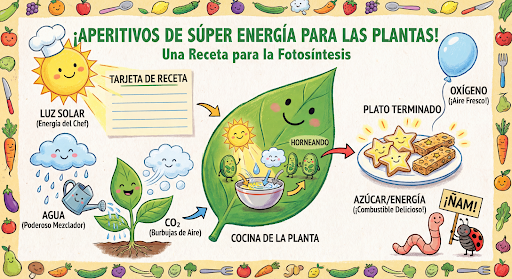
سپس میتوانید از previous_interaction_id برای تغییر زبان روی گرافیک به اسپانیایی استفاده کنید.
پایتون
interaction_2 = client.interactions.create(
    model="gemini-3.1-flash-image",
    input="Update this infographic to be in Spanish. Do not change any other elements of the image.",
    previous_interaction_id=interaction.id,
    response_format={
        "type": "image",
        "mime_type": "image/jpeg",
        "aspect_ratio": "16:9",
        "image_size": "2K"
    },
)

generated_image = interaction_2.output_image
if generated_image:
    with open("photosynthesis_spanish.png", "wb") as f:
        f.write(base64.b64decode(generated_image.data))
جاوا اسکریپت
const interaction2 = await ai.interactions.create({
  model: "gemini-3.1-flash-image",
  input: "Update this infographic to be in Spanish. Do not change any other elements of the image.",
  previous_interaction_id: interaction.id,
  response_format: {
    type: "image",
    mime_type: "image/png",
    aspect_ratio: "16:9",
    image_size: "2K"
  },
});

const generatedImage = interaction2.output_image;
if (generatedImage) {
  const buffer = Buffer.from(generatedImage.data, "base64");
  fs.writeFileSync("photosynthesis_spanish.png", buffer);
}
استراحت
curl -s -X POST \
  "https://generativelanguage.googleapis.com/v1beta/interactions" \
  -H "x-goog-api-key: $GEMINI_API_KEY" \
  -H 'Content-Type: application/json' \
  -d '{
    "model": "gemini-3.1-flash-image",
    "input": "Update this infographic to be in Spanish. Do not change any other elements of the image.",
    "previous_interaction_id": "<PREVIOUS_INTERACTION_ID>",
    "response_format": {
      "type": "image",
      "mime_type": "image/jpeg",
      "aspect_ratio": "16:9",
      "image_size": "2K"
    }
  }'
جدید با مدلهای Gemini 3 Image
Gemini 3 مدلهای پیشرفته تولید و ویرایش تصویر را ارائه میدهد. Gemini 3.1 Flash Image برای سرعت و موارد استفاده با حجم بالا بهینه شده است و Gemini 3 Pro Image برای تولید داراییهای حرفهای بهینه شده است. این نرمافزارها که برای مقابله با چالشبرانگیزترین گردشهای کاری از طریق استدلال پیشرفته طراحی شدهاند، در کارهای پیچیده و چند مرحلهای ایجاد و اصلاح، برتری دارند.
- خروجی با وضوح بالا : قابلیتهای تولید داخلی برای تصاویر 1K، 2K و 4K.
- تصویر فلش Gemini 3.1 وضوح کوچکتر 512 پیکسل (0.5K) را اضافه میکند.
- رندر متن پیشرفته : قادر به تولید متن خوانا و استایلدار برای اینفوگرافیکها، منوها، نمودارها و محتوای بازاریابی است.
- پایهگذاری با جستجوی گوگل : این مدل میتواند از جستجوی گوگل به عنوان ابزاری برای تأیید حقایق و تولید تصاویر بر اساس دادههای بلادرنگ (مثلاً نقشههای آب و هوای فعلی، نمودارهای سهام، رویدادهای اخیر) استفاده کند.
- نرمافزار Gemini 3.1 Flash Image، جستجوی تصویر گوگل (Google Image Search Grounding) را در کنار جستجوی وب اضافه میکند.
- حالت تفکر : این مدل از یک فرآیند «تفکر» برای استدلال از طریق دستورالعملهای پیچیده استفاده میکند. این مدل «تصاویر فکری» موقت (که در پشت صحنه قابل مشاهده هستند اما شارژ نمیشوند) تولید میکند تا ترکیب را قبل از تولید خروجی نهایی با کیفیت بالا اصلاح کند.
- حداکثر ۱۴ تصویر مرجع : اکنون میتوانید حداکثر ۱۴ تصویر مرجع را برای تولید تصویر نهایی با هم ترکیب کنید.
- نسبتهای تصویر جدید : نرمافزار Gemini 3.1 Flash Image نسبتهای تصویر ۱:۴، ۴:۱، ۱:۸ و ۸:۱ را اضافه میکند.
استفاده از حداکثر ۱۴ تصویر مرجع
مدلهای تصویر Gemini 3 به شما امکان میدهند تا ۱۴ تصویر مرجع را با هم ترکیب کنید. این ۱۴ تصویر میتوانند شامل موارد زیر باشند:
| تصویر فلش جمینی ۳.۱ | تصویر Gemini 3 Pro |
|---|---|
| حداکثر ۱۰ تصویر از اشیاء با وضوح بالا برای گنجاندن در تصویر نهایی | حداکثر ۶ تصویر از اشیاء با وضوح بالا برای گنجاندن در تصویر نهایی |
| حداکثر ۴ تصویر از شخصیتها برای حفظ انسجام شخصیت | حداکثر ۵ تصویر از شخصیتها برای حفظ انسجام شخصیت |
| ناموجود | حداکثر ۳ تصویر برای استفاده به عنوان مرجع سبک |
پایتون
from google import genai
from google.genai import types
from PIL import Image
import base64

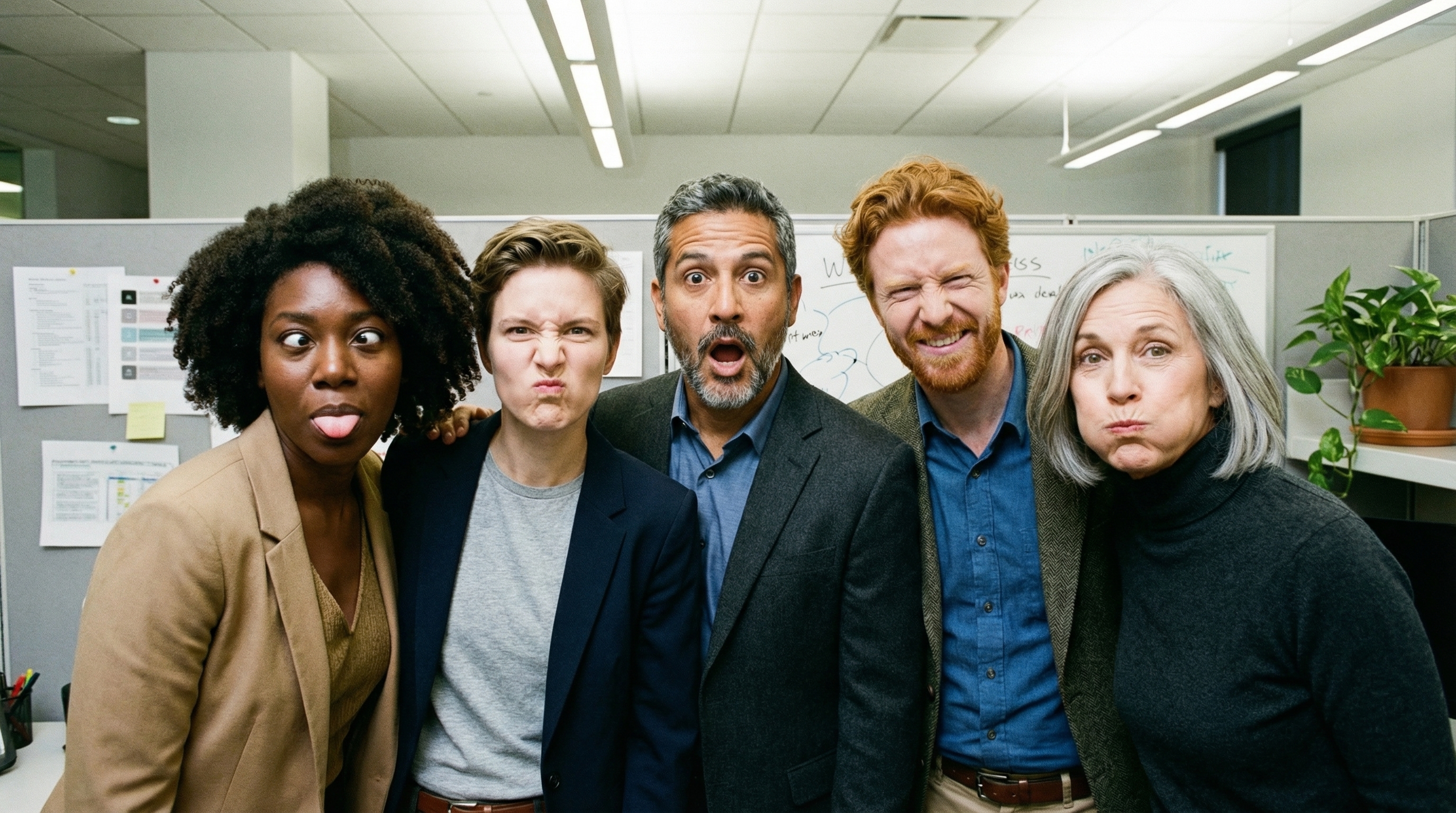
prompt = "An office group photo of these people, they are making funny faces."

client = genai.Client()

interaction = client.interactions.create(
    model="gemini-3.1-flash-image",
    input=[
        {
            "type": "text",
            "text": prompt,
        },
        {
            "type": "image",
            "data": base64.b64encode(image_bytes).decode('utf-8'),
            "mime_type": "image/png"
        },
        {
            "type": "image",
            "data": base64.b64encode(image_bytes).decode('utf-8'),
            "mime_type": "image/png"
        },
        {
            "type": "image",
            "data": base64.b64encode(image_bytes).decode('utf-8'),
            "mime_type": "image/png"
        },
        {
            "type": "image",
            "data": base64.b64encode(image_bytes).decode('utf-8'),
            "mime_type": "image/png"
        },
        {
            "type": "image",
            "data": base64.b64encode(image_bytes).decode('utf-8'),
            "mime_type": "image/png"
        },
    ],
    response_format={
        "type": "image",
        "aspect_ratio": "5:4",
        "image_size": "2K"
    },
)

with open("office.png", "wb") as f:

    f.write(base64.b64decode(interaction.output_image.data))
جاوا اسکریپت
import { GoogleGenAI } from "@google/genai";
import * as fs from "node:fs";

async function main() {
  const ai = new GoogleGenAI({});

  const input = [
    {
      type: "text",
      text: "An office group photo of these people, they are making funny faces.",
    },
    { type: "image", mime_type: "image/jpeg", data: base64ImageFile1 },
    { type: "image", mime_type: "image/jpeg", data: base64ImageFile2 },
    { type: "image", mime_type: "image/jpeg", data: base64ImageFile3 },
    { type: "image", mime_type: "image/jpeg", data: base64ImageFile4 },
    { type: "image", mime_type: "image/jpeg", data: base64ImageFile5 },
  ];

  const interaction = await ai.interactions.create({
    model: "gemini-3.1-flash-image",
    input: input,
    response_format: {
      type: "image",
      aspect_ratio: "5:4",
      image_size: "2K",
    },
  });

  const buffer = Buffer.from(interaction.output_image.data, 'base64');

  fs.writeFileSync('office.png', buffer);
}

main();
استراحت
curl -s -X POST \
  "https://generativelanguage.googleapis.com/v1beta/interactions" \
    -H "x-goog-api-key: $GEMINI_API_KEY" \
    -H 'Content-Type: application/json' \
    -d "{
      \"model\": \"gemini-3.1-flash-image\",
      \"input\": [
        {\"type\": \"text\", \"text\": \"An office group photo of these people, they are making funny faces.\"},
        {\"type\": \"image\", \"mime_type\": \"image/png\", \"data\": \"<BASE64_DATA_IMG_1>\"},
        {\"type\": \"image\", \"mime_type\": \"image/png\", \"data\": \"<BASE64_DATA_IMG_2>\"},
        {\"type\": \"image\", \"mime_type\": \"image/png\", \"data\": \"<BASE64_DATA_IMG_3>\"},
        {\"type\": \"image\", \"mime_type\": \"image/png\", \"data\": \"<BASE64_DATA_IMG_4>\"},
        {\"type\": \"image\", \"mime_type\": \"image/png\", \"data\": \"<BASE64_DATA_IMG_5>\"}
      ],
      \"response_format\": {
        \"type\": \"image\",
        \"aspect_ratio\": \"5:4\",
        \"image_size\": \"2K\"
      }
    }"
اتصال به زمین با جستجوی گوگل
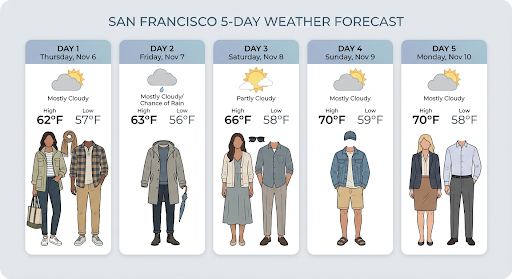
از ابزار جستجوی گوگل برای تولید تصاویر بر اساس اطلاعات لحظهای، مانند پیشبینی آب و هوا، نمودار سهام یا رویدادهای اخیر، استفاده کنید.
توجه داشته باشید که هنگام استفاده از Grounding with Google Search به همراه تولید تصویر، نتایج جستجوی مبتنی بر تصویر به مدل تولید ارسال نمیشوند و از پاسخ حذف میشوند (به Grounding with Google Image Search مراجعه کنید).
پایتون
from google import genai
from google.genai import types
import base64
prompt = "Visualize the current weather forecast for the next 5 days in San Francisco as a clean, modern weather chart. Add a visual on what I should wear each day"

client = genai.Client()

interaction = client.interactions.create(
    model="gemini-3.1-flash-image",
    input=prompt,
    tools=[{"type": "google_search"}],
    response_format={
        "type": "image",
        "mime_type": "image/jpeg",
        "aspect_ratio": "16:9"
    },
)

with open("weather.png", "wb") as f:

    f.write(base64.b64decode(interaction.output_image.data))
جاوا اسکریپت
import { GoogleGenAI } from "@google/genai";
import * as fs from "node:fs";

async function main() {
  const ai = new GoogleGenAI({});

  const interaction = await ai.interactions.create({
    model: "gemini-3.1-flash-image",
    input: "Visualize the current weather forecast for the next 5 days in San Francisco as a clean, modern weather chart. Add a visual on what I should wear each day",
    tools: [{"type": "google_search"}],
    response_format: {
      type: "image",
      mime_type: "image/png",
      aspect_ratio: "16:9",
      image_size: "2K"
    },
  });

  const buffer = Buffer.from(interaction.output_image.data, 'base64');

  fs.writeFileSync('weather.png', buffer);
}

main();
استراحت
curl -s -X POST \
  "https://generativelanguage.googleapis.com/v1beta/interactions" \
  -H "x-goog-api-key: $GEMINI_API_KEY" \
  -H "Content-Type: application/json" \
  -d '{
    "model": "gemini-3.1-flash-image",
    "input": [
      {"type": "text", "text": "Visualize the current weather forecast for the next 5 days in San Francisco as a clean, modern weather chart. Add a visual on what I should wear each day"}
    ],
    "tools": [{"type": "google_search"}],
    "response_format": {
      "type": "image",
      "mime_type": "image/jpeg",
      "aspect_ratio": "16:9"
    }
  }'
این پاسخ شامل مراحل google_search_call و google_search_result به همراه حاشیهنویسیهای درونخطی url_citation در مرحله متن است:
-
google_search_result: شاملsearch_suggestionsاست، یک قطعه کد HTML برای رندر کردن پیشنهادات جستجو در رابط کاربری شما. - حاشیهنویسیهای
url_citation: ارجاعات درونخطی در مرحله متن که بخشهایی از پاسخ را به منابع وب آنها پیوند میدهد.
اتصال به زمین با جستجوی تصاویر گوگل (نسخه ۳.۱ فلش)
اتصال به زمین با جستجوی تصویر گوگل به مدلها اجازه میدهد تا از تصاویر وب بازیابی شده از طریق جستجوی تصویر گوگل به عنوان زمینه بصری برای تولید تصویر استفاده کنند. جستجوی تصویر یک نوع جستجوی جدید در ابزار موجود اتصال به زمین با جستجوی گوگل است که در کنار جستجوی وب استاندارد عمل میکند.
برای فعال کردن جستجوی تصویر، ابزار google_search را در درخواست API خود پیکربندی کنید و image_search در آرایه search_types مشخص کنید. جستجوی تصویر میتواند به صورت مستقل یا همراه با جستجوی وب استفاده شود.
پایتون
from google import genai

client = genai.Client()

interaction = client.interactions.create(
    model="gemini-3.1-flash-image",
    input="A detailed painting of a Timareta butterfly resting on a flower",
    tools=[{
      "type": "google_search",
      "search_types": ["web_search", "image_search"]
    }]
)
جاوا اسکریپت
import { GoogleGenAI } from "@google/genai";

async function main() {
  const ai = new GoogleGenAI({});

  const interaction = await ai.interactions.create({
    model: "gemini-3.1-flash-image",
    input: "A detailed painting of a Timareta butterfly resting on a flower",
    tools: [{
      "type": "google_search",
      "search_types": ["web_search", "image_search"]
    }]
  });
}

main();
استراحت
curl -s -X POST \
  "https://generativelanguage.googleapis.com/v1beta/interactions" \
  -H "x-goog-api-key: $GEMINI_API_KEY" \
  -H "Content-Type: application/json" \
  -d '{
    "model": "gemini-3.1-flash-image",
    "input": "A detailed painting of a Timareta butterfly resting on a flower",
    "tools": [{"type": "google_search", "search_types": ["web_search", "image_search"]}]
  }'
الزامات نمایش
وقتی از جستجوی تصویر در Grounding with Google Search استفاده میکنید، باید پیشنهادات search_suggestions از مرحله google_search_result نمایش دهید. شرایط کامل استفاده در شرایط خدمات به تفصیل شرح داده شده است.
پاسخ
برای پاسخهای مستدل با استفاده از جستجوی تصویر، API استنادهای درونخطی و فرادادههای انتساب را به عنوان بخشی از مراحل پاسخ برمیگرداند:
حاشیهنویسیهای
url_citation: ارجاعات درونخطی در بلوک محتوای متنی درونmodel_output، که محتوای تولید شده را به منبع آن پیوند میدهد.google_search_result: شاملsearch_suggestionsاست، یک قطعه کد HTML برای رندر کردن پیشنهادات جستجو در رابط کاربری شما.
تبدیل ویدیو به تصویر (فلش ۳.۱)
تولید ویدیو به تصویر به شما امکان میدهد تصاویر جدیدی را با استفاده از متن یک ویدیو به عنوان یک مرجع چندوجهی تولید کنید. این قابلیت برای ایجاد تصاویر کوچک ویدیویی با کیفیت بالا، پوسترهای سینمایی، اینفوگرافیکهای خلاصه یا آثار هنری جدید با الهام از صحنههای ویدیویی مفید است.
در طول تولید، مدل، فریمهای ویدیویی را در متن تجزیه و تحلیل میکند تا مضامین بصری و رویدادهای کلیدی را استخراج کند، سپس از آنها در کنار پیام متنی شما برای ترکیب تصویر خروجی استفاده میکند.
شما میتوانید URL های عمومی یوتیوب را مستقیماً در درخواست API خود ارسال کنید یا فایلهای ویدیویی محلی را با استفاده از API فایلها آپلود کنید.
پایتون
from google import genai
from google.genai import types
import base64

client = genai.Client()

interaction = client.interactions.create(
    model="gemini-3.1-flash-image",
    input=[
        {
            "type": "video",
            "uri": "https://www.youtube.com/watch?v=UTdfxFyOQTI",
            "mime_type": "video/mp4"
        },
        {"type": "text", "text": "Generate a poster image that captures the key themes of this video."}
    ],
    response_format={"type": "image", "aspect_ratio": "16:9"}
)

# Save the generated image part
for step in interaction.steps:
    if step.type == "model_output":
        for content_block in step.content:
            if content_block.type == "text":
                print(content_block.text)
            elif content_block.type == "image":
                with open("video_poster.png", "wb") as f:
                    f.write(base64.b64decode(content_block.data))
                print("Image saved as video_poster.png")
جاوا اسکریپت
import { GoogleGenAI } from "@google/genai";
import * as fs from "node:fs";

async function main() {
  const ai = new GoogleGenAI({});

  const interaction = await ai.interactions.create({
    model: "gemini-3.1-flash-image",
    input: [
      {
        type: "video",
        uri: "https://www.youtube.com/watch?v=UTdfxFyOQTI",
        mime_type: "video/mp4"
      },
      { type: "text", text: "Generate a poster image that captures the key themes of this video." }
    ],
    response_format: {
      type: "image",
      aspect_ratio: "16:9"
    }
  });

  for (const step of interaction.steps) {
    if (step.type === "model_output") {
      for (const contentBlock of step.content) {
        if (contentBlock.type === "text") {
          console.log(contentBlock.text);
        } else if (contentBlock.type === "image") {
          const buffer = Buffer.from(contentBlock.data, "base64");
          fs.writeFileSync("video_poster.png", buffer);
          console.log("Image saved as video_poster.png");
        }
      }
    }
  }
}

main();
استراحت
curl -s -X POST \
  "https://generativelanguage.googleapis.com/v1beta/interactions" \
  -H "x-goog-api-key: $GEMINI_API_KEY" \
  -H 'Content-Type: application/json' \
  -d '{
    "model": "gemini-3.1-flash-image",
    "input": [
      {
        "type": "video",
        "uri": "https://www.youtube.com/watch?v=UTdfxFyOQTI",
        "mime_type": "video/mp4"
      },
      {
        "type": "text",
        "text": "Generate a poster image that captures the key themes of this video."
      }
    ],
    "response_format": {
      "type": "image",
      "aspect_ratio": "16:9"
    }
  }'
تولید تصاویر تا وضوح 4K
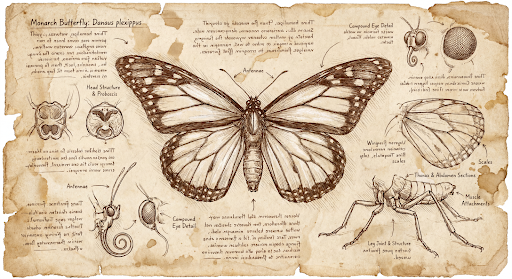
مدلهای تصویر Gemini 3 به طور پیشفرض تصاویر ۱K تولید میکنند، اما میتوانند تصاویر ۲K، ۴K و ۵۱۲px (05.K) (فقط تصاویر فلش Gemini 3.1) را نیز خروجی دهند. برای تولید تصاویر با وضوح بالاتر، image_size در response_format مشخص کنید.
شما باید از حرف بزرگ «K» استفاده کنید (مثلاً 512px (05.K)، 1K، 2K، 4K). پارامترهای با حروف کوچک (مثلاً 1k) پذیرفته نخواهند شد.
پایتون
from google import genai
from google.genai import types
import base64

prompt = "Da Vinci style anatomical sketch of a dissected Monarch butterfly. Detailed drawings of the head, wings, and legs on textured parchment with notes in English."

client = genai.Client()

interaction = client.interactions.create(
    model="gemini-3.1-flash-image",
    input=prompt,
    response_format={
        "type": "image",
        "mime_type": "image/jpeg",
        "aspect_ratio": "1:1",
        "image_size": "1K"
    },
)

print(interaction.output_text)

with open("butterfly.png", "wb") as f:

    f.write(base64.b64decode(interaction.output_image.data))
جاوا اسکریپت
import { GoogleGenAI } from "@google/genai";
import * as fs from "node:fs";

async function main() {
  const ai = new GoogleGenAI({});

  const interaction = await ai.interactions.create({
    model: "gemini-3.1-flash-image",
    input: "Da Vinci style anatomical sketch of a dissected Monarch butterfly. Detailed drawings of the head, wings, and legs on textured parchment with notes in English.",
    response_format: {
      type: "image",
      mime_type: "image/png",
      aspect_ratio: "1:1",
      image_size: "1K",
    },
  });

  console.log(interaction.output_text);

  const buffer = Buffer.from(interaction.output_image.data, 'base64');

  fs.writeFileSync('butterfly.png', buffer);
}

main();
استراحت
curl -s -X POST \
  "https://generativelanguage.googleapis.com/v1beta/interactions" \
  -H "x-goog-api-key: $GEMINI_API_KEY" \
  -H "Content-Type: application/json" \
  -d '{
    "model": "gemini-3.1-flash-image",
    "input": "Da Vinci style anatomical sketch of a dissected Monarch butterfly. Detailed drawings of the head, wings, and legs on textured parchment with notes in English.",
    "response_format": {
      "type": "image",
      "mime_type": "image/jpeg",
      "aspect_ratio": "1:1",
      "image_size": "1K"
    }
  }'
تصویر زیر نمونهای از تصویری است که از این دستور تولید شده است:
فرآیند تفکر
مدلهای تصویر Gemini 3، مدلهای تفکری هستند که از یک فرآیند استدلال ("تفکر") برای دستورات پیچیده استفاده میکنند. این ویژگی به طور پیشفرض فعال است و نمیتوان آن را در API غیرفعال کرد. برای کسب اطلاعات بیشتر در مورد فرآیند تفکر، به راهنمای تفکر Gemini مراجعه کنید.
این مدل تا دو تصویر موقت برای آزمایش ترکیببندی و منطق تولید میکند. آخرین تصویر درون Thinking، تصویر رندر شده نهایی نیز هست.
میتوانید افکاری را که منجر به تولید تصویر نهایی میشوند، بررسی کنید.
پایتون
for step in interaction.steps:
    if step.type == "thought":
        for content_block in step.summary:
            if content_block.type == "text":
                print(content_block.text)
            elif content_block.type == "image":
                image = Image.open(io.BytesIO(base64.b64decode(content_block.data)))
                image.show()
جاوا اسکریپت
for (const step of interaction.steps) {
  if (step.type === "thought") {
    for (const contentBlock of step.summary) {
      if (contentBlock.type === "text") {
        console.log(contentBlock.text);
      } else if (contentBlock.type === "image") {
        const buffer = Buffer.from(contentBlock.data, 'base64');
        fs.writeFileSync('thought_image.png', buffer);
      }
    }
  }
}
متن و تصاویر درهم تنیده
در حالی که مدلهای استاندارد تولید تصویر فقط تصاویر را خروجی میدهند، برخی از مدلهای پیشرفته Gemini 3 (مانند gemini-3-pro-image ) میتوانند محتوای درهمتنیده - مانند داستانها یا راهنماهای آموزشی - تولید کنند که شامل بلوکهای متنی و تصاویر در داخل یک پاسخ واحد هستند.
از آنجا که خروجی پیچیده و لایه لایه است، ویژگیهای راحتی مانند .output_image یا .output_text توالی کامل را ثبت نمیکنند. برای دسترسی و ذخیره محتوای لایه لایه، باید steps زیر را به صورت دستی تکرار کنید:
پایتون
interaction = client.interactions.create(
    model="gemini-3-pro-image",
    input="Write the story of the lifecycle of a monarch butterfly, interleave illustrations",
)

image_counter = 1
for step in interaction.steps:
    if step.type == "model_output":
        for content_block in step.content:
            if content_block.type == "text":
                print(content_block.text)
            elif content_block.type == "image":
                filename = f"butterfly_lifecycle_{image_counter}.png"
                with open(filename, "wb") as f:
                    f.write(base64.b64decode(content_block.data))
                print(f"\n[Saved illustration: {filename}]\n")
                image_counter += 1
جاوا اسکریپت
const interaction = await ai.interactions.create({
    model: "gemini-3-pro-image",
    input: "Write the story of the lifecycle of a monarch butterfly, interleave illustrations",
});

let imageCounter = 1;
for (const step of interaction.steps) {
  if (step.type === "model_output") {
    for (const contentBlock of step.content) {
      if (contentBlock.type === "text") {
        console.log(contentBlock.text);
      } else if (contentBlock.type === "image") {
        const buffer = Buffer.from(contentBlock.data, "base64");
        const filename = `butterfly_lifecycle_${imageCounter}.png`;
        fs.writeFileSync(filename, buffer);
        console.log(`\n[Saved illustration: ${filename}]\n`);
        imageCounter++;
      }
    }
  }
}
کنترل سطوح تفکر
با استفاده از Gemini 3.1 Flash Image، میتوانید میزان تفکری که مدل استفاده میکند را کنترل کنید تا کیفیت و تأخیر را متعادل کنید. سطح thinking_level پیشفرض minimal است و سطوح پشتیبانی شده minimal و high هستند.
پایتون
from google import genai
from PIL import Image
import base64
import io

client = genai.Client()

interaction = client.interactions.create(
    model="gemini-3.1-flash-image",
    input="A futuristic city built inside a giant glass bottle floating in space",
    generation_config={"thinking_level": "high"},
)

print(interaction.output_text)

image = Image.open(io.BytesIO(base64.b64decode(interaction.output_image.data)))

image.show()
جاوا اسکریپت
import { GoogleGenAI } from "@google/genai";
import * as fs from "node:fs";

async function main() {
  const ai = new GoogleGenAI({});

  const interaction = await ai.interactions.create({
    model: "gemini-3.1-flash-image",
    input: "A futuristic city built inside a giant glass bottle floating in space",
    generation_config: { thinking_level: "high" },
  });

  console.log(interaction.output_text);

  const buffer = Buffer.from(interaction.output_image.data, 'base64');

  fs.writeFileSync('image.png', buffer);
}
main();
استراحت
curl -s -X POST \
  "https://generativelanguage.googleapis.com/v1beta/interactions" \
  -H "x-goog-api-key: $GEMINI_API_KEY" \
  -H "Content-Type: application/json" \
  -d '{
    "model": "gemini-3.1-flash-image",
    "input": "A futuristic city built inside a giant glass bottle floating in space",
    "generation_config": {
      "thinking_level": "high"
    }
  }'
توجه داشته باشید که توکنهای تفکر به طور پیشفرض برای مدلهای تفکر هزینه دریافت میکنند، زیرا فرآیند تفکر همیشه به طور پیشفرض اتفاق میافتد، چه شما این فرآیند را ببینید و چه نبینید.
سایر حالتهای تولید تصویر
اگرچه مدلهای تولید تصویر Nano Banana برای اکثر موارد استفاده توصیه میشوند، میتوانید مدلهای تولید تصویر اختصاصی را نیز بررسی کنید:
- Imagen : مدلهای تبدیل متن به تصویر گوگل که برای تولید تصاویر با کیفیت بالا بهینه شدهاند.
- وئو : مدل تولید ویدیوی گوگل.
تولید تصاویر به صورت دستهای
تمام قابلیتهای تولید تصویر که در این صفحه توضیح داده شدهاند، میتوانند با استفاده از Batch API به صورت دستهای نیز اجرا شوند.
راهنمای تشویق و استراتژیها
این بخش مثالها و قالبهای آماده برای گردشهای کاری رایج تولید و ویرایش تصویر را ارائه میدهد. هر مثال شامل یک قالب قابل استفاده مجدد و یک نمونه آماده برای Interactions API است.
دستورالعملهای تولید تصاویر
مثالهای زیر نحوه استفاده از دستورات متنی برای تولید انواع مختلف تصاویر را نشان میدهند.
۱. صحنههای واقعگرایانه
یک صحنه را با جزئیات کامل توصیف کنید. هرچه دقیقتر باشید، کنترل بیشتری بر نتایج خواهید داشت.
الگو
A photorealistic [type of shot] of a [subject description] in a [setting
description]. [Description of the light]. Shot from a [camera angle]
with a [lens type].
سریع
A photorealistic wide-angle shot of a vibrant coral reef teeming with tropical fish. Crystal-clear turquoise water with sunbeams filtering down from the surface, illuminating a sea turtle gliding gracefully over the coral. Shot from a low perspective with a wide-angle lens. Aspect ratio 16:9.
پایتون
from google import genai
from google.genai import types
import base64

client = genai.Client()

interaction = client.interactions.create(
    model="gemini-3.1-flash-image",
    input="A photorealistic wide-angle shot of a vibrant coral reef teeming with tropical fish. Crystal-clear turquoise water with sunbeams filtering down from the surface, illuminating a sea turtle gliding gracefully over the coral. Shot from a low perspective with a wide-angle lens. Aspect ratio 16:9.",
    response_format=[
        {
            "type": "image",
            "mime_type": "image/jpeg",
            "aspect_ratio": "16:9",
        }
    ],
)

print(interaction.output_text)

with open("coral_reef.png", "wb") as f:

    f.write(base64.b64decode(interaction.output_image.data))
جاوا اسکریپت
import { GoogleGenAI } from "@google/genai";
import * as fs from "node:fs";

async function main() {
  const ai = new GoogleGenAI({});

  const interaction = await ai.interactions.create({
    model: "gemini-3.1-flash-image",
    input: "A photorealistic wide-angle shot of a vibrant coral reef teeming with tropical fish. Crystal-clear turquoise water with sunbeams filtering down from the surface, illuminating a sea turtle gliding gracefully over the coral. Shot from a low perspective with a wide-angle lens. Aspect ratio 16:9.",
    response_format: [
      {
        type: "image",
        mime_type: "image/jpeg",
        aspect_ratio: "16:9",
      }
    ],
  });
  console.log(interaction.output_text);

  const buffer = Buffer.from(interaction.output_image.data, 'base64');

  fs.writeFileSync('coral_reef.png', buffer);
}

main();
استراحت
curl -s -X POST \
  "https://generativelanguage.googleapis.com/v1beta/interactions" \
  -H "x-goog-api-key: $GEMINI_API_KEY" \
  -H "Content-Type: application/json" \
  -d '{
    "model": "gemini-3.1-flash-image",
    "input": "A photorealistic wide-angle shot of a vibrant coral reef teeming with tropical fish. Crystal-clear turquoise water with sunbeams filtering down from the surface, illuminating a sea turtle gliding gracefully over the coral. Shot from a low perspective with a wide-angle lens. Aspect ratio 16:9.",
    "response_format": {
      "type": "image",
      "mime_type": "image/png",
      "aspect_ratio": "16:9"
    }
  }'

۲. تصاویر و برچسبهای سبکدار
سبک هنری، موضوع و رسانه را شرح دهید. برای نتایج منسجم، در مورد جزئیات بصری (خطوط پررنگ، رنگها و غیره) دقیق باشید.
الگو
A [style] of a [subject, with details about accessories or actions]
doing [activity]. The design features [visual qualities, e.g., bold outlines,
cel-shading, etc.] and [color/background preference].
سریع
A kawaii-style sticker of a happy red panda wearing a tiny bamboo hat. It's munching on a green bamboo leaf. The design features bold, clean outlines, simple cel-shading, and a vibrant color palette. The background must be white.
پایتون
from google import genai
import base64

client = genai.Client()

interaction = client.interactions.create(
    model="gemini-3.1-flash-image",
    input="A kawaii-style sticker of a happy red panda wearing a tiny bamboo hat. It's munching on a green bamboo leaf. The design features bold, clean outlines, simple cel-shading, and a vibrant color palette. The background must be white.",
)

for step in interaction.steps:
    if step.type == "model_output":
        for content_block in step.content:
            if content_block.type == "text":
                print(content_block.text)
            elif content_block.type == "image":
                with open("red_panda_sticker.png", "wb") as f:
                    f.write(base64.b64decode(content_block.data))
جاوا اسکریپت
import { GoogleGenAI } from "@google/genai";
import * as fs from "node:fs";

async function main() {
  const ai = new GoogleGenAI({});

  const interaction = await ai.interactions.create({
    model: "gemini-3.1-flash-image",
    input: "A kawaii-style sticker of a happy red panda wearing a tiny bamboo hat. It's munching on a green bamboo leaf. The design features bold, clean outlines, simple cel-shading, and a vibrant color palette. The background must be white.",
  });
  for (const step of interaction.steps) {
    if (step.type === "model_output") {
      for (const contentBlock of step.content) {
        if (contentBlock.type === "text") {
          console.log(contentBlock.text);
        } else if (contentBlock.type === "image") {
          const buffer = Buffer.from(contentBlock.data, "base64");
          fs.writeFileSync("red_panda_sticker.png", buffer);
        }
      }
    }
  }
}

main();
استراحت
curl -s -X POST \
  "https://generativelanguage.googleapis.com/v1beta/interactions" \
  -H "x-goog-api-key: $GEMINI_API_KEY" \
  -H "Content-Type: application/json" \
  -d '{
    "model": "gemini-3.1-flash-image",
    "input": "A kawaii-style sticker of a happy red panda wearing a tiny bamboo hat. It is munching on a green bamboo leaf. The design features bold, clean outlines, simple cel-shading, and a vibrant color palette. The background must be white."
  }'

۳. متن دقیق در تصاویر
Gemini در رندر کردن متن عالی است. در مورد متن، سبک فونت (به صورت توصیفی) و طراحی کلی، واضح باشید. از Gemini 3 Pro Image برای تولید حرفهای تصاویر استفاده کنید.
الگو
Create a [image type] for [brand/concept] with the text "[text to render]"
in a [font style]. The design should be [style description], with a
[color scheme].
سریع
Create a modern, minimalist logo for a coffee shop called 'The Daily Grind'. The text should be in a clean, bold, sans-serif font. The color scheme is black and white. Put the logo in a circle. Use a coffee bean in a clever way.
پایتون
from google import genai
import base64

client = genai.Client()

interaction = client.interactions.create(
    model="gemini-3.1-flash-image",
    input="Create a modern, minimalist logo for a coffee shop called 'The Daily Grind'. The text should be in a clean, bold, sans-serif font. The color scheme is black and white. Put the logo in a circle. Use a coffee bean in a clever way.",
    response_format={"type": "image", "aspect_ratio": "1:1"},
)

for step in interaction.steps:
    if step.type == "model_output":
        for content_block in step.content:
            if content_block.type == "text":
                print(content_block.text)
            elif content_block.type == "image":
                with open("logo_example.jpg", "wb") as f:
                    f.write(base64.b64decode(content_block.data))
جاوا اسکریپت
import { GoogleGenAI } from "@google/genai";
import * as fs from "node:fs";

async function main() {
  const ai = new GoogleGenAI({});

  const interaction = await ai.interactions.create({
    model: "gemini-3.1-flash-image",
    input: "Create a modern, minimalist logo for a coffee shop called 'The Daily Grind'. The text should be in a clean, bold, sans-serif font. The color scheme is black and white. Put the logo in a circle. Use a coffee bean in a clever way.",
    response_format: { type: "image", aspect_ratio: "1:1" },
  });
  for (const step of interaction.steps) {
    if (step.type === "model_output") {
      for (const contentBlock of step.content) {
        if (contentBlock.type === "text") {
          console.log(contentBlock.text);
        } else if (contentBlock.type === "image") {
          const buffer = Buffer.from(contentBlock.data, "base64");
          fs.writeFileSync("logo_example.jpg", buffer);
        }
      }
    }
  }
}

main();
استراحت
curl -s -X POST \
  "https://generativelanguage.googleapis.com/v1beta/interactions" \
  -H "x-goog-api-key: $GEMINI_API_KEY" \
  -H "Content-Type: application/json" \
  -d '{
    "model": "gemini-3.1-flash-image",
    "input": "Create a modern, minimalist logo for a coffee shop called The Daily Grind. The text should be in a clean, bold, sans-serif font. The color scheme is black and white. Put the logo in a circle. Use a coffee bean in a clever way.",
    "response_format": {
      "type": "image",
      "aspect_ratio": "1:1"
    }
  }'

۴. ماکتهای محصول و عکاسی تجاری
ایدهآل برای ایجاد عکسهای تمیز و حرفهای از محصولات برای تجارت الکترونیک، تبلیغات یا برندسازی.
الگو
A high-resolution, studio-lit product photograph of a [product description]
on a [background surface/description]. The lighting is a [lighting setup,
e.g., three-point softbox setup] to [lighting purpose]. The camera angle is
a [angle type] to showcase [specific feature]. Ultra-realistic, with sharp
focus on [key detail]. [Aspect ratio].
سریع
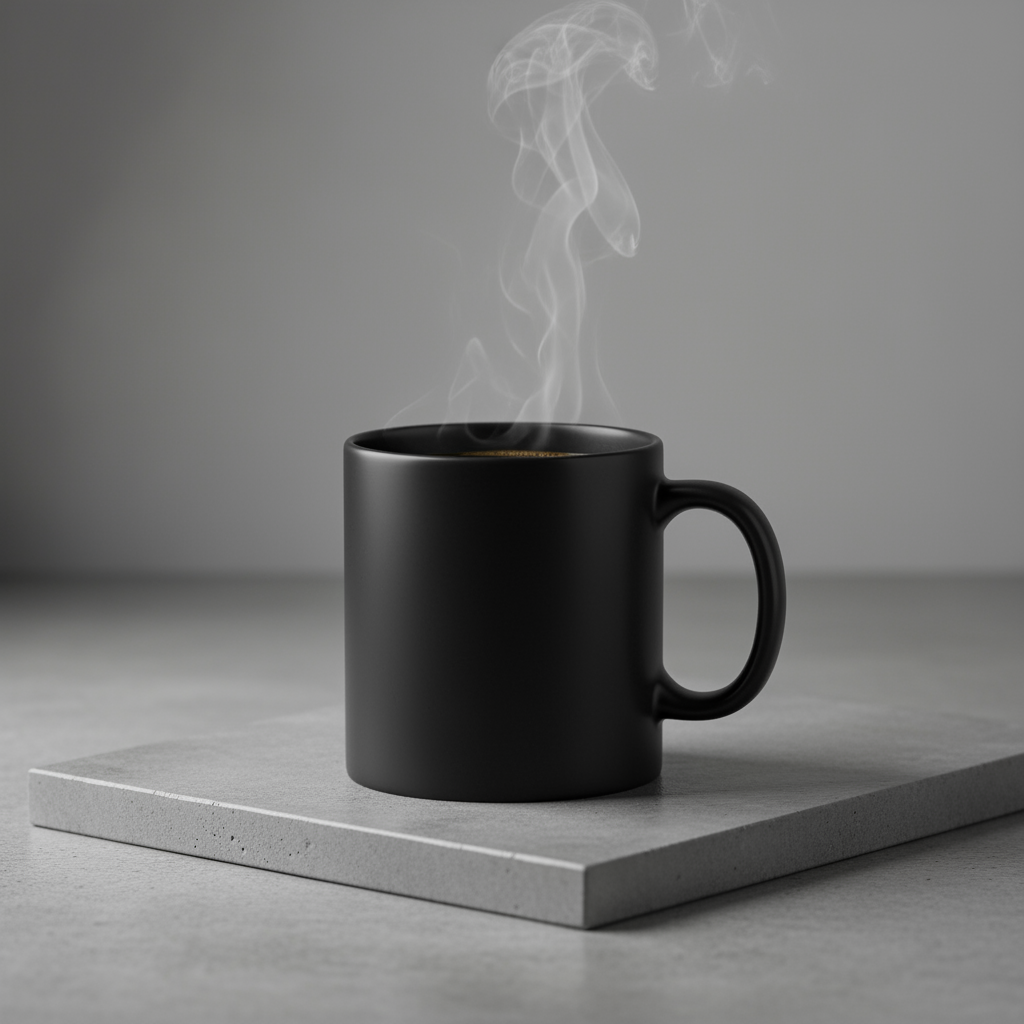
A high-resolution, studio-lit product photograph of a minimalist ceramic
coffee mug in matte black, presented on a polished concrete surface. The
lighting is a three-point softbox setup designed to create soft, diffused
highlights and eliminate harsh shadows. The camera angle is a slightly
elevated 45-degree shot to showcase its clean lines. Ultra-realistic, with
sharp focus on the steam rising from the coffee. Square image.
پایتون
from google import genai
import base64

client = genai.Client()

interaction = client.interactions.create(
    model="gemini-3.1-flash-image",
    input="A high-resolution, studio-lit product photograph of a minimalist ceramic coffee mug in matte black, presented on a polished concrete surface. The lighting is a three-point softbox setup designed to create soft, diffused highlights and eliminate harsh shadows. The camera angle is a slightly elevated 45-degree shot to showcase its clean lines. Ultra-realistic, with sharp focus on the steam rising from the coffee. Square image.",
)

for step in interaction.steps:
    if step.type == "model_output":
        for content_block in step.content:
            if content_block.type == "text":
                print(content_block.text)
            elif content_block.type == "image":
                with open("product_mockup.png", "wb") as f:
                    f.write(base64.b64decode(content_block.data))
جاوا اسکریپت
import { GoogleGenAI } from "@google/genai";
import * as fs from "node:fs";

async function main() {
  const ai = new GoogleGenAI({});

  const interaction = await ai.interactions.create({
    model: "gemini-3.1-flash-image",
    input: "A high-resolution, studio-lit product photograph of a minimalist ceramic coffee mug in matte black, presented on a polished concrete surface. The lighting is a three-point softbox setup designed to create soft, diffused highlights and eliminate harsh shadows. The camera angle is a slightly elevated 45-degree shot to showcase its clean lines. Ultra-realistic, with sharp focus on the steam rising from the coffee. Square image.",
  });
  for (const step of interaction.steps) {
    if (step.type === "model_output") {
      for (const contentBlock of step.content) {
        if (contentBlock.type === "text") {
          console.log(contentBlock.text);
        } else if (contentBlock.type === "image") {
          const buffer = Buffer.from(contentBlock.data, "base64");
          fs.writeFileSync("product_mockup.png", buffer);
        }
      }
    }
  }
}

main();
استراحت
curl -s -X POST \
  "https://generativelanguage.googleapis.com/v1beta/interactions" \
  -H "x-goog-api-key: $GEMINI_API_KEY" \
  -H "Content-Type: application/json" \
  -d '{
    "model": "gemini-3.1-flash-image",
    "input": "A high-resolution, studio-lit product photograph of a minimalist ceramic coffee mug in matte black, presented on a polished concrete surface. The lighting is a three-point softbox setup designed to create soft, diffused highlights and eliminate harsh shadows. The camera angle is a slightly elevated 45-degree shot to showcase its clean lines. Ultra-realistic, with sharp focus on the steam rising from the coffee. Square image."
  }'
۵. طراحی مینیمالیستی و فضای منفی
عالی برای ایجاد پسزمینه برای وبسایتها، ارائهها یا مطالب بازاریابی که در آنها متن روی چیزی قرار میگیرد.
الگو
A minimalist composition featuring a single [subject] positioned in the
[bottom-right/top-left/etc.] of the frame. The background is a vast, empty
[color] canvas, creating significant negative space. Soft, subtle lighting.
[Aspect ratio].
سریع
A minimalist composition featuring a single, delicate red maple leaf
positioned in the bottom-right of the frame. The background is a vast, empty
off-white canvas, creating significant negative space for text. Soft,
diffused lighting from the top left. Square image.
پایتون
from google import genai
import base64

client = genai.Client()

interaction = client.interactions.create(
    model="gemini-3.1-flash-image",
    input="A minimalist composition featuring a single, delicate red maple leaf positioned in the bottom-right of the frame. The background is a vast, empty off-white canvas, creating significant negative space for text. Soft, diffused lighting from the top left. Square image.",
)

for step in interaction.steps:
    if step.type == "model_output":
        for content_block in step.content:
            if content_block.type == "text":
                print(content_block.text)
            elif content_block.type == "image":
                with open("minimalist_design.png", "wb") as f:
                    f.write(base64.b64decode(content_block.data))
جاوا اسکریپت
import { GoogleGenAI } from "@google/genai";
import * as fs from "node:fs";

async function main() {
  const ai = new GoogleGenAI({});

  const interaction = await ai.interactions.create({
    model: "gemini-3.1-flash-image",
    input: "A minimalist composition featuring a single, delicate red maple leaf positioned in the bottom-right of the frame. The background is a vast, empty off-white canvas, creating significant negative space for text. Soft, diffused lighting from the top left. Square image.",
  });
  for (const step of interaction.steps) {
    if (step.type === "model_output") {
      for (const contentBlock of step.content) {
        if (contentBlock.type === "text") {
          console.log(contentBlock.text);
        } else if (contentBlock.type === "image") {
          const buffer = Buffer.from(contentBlock.data, "base64");
          fs.writeFileSync("minimalist_design.png", buffer);
        }
      }
    }
  }
}

main();
استراحت
curl -s -X POST \
  "https://generativelanguage.googleapis.com/v1beta/interactions" \
  -H "x-goog-api-key: $GEMINI_API_KEY" \
  -H "Content-Type: application/json" \
  -d '{
    "model": "gemini-3.1-flash-image",
    "input": "A minimalist composition featuring a single, delicate red maple leaf positioned in the bottom-right of the frame. The background is a vast, empty off-white canvas, creating significant negative space for text. Soft, diffused lighting from the top left. Square image."
  }'

۶. هنر ترتیبی (پنل کمیک / استوریبورد)
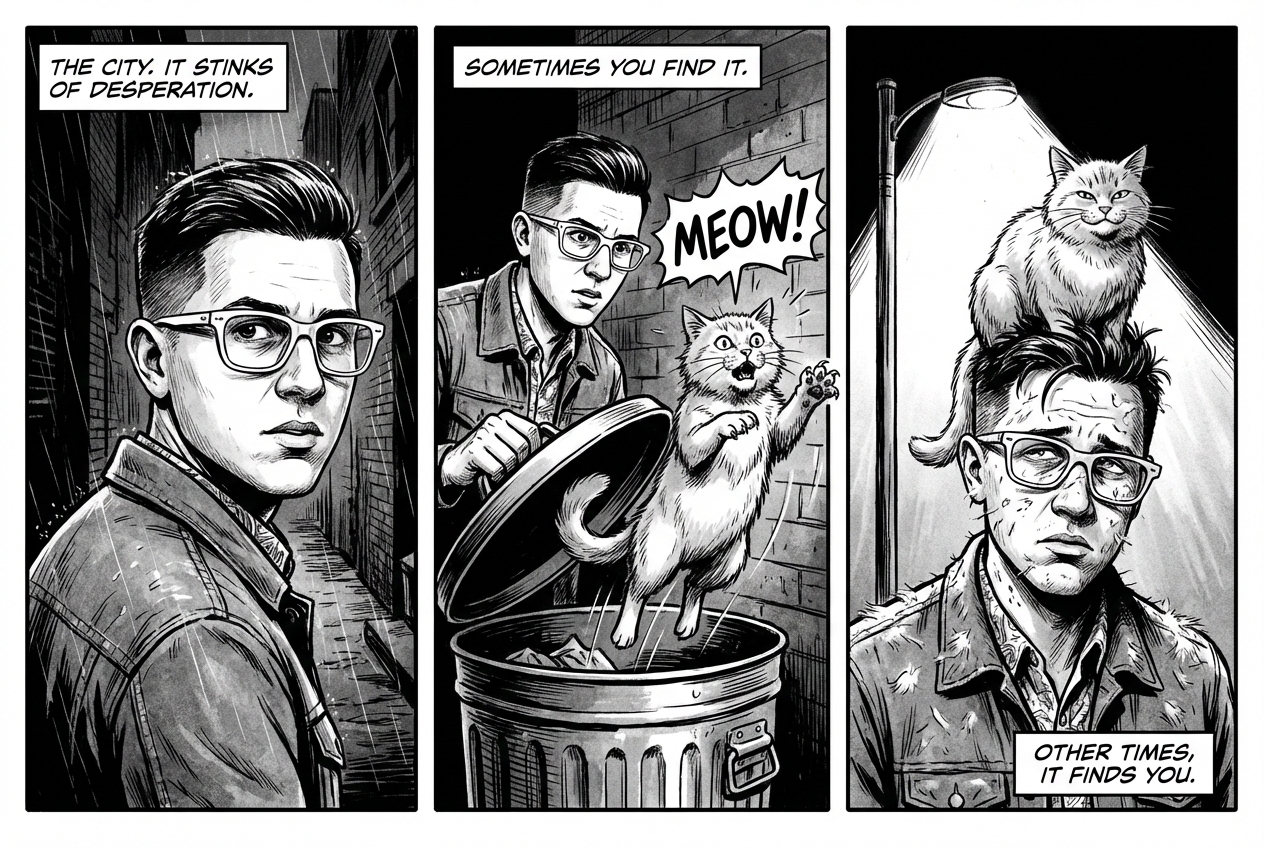
بر اساس ثبات شخصیت و توصیف صحنه، پنلهایی برای داستانسرایی بصری ایجاد میکند. برای دقت در متن و توانایی داستانسرایی، این دستورالعملها با Gemini 3 Pro و Gemini 3.1 Flash Image بهترین عملکرد را دارند.
الگو
Make a 3 panel comic in a [style]. Put the character in a [type of scene].
سریع
Make a 3 panel comic in a gritty, noir art style with high-contrast black and white inks. Put the character in a humurous scene.
پایتون
from google import genai
from PIL import Image
import base64

client = genai.Client()

with open('/path/to/your/man_in_white_glasses.jpg', 'rb') as f:
    image_bytes = f.read()
text_input = "Make a 3 panel comic in a gritty, noir art style with high-contrast black and white inks. Put the character in a humurous scene."

interaction = client.interactions.create(
    model="gemini-3.1-flash-image",
    input=[
        {"type": "text", "text": text_input},
        {
            "type": "image",
            "data": base64.b64encode(image_bytes).decode('utf-8'),
            "mime_type": "image/jpeg"
        }
    ],
)

for step in interaction.steps:
    if step.type == "model_output":
        for content_block in step.content:
            if content_block.type == "text":
                print(content_block.text)
            elif content_block.type == "image":
                with open("comic_panel.jpg", "wb") as f:
                    f.write(base64.b64decode(content_block.data))
جاوا اسکریپت
import { GoogleGenAI } from "@google/genai";
import * as fs from "node:fs";

async function main() {
  const ai = new GoogleGenAI({});

  const imagePath = "/path/to/your/man_in_white_glasses.jpg";
  const imageData = fs.readFileSync(imagePath);
  const base64Image = imageData.toString("base64");

  const input = [
    { type: "text", text: "Make a 3 panel comic in a gritty, noir art style with high-contrast black and white inks. Put the character in a humurous scene." },
    {
      type: "image",
      mime_type: "image/jpeg",
      data: base64Image
    },
  ];

  const interaction = await ai.interactions.create({
    model: "gemini-3.1-flash-image",
    input: input,
  });
  for (const step of interaction.steps) {
    if (step.type === "model_output") {
      for (const contentBlock of step.content) {
        if (contentBlock.type === "text") {
          console.log(contentBlock.text);
        } else if (contentBlock.type === "image") {
          const buffer = Buffer.from(contentBlock.data, "base64");
          fs.writeFileSync("comic_panel.jpg", buffer);
        }
      }
    }
  }
}

main();
استراحت
curl -s -X POST \
  "https://generativelanguage.googleapis.com/v1beta/interactions" \
  -H "x-goog-api-key: $GEMINI_API_KEY" \
  -H "Content-Type: application/json" \
  -d '{
    "model": "gemini-3.1-flash-image",
    "input": [
      {"type": "text", "text": "Make a 3 panel comic in a gritty, noir art style with high-contrast black and white inks. Put the character in a humurous scene."},
      {"type": "image", "data": "<BASE64_IMAGE_DATA>", "mime_type": "image/jpeg"}
    ]
  }'
ورودی | خروجی |
 |  |
۷. اتصال به اینترنت با جستجوی گوگل
از جستجوی گوگل برای تولید تصاویر بر اساس اطلاعات اخیر یا اطلاعات لحظهای استفاده کنید. این قابلیت برای اخبار، آب و هوا و سایر موضوعات حساس به زمان مفید است.
سریع
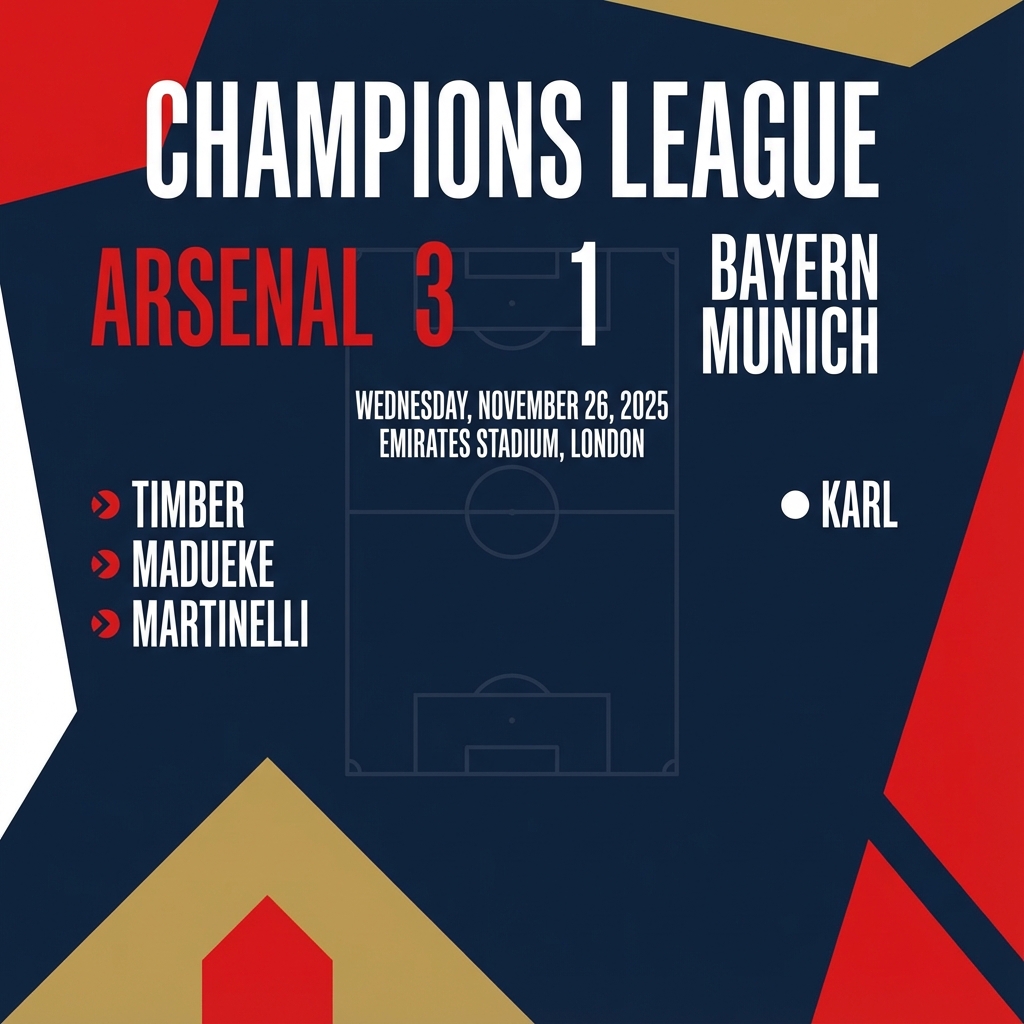
Make a simple but stylish graphic of last night's Arsenal game in the Champion's League
پایتون
from google import genai
from google.genai import types
import base64

client = genai.Client()

interaction = client.interactions.create(
    model="gemini-3.1-flash-image",
    input="Make a simple but stylish graphic of last night's Arsenal game in the Champion's League",
    tools=[{"type": "google_search"}],
    response_format={"type": "image", "aspect_ratio": "16:9"},
)

for step in interaction.steps:
    if step.type == "model_output":
        for content_block in step.content:
            if content_block.type == "text":
                print(content_block.text)
            elif content_block.type == "image":
                with open("football-score.jpg", "wb") as f:
                    f.write(base64.b64decode(content_block.data))
جاوا اسکریپت
import { GoogleGenAI } from "@google/genai";
import * as fs from "node:fs";

async function main() {
  const ai = new GoogleGenAI({});

  const interaction = await ai.interactions.create({
    model: "gemini-3.1-flash-image",
    input: "Make a simple but stylish graphic of last night's Arsenal game in the Champion's League",
    tools: [{ type: "google_search" }],
    response_format: { type: "image", aspect_ratio: "16:9", image_size: "2K" },
  });

  for (const step of interaction.steps) {
    if (step.type === "model_output") {
      for (const contentBlock of step.content) {
        if (contentBlock.type === "text") {
          console.log(contentBlock.text);
        } else if (contentBlock.type === "image") {
          const buffer = Buffer.from(contentBlock.data, "base64");
          fs.writeFileSync("football-score.jpg", buffer);
        }
      }
    }
  }
}

main();
استراحت
curl -s -X POST \
  "https://generativelanguage.googleapis.com/v1beta/interactions" \
  -H "x-goog-api-key: $GEMINI_API_KEY" \
  -H "Content-Type: application/json" \
  -d '{
    "model": "gemini-3.1-flash-image",
    "input": "Make a simple but stylish graphic of last nights Arsenal game in the Champions League",
    "tools": [{"type": "google_search"}],
    "response_format": {
      "type": "image",
      "aspect_ratio": "16:9"
    }
  }'
دستورالعملهای ویرایش تصاویر
این مثالها نشان میدهند که چگونه میتوانید در کنار متنهای خود، تصاویر را برای ویرایش، ترکیببندی و انتقال سبک ارائه دهید.
۱. اضافه کردن و حذف کردن عناصر
یک تصویر ارائه دهید و تغییر خود را شرح دهید. مدل با سبک، نورپردازی و پرسپکتیو تصویر اصلی مطابقت خواهد داشت.
الگو
Using the provided image of [subject], please [add/remove/modify] [element]
to/from the scene. Ensure the change is [description of how the change should
integrate].
سریع
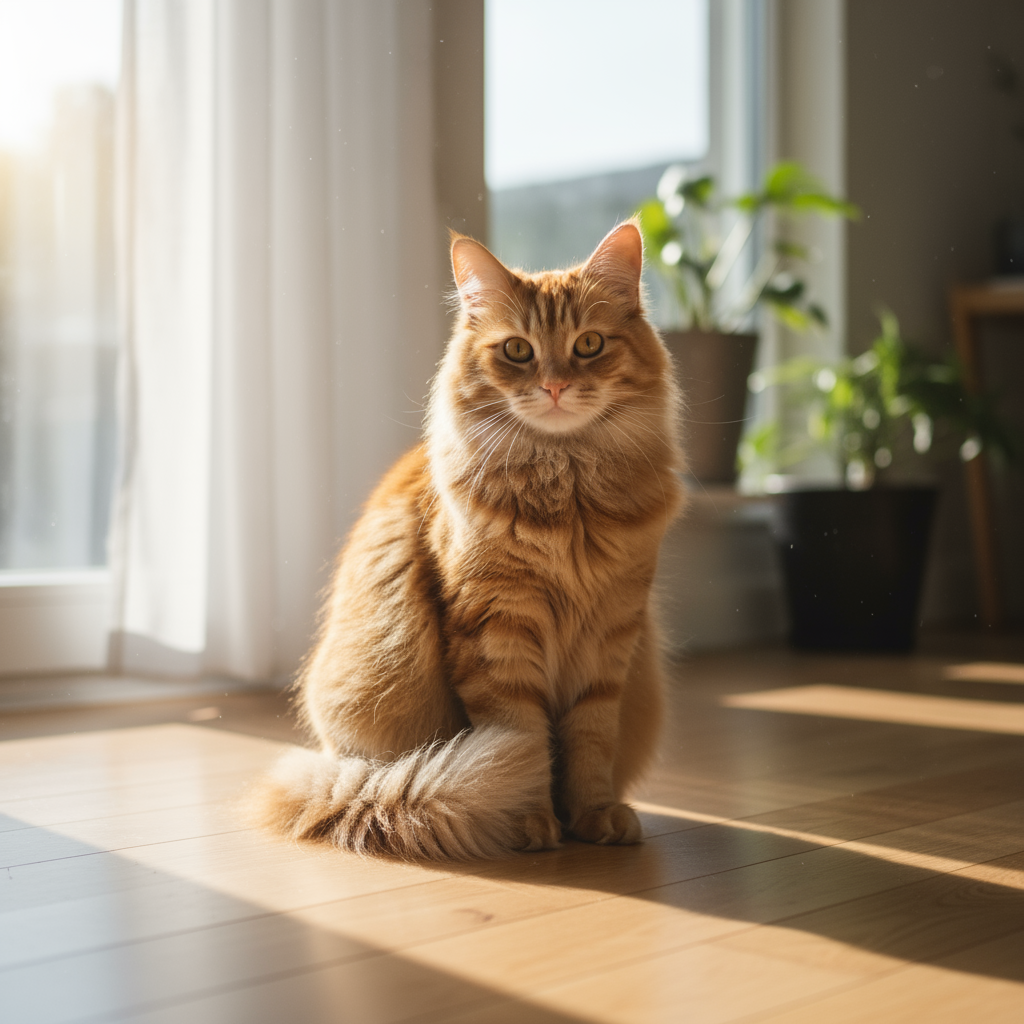
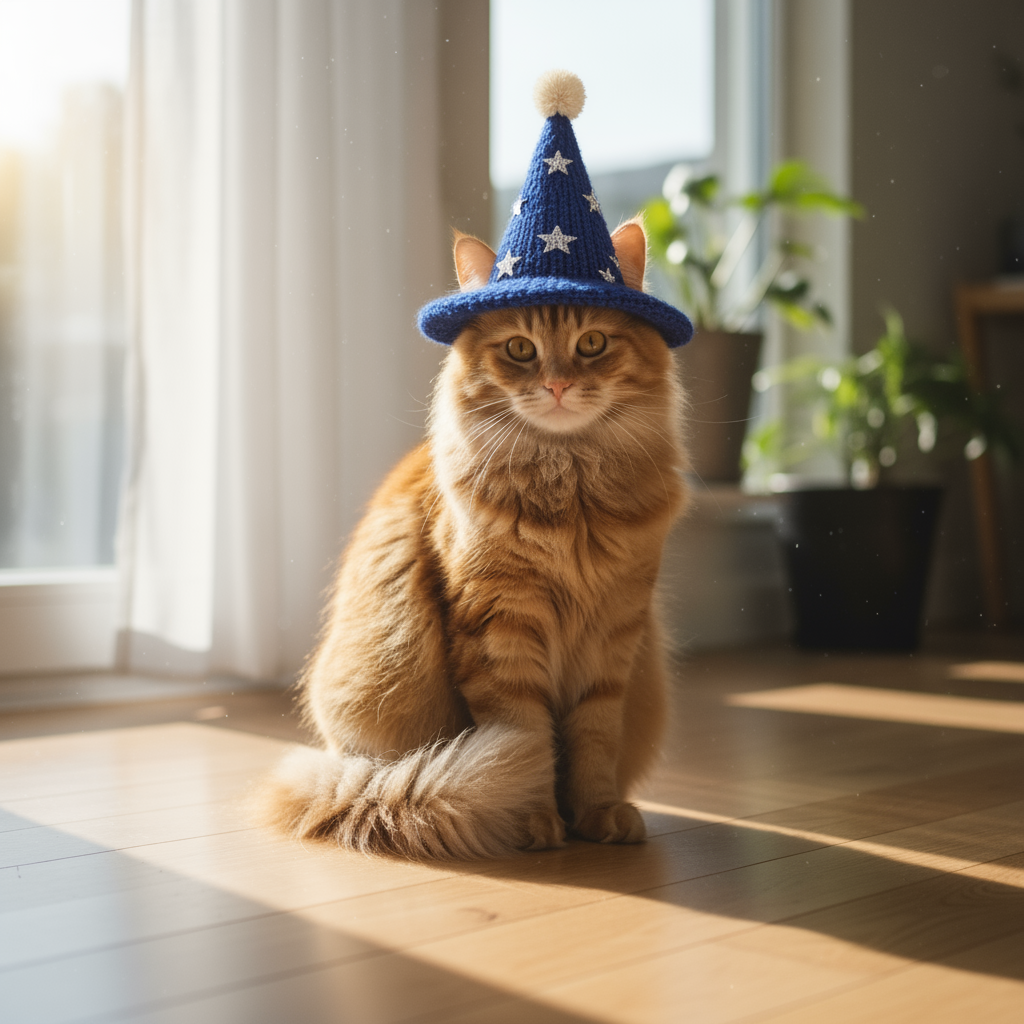
"Using the provided image of my cat, please add a small, knitted wizard hat
on its head. Make it look like it's sitting comfortably and matches the soft
lighting of the photo."
پایتون
from google import genai
from PIL import Image
import base64

client = genai.Client()

with open('/path/to/your/cat_photo.png', 'rb') as f:
    image_bytes = f.read()
text_input = """Using the provided image of my cat, please add a small, knitted wizard hat on its head. Make it look like it's sitting comfortably and not falling off."""

interaction = client.interactions.create(
    model="gemini-3.1-flash-image",
    input=[
        {"type": "text", "text": text_input},
        {
            "type": "image",
            "data": base64.b64encode(image_bytes).decode('utf-8'),
            "mime_type": "image/png"
        }
    ],
)

for step in interaction.steps:
    if step.type == "model_output":
        for content_block in step.content:
            if content_block.type == "text":
                print(content_block.text)
            elif content_block.type == "image":
                with open("cat_with_hat.png", "wb") as f:
                    f.write(base64.b64decode(content_block.data))
جاوا اسکریپت
import { GoogleGenAI } from "@google/genai";
import * as fs from "node:fs";

async function main() {
  const ai = new GoogleGenAI({});

  const imagePath = "/path/to/your/cat_photo.png";
  const imageData = fs.readFileSync(imagePath);
  const base64Image = imageData.toString("base64");

  const input = [
    { type: "text", text: "Using the provided image of my cat, please add a small, knitted wizard hat on its head. Make it look like it's sitting comfortably and not falling off." },
    {
      type: "image",
      mime_type: "image/png",
      data: base64Image
    },
  ];

  const interaction = await ai.interactions.create({
    model: "gemini-3.1-flash-image",
    input: input,
  });
  for (const step of interaction.steps) {
    if (step.type === "model_output") {
      for (const contentBlock of step.content) {
        if (contentBlock.type === "text") {
          console.log(contentBlock.text);
        } else if (contentBlock.type === "image") {
          const buffer = Buffer.from(contentBlock.data, "base64");
          fs.writeFileSync("cat_with_hat.png", buffer);
        }
      }
    }
  }
}

main();
استراحت
curl -s -X POST \
  "https://generativelanguage.googleapis.com/v1beta/interactions" \
    -H "x-goog-api-key: $GEMINI_API_KEY" \
    -H 'Content-Type: application/json' \
    -d "{
      \"model\": \"gemini-3.1-flash-image\",
      \"input\": [
            {\"type\": \"text\", \"text\": \"Using the provided image of my cat, please add a small, knitted wizard hat on its head. Make it look like it's sitting comfortably and not falling off.\"},
            {\"type\": \"image\", \"mime_type\":\"image/png\", \"data\": \"<BASE64_IMAGE_DATA>\"}
        ]
    }"
ورودی | خروجی |
 |  |
۲. رنگآمیزی (پوشش معنایی)
به صورت محاورهای یک «ماسک» تعریف کنید تا بخش خاصی از تصویر را ویرایش کنید و بقیه را دستنخورده باقی بگذارید.
الگو
Using the provided image, change only the [specific element] to [new
element/description]. Keep everything else in the image exactly the same,
preserving the original style, lighting, and composition.
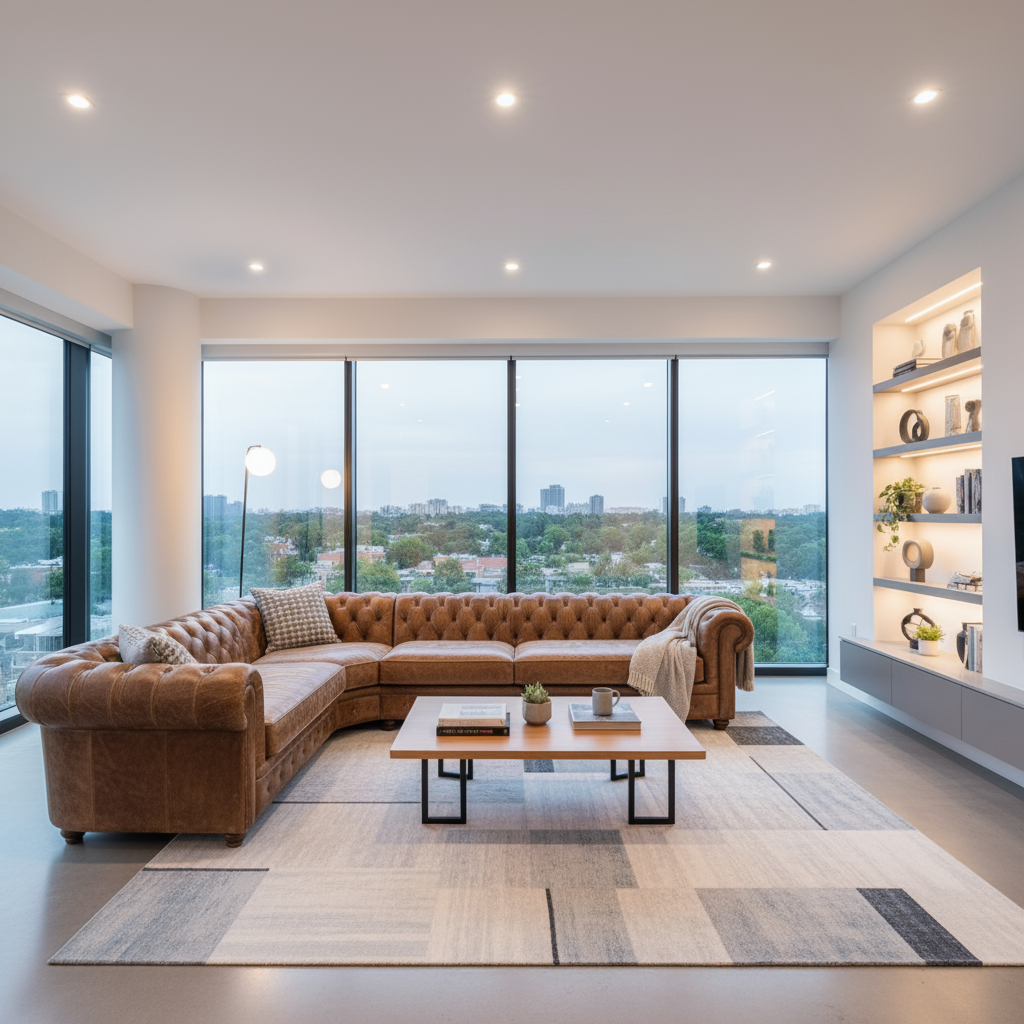
سریع
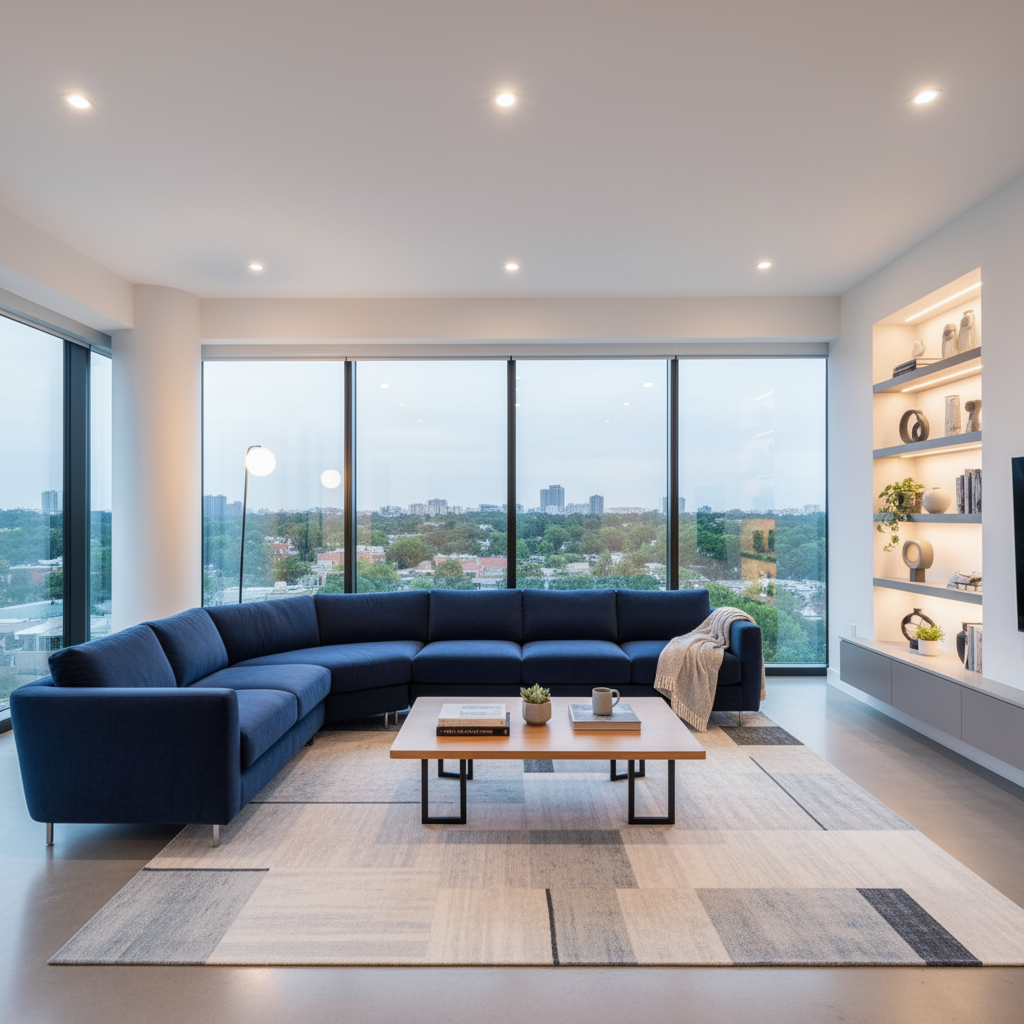
"Using the provided image of a living room, change only the blue sofa to be
a vintage, brown leather chesterfield sofa. Keep the rest of the room,
including the pillows on the sofa and the lighting, unchanged."
پایتون
from google import genai
from PIL import Image
import base64

client = genai.Client()

with open('/path/to/your/living_room.png', 'rb') as f:
    image_bytes = f.read()
text_input = """Using the provided image of a living room, change only the blue sofa to be a vintage, brown leather chesterfield sofa. Keep the rest of the room, including the pillows on the sofa and the lighting, unchanged."""

interaction = client.interactions.create(
    model="gemini-3.1-flash-image",
    input=[
        {
            "type": "image",
            "data": base64.b64encode(image_bytes).decode('utf-8'),
            "mime_type": "image/png"
        },
        {"type": "text", "text": text_input}
    ],
)

for step in interaction.steps:
    if step.type == "model_output":
        for content_block in step.content:
            if content_block.type == "text":
                print(content_block.text)
            elif content_block.type == "image":
                with open("living_room_edited.png", "wb") as f:
                    f.write(base64.b64decode(content_block.data))
جاوا اسکریپت
import { GoogleGenAI } from "@google/genai";
import * as fs from "node:fs";

async function main() {
  const ai = new GoogleGenAI({});

  const imagePath = "/path/to/your/living_room.png";
  const imageData = fs.readFileSync(imagePath);
  const base64Image = imageData.toString("base64");

  const input = [
    {
      type: "image",
      mime_type: "image/png",
      data: base64Image
    },
    { type: "text", text: "Using the provided image of a living room, change only the blue sofa to be a vintage, brown leather chesterfield sofa. Keep the rest of the room, including the pillows on the sofa and the lighting, unchanged." },
  ];

  const interaction = await ai.interactions.create({
    model: "gemini-3.1-flash-image",
    input: input,
  });
  for (const step of interaction.steps) {
    if (step.type === "model_output") {
      for (const contentBlock of step.content) {
        if (contentBlock.type === "text") {
          console.log(contentBlock.text);
        } else if (contentBlock.type === "image") {
          const buffer = Buffer.from(contentBlock.data, "base64");
          fs.writeFileSync("living_room_edited.png", buffer);
        }
      }
    }
  }
}

main();
استراحت
curl -s -X POST \
  "https://generativelanguage.googleapis.com/v1beta/interactions" \
    -H "x-goog-api-key: $GEMINI_API_KEY" \
    -H 'Content-Type: application/json' \
    -d "{
      \"model\": \"gemini-3.1-flash-image\",
      \"input\": [
        {\"type\": \"image\", \"mime_type\":\"image/png\", \"data\": \"<BASE64_IMAGE_DATA>\"},
        {\"type\": \"text\", \"text\": \"Using the provided image of a living room, change only the blue sofa to be a vintage, brown leather chesterfield sofa. Keep the rest of the room, including the pillows on the sofa and the lighting, unchanged.\"}
      ]
    }"
ورودی | خروجی |
 |  |
۳. انتقال سبک
تصویری ارائه دهید و از مدل بخواهید محتوای آن را با سبک هنری متفاوتی بازآفرینی کند.
الگو
Transform the provided photograph of [subject] into the artistic style of [artist/art style]. Preserve the original composition but render it with [description of stylistic elements].
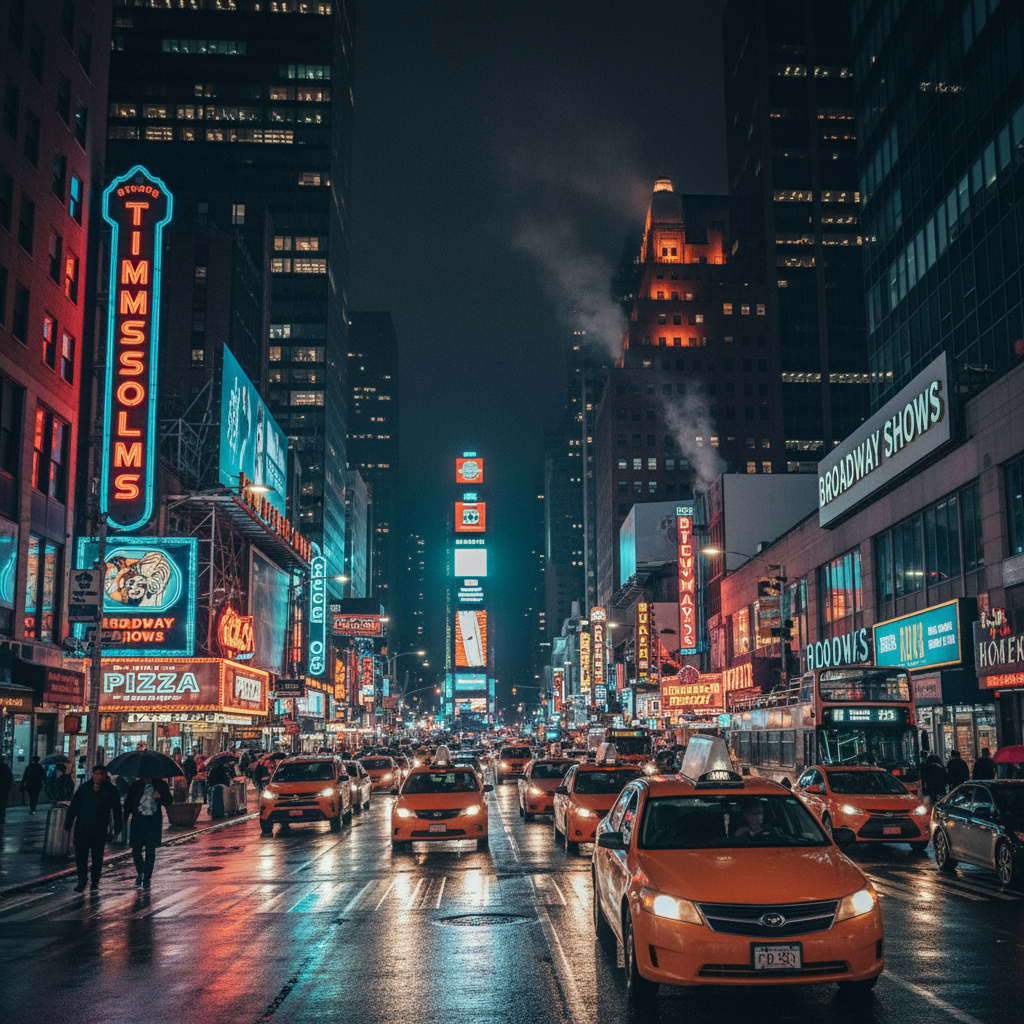
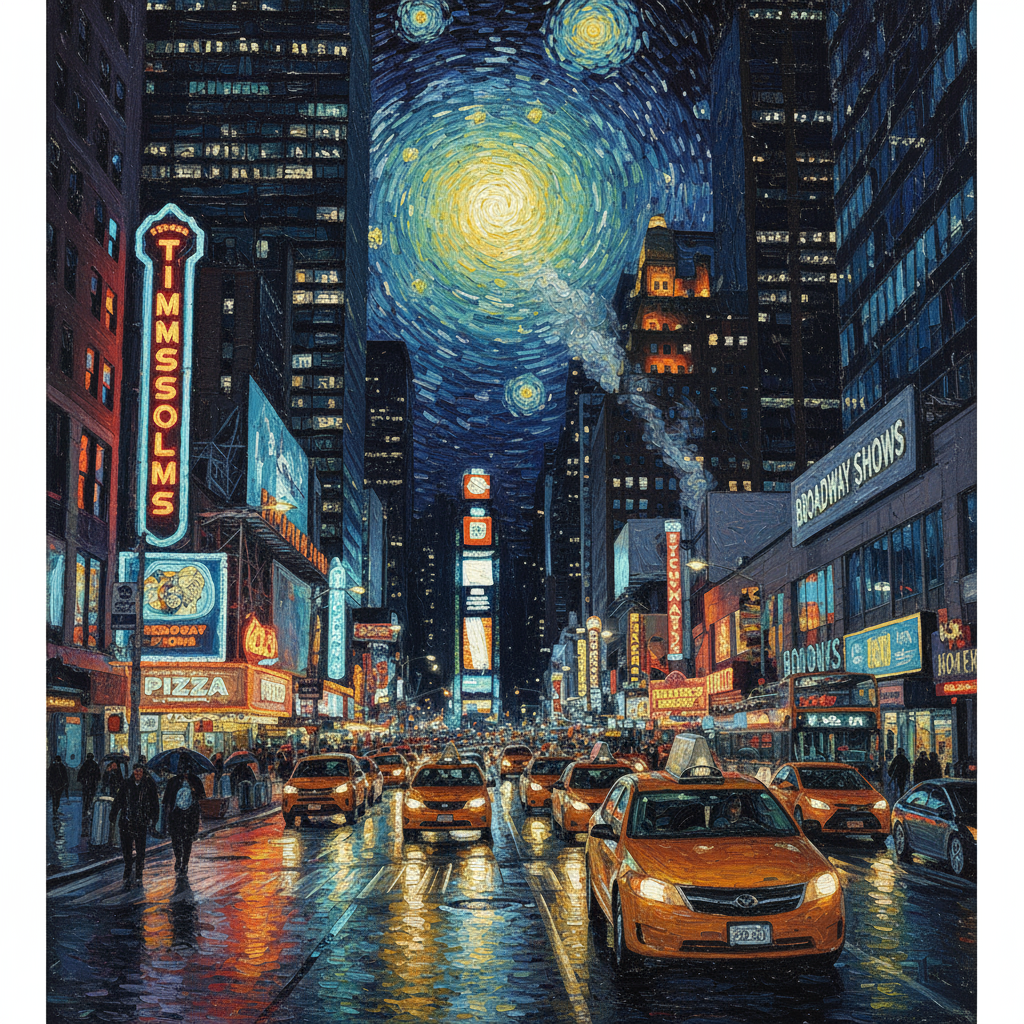
سریع
"Transform the provided photograph of a modern city street at night into the artistic style of Vincent van Gogh's 'Starry Night'. Preserve the original composition of buildings and cars, but render all elements with swirling, impasto brushstrokes and a dramatic palette of deep blues and bright yellows."
پایتون
from google import genai
from PIL import Image
import base64

client = genai.Client()

with open('/path/to/your/city.png', 'rb') as f:
    image_bytes = f.read()
text_input = """Transform the provided photograph of a modern city street at night into the artistic style of Vincent van Gogh's 'Starry Night'. Preserve the original composition of buildings and cars, but render all elements with swirling, impasto brushstrokes and a dramatic palette of deep blues and bright yellows."""

interaction = client.interactions.create(
    model="gemini-3.1-flash-image",
    input=[
        {
            "type": "image",
            "data": base64.b64encode(image_bytes).decode('utf-8'),
            "mime_type": "image/png"
        },
        {"type": "text", "text": text_input}
    ],
)

for step in interaction.steps:
    if step.type == "model_output":
        for content_block in step.content:
            if content_block.type == "text":
                print(content_block.text)
            elif content_block.type == "image":
                with open("city_style_transfer.png", "wb") as f:
                    f.write(base64.b64decode(content_block.data))
جاوا اسکریپت
import { GoogleGenAI } from "@google/genai";
import * as fs from "node:fs";

async function main() {
  const ai = new GoogleGenAI({});
  const imageData = fs.readFileSync("/path/to/your/city.png");
  const base64Image = imageData.toString("base64");

  const interaction = await ai.interactions.create({
    model: "gemini-3.1-flash-image",
    input: [
      {
        type: "image",
        mime_type: "image/png",
        data: base64Image
      },
      { type: "text", text: "Transform the provided photograph of a modern city street at night into the artistic style of Vincent van Gogh's 'Starry Night'. Preserve the original composition of buildings and cars, but render all elements with swirling, impasto brushstrokes and a dramatic palette of deep blues and bright yellows." },
    ],
  });
  for (const step of interaction.steps) {
    if (step.type === "model_output") {
      for (const contentBlock of step.content) {
        if (contentBlock.type === "text") {
          console.log(contentBlock.text);
        } else if (contentBlock.type === "image") {
          const buffer = Buffer.from(contentBlock.data, "base64");
          fs.writeFileSync("city_style_transfer.png", buffer);
        }
      }
    }
  }
}

main();
استراحت
curl -s -X POST \
  "https://generativelanguage.googleapis.com/v1beta/interactions" \
    -H "x-goog-api-key: $GEMINI_API_KEY" \
    -H 'Content-Type: application/json' \
    -d "{
      \"model\": \"gemini-3.1-flash-image\",
      \"input\": [
        {\"type\": \"image\", \"mime_type\":\"image/png\", \"data\": \"<BASE64_IMAGE_DATA>\"},
        {\"type\": \"text\", \"text\": \"Transform the provided photograph of a modern city street at night into the artistic style of Vincent van Gogh's 'Starry Night'. Preserve the original composition of buildings and cars, but render all elements with swirling, impasto brushstrokes and a dramatic palette of deep blues and bright yellows.\"}
      ]
    }"
ورودی | خروجی |
 |  |
۴. ترکیب پیشرفته: ترکیب چندین تصویر
چندین تصویر را به عنوان زمینه برای ایجاد یک صحنه جدید و ترکیبی ارائه دهید. این برای ماکتهای محصول یا کلاژهای خلاقانه عالی است.
الگو
Create a new image by combining the elements from the provided images. Take
the [element from image 1] and place it with/on the [element from image 2].
The final image should be a [description of the final scene].
سریع
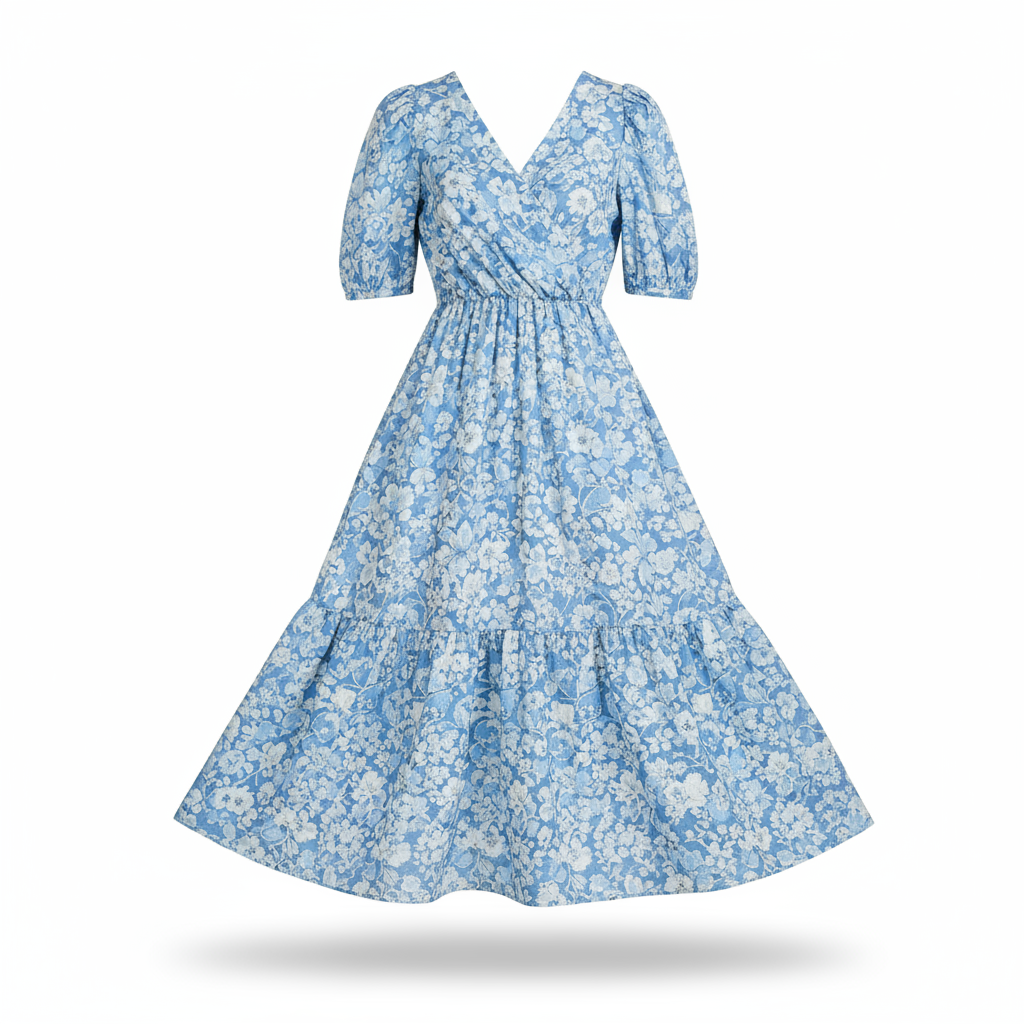
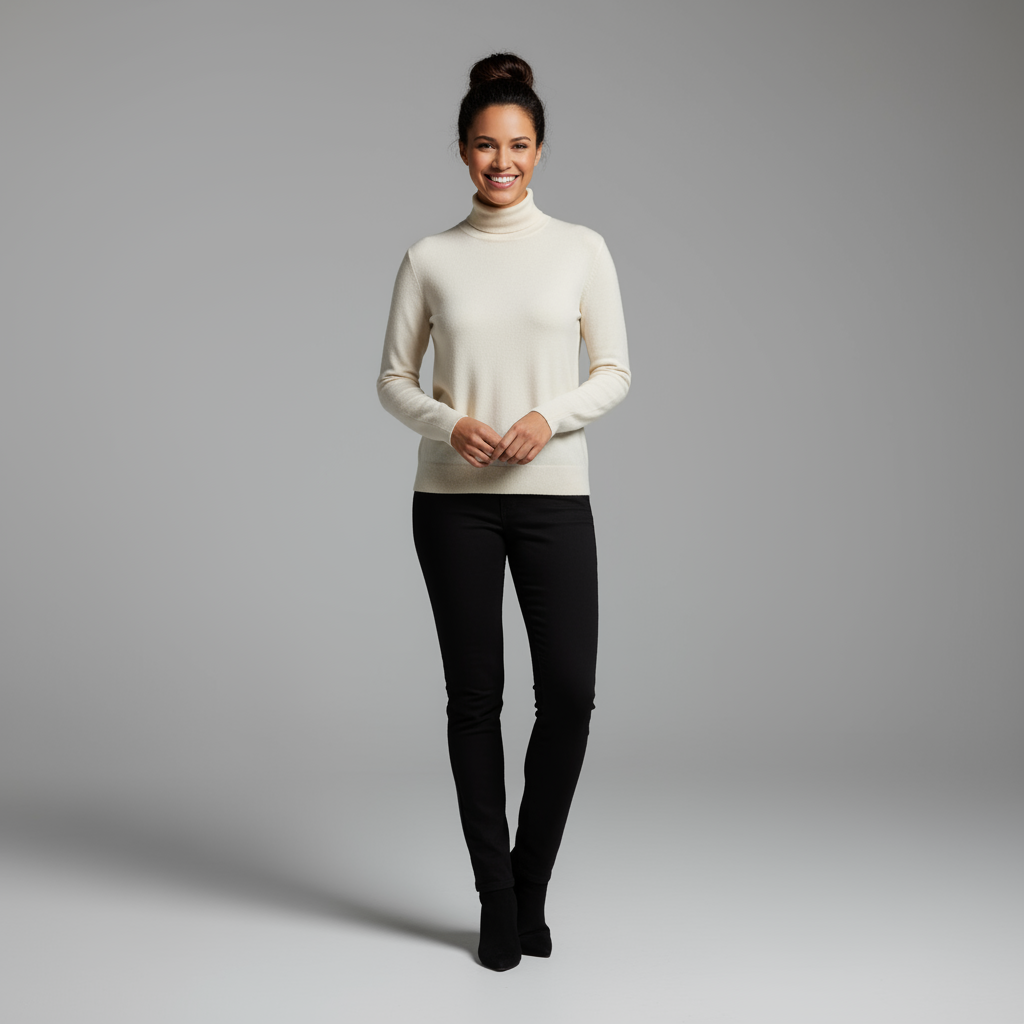
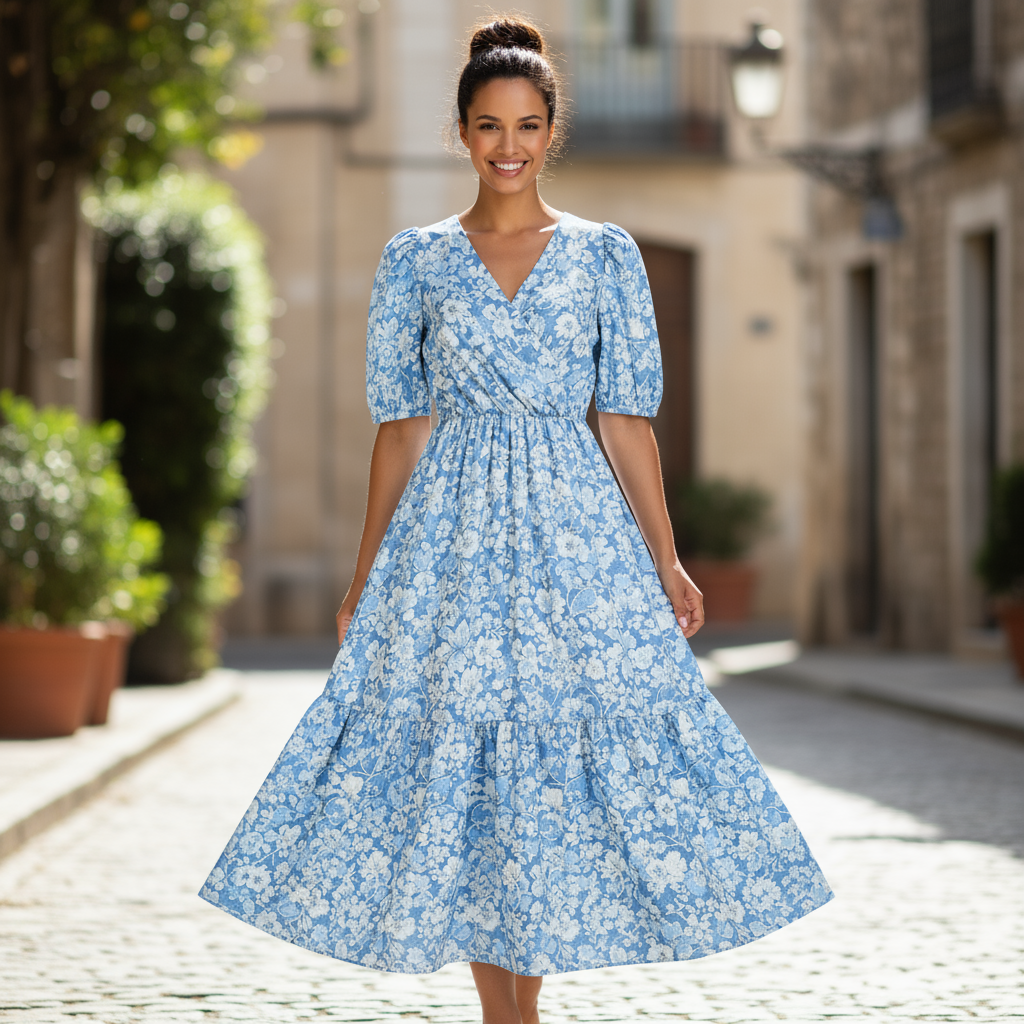
"Create a professional e-commerce fashion photo. Take the blue floral dress
from the first image and let the woman from the second image wear it.
Generate a realistic, full-body shot of the woman wearing the dress, with
the lighting and shadows adjusted to match the outdoor environment."
پایتون
from google import genai
from PIL import Image
import base64

client = genai.Client()

with open('/path/to/your/dress.png', 'rb') as f:
    dress_bytes = f.read()
with open('/path/to/your/model.png', 'rb') as f:
    model_bytes = f.read()
text_input = """Create a professional e-commerce fashion photo. Take the blue floral dress from the first image and let the woman from the second image wear it. Generate a realistic, full-body shot of the woman wearing the dress, with the lighting and shadows adjusted to match the outdoor environment."""

interaction = client.interactions.create(
    model="gemini-3.1-flash-image",
    input=[
        {
            "type": "image",
            "data": base64.b64encode(dress_bytes).decode('utf-8'),
            "mime_type": "image/png"
        },
        {
            "type": "image",
            "data": base64.b64encode(model_bytes).decode('utf-8'),
            "mime_type": "image/png"
        },
        {"type": "text", "text": text_input}
    ],
)

for step in interaction.steps:
    if step.type == "model_output":
        for content_block in step.content:
            if content_block.type == "text":
                print(content_block.text)
            elif content_block.type == "image":
                with open("fashion_ecommerce_shot.png", "wb") as f:
                    f.write(base64.b64decode(content_block.data))
جاوا اسکریپت
import { GoogleGenAI } from "@google/genai";
import * as fs from "node:fs";

async function main() {
  const ai = new GoogleGenAI({});

  const imagePath1 = "/path/to/your/dress.png";
  const imageData1 = fs.readFileSync(imagePath1);
  const base64Image1 = imageData1.toString("base64");
  const imagePath2 = "/path/to/your/model.png";
  const imageData2 = fs.readFileSync(imagePath2);
  const base64Image2 = imageData2.toString("base64");

  const input = [
    {
      type: "image",
      mime_type: "image/png",
      data: base64Image1
    },
    {
      type: "image",
      mime_type: "image/png",
      data: base64Image2
    },
    { type: "text", text: "Create a professional e-commerce fashion photo. Take the blue floral dress from the first image and let the woman from the second image wear it. Generate a realistic, full-body shot of the woman wearing the dress, with the lighting and shadows adjusted to match the outdoor environment." },
  ];

  const interaction = await ai.interactions.create({
    model: "gemini-3.1-flash-image",
    input: input,
  });
  for (const step of interaction.steps) {
    if (step.type === "model_output") {
      for (const contentBlock of step.content) {
        if (contentBlock.type === "text") {
          console.log(contentBlock.text);
        } else if (contentBlock.type === "image") {
          const buffer = Buffer.from(contentBlock.data, "base64");
          fs.writeFileSync("fashion_ecommerce_shot.png", buffer);
        }
      }
    }
  }
}

main();
استراحت
curl -s -X POST \
  "https://generativelanguage.googleapis.com/v1beta/interactions" \
    -H "x-goog-api-key: $GEMINI_API_KEY" \
    -H 'Content-Type: application/json' \
    -d "{
      \"model\": \"gemini-3.1-flash-image\",
      \"input\": [
            {\"type\": \"image\", \"mime_type\":\"image/png\", \"data\": \"<BASE64_IMAGE_DATA_1>\"},
            {\"type\": \"image\", \"mime_type\":\"image/png\", \"data\": \"<BASE64_IMAGE_DATA_2>\"},
            {\"type\": \"text\", \"text\": \"Create a professional e-commerce fashion photo. Take the blue floral dress from the first image and let the woman from the second image wear it. Generate a realistic, full-body shot of the woman wearing the dress, with the lighting and shadows adjusted to match the outdoor environment.\"}
      }]
    }"
ورودی ۱ | ورودی ۲ | خروجی |
 |  |  |
۵. حفظ جزئیات با دقت بالا
برای اطمینان از حفظ جزئیات مهم (مانند چهره یا لوگو) در طول ویرایش، آنها را با جزئیات کامل همراه با درخواست ویرایش خود شرح دهید.
الگو
Using the provided images, place [element from image 2] onto [element from
image 1]. Ensure that the features of [element from image 1] remain
completely unchanged. The added element should [description of how the
element should integrate].
سریع
"Take the first image of the woman with brown hair, blue eyes, and a neutral
expression. Add the logo from the second image onto her black t-shirt.
Ensure the woman's face and features remain completely unchanged. The logo
should look like it's naturally printed on the fabric, following the folds
of the shirt."
پایتون
from google import genai
from PIL import Image
import base64

client = genai.Client()

with open('/path/to/your/woman.png', 'rb') as f:
    woman_bytes = f.read()
with open('/path/to/your/logo.png', 'rb') as f:
    logo_bytes = f.read()
text_input = """Take the first image of the woman with brown hair, blue eyes, and a neutral expression. Add the logo from the second image onto her black t-shirt. Ensure the woman's face and features remain completely unchanged. The logo should look like it's naturally printed on the fabric, following the folds of the shirt."""

interaction = client.interactions.create(
    model="gemini-3.1-flash-image",
    input=[
      {"type": "image", "mime_type":"image/png", "data": base64.b64encode(woman_bytes).decode('utf-8')},
      {"type": "image", "mime_type":"image/png", "data": base64.b64encode(logo_bytes).decode('utf-8')},
      {"type": "text", "text": text_input}
    ],
)

for step in interaction.steps:
    if step.type == "model_output":
        for content_block in step.content:
            if content_block.type == "text":
                print(content_block.text)
            elif content_block.type == "image":
                with open("woman_with_logo.png", "wb") as f:
                    f.write(base64.b64decode(content_block.data))
جاوا اسکریپت
import { GoogleGenAI } from "@google/genai";
import * as fs from "node:fs";

async function main() {
  const ai = new GoogleGenAI({});

  const imagePath1 = "/path/to/your/woman.png";
  const imageData1 = fs.readFileSync(imagePath1);
  const base64Image1 = imageData1.toString("base64");
  const imagePath2 = "/path/to/your/logo.png";
  const imageData2 = fs.readFileSync(imagePath2);
  const base64Image2 = imageData2.toString("base64");

  const input = [
    {"type": "image", "mime_type":"image/png", "data": base64Image1},
    {"type": "image", "mime_type":"image/png", "data": base64Image2},
    {"type": "text", "text": "Take the first image of the woman with brown hair, blue eyes, and a neutral expression. Add the logo from the second image onto her black t-shirt. Ensure the woman's face and features remain completely unchanged. The logo should look like it's naturally printed on the fabric, following the folds of the shirt."},
  ];

  const interaction = await ai.interactions.create({
    model: "gemini-3.1-flash-image",
    input: input,
  });
  for (const step of interaction.steps) {
    if (step.type === "model_output") {
      for (const contentBlock of step.content) {
        if (contentBlock.type === "text") {
          console.log(contentBlock.text);
        } else if (contentBlock.type === "image") {
          const buffer = Buffer.from(contentBlock.data, "base64");
          fs.writeFileSync("woman_with_logo.png", buffer);
        }
      }
    }
  }
}

main();
استراحت
curl -s -X POST \
  "https://generativelanguage.googleapis.com/v1beta/interactions" \
    -H "x-goog-api-key: $GEMINI_API_KEY" \
    -H 'Content-Type: application/json' \
    -d "{
      \"model\": \"gemini-3.1-flash-image\",
      \"input\": [
        {\"type\": \"image\", \"mime_type\":\"image/png\", \"data\": \"<BASE64_IMAGE_DATA_1>\"},
        {\"type\": \"image\", \"mime_type\":\"image/png\", \"data\": \"<BASE64_IMAGE_DATA_2>\"},
        {\"type\": \"text\", \"text\": \"Take the first image of the woman with brown hair, blue eyes, and a neutral expression. Add the logo from the second image onto her black t-shirt. Ensure the woman's face and features remain completely unchanged. The logo should look like it's naturally printed on the fabric, following the folds of the shirt.\"}
      ]
    }"
ورودی ۱ | ورودی ۲ | خروجی |
 |  |  |
۶. چیزی را به زندگی بیاورید
یک طرح یا نقاشی اولیه را آپلود کنید و از مدل بخواهید آن را اصلاح کند تا به یک تصویر نهایی تبدیل شود.
الگو
Turn this rough [medium] sketch of a [subject] into a [style description]
photo. Keep the [specific features] from the sketch but add [new details/materials].
سریع
"Turn this rough pencil sketch of a futuristic car into a polished photo of the finished concept car in a showroom. Keep the sleek lines and low profile from the sketch but add metallic blue paint and neon rim lighting."
پایتون
from google import genai
from PIL import Image
import base64

client = genai.Client()

with open('/path/to/your/car_sketch.png', 'rb') as f:
    sketch_bytes = f.read()
text_input = """Turn this rough pencil sketch of a futuristic car into a polished photo of the finished concept car in a showroom. Keep the sleek lines and low profile from the sketch but add metallic blue paint and neon rim lighting."""

interaction = client.interactions.create(
    model="gemini-3.1-flash-image",
    input=[
      {"type": "image", "mime_type":"image/png", "data": base64.b64encode(sketch_bytes).decode('utf-8')},
      {"type": "text", "text": text_input}
    ],
)

for step in interaction.steps:
    if step.type == "model_output":
        for content_block in step.content:
            if content_block.type == "text":
                print(content_block.text)
            elif content_block.type == "image":
                with open("car_photo.png", "wb") as f:
                    f.write(base64.b64decode(content_block.data))
جاوا اسکریپت
import { GoogleGenAI } from "@google/genai";
import * as fs from "node:fs";

async function main() {
  const ai = new GoogleGenAI({});

  const imagePath = "/path/to/your/car_sketch.png";
  const imageData = fs.readFileSync(imagePath);
  const base64Image = imageData.toString("base64");

  const input = [
    {"type": "image", "mime_type":"image/png", "data": base64Image},
    {"type": "text", "text": "Turn this rough pencil sketch of a futuristic car into a polished photo of the finished concept car in a showroom. Keep the sleek lines and low profile from the sketch but add metallic blue paint and neon rim lighting."},
  ];

  const interaction = await ai.interactions.create({
    model: "gemini-3.1-flash-image",
    input: input,
  });
  for (const step of interaction.steps) {
    if (step.type === "model_output") {
      for (const contentBlock of step.content) {
        if (contentBlock.type === "text") {
          console.log(contentBlock.text);
        } else if (contentBlock.type === "image") {
          const buffer = Buffer.from(contentBlock.data, "base64");
          fs.writeFileSync("car_photo.png", buffer);
        }
      }
    }
  }
}

main();
استراحت
curl -s -X POST \
  "https://generativelanguage.googleapis.com/v1beta/interactions" \
    -H "x-goog-api-key: $GEMINI_API_KEY" \
    -H 'Content-Type: application/json' \
    -d "{
      \"model\": \"gemini-3.1-flash-image\",
      \"input\": [
        {\"type\": \"image\", \"mime_type\":\"image/png\", \"data\": \"<BASE64_IMAGE_DATA>\"},
        {\"type\": \"text\", \"text\": \"Turn this rough pencil sketch of a futuristic car into a polished photo of the finished concept car in a showroom. Keep the sleek lines and low profile from the sketch but add metallic blue paint and neon rim lighting.\"}
      ]
    }"
ورودی | خروجی |
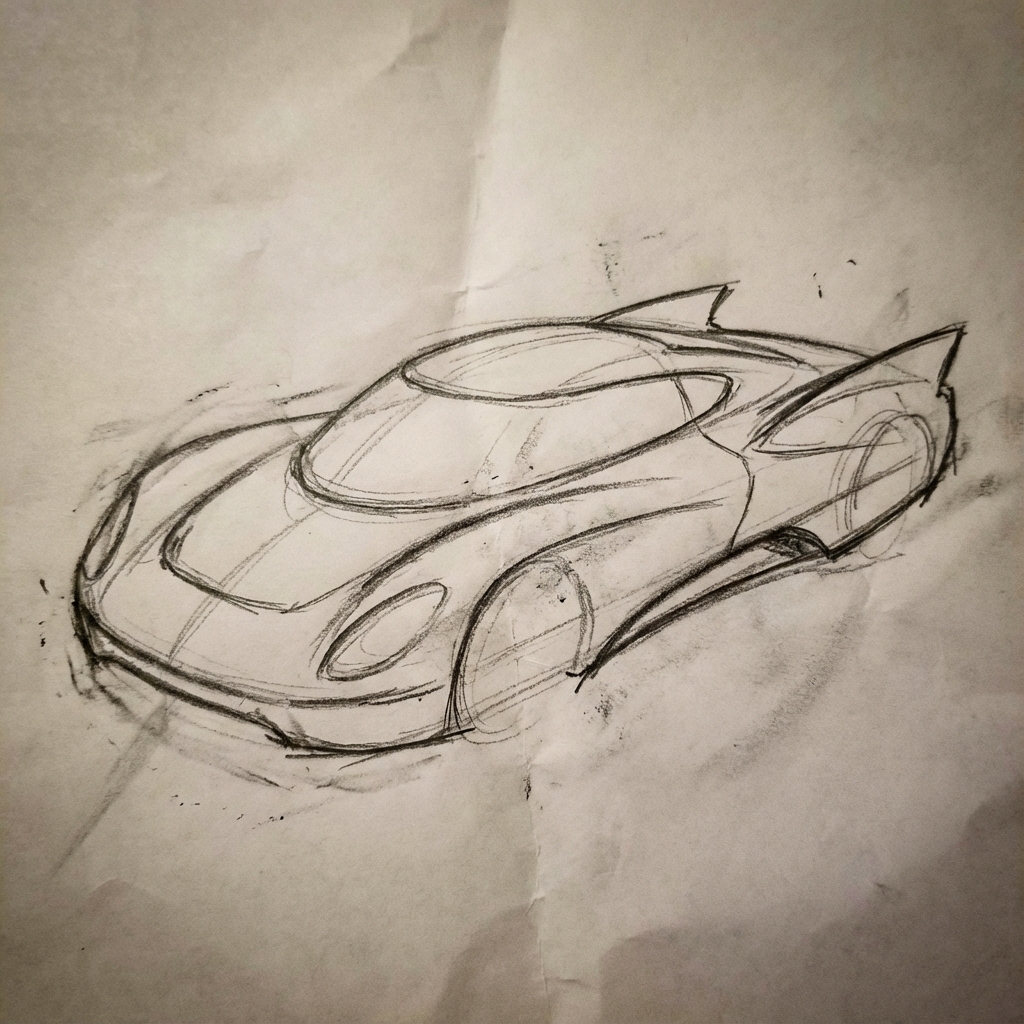 | 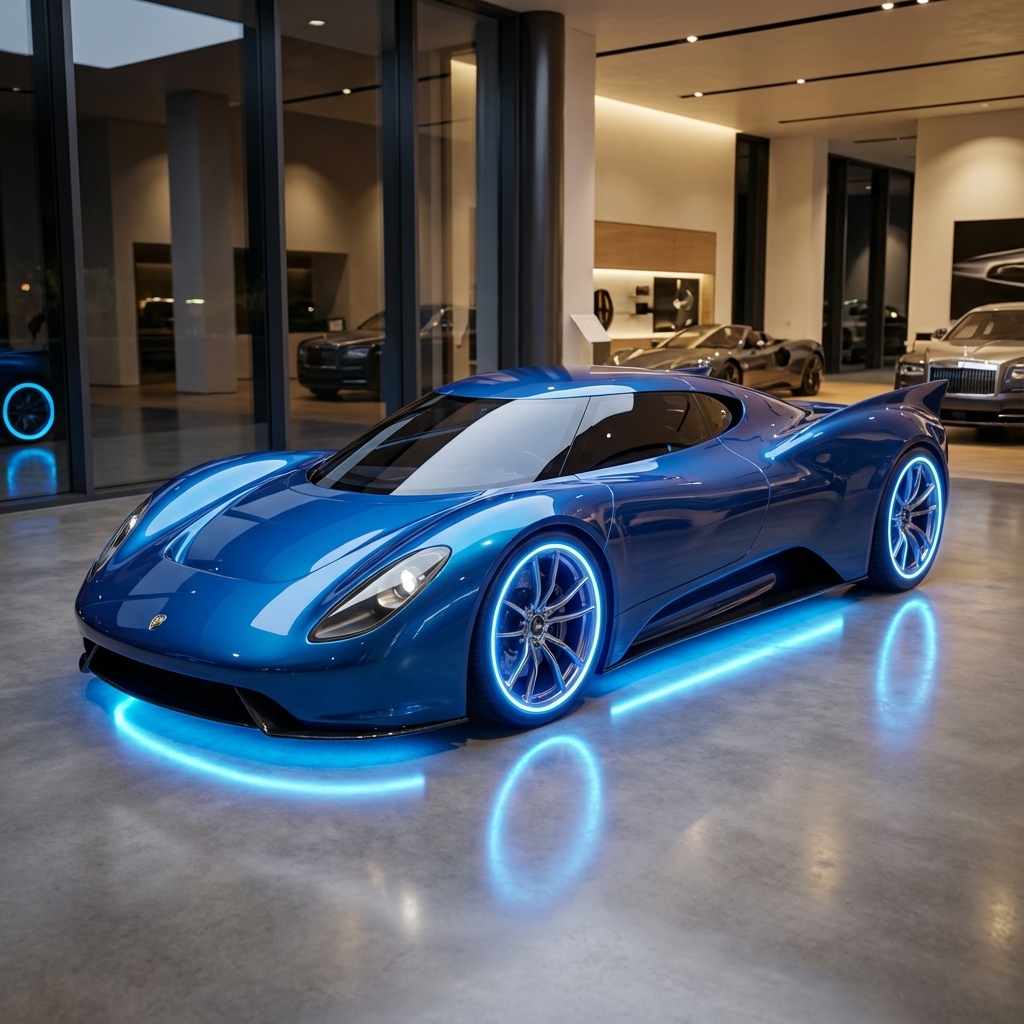 |
۷. ثبات شخصیت: نمای ۳۶۰ درجه
شما میتوانید با درخواست مکرر برای زوایای مختلف، نماهای ۳۶۰ درجه از یک شخصیت ایجاد کنید. برای بهترین نتیجه، تصاویر تولید شده قبلی را در درخواستهای بعدی بگنجانید تا ثبات حفظ شود. برای حالتهای پیچیده، یک تصویر مرجع از حالت انتخاب شده را نیز اضافه کنید.
الگو
A studio portrait of [person] against [background], [looking forward/in profile looking right/etc.]
سریع
A studio portrait of this man against white, in profile looking right
پایتون
from google import genai
from PIL import Image
import base64

client = genai.Client()

with open('/path/to/your/man_in_white_glasses.jpg', 'rb') as f:
    image_bytes = f.read()
text_input = """A studio portrait of this man against white, in profile looking right"""

interaction = client.interactions.create(
    model="gemini-3.1-flash-image",
    input={
      {"type": "text", "text": text_input},
      {"type": "image", "mime_type":"image/png", "data": base64.b64encode(image_bytes).decode('utf-8')}
    },
)

for step in interaction.steps:
    if step.type == "model_output":
        for content_block in step.content:
            if content_block.type == "text":
                print(content_block.text)
            elif content_block.type == "image":
                with open("man_right_profile.png", "wb") as f:
                    f.write(base64.b64decode(content_block.data))
ورودی | خروجی ۱ | خروجی ۲ |
| 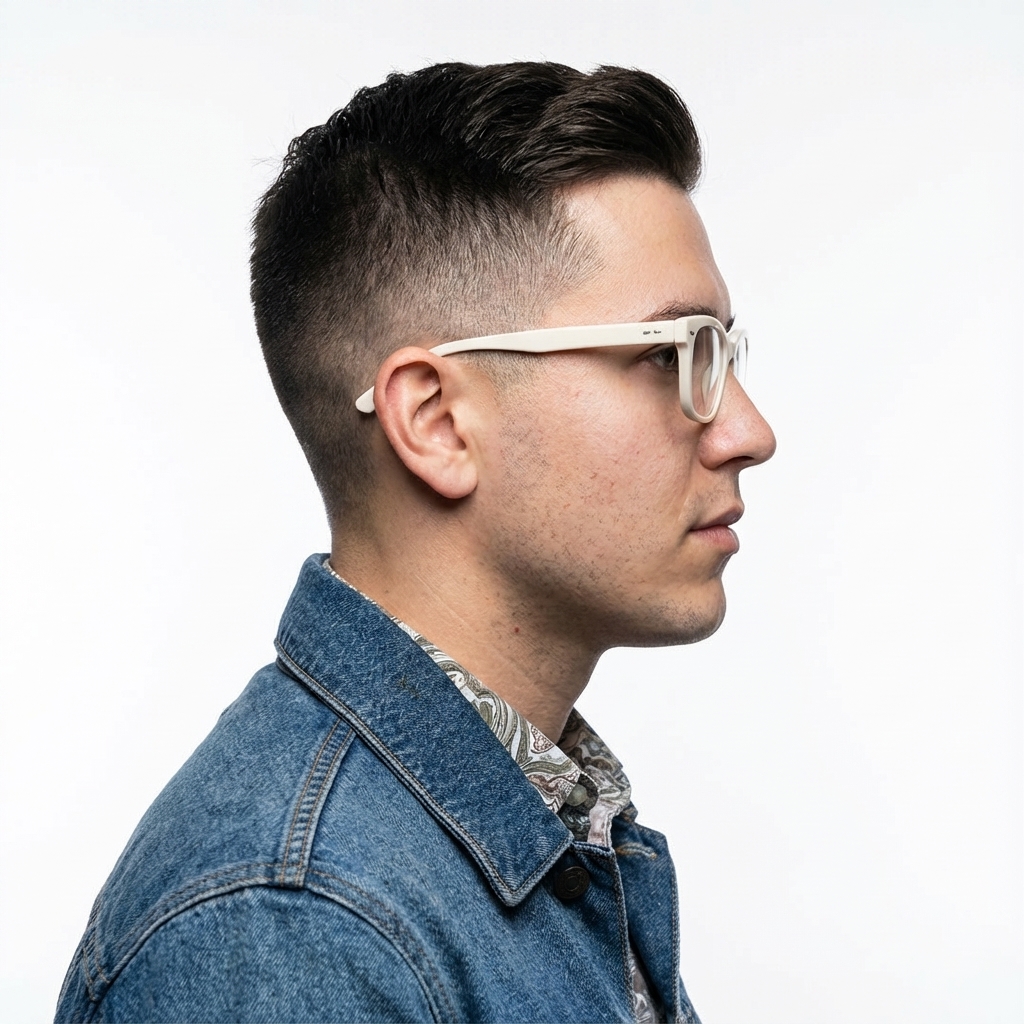 |  |
بهترین شیوهها
برای ارتقای نتایج خود از خوب به عالی، این استراتژیهای حرفهای را در جریان کاری خود بگنجانید.
- بسیار خاص باشید: هرچه جزئیات بیشتری ارائه دهید، کنترل بیشتری خواهید داشت. به جای «زره فانتزی»، آن را اینگونه توصیف کنید: «زره صفحهای الفی مزین، با طرحهای برگ نقرهای، با یقه بلند و پالدرونهایی به شکل بالهای شاهین».
- ارائه زمینه و هدف: هدف تصویر را توضیح دهید. درک مدل از زمینه بر خروجی نهایی تأثیر خواهد گذاشت. برای مثال، «ایجاد یک لوگو برای یک برند مراقبت از پوست لوکس و مینیمالیستی» نتایج بهتری نسبت به صرفاً «ایجاد یک لوگو» خواهد داشت.
- تکرار و اصلاح: انتظار نداشته باشید در اولین تلاش، تصویر بینقصی به دست آورید. از ماهیت محاورهای مدل برای ایجاد تغییرات کوچک استفاده کنید. در ادامه، از جملاتی مانند «عالی است، اما میتوانید نور را کمی گرمتر کنید؟» یا «همه چیز را مثل قبل نگه دارید، اما حالت چهره شخصیت را تغییر دهید تا جدیتر شود» استفاده کنید.
- از دستورالعملهای گام به گام استفاده کنید: برای صحنههای پیچیده با عناصر زیاد، طرح خود را به مراحل مختلف تقسیم کنید. «ابتدا، پسزمینهای از یک جنگل آرام و مهآلود در سپیدهدم ایجاد کنید. سپس، در پیشزمینه، یک محراب سنگی باستانی پوشیده از خزه اضافه کنید. در نهایت، یک شمشیر درخشان و واحد را روی محراب قرار دهید.»
- از «تشویقهای منفی معنایی» استفاده کنید: به جای گفتن «ماشین ممنوع»، صحنه مورد نظر را به صورت مثبت توصیف کنید: «خیابان خالی و خلوت بدون هیچ نشانهای از ترافیک».
- کنترل دوربین: از زبان عکاسی و سینمایی برای کنترل ترکیببندی استفاده کنید. اصطلاحاتی مانند
wide-angle shot،macro shot،low-angle perspective.
محدودیتها
- برای بهترین عملکرد، از زبانهای زیر استفاده کنید: EN، ar-EG، de-DE، es-MX، fr-FR، hi-IN، id-ID، it-IT، ja-JP، ko-KR، pt-BR، ru-RU، ua-UA، vi-VN، zh-CN.
- تولید تصویر از ورودیهای صدا پشتیبانی نمیکند. ورودیهای ویدیو فقط برای Gemini 3.1 Flash Image پشتیبانی میشوند.
- این مدل همیشه تعداد دقیق خروجیهای تصویری که کاربر صریحاً درخواست میکند را دنبال نمیکند.
-
gemini-2.5-flash-imageبا حداکثر ۳ تصویر به عنوان ورودی بهترین عملکرد را دارد، در حالی کهgemini-3-pro-imageاز ۵ تصویر با دقت بالا و در مجموع تا ۱۴ تصویر پشتیبانی میکند.gemini-3.1-flash-imageاز شباهت کاراکتری تا ۴ کاراکتر و دقت تا ۱۰ شیء در یک گردش کار واحد پشتیبانی میکند. - هنگام تولید متن برای یک تصویر، اگر ابتدا متن را تولید کنید و سپس تصویری با متن درخواست کنید، Gemini بهترین عملکرد را دارد.
-
gemini-3.1-flash-imageاتصال زمینی با جستجوی گوگل در حال حاضر از تصاویر واقعی افراد از جستجوی وب پشتیبانی نمیکند. - تمام تصاویر تولید شده شامل واترمارک SynthID هستند.
پیکربندیهای اختیاری
شما میتوانید به صورت اختیاری فرمت خروجی، نسبت ابعاد و اندازه تصویر را با استفاده از پارامتر response_format پیکربندی کنید.
فرمت خروجی
این مدل به طور پیشفرض پاسخها را هم به صورت متنی و هم تصویری برمیگرداند. شما میتوانید با مشخص کردن فرمت تصویر در پارامتر response_format ، پاسخ را طوری پیکربندی کنید که فقط تصاویر تولید شده را برگرداند (متن محاورهای را حذف کند).
برای درخواست چندین روش (مثلاً متن و تصویر تولید شده)، به جای آن، آرایهای از ورودیهای قالب را به response_format ارسال کنید.
پایتون
interaction = client.interactions.create(
    model="gemini-3.1-flash-image",
    input="Write a short poem about a starry night and generate an image of it.",
    response_format=[
        {"type": "text"},
        {"type": "image"},
    ],
)
جاوا اسکریپت
const interaction = await ai.interactions.create({
  model: "gemini-3.1-flash-image",
  input: "Write a short poem about a starry night and generate an image of it.",
  response_format: [
    { type: "text" },
    { type: "image" },
  ],
});
استراحت
curl -s -X POST \
  "https://generativelanguage.googleapis.com/v1beta/interactions" \
  -H "x-goog-api-key: $GEMINI_API_KEY" \
  -H 'Content-Type: application/json' \
  -d '{
    "model": "gemini-3.1-flash-image",
    "input": "Write a short poem about a starry night and generate an image of it.",
    "response_format": [
      { "type": "text" },
      { "type": "image" }
    ]
  }'
نسبت ابعاد و اندازه تصویر
به طور پیشفرض، مدل اندازه تصویر خروجی را با اندازه تصویر ورودی شما مطابقت میدهد، یا در غیر این صورت مربعهای ۱:۱ تولید میکند. میتوانید نسبت ابعاد و اندازه تصویر خروجی را با استفاده از فیلدهای aspect_ratio و image_size در response_format ، زمانی که type روی "image" تنظیم شده است، کنترل کنید.
پایتون
interaction = client.interactions.create(
    model="gemini-3.1-flash-image",
    input=prompt,
    response_format={
        "type": "image",
        "aspect_ratio": "16:9",
        "image_size": "2K",
    },
)
جاوا اسکریپت
const interaction = await ai.interactions.create({
    model: "gemini-3.1-flash-image",
    input: prompt,
    response_format: {
      type: "image",
      aspect_ratio: "16:9",
      image_size: "2K",
    },
  });
استراحت
curl -s -X POST \
  "https://generativelanguage.googleapis.com/v1beta/interactions" \
  -H "x-goog-api-key: $GEMINI_API_KEY" \
  -H 'Content-Type: application/json' \
  -d '{
    "model": "gemini-3.1-flash-image",
    "input": "Create a picture of a nano banana dish in a fancy restaurant with a Gemini theme",
    "response_format": {
      "type": "image",
      "aspect_ratio": "16:9",
      "image_size": "2K"
    }
  }'
نسبتهای مختلف موجود و اندازه تصویر تولید شده در جداول زیر فهرست شدهاند:
۳.۱ تصویر فلش
| نسبت ابعاد | وضوح ۵۱۲ پیکسل | ۰.۵ هزار توکن | وضوح ۱K | ۱ هزار توکن | وضوح تصویر 2K | ۲ هزار توکن | وضوح تصویر 4K | ۴۰۰۰ توکن |
|---|---|---|---|---|---|---|---|---|
| ۱:۱ | ۵۱۲x۵۱۲ | ۷۴۷ عدد | ۱۰۲۴x۱۰۲۴ | ۱۱۲۰ | 2048x2048 | ۱۱۲۰ | ۴۰۹۶x۴۰۹۶ | ۲۰۰۰ |
| ۱:۴ | ۲۵۶x۱۰۲۴ | ۷۴۷ عدد | ۵۱۲x۲۰۴۸ | ۱۱۲۰ | ۱۰۲۴x۴۰۹۶ | ۱۱۲۰ | 2048x8192 | ۲۰۰۰ |
| ۱:۸ | ۱۹۲x۱۵۳۶ | ۷۴۷ عدد | ۳۸۴x۳۰۷۲ | ۱۱۲۰ | ۷۶۸x۶۱۴۴ | ۱۱۲۰ | ۱۵۳۶x۱۲۲۸۸ | ۲۰۰۰ |
| ۲:۳ | ۴۲۴x۶۳۲ | ۷۴۷ عدد | ۸۴۸x۱۲۶۴ | ۱۱۲۰ | ۱۶۹۶x۲۵۲۸ | ۱۱۲۰ | ۳۳۹۲x۵۰۵۶ | ۲۰۰۰ |
| ۳:۲ | 632x424 | ۷۴۷ عدد | ۱۲۶۴x۸۴۸ | ۱۱۲۰ | ۲۵۲۸x۱۶۹۶ | ۱۱۲۰ | ۵۰۵۶x۳۳۹۲ | ۲۰۰۰ |
| ۳:۴ | ۴۴۸x۶۰۰ | ۷۴۷ عدد | ۸۹۶x۱۲۰۰ | ۱۱۲۰ | ۱۷۹۲x۲۴۰۰ | ۱۱۲۰ | ۳۵۸۴x۴۸۰۰ | ۲۰۰۰ |
| ۴:۱ | ۱۰۲۴x۲۵۶ | ۷۴۷ عدد | 2048x512 | ۱۱۲۰ | ۴۰۹۶x۱۰۲۴ | ۱۱۲۰ | ۸۱۹۲x۲۰۴۸ | ۲۰۰۰ |
| ۴:۳ | ۶۰۰x۴۴۸ | ۷۴۷ عدد | ۱۲۰۰x۸۹۶ | ۱۱۲۰ | ۲۴۰۰x۱۷۹۲ | ۱۱۲۰ | ۴۸۰۰x۳۵۸۴ | ۲۰۰۰ |
| ۴:۵ | ۴۶۴x۵۷۶ | ۷۴۷ عدد | ۹۲۸x۱۱۵۲ | ۱۱۲۰ | ۱۸۵۶x۲۳۰۴ | ۱۱۲۰ | ۳۷۱۲x۴۶۰۸ | ۲۰۰۰ |
| ۵:۴ | ۵۷۶x۴۶۴ | ۷۴۷ عدد | ۱۱۵۲x۹۲۸ | ۱۱۲۰ | ۲۳۰۴x۱۸۵۶ | ۱۱۲۰ | ۴۶۰۸x۳۷۱۲ | ۲۰۰۰ |
| ۸:۱ | ۱۵۳۶x۱۹۲ | ۷۴۷ عدد | ۳۰۷۲x۳۸۴ | ۱۱۲۰ | ۶۱۴۴x۷۶۸ | ۱۱۲۰ | ۱۲۲۸۸x۱۵۳۶ | ۲۰۰۰ |
| ۹:۱۶ | ۳۸۴x۶۸۸ | ۷۴۷ عدد | ۷۶۸x۱۳۷۶ | ۱۱۲۰ | ۱۵۳۶x۲۷۵۲ | ۱۱۲۰ | 3072x5504 | ۲۰۰۰ |
| ۱۶:۹ | ۶۸۸x۳۸۴ | ۷۴۷ عدد | ۱۳۷۶x۷۶۸ | ۱۱۲۰ | ۲۷۵۲x۱۵۳۶ | ۱۱۲۰ | ۵۵۰۴x۳۰۷۲ | ۲۰۰۰ |
| ۲۱:۹ | ۷۹۲x۱۶۸ | ۷۴۷ عدد | ۱۵۸۴x۶۷۲ | ۱۱۲۰ | ۳۱۶۸x۱۳۴۴ | ۱۱۲۰ | ۶۳۳۶x۲۶۸۸ | ۲۰۰۰ |
۳ تصویر حرفهای
| نسبت ابعاد | وضوح ۱K | ۱ هزار توکن | وضوح تصویر 2K | ۲ هزار توکن | وضوح تصویر 4K | ۴۰۰۰ توکن |
|---|---|---|---|---|---|---|
| ۱:۱ | ۱۰۲۴x۱۰۲۴ | ۱۱۲۰ | 2048x2048 | ۱۱۲۰ | ۴۰۹۶x۴۰۹۶ | ۲۰۰۰ |
| ۲:۳ | ۸۴۸x۱۲۶۴ | ۱۱۲۰ | ۱۶۹۶x۲۵۲۸ | ۱۱۲۰ | ۳۳۹۲x۵۰۵۶ | ۲۰۰۰ |
| ۳:۲ | ۱۲۶۴x۸۴۸ | ۱۱۲۰ | ۲۵۲۸x۱۶۹۶ | ۱۱۲۰ | ۵۰۵۶x۳۳۹۲ | ۲۰۰۰ |
| ۳:۴ | ۸۹۶x۱۲۰۰ | ۱۱۲۰ | ۱۷۹۲x۲۴۰۰ | ۱۱۲۰ | ۳۵۸۴x۴۸۰۰ | ۲۰۰۰ |
| ۴:۳ | ۱۲۰۰x۸۹۶ | ۱۱۲۰ | ۲۴۰۰x۱۷۹۲ | ۱۱۲۰ | ۴۸۰۰x۳۵۸۴ | ۲۰۰۰ |
| ۴:۵ | ۹۲۸x۱۱۵۲ | ۱۱۲۰ | ۱۸۵۶x۲۳۰۴ | ۱۱۲۰ | ۳۷۱۲x۴۶۰۸ | ۲۰۰۰ |
| ۵:۴ | ۱۱۵۲x۹۲۸ | ۱۱۲۰ | ۲۳۰۴x۱۸۵۶ | ۱۱۲۰ | ۴۶۰۸x۳۷۱۲ | ۲۰۰۰ |
| ۹:۱۶ | ۷۶۸x۱۳۷۶ | ۱۱۲۰ | ۱۵۳۶x۲۷۵۲ | ۱۱۲۰ | 3072x5504 | ۲۰۰۰ |
| ۱۶:۹ | ۱۳۷۶x۷۶۸ | ۱۱۲۰ | ۲۷۵۲x۱۵۳۶ | ۱۱۲۰ | ۵۵۰۴x۳۰۷۲ | ۲۰۰۰ |
| ۲۱:۹ | ۱۵۸۴x۶۷۲ | ۱۱۲۰ | ۳۱۶۸x۱۳۴۴ | ۱۱۲۰ | ۶۳۳۶x۲۶۸۸ | ۲۰۰۰ |
تصویر فلش Gemini 2.5
| نسبت ابعاد | وضوح تصویر | توکنها |
|---|---|---|
| ۱:۱ | ۱۰۲۴x۱۰۲۴ | ۱۲۹۰ |
| ۲:۳ | ۸۳۲x۱۲۴۸ | ۱۲۹۰ |
| ۳:۲ | ۱۲۴۸x۸۳۲ | ۱۲۹۰ |
| ۳:۴ | ۸۶۴x۱۱۸۴ | ۱۲۹۰ |
| ۴:۳ | ۱۱۸۴x۸۶۴ | ۱۲۹۰ |
| ۴:۵ | ۸۹۶x۱۱۵۲ | ۱۲۹۰ |
| ۵:۴ | ۱۱۵۲x۸۹۶ | ۱۲۹۰ |
| ۹:۱۶ | ۷۶۸x۱۳۴۴ | ۱۲۹۰ |
| ۱۶:۹ | ۱۳۴۴x۷۶۸ | ۱۲۹۰ |
| ۲۱:۹ | ۱۵۳۶x۶۷۲ | ۱۲۹۰ |
انتخاب مدل
مدلی را انتخاب کنید که برای مورد استفاده خاص شما مناسبترین باشد.
Gemini 3.1 Flash Image (Nano Banana 2) باید مدل تولید تصویر مورد علاقه شما باشد، زیرا از نظر عملکرد و هوش، بهترین گزینه برای تعادل هزینه و تأخیر است. برای جزئیات بیشتر، صفحه قیمتگذاری و قابلیتهای مدل را بررسی کنید.
Gemini 3 Pro Image (Nano Banana Pro) برای تولید حرفهای داراییها و دستورالعملهای پیچیده طراحی شده است. این مدل با استفاده از جستجوی گوگل، یک فرآیند پیشفرض "فکر کردن" که ترکیببندی را قبل از تولید اصلاح میکند، دارای زمینهسازی در دنیای واقعی است و میتواند تصاویری با وضوح حداکثر 4K تولید کند. برای جزئیات بیشتر، صفحه قیمتگذاری و قابلیتهای مدل را بررسی کنید.
Gemini 2.5 Flash Image (Nano Banana) برای سرعت و کارایی طراحی شده است. این مدل برای کارهای با حجم بالا و تأخیر کم بهینه شده است و تصاویر را با وضوح 1024 پیکسل تولید میکند. برای جزئیات بیشتر، صفحه قیمتگذاری و قابلیتهای مدل را بررسی کنید.
چه زمانی از ایمجین استفاده کنیم
علاوه بر استفاده از قابلیتهای تولید تصویر داخلی Gemini، میتوانید از طریق رابط برنامهنویسی کاربردی (API) Gemini به Imagen ، مدل تخصصی تولید تصویر ما، نیز دسترسی داشته باشید. برای مهاجرت قبل از تاریخ خاموشی برنامهریزی کنید.
قدم بعدی چیست؟
- برای یادگیری نحوه تولید ویدیو با Gemini API ، راهنمای Veo را بررسی کنید.
- برای کسب اطلاعات بیشتر در مورد مدلهای جمینی، به مدلهای جمینی مراجعه کنید.