

Gjenerimi i imazhit Nano Banana
- Ose ndërtoni vetë nga udhëzimet:






Gjeneruar nga Nano Banana 2 Pyetje: "Një foto e një kopertine me shkëlqim reviste, kopertina minimale blu ka fjalët e mëdha të trasha Nano Banana. Teksti është me shkronja serif dhe mbush pamjen. Asnjë tekst tjetër. Përpara tekstit ka një portret të një personi me një fustan elegant dhe minimalist. Ajo mban me shaka numrin 2, i cili është pika qendrore."
Vendos numrin e botimit dhe datën "Shkurt 2026" në cep së bashku me një barkod. Revista është në një raft pranë një muri të suvatuar me portokalli, brenda një dyqani firmash.Gjeneruar nga Nano Banana Pro Nxitje: "Paraqitni një skenë të qartë, 45° nga lart poshtë, vizatimore 3D miniaturë izometrike të Londrës, duke paraqitur monumentet dhe elementët e saj arkitektonikë më ikonikë. Përdorni tekstura të buta dhe të rafinuara me materiale realiste PBR dhe ndriçim dhe hije të buta dhe të gjalla. Integroni kushtet aktuale të motit direkt në mjedisin e qytetit për të krijuar një atmosferë atmosferike gjithëpërfshirëse. Përdorni një kompozim të pastër dhe minimalist me një sfond të butë me ngjyra të forta. Në qendër të sipërme, vendosni titullin "Londër" me tekst të madh të trashë, një ikonë të spikatur moti poshtë tij, pastaj datën (tekst i vogël) dhe temperaturën (tekst mesatar). I gjithë teksti duhet të jetë i qendërzuar me hapësira të qëndrueshme dhe mund të mbivendoset lehtë me majat e ndërtesave."Gjeneruar nga Nano Banana 2 Njoftim: "Përdorni kërkimin e imazheve për të gjetur imazhe të sakta të një zogu të shkëlqyer ketzal. Krijoni një sfond të bukur 3:2 të këtij zogu, me një gradient natyral nga lart poshtë dhe kompozim minimal."
Gjeneruar nga Nano Banana Pro Nxitje: "Vendoseni këtë logo në një reklamë luksoze për një parfum me aromë bananeje. Logoja është integruar në mënyrë të përkryer në shishe."Gjeneruar nga Nano Banana Pro Njoftim: "Një foto e një skene të përditshme në një kafene të mbushur me njerëz që shërben mëngjes. Në plan të parë është një burrë anime me flokë blu, njëri prej personave është një skicues me laps, një tjetër është një person që punon me argjilë"Gjeneruar nga Nano Banana Pro Njoftim: "Përdorni kërkimin për të gjetur se si është pritur lançimi i Gemini 3 Flash. Përdorni këtë informacion për të shkruar një artikull të shkurtër rreth tij (me tituj). Ktheni një foto të artikullit ashtu siç u shfaq në një revistë me shkëlqim të fokusuar në dizajn. Është një foto e një faqeje të vetme të palosur, që tregon artikullin rreth Gemini 3 Flash. Një foto kryesore. Titulli është me serif."Gjeneruar nga Nano Banana Pro Njoftim: "Një ikonë që përfaqëson një qen të lezetshëm. Sfondi është i bardhë. Krijoni ikonat në një stil 3D shumëngjyrësh dhe të prekshëm. Pa tekst."Gjeneruar nga Nano Banana 2 Nxitje: "Bëni një foto që është në mënyrë perfekte izometrike. Nuk është një miniaturë, është një foto e kapur që rastësisht është në mënyrë perfekte izometrike. Është një foto e një kopshti të bukur modern. Ka një pishinë të madhe në formë 2 dhe fjalët: Nano Banana 2."
Nano Banana është emri për aftësitë e gjenerimit të imazheve native të Gemini. Gemini mund të gjenerojë dhe përpunojë imazhe në mënyrë bisedore me tekst, imazhe ose një kombinim të të dyjave. Kjo ju lejon të krijoni, modifikoni dhe përsërisni pamjet me një kontroll të paparë.
Nano Banana i referohet dy modeleve të dallueshme të disponueshme në Gemini API:
- Nano Banana 2 : Modeli Gemini 3.1 Flash Image (
gemini-3.1-flash-image). Ky model shërben si homologu me efikasitet të lartë i Gemini 3 Pro Image, i optimizuar për raste përdorimi nga zhvilluesit me shpejtësi dhe volum të lartë. - Nano Banana Pro : Modeli i Imazhit Gemini 3 Pro (
gemini-3-pro-image). Ky model është projektuar për prodhimin profesional të aseteve, duke përdorur arsyetim të avancuar ("Të Menduarit") për të ndjekur udhëzime komplekse dhe për të paraqitur tekst me besnikëri të lartë. - Nano Banana : Modeli Gemini 2.5 Flash Image (
gemini-2.5-flash-image). Ky model është projektuar për shpejtësi dhe efikasitet, i optimizuar për detyra me volum të lartë dhe me vonesë të ulët.
Të gjitha imazhet e gjeneruara përfshijnë një filigran SynthID .
Gjenerimi i imazhit (tekst-në-imazh)
Python
from google import genai
from PIL import Image
import base64

client = genai.Client()

interaction = client.interactions.create(
    model="gemini-3.1-flash-image",
    input="Create a picture of a nano banana dish in a fancy restaurant with a Gemini theme",
)

with open("generated_image.png", "wb") as f:

    f.write(base64.b64decode(interaction.output_image.data))
JavaScript
import { GoogleGenAI } from "@google/genai";
import * as fs from "node:fs";

async function main() {

  const ai = new GoogleGenAI({});

  const prompt =
    "Create a picture of a nano banana dish in a fancy restaurant with a Gemini theme";

  const interaction = await ai.interactions.create({
    model: "gemini-3.1-flash-image",
    input: prompt,
  });
  const generatedImage = interaction.output_image;
  if (generatedImage) {
    const buffer = Buffer.from(generatedImage.data, "base64");
    fs.writeFileSync("gemini-native-image.png", buffer);
    console.log("Image saved as gemini-native-image.png");
  }
}

main();
PUSHTIM
curl -s -X POST \
  "https://generativelanguage.googleapis.com/v1beta/interactions" \
  -H "x-goog-api-key: $GEMINI_API_KEY" \
  -H "Content-Type: application/json" \
  -d '{
    "model": "gemini-3.1-flash-image",
    "input": [
      {"type": "text", "text": "Create a picture of a nano banana dish in a fancy restaurant with a Gemini theme"}
    ]
  }'
Mund të merrni të dhënat e gjeneruara të imazhit duke përdorur vetinë interaction.output_image , e cila kthen bllokun e fundit të gjeneruar të imazhit. Për detaje mbi vetitë e komoditetit, shihni përmbledhjen e Ndërveprimeve .
Redaktimi i imazhit (tekst dhe imazh në imazh)
Kujtesë : Sigurohuni që keni të drejtat e nevojshme për çdo imazh që ngarkoni. Mos gjeneroni përmbajtje që shkel të drejtat e të tjerëve, duke përfshirë video ose imazhe që mashtrojnë, ngacmojnë ose dëmtojnë. Përdorimi juaj i këtij shërbimi gjenerues të IA-së i nënshtrohet Politikës sonë të Përdorimit të Ndaluar .
Jepni një imazh dhe përdorni udhëzime tekstuale për të shtuar, hequr ose modifikuar elementë, për të ndryshuar stilin ose për të rregulluar gradimin e ngjyrave.
Shembulli i mëposhtëm demonstron ngarkimin e imazheve të koduara base64 . Për imazhe të shumëfishta, ngarkesa më të mëdha dhe lloje MIME të mbështetura, kontrolloni faqen Kuptimi i imazheve .
Python
from google import genai
from PIL import Image
import base64

client = genai.Client()

with open("/path/to/cat_image.png", "rb") as f:
    image_bytes = f.read()

interaction = client.interactions.create(
    model="gemini-3.1-flash-image",
    input=[
        {
          "type": "text",
          "text": "Create a picture of a nano banana dish in a fancy restaurant with a Gemini theme"
        },
        {
            "type": "image",
            "data": base64.b64encode(image_bytes).decode('utf-8'),
            "mime_type": "image/png"
        }
    ],
)

with open("generated_image.png", "wb") as f:

    f.write(base64.b64decode(interaction.output_image.data))
JavaScript
import { GoogleGenAI } from "@google/genai";
import * as fs from "node:fs";

async function main() {

  const ai = new GoogleGenAI({});

  const imagePath = "path/to/cat_image.png";
  const imageData = fs.readFileSync(imagePath);
  const base64Image = imageData.toString("base64");

  const prompt = [
    { type: "text", text: "Create a picture of my cat eating a nano-banana in a" +
            "fancy restaurant under the Gemini constellation" },
    {
      type: "image",
      mime_type: "image/png",
      data: base64Image
    },
  ];

  const interaction = await ai.interactions.create({
    model: "gemini-3.1-flash-image",
    input: prompt,
  });
  const generatedImage = interaction.output_image;
  if (generatedImage) {
    const buffer = Buffer.from(generatedImage.data, "base64");
    fs.writeFileSync("gemini-native-image.png", buffer);
    console.log("Image saved as gemini-native-image.png");
  }
}

main();
PUSHTIM
curl -s -X POST \
  "https://generativelanguage.googleapis.com/v1beta/interactions" \
    -H "x-goog-api-key: $GEMINI_API_KEY" \
    -H 'Content-Type: application/json' \
    -d "{
      \"model\": \"gemini-3.1-flash-image\",
      \"input\": [
        {\"type\": \"text\", \"text\": \"Create a picture of my cat eating a nano-banana in a fancy restaurant under the Gemini constellation\"},
        {
          \"type\": \"image\",
          \"mime_type\": \"image/jpeg\",
          \"data\": \"<BASE64_IMAGE_DATA>\"
        }
      ]
    }"
Redaktimi i imazhit me shumë kthesa
Vazhdo të gjenerosh dhe modifikosh imazhe në mënyrë bisedore. Biseda me shumë kthesa është mënyra e rekomanduar për të përsëritur imazhet. Shembulli i mëposhtëm tregon një sugjerim për të gjeneruar një infografik rreth fotosintezës.
Python
from google import genai
import base64

client = genai.Client()

interaction = client.interactions.create(
    model="gemini-3.1-flash-image",
    input="Create a vibrant infographic that explains photosynthesis as if it were a recipe for a plant's favorite food. Show the \"ingredients\" (sunlight, water, CO2) and the \"finished dish\" (sugar/energy). The style should be like a page from a colorful kids' cookbook, suitable for a 4th grader.",
    tools=[{"type": "google_search"}],
)

with open("photosynthesis.png", "wb") as f:

    f.write(base64.b64decode(interaction.output_image.data))
JavaScript
import { GoogleGenAI } from "@google/genai";
import * as fs from "node:fs";

const ai = new GoogleGenAI({});

async function main() {
  const interaction = await ai.interactions.create({
    model: "gemini-3.1-flash-image",
    input: "Create a vibrant infographic that explains photosynthesis as if it were a recipe for a plant's favorite food. Show the \"ingredients\" (sunlight, water, CO2) and the \"finished dish\" (sugar/energy). The style should be like a page from a colorful kids' cookbook, suitable for a 4th grader.",
    tools: [{"type": "google_search"}],
  });

  const generatedImage = interaction.output_image;
  if (generatedImage) {
    const buffer = Buffer.from(generatedImage.data, "base64");
    fs.writeFileSync("photosynthesis.png", buffer);
    console.log("Image saved as photosynthesis.png");
  }
}

await main();
PUSHTIM
curl -s -X POST \
  "https://generativelanguage.googleapis.com/v1beta/interactions" \
  -H "x-goog-api-key: $GEMINI_API_KEY" \
  -H "Content-Type: application/json" \
  -d '{
    "model": "gemini-3.1-flash-image",
    "input": [
      {"type": "text", "text": "Create a vibrant infographic that explains photosynthesis as if it were a recipe for a plants favorite food. Show the \"ingredients\" (sunlight, water, CO2) and the \"finished dish\" (sugar/energy). The style should be like a page from a colorful kids cookbook, suitable for a 4th grader."}
    ],
    "tools": [{"type": "google_search"}]
  }'
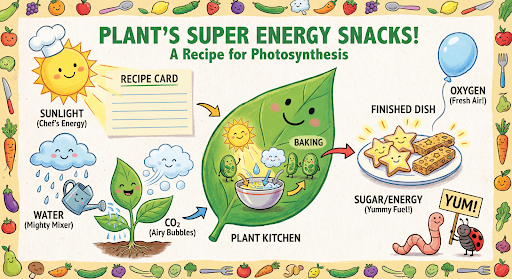
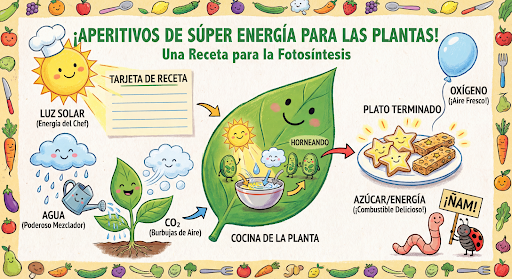
Pastaj mund të përdorni previous_interaction_id për të ndryshuar gjuhën në grafik në spanjisht.
Python
interaction_2 = client.interactions.create(
    model="gemini-3.1-flash-image",
    input="Update this infographic to be in Spanish. Do not change any other elements of the image.",
    previous_interaction_id=interaction.id,
    response_format={
        "type": "image",
        "mime_type": "image/jpeg",
        "aspect_ratio": "16:9",
        "image_size": "2K"
    },
)

generated_image = interaction_2.output_image
if generated_image:
    with open("photosynthesis_spanish.png", "wb") as f:
        f.write(base64.b64decode(generated_image.data))
JavaScript
const interaction2 = await ai.interactions.create({
  model: "gemini-3.1-flash-image",
  input: "Update this infographic to be in Spanish. Do not change any other elements of the image.",
  previous_interaction_id: interaction.id,
  response_format: {
    type: "image",
    mime_type: "image/png",
    aspect_ratio: "16:9",
    image_size: "2K"
  },
});

const generatedImage = interaction2.output_image;
if (generatedImage) {
  const buffer = Buffer.from(generatedImage.data, "base64");
  fs.writeFileSync("photosynthesis_spanish.png", buffer);
}
PUSHTIM
curl -s -X POST \
  "https://generativelanguage.googleapis.com/v1beta/interactions" \
  -H "x-goog-api-key: $GEMINI_API_KEY" \
  -H 'Content-Type: application/json' \
  -d '{
    "model": "gemini-3.1-flash-image",
    "input": "Update this infographic to be in Spanish. Do not change any other elements of the image.",
    "previous_interaction_id": "<PREVIOUS_INTERACTION_ID>",
    "response_format": {
      "type": "image",
      "mime_type": "image/jpeg",
      "aspect_ratio": "16:9",
      "image_size": "2K"
    }
  }'
E re me modelet Gemini 3 Image
Gemini 3 ofron modele të gjenerimit dhe redaktimit të imazheve të teknologjisë së fundit. Gemini 3.1 Flash Image është i optimizuar për shpejtësi dhe raste përdorimi me volum të lartë, dhe Gemini 3 Pro Image është i optimizuar për prodhimin profesional të aseteve. I projektuar për të përballuar rrjedhat më sfiduese të punës përmes arsyetimit të avancuar, ato shkëlqejnë në detyra komplekse krijimi dhe modifikimi me shumë kthesa.
- Dalje me rezolucion të lartë : Aftësi të integruara gjenerimi për pamje 1K, 2K dhe 4K.
- Imazhja Flash Gemini 3.1 shton rezolucionin më të vogël prej 512px (0.5K).
- Renderim i avancuar i tekstit : I aftë të gjenerojë tekst të lexueshëm dhe të stilizuar për infografikë, menu, diagrame dhe asete marketingu.
- Bazë me Kërkimin në Google : Modeli mund të përdorë Kërkimin në Google si një mjet për të verifikuar faktet dhe për të gjeneruar imazhe bazuar në të dhëna në kohë reale (p.sh., harta aktuale të motit, grafikë të aksioneve, ngjarje të fundit).
- Gemini 3.1 Flash Image shton integrimin e Google Image Search Grounding së bashku me Web Search.
- Modaliteti i të menduarit : Modeli përdor një proces "të të menduarit" për të arsyetuar përmes pyetjeve komplekse. Ai gjeneron "imazhe mendimi" të ndërmjetme (të dukshme në sfond, por jo të ngarkuara) për të rafinuar kompozimin përpara se të prodhojë rezultatin përfundimtar me cilësi të lartë.
- Deri në 14 imazhe referuese : Tani mund të përzieni deri në 14 imazhe referuese për të prodhuar imazhin përfundimtar.
- Raporte të reja aspektesh : Gemini 3.1 Flash Image shton raporte aspektesh 1:4, 4:1, 1:8 dhe 8:1.
Përdorni deri në 14 imazhe referuese
Modelet e imazheve Gemini 3 ju lejojnë të përzieni deri në 14 imazhe referuese. Këto 14 imazhe mund të përfshijnë sa vijon:
| Imazh Flash i Gemini 3.1 | Imazh i Gemini 3 Pro |
|---|---|
| Deri në 10 imazhe të objekteve me besueshmëri të lartë për t'u përfshirë në imazhin përfundimtar | Deri në 6 imazhe të objekteve me besueshmëri të lartë për t'u përfshirë në imazhin përfundimtar |
| Deri në 4 imazhe të personazheve për të ruajtur qëndrueshmërinë e personazheve | Deri në 5 imazhe të personazheve për të ruajtur qëndrueshmërinë e personazheve |
| N/A | Deri në 3 imazhe që mund të përdoren si referenca stili |
Python
from google import genai
from google.genai import types
from PIL import Image
import base64

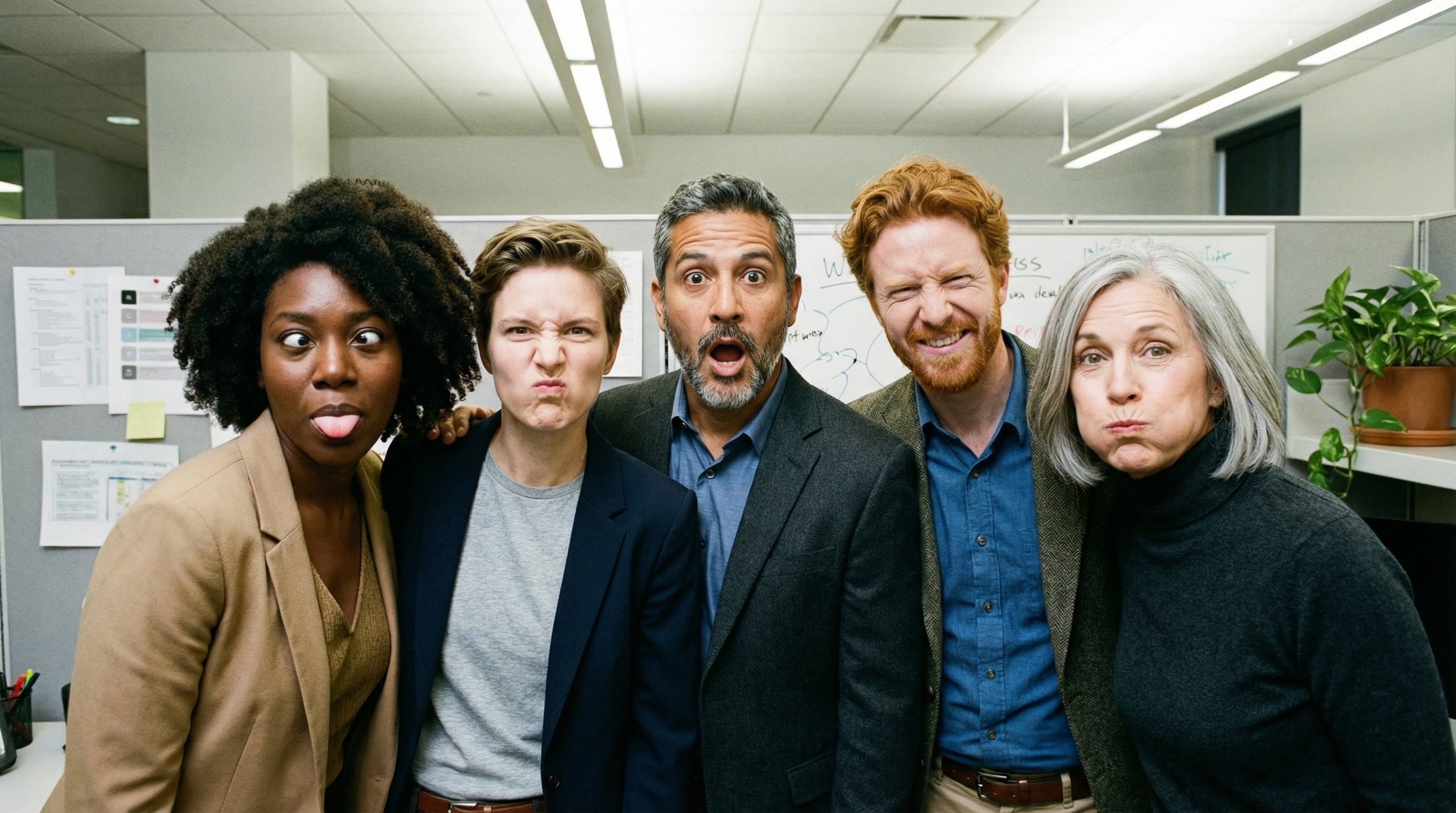
prompt = "An office group photo of these people, they are making funny faces."

client = genai.Client()

interaction = client.interactions.create(
    model="gemini-3.1-flash-image",
    input=[
        {
            "type": "text",
            "text": prompt,
        },
        {
            "type": "image",
            "data": base64.b64encode(image_bytes).decode('utf-8'),
            "mime_type": "image/png"
        },
        {
            "type": "image",
            "data": base64.b64encode(image_bytes).decode('utf-8'),
            "mime_type": "image/png"
        },
        {
            "type": "image",
            "data": base64.b64encode(image_bytes).decode('utf-8'),
            "mime_type": "image/png"
        },
        {
            "type": "image",
            "data": base64.b64encode(image_bytes).decode('utf-8'),
            "mime_type": "image/png"
        },
        {
            "type": "image",
            "data": base64.b64encode(image_bytes).decode('utf-8'),
            "mime_type": "image/png"
        },
    ],
    response_format={
        "type": "image",
        "aspect_ratio": "5:4",
        "image_size": "2K"
    },
)

with open("office.png", "wb") as f:

    f.write(base64.b64decode(interaction.output_image.data))
JavaScript
import { GoogleGenAI } from "@google/genai";
import * as fs from "node:fs";

async function main() {
  const ai = new GoogleGenAI({});

  const input = [
    {
      type: "text",
      text: "An office group photo of these people, they are making funny faces.",
    },
    { type: "image", mime_type: "image/jpeg", data: base64ImageFile1 },
    { type: "image", mime_type: "image/jpeg", data: base64ImageFile2 },
    { type: "image", mime_type: "image/jpeg", data: base64ImageFile3 },
    { type: "image", mime_type: "image/jpeg", data: base64ImageFile4 },
    { type: "image", mime_type: "image/jpeg", data: base64ImageFile5 },
  ];

  const interaction = await ai.interactions.create({
    model: "gemini-3.1-flash-image",
    input: input,
    response_format: {
      type: "image",
      aspect_ratio: "5:4",
      image_size: "2K",
    },
  });

  const buffer = Buffer.from(interaction.output_image.data, 'base64');

  fs.writeFileSync('office.png', buffer);
}

main();
PUSHTIM
curl -s -X POST \
  "https://generativelanguage.googleapis.com/v1beta/interactions" \
    -H "x-goog-api-key: $GEMINI_API_KEY" \
    -H 'Content-Type: application/json' \
    -d "{
      \"model\": \"gemini-3.1-flash-image\",
      \"input\": [
        {\"type\": \"text\", \"text\": \"An office group photo of these people, they are making funny faces.\"},
        {\"type\": \"image\", \"mime_type\": \"image/png\", \"data\": \"<BASE64_DATA_IMG_1>\"},
        {\"type\": \"image\", \"mime_type\": \"image/png\", \"data\": \"<BASE64_DATA_IMG_2>\"},
        {\"type\": \"image\", \"mime_type\": \"image/png\", \"data\": \"<BASE64_DATA_IMG_3>\"},
        {\"type\": \"image\", \"mime_type\": \"image/png\", \"data\": \"<BASE64_DATA_IMG_4>\"},
        {\"type\": \"image\", \"mime_type\": \"image/png\", \"data\": \"<BASE64_DATA_IMG_5>\"}
      ],
      \"response_format\": {
        \"type\": \"image\",
        \"aspect_ratio\": \"5:4\",
        \"image_size\": \"2K\"
      }
    }"
Bazë me Kërkimin në Google
Përdorni mjetin e Kërkimit në Google për të gjeneruar imazhe bazuar në informacione në kohë reale, siç janë parashikimet e motit, grafikët e aksioneve ose ngjarjet e fundit.
Vini re se kur përdorni Grounding me Google Search me gjenerimin e imazheve, rezultatet e kërkimit të bazuara në imazhe nuk i kalohen modelit të gjenerimit dhe përjashtohen nga përgjigja (shih Grounding me Google Image Search )
Python
from google import genai
from google.genai import types
import base64
prompt = "Visualize the current weather forecast for the next 5 days in San Francisco as a clean, modern weather chart. Add a visual on what I should wear each day"

client = genai.Client()

interaction = client.interactions.create(
    model="gemini-3.1-flash-image",
    input=prompt,
    tools=[{"type": "google_search"}],
    response_format={
        "type": "image",
        "mime_type": "image/jpeg",
        "aspect_ratio": "16:9"
    },
)

with open("weather.png", "wb") as f:

    f.write(base64.b64decode(interaction.output_image.data))
JavaScript
import { GoogleGenAI } from "@google/genai";
import * as fs from "node:fs";

async function main() {
  const ai = new GoogleGenAI({});

  const interaction = await ai.interactions.create({
    model: "gemini-3.1-flash-image",
    input: "Visualize the current weather forecast for the next 5 days in San Francisco as a clean, modern weather chart. Add a visual on what I should wear each day",
    tools: [{"type": "google_search"}],
    response_format: {
      type: "image",
      mime_type: "image/png",
      aspect_ratio: "16:9",
      image_size: "2K"
    },
  });

  const buffer = Buffer.from(interaction.output_image.data, 'base64');

  fs.writeFileSync('weather.png', buffer);
}

main();
PUSHTIM
curl -s -X POST \
  "https://generativelanguage.googleapis.com/v1beta/interactions" \
  -H "x-goog-api-key: $GEMINI_API_KEY" \
  -H "Content-Type: application/json" \
  -d '{
    "model": "gemini-3.1-flash-image",
    "input": [
      {"type": "text", "text": "Visualize the current weather forecast for the next 5 days in San Francisco as a clean, modern weather chart. Add a visual on what I should wear each day"}
    ],
    "tools": [{"type": "google_search"}],
    "response_format": {
      "type": "image",
      "mime_type": "image/jpeg",
      "aspect_ratio": "16:9"
    }
  }'
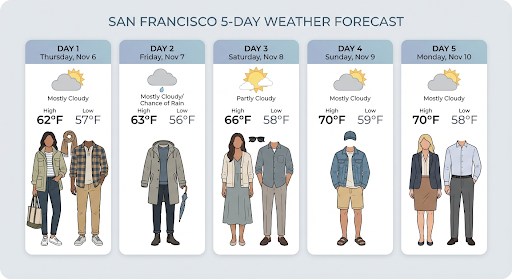
Përgjigja përfshin hapat google_search_call dhe google_search_result , së bashku me shënimet e integruara url_citation në hapin e tekstit:
-
google_search_result: Përmbansearch_suggestions, një fragment HTML për paraqitjen e sugjerimeve të kërkimit në ndërfaqen tuaj të përdoruesit. - shënime
url_citation: Citimet e integruara në hapin e tekstit që lidhin pjesë të përgjigjes me burimet e tyre në internet.
Bazë me Kërkimin Google për Imazhe (3.1 Flash)
Grounding with Google Image Search u lejon modeleve të përdorin imazhet e uebit të marra nëpërmjet Google Image Search si kontekst vizual për gjenerimin e imazheve. Image Search është një lloj i ri kërkimi brenda mjetit ekzistues Grounding with Google Search, i cili funksionon së bashku me Web Search standard.
Për të aktivizuar Kërkimin e Imazheve, konfiguroni mjetin google_search në kërkesën tuaj API dhe specifikoni image_search brenda vargut search_types . Kërkimi i Imazheve mund të përdoret në mënyrë të pavarur ose së bashku me Kërkimin në Ueb.
Python
from google import genai

client = genai.Client()

interaction = client.interactions.create(
    model="gemini-3.1-flash-image",
    input="A detailed painting of a Timareta butterfly resting on a flower",
    tools=[{
      "type": "google_search",
      "search_types": ["web_search", "image_search"]
    }]
)
JavaScript
import { GoogleGenAI } from "@google/genai";

async function main() {
  const ai = new GoogleGenAI({});

  const interaction = await ai.interactions.create({
    model: "gemini-3.1-flash-image",
    input: "A detailed painting of a Timareta butterfly resting on a flower",
    tools: [{
      "type": "google_search",
      "search_types": ["web_search", "image_search"]
    }]
  });
}

main();
PUSHTIM
curl -s -X POST \
  "https://generativelanguage.googleapis.com/v1beta/interactions" \
  -H "x-goog-api-key: $GEMINI_API_KEY" \
  -H "Content-Type: application/json" \
  -d '{
    "model": "gemini-3.1-flash-image",
    "input": "A detailed painting of a Timareta butterfly resting on a flower",
    "tools": [{"type": "google_search", "search_types": ["web_search", "image_search"]}]
  }'
Kërkesat e ekranit
Kur përdorni Kërkimin e Imazheve brenda Grounding me Kërkimin Google, duhet të shfaqni search_suggestions nga hapi google_search_result . Kërkesat e plota të përdorimit janë të detajuara në Kushtet e Shërbimit .
Përgjigje
Për përgjigjet e bazuara duke përdorur kërkimin e imazheve, API kthen citime të brendshme dhe metadata atribuimi si pjesë e hapave të përgjigjes:
shënime
url_citation: Citate të integruara në bllokun e përmbajtjes së tekstit brendamodel_output, duke lidhur përmbajtjen e gjeneruar me burimin e saj.google_search_result: Përmbansearch_suggestions, një fragment HTML për paraqitjen e sugjerimeve të kërkimit në ndërfaqen tuaj të përdoruesit.
Gjenerimi i videos në imazh (3.1 Flash)
Gjenerimi i videos në imazh ju lejon të gjeneroni imazhe të reja duke përdorur kontekstin e një videoje si referencë multimodale. Kjo është e dobishme për krijimin e miniaturave të videove me cilësi të lartë, posterave kinematografikë, infografikëve përmbledhës ose veprave të reja artistike të frymëzuara nga një skenë videoje.
Gjatë gjenerimit, modeli analizon kuadrot e videos në kontekst për të nxjerrë temat vizuale dhe ngjarjet kryesore, pastaj i përdor ato së bashku me kërkesën tuaj të tekstit për të sintetizuar imazhin e daljes.
Mund të kaloni URL-të publike të YouTube direkt në kërkesën tuaj të API-t ose të ngarkoni skedarë video lokale duke përdorur API-n e Skedarëve .
Python
from google import genai
from google.genai import types
import base64

client = genai.Client()

interaction = client.interactions.create(
    model="gemini-3.1-flash-image",
    input=[
        {
            "type": "video",
            "uri": "https://www.youtube.com/watch?v=UTdfxFyOQTI",
            "mime_type": "video/mp4"
        },
        {"type": "text", "text": "Generate a poster image that captures the key themes of this video."}
    ],
    response_format={"type": "image", "aspect_ratio": "16:9"}
)

# Save the generated image part
for step in interaction.steps:
    if step.type == "model_output":
        for content_block in step.content:
            if content_block.type == "text":
                print(content_block.text)
            elif content_block.type == "image":
                with open("video_poster.png", "wb") as f:
                    f.write(base64.b64decode(content_block.data))
                print("Image saved as video_poster.png")
JavaScript
import { GoogleGenAI } from "@google/genai";
import * as fs from "node:fs";

async function main() {
  const ai = new GoogleGenAI({});

  const interaction = await ai.interactions.create({
    model: "gemini-3.1-flash-image",
    input: [
      {
        type: "video",
        uri: "https://www.youtube.com/watch?v=UTdfxFyOQTI",
        mime_type: "video/mp4"
      },
      { type: "text", text: "Generate a poster image that captures the key themes of this video." }
    ],
    response_format: {
      type: "image",
      aspect_ratio: "16:9"
    }
  });

  for (const step of interaction.steps) {
    if (step.type === "model_output") {
      for (const contentBlock of step.content) {
        if (contentBlock.type === "text") {
          console.log(contentBlock.text);
        } else if (contentBlock.type === "image") {
          const buffer = Buffer.from(contentBlock.data, "base64");
          fs.writeFileSync("video_poster.png", buffer);
          console.log("Image saved as video_poster.png");
        }
      }
    }
  }
}

main();
PUSHTIM
curl -s -X POST \
  "https://generativelanguage.googleapis.com/v1beta/interactions" \
  -H "x-goog-api-key: $GEMINI_API_KEY" \
  -H 'Content-Type: application/json' \
  -d '{
    "model": "gemini-3.1-flash-image",
    "input": [
      {
        "type": "video",
        "uri": "https://www.youtube.com/watch?v=UTdfxFyOQTI",
        "mime_type": "video/mp4"
      },
      {
        "type": "text",
        "text": "Generate a poster image that captures the key themes of this video."
      }
    ],
    "response_format": {
      "type": "image",
      "aspect_ratio": "16:9"
    }
  }'
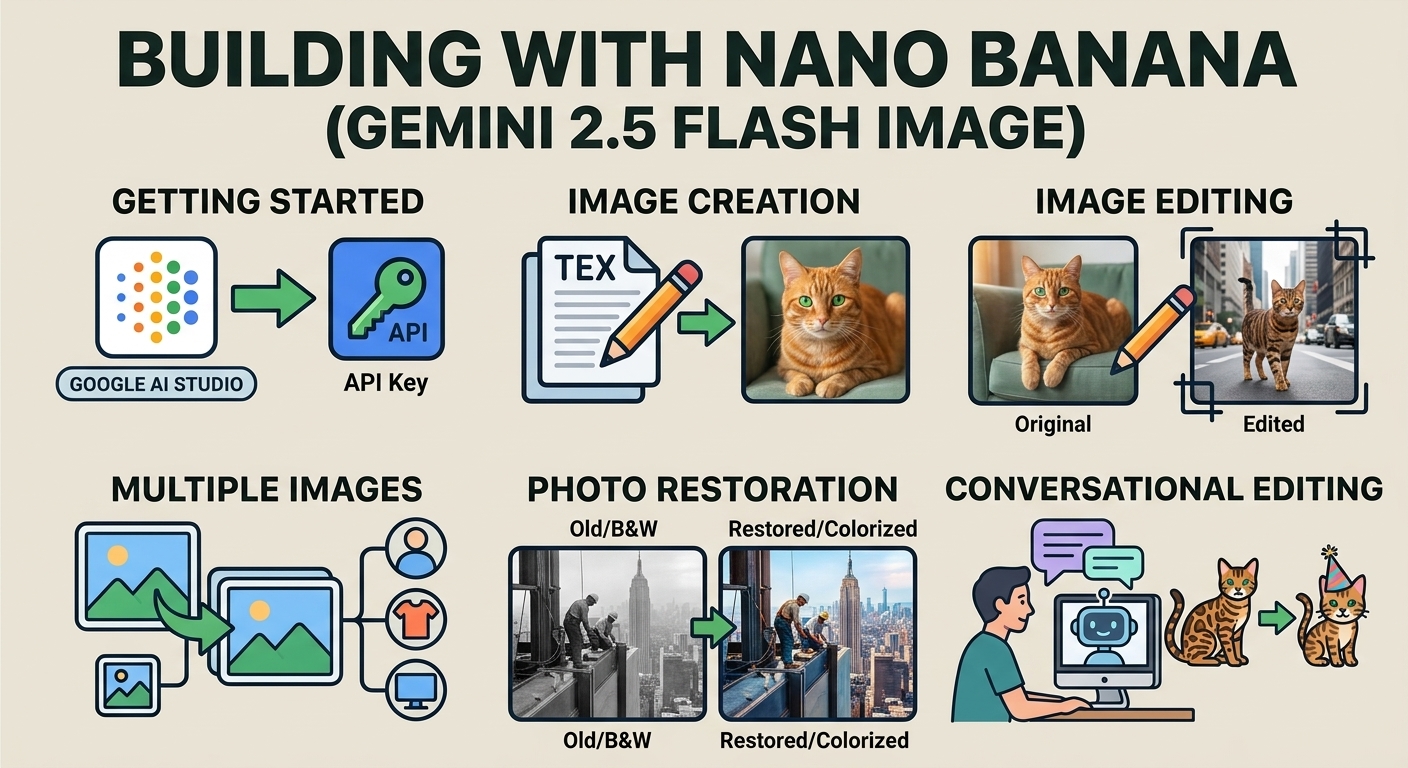
Gjeneroni imazhe me rezolucion deri në 4K
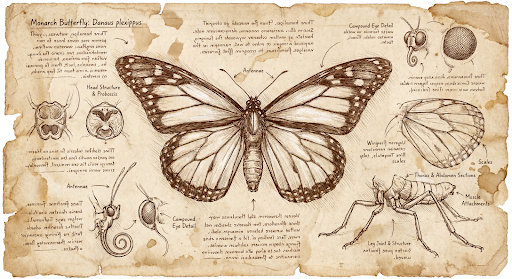
Modelet e imazheve Gemini 3 gjenerojnë imazhe 1K si parazgjedhje, por mund të prodhojnë edhe imazhe 2K, 4K dhe 512px (05.K) (vetëm Imazh Flash Gemini 3.1). Për të gjeneruar asete me rezolucion më të lartë, specifikoni image_size në formatin response_format .
Duhet të përdorni një 'K' me shkronjë të madhe (p.sh. 512px (05.K), 1K, 2K, 4K). Parametrat me shkronjë të vogël (p.sh., 1k) do të refuzohen.
Python
from google import genai
from google.genai import types
import base64

prompt = "Da Vinci style anatomical sketch of a dissected Monarch butterfly. Detailed drawings of the head, wings, and legs on textured parchment with notes in English."

client = genai.Client()

interaction = client.interactions.create(
    model="gemini-3.1-flash-image",
    input=prompt,
    response_format={
        "type": "image",
        "mime_type": "image/jpeg",
        "aspect_ratio": "1:1",
        "image_size": "1K"
    },
)

print(interaction.output_text)

with open("butterfly.png", "wb") as f:

    f.write(base64.b64decode(interaction.output_image.data))
JavaScript
import { GoogleGenAI } from "@google/genai";
import * as fs from "node:fs";

async function main() {
  const ai = new GoogleGenAI({});

  const interaction = await ai.interactions.create({
    model: "gemini-3.1-flash-image",
    input: "Da Vinci style anatomical sketch of a dissected Monarch butterfly. Detailed drawings of the head, wings, and legs on textured parchment with notes in English.",
    response_format: {
      type: "image",
      mime_type: "image/png",
      aspect_ratio: "1:1",
      image_size: "1K",
    },
  });

  console.log(interaction.output_text);

  const buffer = Buffer.from(interaction.output_image.data, 'base64');

  fs.writeFileSync('butterfly.png', buffer);
}

main();
PUSHTIM
curl -s -X POST \
  "https://generativelanguage.googleapis.com/v1beta/interactions" \
  -H "x-goog-api-key: $GEMINI_API_KEY" \
  -H "Content-Type: application/json" \
  -d '{
    "model": "gemini-3.1-flash-image",
    "input": "Da Vinci style anatomical sketch of a dissected Monarch butterfly. Detailed drawings of the head, wings, and legs on textured parchment with notes in English.",
    "response_format": {
      "type": "image",
      "mime_type": "image/jpeg",
      "aspect_ratio": "1:1",
      "image_size": "1K"
    }
  }'
Më poshtë është një shembull imazhi i gjeneruar nga kjo kërkesë:
Procesi i të menduarit
Modelet e imazheve Gemini 3 janë modele të të menduarit që përdorin një proces arsyetimi ("Thinking") për kërkesa komplekse. Kjo veçori është aktivizuar si parazgjedhje dhe nuk mund të çaktivizohet në API. Për të mësuar më shumë rreth procesit të të menduarit, shihni udhëzuesin Gemini Thinking .
Modeli gjeneron deri në dy imazhe të ndërmjetme për të testuar përbërjen dhe logjikën. Imazhi i fundit brenda Thinking është gjithashtu imazhi përfundimtar i renderuar.
Mund të kontrolloni mendimet që çojnë në imazhin përfundimtar që po prodhohet.
Python
for step in interaction.steps:
    if step.type == "thought":
        for content_block in step.summary:
            if content_block.type == "text":
                print(content_block.text)
            elif content_block.type == "image":
                image = Image.open(io.BytesIO(base64.b64decode(content_block.data)))
                image.show()
JavaScript
for (const step of interaction.steps) {
  if (step.type === "thought") {
    for (const contentBlock of step.summary) {
      if (contentBlock.type === "text") {
        console.log(contentBlock.text);
      } else if (contentBlock.type === "image") {
        const buffer = Buffer.from(contentBlock.data, 'base64');
        fs.writeFileSync('thought_image.png', buffer);
      }
    }
  }
}
Tekst dhe imazhe të ndërthurura
Ndërsa modelet standarde të gjenerimit të imazheve nxjerrin vetëm imazhe, disa modele të përparuara Gemini 3 (siç është gemini-3-pro-image ) mund të gjenerojnë përmbajtje të ndërthurur - si histori ose udhëzues mësimorë që përmbajnë blloqe teksti dhe ilustrime brenda të njëjtës përgjigje.
Meqenëse rezultati është kompleks dhe i ndërthurur, vetitë e përshtatshme si .output_image ose .output_text nuk do ta kapin sekuencën e plotë. Për të aksesuar dhe ruajtur përmbajtjen e ndërthurur, duhet të përsërisni manualisht steps :
Python
interaction = client.interactions.create(
    model="gemini-3-pro-image",
    input="Write the story of the lifecycle of a monarch butterfly, interleave illustrations",
)

image_counter = 1
for step in interaction.steps:
    if step.type == "model_output":
        for content_block in step.content:
            if content_block.type == "text":
                print(content_block.text)
            elif content_block.type == "image":
                filename = f"butterfly_lifecycle_{image_counter}.png"
                with open(filename, "wb") as f:
                    f.write(base64.b64decode(content_block.data))
                print(f"\n[Saved illustration: {filename}]\n")
                image_counter += 1
JavaScript
const interaction = await ai.interactions.create({
    model: "gemini-3-pro-image",
    input: "Write the story of the lifecycle of a monarch butterfly, interleave illustrations",
});

let imageCounter = 1;
for (const step of interaction.steps) {
  if (step.type === "model_output") {
    for (const contentBlock of step.content) {
      if (contentBlock.type === "text") {
        console.log(contentBlock.text);
      } else if (contentBlock.type === "image") {
        const buffer = Buffer.from(contentBlock.data, "base64");
        const filename = `butterfly_lifecycle_${imageCounter}.png`;
        fs.writeFileSync(filename, buffer);
        console.log(`\n[Saved illustration: ${filename}]\n`);
        imageCounter++;
      }
    }
  }
}
Kontrollimi i niveleve të të menduarit
Me Gemini 3.1 Flash Image, ju mund të kontrolloni sasinë e të menduarit që përdor modeli për të balancuar cilësinë dhe vonesën. Niveli i parazgjedhur thinking_level është minimal , dhe nivelet e mbështetura janë minimal dhe high .
Python
from google import genai
from PIL import Image
import base64
import io

client = genai.Client()

interaction = client.interactions.create(
    model="gemini-3.1-flash-image",
    input="A futuristic city built inside a giant glass bottle floating in space",
    generation_config={"thinking_level": "high"},
)

print(interaction.output_text)

image = Image.open(io.BytesIO(base64.b64decode(interaction.output_image.data)))

image.show()
JavaScript
import { GoogleGenAI } from "@google/genai";
import * as fs from "node:fs";

async function main() {
  const ai = new GoogleGenAI({});

  const interaction = await ai.interactions.create({
    model: "gemini-3.1-flash-image",
    input: "A futuristic city built inside a giant glass bottle floating in space",
    generation_config: { thinking_level: "high" },
  });

  console.log(interaction.output_text);

  const buffer = Buffer.from(interaction.output_image.data, 'base64');

  fs.writeFileSync('image.png', buffer);
}
main();
PUSHTIM
curl -s -X POST \
  "https://generativelanguage.googleapis.com/v1beta/interactions" \
  -H "x-goog-api-key: $GEMINI_API_KEY" \
  -H "Content-Type: application/json" \
  -d '{
    "model": "gemini-3.1-flash-image",
    "input": "A futuristic city built inside a giant glass bottle floating in space",
    "generation_config": {
      "thinking_level": "high"
    }
  }'
Vini re se tokenët e të menduarit faturohen si parazgjedhje për modelet e të menduarit, pasi procesi i të menduarit ndodh gjithmonë si parazgjedhje, pavarësisht nëse e shikoni procesin apo jo.
Mënyra të tjera të gjenerimit të imazheve
Edhe pse modelet e gjenerimit të imazheve Nano Banana rekomandohen për shumicën e rasteve të përdorimit, mund të eksploroni edhe modele të dedikuara të gjenerimit të imazheve:
- Imazh : Modelet e konvertimit tekst-në-imazh të Google-it të optimizuara për gjenerimin e imazheve me cilësi të lartë.
- Veo : Modeli i gjenerimit të videove i Google-it.
Gjeneroni imazhe në grup
Të gjitha aftësitë e gjenerimit të imazheve të përshkruara në këtë faqe mund të ekzekutohen edhe si punë grumbull duke përdorur Batch API .
Udhëzues dhe strategji nxitëse
Ky seksion ofron shembuj dhe shabllone për rrjedhat e zakonshme të punës për gjenerimin dhe redaktimin e imazheve. Çdo shembull përfshin një shabllon të ripërdorshëm dhe një shembull për API-në e Ndërveprimeve.
Udhëzime për gjenerimin e imazheve
Shembujt e mëposhtëm tregojnë se si të përdoren udhëzimet me tekst për të gjeneruar lloje të ndryshme imazhesh.
1. Skena fotorealiste
Përshkruani një skenë me shumë detaje. Sa më specifik të jeni, aq më shumë kontroll keni mbi rezultatet.
Shabllon
A photorealistic [type of shot] of a [subject description] in a [setting
description]. [Description of the light]. Shot from a [camera angle]
with a [lens type].
Nxitje
A photorealistic wide-angle shot of a vibrant coral reef teeming with tropical fish. Crystal-clear turquoise water with sunbeams filtering down from the surface, illuminating a sea turtle gliding gracefully over the coral. Shot from a low perspective with a wide-angle lens. Aspect ratio 16:9.
Python
from google import genai
from google.genai import types
import base64

client = genai.Client()

interaction = client.interactions.create(
    model="gemini-3.1-flash-image",
    input="A photorealistic wide-angle shot of a vibrant coral reef teeming with tropical fish. Crystal-clear turquoise water with sunbeams filtering down from the surface, illuminating a sea turtle gliding gracefully over the coral. Shot from a low perspective with a wide-angle lens. Aspect ratio 16:9.",
    response_format=[
        {
            "type": "image",
            "mime_type": "image/jpeg",
            "aspect_ratio": "16:9",
        }
    ],
)

print(interaction.output_text)

with open("coral_reef.png", "wb") as f:

    f.write(base64.b64decode(interaction.output_image.data))
JavaScript
import { GoogleGenAI } from "@google/genai";
import * as fs from "node:fs";

async function main() {
  const ai = new GoogleGenAI({});

  const interaction = await ai.interactions.create({
    model: "gemini-3.1-flash-image",
    input: "A photorealistic wide-angle shot of a vibrant coral reef teeming with tropical fish. Crystal-clear turquoise water with sunbeams filtering down from the surface, illuminating a sea turtle gliding gracefully over the coral. Shot from a low perspective with a wide-angle lens. Aspect ratio 16:9.",
    response_format: [
      {
        type: "image",
        mime_type: "image/jpeg",
        aspect_ratio: "16:9",
      }
    ],
  });
  console.log(interaction.output_text);

  const buffer = Buffer.from(interaction.output_image.data, 'base64');

  fs.writeFileSync('coral_reef.png', buffer);
}

main();
PUSHTIM
curl -s -X POST \
  "https://generativelanguage.googleapis.com/v1beta/interactions" \
  -H "x-goog-api-key: $GEMINI_API_KEY" \
  -H "Content-Type: application/json" \
  -d '{
    "model": "gemini-3.1-flash-image",
    "input": "A photorealistic wide-angle shot of a vibrant coral reef teeming with tropical fish. Crystal-clear turquoise water with sunbeams filtering down from the surface, illuminating a sea turtle gliding gracefully over the coral. Shot from a low perspective with a wide-angle lens. Aspect ratio 16:9.",
    "response_format": {
      "type": "image",
      "mime_type": "image/png",
      "aspect_ratio": "16:9"
    }
  }'

2. Ilustrime dhe afishe të stilizuara
Përshkruani stilin artistik, subjektin dhe mediumin. Jini specifik në lidhje me detajet vizuale (linjat e theksuara, ngjyrat, etj.) për rezultate të qëndrueshme.
Shabllon
A [style] of a [subject, with details about accessories or actions]
doing [activity]. The design features [visual qualities, e.g., bold outlines,
cel-shading, etc.] and [color/background preference].
Nxitje
A kawaii-style sticker of a happy red panda wearing a tiny bamboo hat. It's munching on a green bamboo leaf. The design features bold, clean outlines, simple cel-shading, and a vibrant color palette. The background must be white.
Python
from google import genai
import base64

client = genai.Client()

interaction = client.interactions.create(
    model="gemini-3.1-flash-image",
    input="A kawaii-style sticker of a happy red panda wearing a tiny bamboo hat. It's munching on a green bamboo leaf. The design features bold, clean outlines, simple cel-shading, and a vibrant color palette. The background must be white.",
)

for step in interaction.steps:
    if step.type == "model_output":
        for content_block in step.content:
            if content_block.type == "text":
                print(content_block.text)
            elif content_block.type == "image":
                with open("red_panda_sticker.png", "wb") as f:
                    f.write(base64.b64decode(content_block.data))
JavaScript
import { GoogleGenAI } from "@google/genai";
import * as fs from "node:fs";

async function main() {
  const ai = new GoogleGenAI({});

  const interaction = await ai.interactions.create({
    model: "gemini-3.1-flash-image",
    input: "A kawaii-style sticker of a happy red panda wearing a tiny bamboo hat. It's munching on a green bamboo leaf. The design features bold, clean outlines, simple cel-shading, and a vibrant color palette. The background must be white.",
  });
  for (const step of interaction.steps) {
    if (step.type === "model_output") {
      for (const contentBlock of step.content) {
        if (contentBlock.type === "text") {
          console.log(contentBlock.text);
        } else if (contentBlock.type === "image") {
          const buffer = Buffer.from(contentBlock.data, "base64");
          fs.writeFileSync("red_panda_sticker.png", buffer);
        }
      }
    }
  }
}

main();
PUSHTIM
curl -s -X POST \
  "https://generativelanguage.googleapis.com/v1beta/interactions" \
  -H "x-goog-api-key: $GEMINI_API_KEY" \
  -H "Content-Type: application/json" \
  -d '{
    "model": "gemini-3.1-flash-image",
    "input": "A kawaii-style sticker of a happy red panda wearing a tiny bamboo hat. It is munching on a green bamboo leaf. The design features bold, clean outlines, simple cel-shading, and a vibrant color palette. The background must be white."
  }'

3. Tekst i saktë në imazhe
Gemini shkëlqen në paraqitjen e tekstit. Jini të qartë në lidhje me tekstin, stilin e shkronjave (në mënyrë përshkruese) dhe dizajnin e përgjithshëm. Përdorni Gemini 3 Pro Image për prodhim profesional të aseteve.
Shabllon
Create a [image type] for [brand/concept] with the text "[text to render]"
in a [font style]. The design should be [style description], with a
[color scheme].
Nxitje
Create a modern, minimalist logo for a coffee shop called 'The Daily Grind'. The text should be in a clean, bold, sans-serif font. The color scheme is black and white. Put the logo in a circle. Use a coffee bean in a clever way.
Python
from google import genai
import base64

client = genai.Client()

interaction = client.interactions.create(
    model="gemini-3.1-flash-image",
    input="Create a modern, minimalist logo for a coffee shop called 'The Daily Grind'. The text should be in a clean, bold, sans-serif font. The color scheme is black and white. Put the logo in a circle. Use a coffee bean in a clever way.",
    response_format={"type": "image", "aspect_ratio": "1:1"},
)

for step in interaction.steps:
    if step.type == "model_output":
        for content_block in step.content:
            if content_block.type == "text":
                print(content_block.text)
            elif content_block.type == "image":
                with open("logo_example.jpg", "wb") as f:
                    f.write(base64.b64decode(content_block.data))
JavaScript
import { GoogleGenAI } from "@google/genai";
import * as fs from "node:fs";

async function main() {
  const ai = new GoogleGenAI({});

  const interaction = await ai.interactions.create({
    model: "gemini-3.1-flash-image",
    input: "Create a modern, minimalist logo for a coffee shop called 'The Daily Grind'. The text should be in a clean, bold, sans-serif font. The color scheme is black and white. Put the logo in a circle. Use a coffee bean in a clever way.",
    response_format: { type: "image", aspect_ratio: "1:1" },
  });
  for (const step of interaction.steps) {
    if (step.type === "model_output") {
      for (const contentBlock of step.content) {
        if (contentBlock.type === "text") {
          console.log(contentBlock.text);
        } else if (contentBlock.type === "image") {
          const buffer = Buffer.from(contentBlock.data, "base64");
          fs.writeFileSync("logo_example.jpg", buffer);
        }
      }
    }
  }
}

main();
PUSHTIM
curl -s -X POST \
  "https://generativelanguage.googleapis.com/v1beta/interactions" \
  -H "x-goog-api-key: $GEMINI_API_KEY" \
  -H "Content-Type: application/json" \
  -d '{
    "model": "gemini-3.1-flash-image",
    "input": "Create a modern, minimalist logo for a coffee shop called The Daily Grind. The text should be in a clean, bold, sans-serif font. The color scheme is black and white. Put the logo in a circle. Use a coffee bean in a clever way.",
    "response_format": {
      "type": "image",
      "aspect_ratio": "1:1"
    }
  }'

4. Makete produktesh dhe fotografi komerciale
Perfekt për krijimin e fotove të pastra dhe profesionale të produkteve për tregtinë elektronike, reklamimin ose krijimin e markave.
Shabllon
A high-resolution, studio-lit product photograph of a [product description]
on a [background surface/description]. The lighting is a [lighting setup,
e.g., three-point softbox setup] to [lighting purpose]. The camera angle is
a [angle type] to showcase [specific feature]. Ultra-realistic, with sharp
focus on [key detail]. [Aspect ratio].
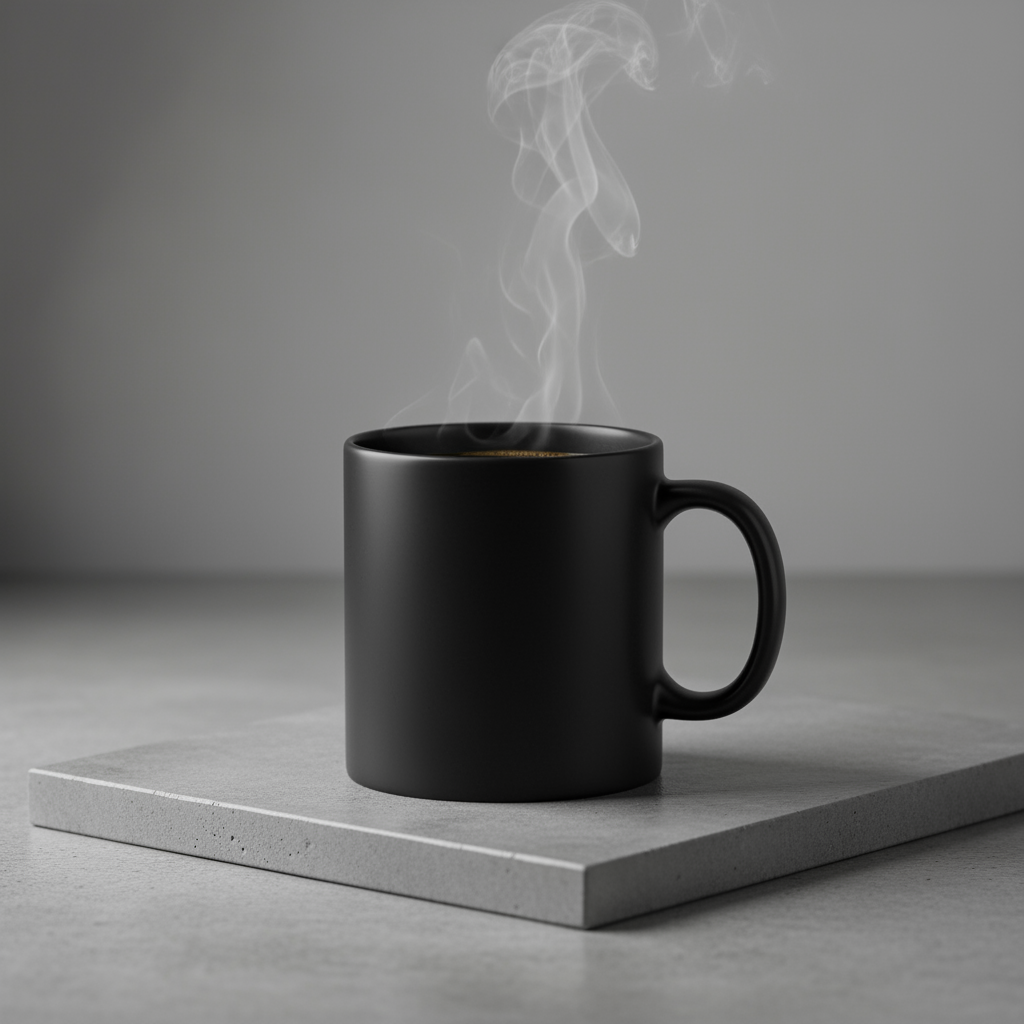
Nxitje
A high-resolution, studio-lit product photograph of a minimalist ceramic
coffee mug in matte black, presented on a polished concrete surface. The
lighting is a three-point softbox setup designed to create soft, diffused
highlights and eliminate harsh shadows. The camera angle is a slightly
elevated 45-degree shot to showcase its clean lines. Ultra-realistic, with
sharp focus on the steam rising from the coffee. Square image.
Python
from google import genai
import base64

client = genai.Client()

interaction = client.interactions.create(
    model="gemini-3.1-flash-image",
    input="A high-resolution, studio-lit product photograph of a minimalist ceramic coffee mug in matte black, presented on a polished concrete surface. The lighting is a three-point softbox setup designed to create soft, diffused highlights and eliminate harsh shadows. The camera angle is a slightly elevated 45-degree shot to showcase its clean lines. Ultra-realistic, with sharp focus on the steam rising from the coffee. Square image.",
)

for step in interaction.steps:
    if step.type == "model_output":
        for content_block in step.content:
            if content_block.type == "text":
                print(content_block.text)
            elif content_block.type == "image":
                with open("product_mockup.png", "wb") as f:
                    f.write(base64.b64decode(content_block.data))
JavaScript
import { GoogleGenAI } from "@google/genai";
import * as fs from "node:fs";

async function main() {
  const ai = new GoogleGenAI({});

  const interaction = await ai.interactions.create({
    model: "gemini-3.1-flash-image",
    input: "A high-resolution, studio-lit product photograph of a minimalist ceramic coffee mug in matte black, presented on a polished concrete surface. The lighting is a three-point softbox setup designed to create soft, diffused highlights and eliminate harsh shadows. The camera angle is a slightly elevated 45-degree shot to showcase its clean lines. Ultra-realistic, with sharp focus on the steam rising from the coffee. Square image.",
  });
  for (const step of interaction.steps) {
    if (step.type === "model_output") {
      for (const contentBlock of step.content) {
        if (contentBlock.type === "text") {
          console.log(contentBlock.text);
        } else if (contentBlock.type === "image") {
          const buffer = Buffer.from(contentBlock.data, "base64");
          fs.writeFileSync("product_mockup.png", buffer);
        }
      }
    }
  }
}

main();
PUSHTIM
curl -s -X POST \
  "https://generativelanguage.googleapis.com/v1beta/interactions" \
  -H "x-goog-api-key: $GEMINI_API_KEY" \
  -H "Content-Type: application/json" \
  -d '{
    "model": "gemini-3.1-flash-image",
    "input": "A high-resolution, studio-lit product photograph of a minimalist ceramic coffee mug in matte black, presented on a polished concrete surface. The lighting is a three-point softbox setup designed to create soft, diffused highlights and eliminate harsh shadows. The camera angle is a slightly elevated 45-degree shot to showcase its clean lines. Ultra-realistic, with sharp focus on the steam rising from the coffee. Square image."
  }'
5. Dizajn minimalist dhe negativ i hapësirës
Shkëlqyeshëm për krijimin e sfondeve për faqet e internetit, prezantimet ose materialet e marketingut ku teksti do të mbivendoset.
Shabllon
A minimalist composition featuring a single [subject] positioned in the
[bottom-right/top-left/etc.] of the frame. The background is a vast, empty
[color] canvas, creating significant negative space. Soft, subtle lighting.
[Aspect ratio].
Nxitje
A minimalist composition featuring a single, delicate red maple leaf
positioned in the bottom-right of the frame. The background is a vast, empty
off-white canvas, creating significant negative space for text. Soft,
diffused lighting from the top left. Square image.
Python
from google import genai
import base64

client = genai.Client()

interaction = client.interactions.create(
    model="gemini-3.1-flash-image",
    input="A minimalist composition featuring a single, delicate red maple leaf positioned in the bottom-right of the frame. The background is a vast, empty off-white canvas, creating significant negative space for text. Soft, diffused lighting from the top left. Square image.",
)

for step in interaction.steps:
    if step.type == "model_output":
        for content_block in step.content:
            if content_block.type == "text":
                print(content_block.text)
            elif content_block.type == "image":
                with open("minimalist_design.png", "wb") as f:
                    f.write(base64.b64decode(content_block.data))
JavaScript
import { GoogleGenAI } from "@google/genai";
import * as fs from "node:fs";

async function main() {
  const ai = new GoogleGenAI({});

  const interaction = await ai.interactions.create({
    model: "gemini-3.1-flash-image",
    input: "A minimalist composition featuring a single, delicate red maple leaf positioned in the bottom-right of the frame. The background is a vast, empty off-white canvas, creating significant negative space for text. Soft, diffused lighting from the top left. Square image.",
  });
  for (const step of interaction.steps) {
    if (step.type === "model_output") {
      for (const contentBlock of step.content) {
        if (contentBlock.type === "text") {
          console.log(contentBlock.text);
        } else if (contentBlock.type === "image") {
          const buffer = Buffer.from(contentBlock.data, "base64");
          fs.writeFileSync("minimalist_design.png", buffer);
        }
      }
    }
  }
}

main();
PUSHTIM
curl -s -X POST \
  "https://generativelanguage.googleapis.com/v1beta/interactions" \
  -H "x-goog-api-key: $GEMINI_API_KEY" \
  -H "Content-Type: application/json" \
  -d '{
    "model": "gemini-3.1-flash-image",
    "input": "A minimalist composition featuring a single, delicate red maple leaf positioned in the bottom-right of the frame. The background is a vast, empty off-white canvas, creating significant negative space for text. Soft, diffused lighting from the top left. Square image."
  }'

6. Art sekuencial (Paneli komik / Storyboard)
Ndërtohet mbi qëndrueshmërinë e personazheve dhe përshkrimin e skenës për të krijuar panele për rrëfim vizual. Për saktësi me tekstin dhe aftësinë e rrëfimit, këto sugjerime funksionojnë më mirë me Gemini 3 Pro dhe Gemini 3.1 Flash Image.
Shabllon
Make a 3 panel comic in a [style]. Put the character in a [type of scene].
Nxitje
Make a 3 panel comic in a gritty, noir art style with high-contrast black and white inks. Put the character in a humurous scene.
Python
from google import genai
from PIL import Image
import base64

client = genai.Client()

with open('/path/to/your/man_in_white_glasses.jpg', 'rb') as f:
    image_bytes = f.read()
text_input = "Make a 3 panel comic in a gritty, noir art style with high-contrast black and white inks. Put the character in a humurous scene."

interaction = client.interactions.create(
    model="gemini-3.1-flash-image",
    input=[
        {"type": "text", "text": text_input},
        {
            "type": "image",
            "data": base64.b64encode(image_bytes).decode('utf-8'),
            "mime_type": "image/jpeg"
        }
    ],
)

for step in interaction.steps:
    if step.type == "model_output":
        for content_block in step.content:
            if content_block.type == "text":
                print(content_block.text)
            elif content_block.type == "image":
                with open("comic_panel.jpg", "wb") as f:
                    f.write(base64.b64decode(content_block.data))
JavaScript
import { GoogleGenAI } from "@google/genai";
import * as fs from "node:fs";

async function main() {
  const ai = new GoogleGenAI({});

  const imagePath = "/path/to/your/man_in_white_glasses.jpg";
  const imageData = fs.readFileSync(imagePath);
  const base64Image = imageData.toString("base64");

  const input = [
    { type: "text", text: "Make a 3 panel comic in a gritty, noir art style with high-contrast black and white inks. Put the character in a humurous scene." },
    {
      type: "image",
      mime_type: "image/jpeg",
      data: base64Image
    },
  ];

  const interaction = await ai.interactions.create({
    model: "gemini-3.1-flash-image",
    input: input,
  });
  for (const step of interaction.steps) {
    if (step.type === "model_output") {
      for (const contentBlock of step.content) {
        if (contentBlock.type === "text") {
          console.log(contentBlock.text);
        } else if (contentBlock.type === "image") {
          const buffer = Buffer.from(contentBlock.data, "base64");
          fs.writeFileSync("comic_panel.jpg", buffer);
        }
      }
    }
  }
}

main();
PUSHTIM
curl -s -X POST \
  "https://generativelanguage.googleapis.com/v1beta/interactions" \
  -H "x-goog-api-key: $GEMINI_API_KEY" \
  -H "Content-Type: application/json" \
  -d '{
    "model": "gemini-3.1-flash-image",
    "input": [
      {"type": "text", "text": "Make a 3 panel comic in a gritty, noir art style with high-contrast black and white inks. Put the character in a humurous scene."},
      {"type": "image", "data": "<BASE64_IMAGE_DATA>", "mime_type": "image/jpeg"}
    ]
  }'
Hyrje | Prodhimi |
 |  |
7. Bazë me Kërkimin në Google
Përdorni Kërkimin në Google për të gjeneruar imazhe bazuar në informacione të fundit ose në kohë reale. Kjo është e dobishme për lajmet, motin dhe tema të tjera të ndjeshme ndaj kohës.
Nxitje
Make a simple but stylish graphic of last night's Arsenal game in the Champion's League
Python
from google import genai
from google.genai import types
import base64

client = genai.Client()

interaction = client.interactions.create(
    model="gemini-3.1-flash-image",
    input="Make a simple but stylish graphic of last night's Arsenal game in the Champion's League",
    tools=[{"type": "google_search"}],
    response_format={"type": "image", "aspect_ratio": "16:9"},
)

for step in interaction.steps:
    if step.type == "model_output":
        for content_block in step.content:
            if content_block.type == "text":
                print(content_block.text)
            elif content_block.type == "image":
                with open("football-score.jpg", "wb") as f:
                    f.write(base64.b64decode(content_block.data))
JavaScript
import { GoogleGenAI } from "@google/genai";
import * as fs from "node:fs";

async function main() {
  const ai = new GoogleGenAI({});

  const interaction = await ai.interactions.create({
    model: "gemini-3.1-flash-image",
    input: "Make a simple but stylish graphic of last night's Arsenal game in the Champion's League",
    tools: [{ type: "google_search" }],
    response_format: { type: "image", aspect_ratio: "16:9", image_size: "2K" },
  });

  for (const step of interaction.steps) {
    if (step.type === "model_output") {
      for (const contentBlock of step.content) {
        if (contentBlock.type === "text") {
          console.log(contentBlock.text);
        } else if (contentBlock.type === "image") {
          const buffer = Buffer.from(contentBlock.data, "base64");
          fs.writeFileSync("football-score.jpg", buffer);
        }
      }
    }
  }
}

main();
PUSHTIM
curl -s -X POST \
  "https://generativelanguage.googleapis.com/v1beta/interactions" \
  -H "x-goog-api-key: $GEMINI_API_KEY" \
  -H "Content-Type: application/json" \
  -d '{
    "model": "gemini-3.1-flash-image",
    "input": "Make a simple but stylish graphic of last nights Arsenal game in the Champions League",
    "tools": [{"type": "google_search"}],
    "response_format": {
      "type": "image",
      "aspect_ratio": "16:9"
    }
  }'

Udhëzime për redaktimin e imazheve
Këto shembuj tregojnë se si të ofroni imazhe së bashku me kërkesat e tekstit për redaktim, kompozim dhe transferim stili.
1. Shtimi dhe heqja e elementeve
Jepni një imazh dhe përshkruani ndryshimin tuaj. Modeli do të përputhet me stilin, ndriçimin dhe perspektivën e imazhit origjinal.
Shabllon
Using the provided image of [subject], please [add/remove/modify] [element]
to/from the scene. Ensure the change is [description of how the change should
integrate].
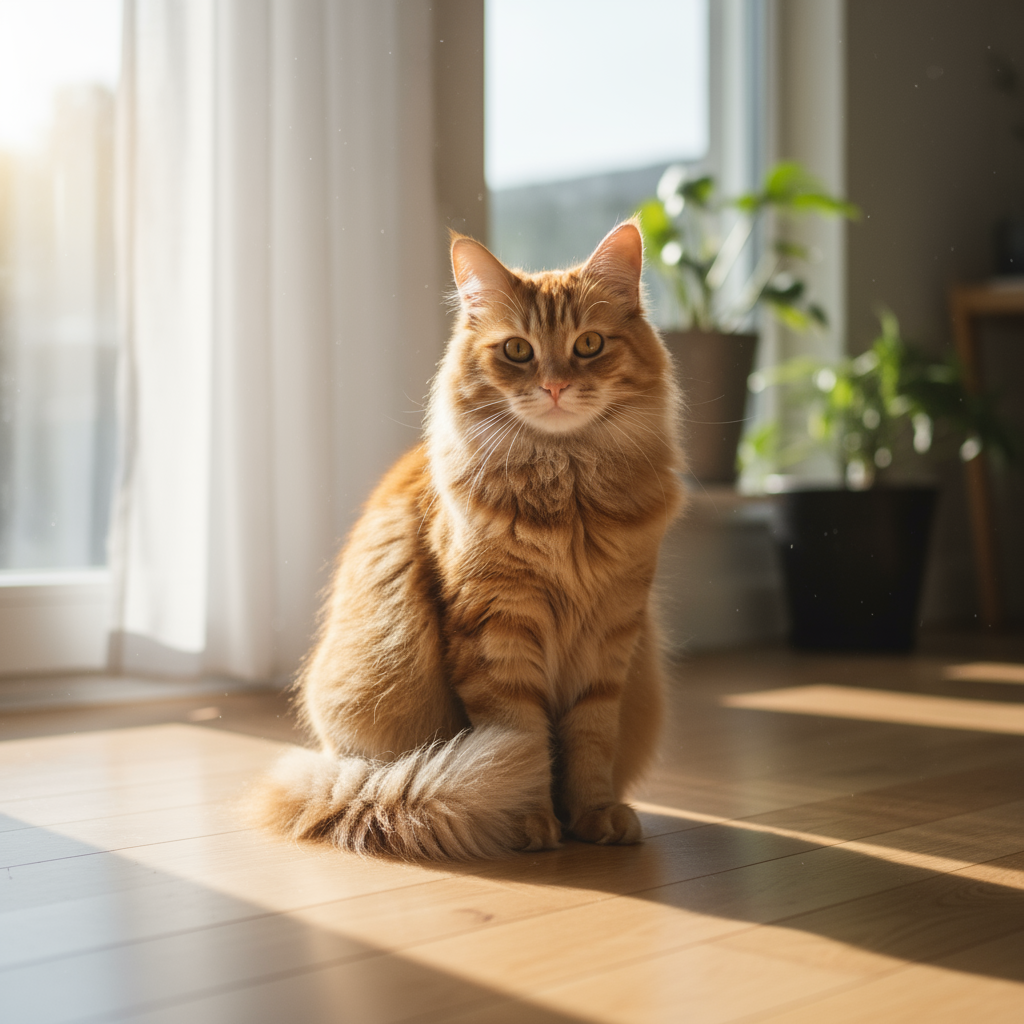
Nxitje
"Using the provided image of my cat, please add a small, knitted wizard hat
on its head. Make it look like it's sitting comfortably and matches the soft
lighting of the photo."
Python
from google import genai
from PIL import Image
import base64

client = genai.Client()

with open('/path/to/your/cat_photo.png', 'rb') as f:
    image_bytes = f.read()
text_input = """Using the provided image of my cat, please add a small, knitted wizard hat on its head. Make it look like it's sitting comfortably and not falling off."""

interaction = client.interactions.create(
    model="gemini-3.1-flash-image",
    input=[
        {"type": "text", "text": text_input},
        {
            "type": "image",
            "data": base64.b64encode(image_bytes).decode('utf-8'),
            "mime_type": "image/png"
        }
    ],
)

for step in interaction.steps:
    if step.type == "model_output":
        for content_block in step.content:
            if content_block.type == "text":
                print(content_block.text)
            elif content_block.type == "image":
                with open("cat_with_hat.png", "wb") as f:
                    f.write(base64.b64decode(content_block.data))
JavaScript
import { GoogleGenAI } from "@google/genai";
import * as fs from "node:fs";

async function main() {
  const ai = new GoogleGenAI({});

  const imagePath = "/path/to/your/cat_photo.png";
  const imageData = fs.readFileSync(imagePath);
  const base64Image = imageData.toString("base64");

  const input = [
    { type: "text", text: "Using the provided image of my cat, please add a small, knitted wizard hat on its head. Make it look like it's sitting comfortably and not falling off." },
    {
      type: "image",
      mime_type: "image/png",
      data: base64Image
    },
  ];

  const interaction = await ai.interactions.create({
    model: "gemini-3.1-flash-image",
    input: input,
  });
  for (const step of interaction.steps) {
    if (step.type === "model_output") {
      for (const contentBlock of step.content) {
        if (contentBlock.type === "text") {
          console.log(contentBlock.text);
        } else if (contentBlock.type === "image") {
          const buffer = Buffer.from(contentBlock.data, "base64");
          fs.writeFileSync("cat_with_hat.png", buffer);
        }
      }
    }
  }
}

main();
PUSHTIM
curl -s -X POST \
  "https://generativelanguage.googleapis.com/v1beta/interactions" \
    -H "x-goog-api-key: $GEMINI_API_KEY" \
    -H 'Content-Type: application/json' \
    -d "{
      \"model\": \"gemini-3.1-flash-image\",
      \"input\": [
            {\"type\": \"text\", \"text\": \"Using the provided image of my cat, please add a small, knitted wizard hat on its head. Make it look like it's sitting comfortably and not falling off.\"},
            {\"type\": \"image\", \"mime_type\":\"image/png\", \"data\": \"<BASE64_IMAGE_DATA>\"}
        ]
    }"
Hyrje | Prodhimi |
 |  |
2. Inpainting (Maskimi semantik)
Përcaktoni në mënyrë bisedore një "maskë" për të modifikuar një pjesë specifike të një imazhi duke e lënë pjesën tjetër të paprekur.
Shabllon
Using the provided image, change only the [specific element] to [new
element/description]. Keep everything else in the image exactly the same,
preserving the original style, lighting, and composition.
Nxitje
"Using the provided image of a living room, change only the blue sofa to be
a vintage, brown leather chesterfield sofa. Keep the rest of the room,
including the pillows on the sofa and the lighting, unchanged."
Python
from google import genai
from PIL import Image
import base64

client = genai.Client()

with open('/path/to/your/living_room.png', 'rb') as f:
    image_bytes = f.read()
text_input = """Using the provided image of a living room, change only the blue sofa to be a vintage, brown leather chesterfield sofa. Keep the rest of the room, including the pillows on the sofa and the lighting, unchanged."""

interaction = client.interactions.create(
    model="gemini-3.1-flash-image",
    input=[
        {
            "type": "image",
            "data": base64.b64encode(image_bytes).decode('utf-8'),
            "mime_type": "image/png"
        },
        {"type": "text", "text": text_input}
    ],
)

for step in interaction.steps:
    if step.type == "model_output":
        for content_block in step.content:
            if content_block.type == "text":
                print(content_block.text)
            elif content_block.type == "image":
                with open("living_room_edited.png", "wb") as f:
                    f.write(base64.b64decode(content_block.data))
JavaScript
import { GoogleGenAI } from "@google/genai";
import * as fs from "node:fs";

async function main() {
  const ai = new GoogleGenAI({});

  const imagePath = "/path/to/your/living_room.png";
  const imageData = fs.readFileSync(imagePath);
  const base64Image = imageData.toString("base64");

  const input = [
    {
      type: "image",
      mime_type: "image/png",
      data: base64Image
    },
    { type: "text", text: "Using the provided image of a living room, change only the blue sofa to be a vintage, brown leather chesterfield sofa. Keep the rest of the room, including the pillows on the sofa and the lighting, unchanged." },
  ];

  const interaction = await ai.interactions.create({
    model: "gemini-3.1-flash-image",
    input: input,
  });
  for (const step of interaction.steps) {
    if (step.type === "model_output") {
      for (const contentBlock of step.content) {
        if (contentBlock.type === "text") {
          console.log(contentBlock.text);
        } else if (contentBlock.type === "image") {
          const buffer = Buffer.from(contentBlock.data, "base64");
          fs.writeFileSync("living_room_edited.png", buffer);
        }
      }
    }
  }
}

main();
PUSHTIM
curl -s -X POST \
  "https://generativelanguage.googleapis.com/v1beta/interactions" \
    -H "x-goog-api-key: $GEMINI_API_KEY" \
    -H 'Content-Type: application/json' \
    -d "{
      \"model\": \"gemini-3.1-flash-image\",
      \"input\": [
        {\"type\": \"image\", \"mime_type\":\"image/png\", \"data\": \"<BASE64_IMAGE_DATA>\"},
        {\"type\": \"text\", \"text\": \"Using the provided image of a living room, change only the blue sofa to be a vintage, brown leather chesterfield sofa. Keep the rest of the room, including the pillows on the sofa and the lighting, unchanged.\"}
      ]
    }"
Hyrje | Prodhimi |
 |  |
3. Transferimi i stilit
Jepni një imazh dhe kërkojini modelit të rikrijojë përmbajtjen e tij në një stil artistik të ndryshëm.
Shabllon
Transform the provided photograph of [subject] into the artistic style of [artist/art style]. Preserve the original composition but render it with [description of stylistic elements].
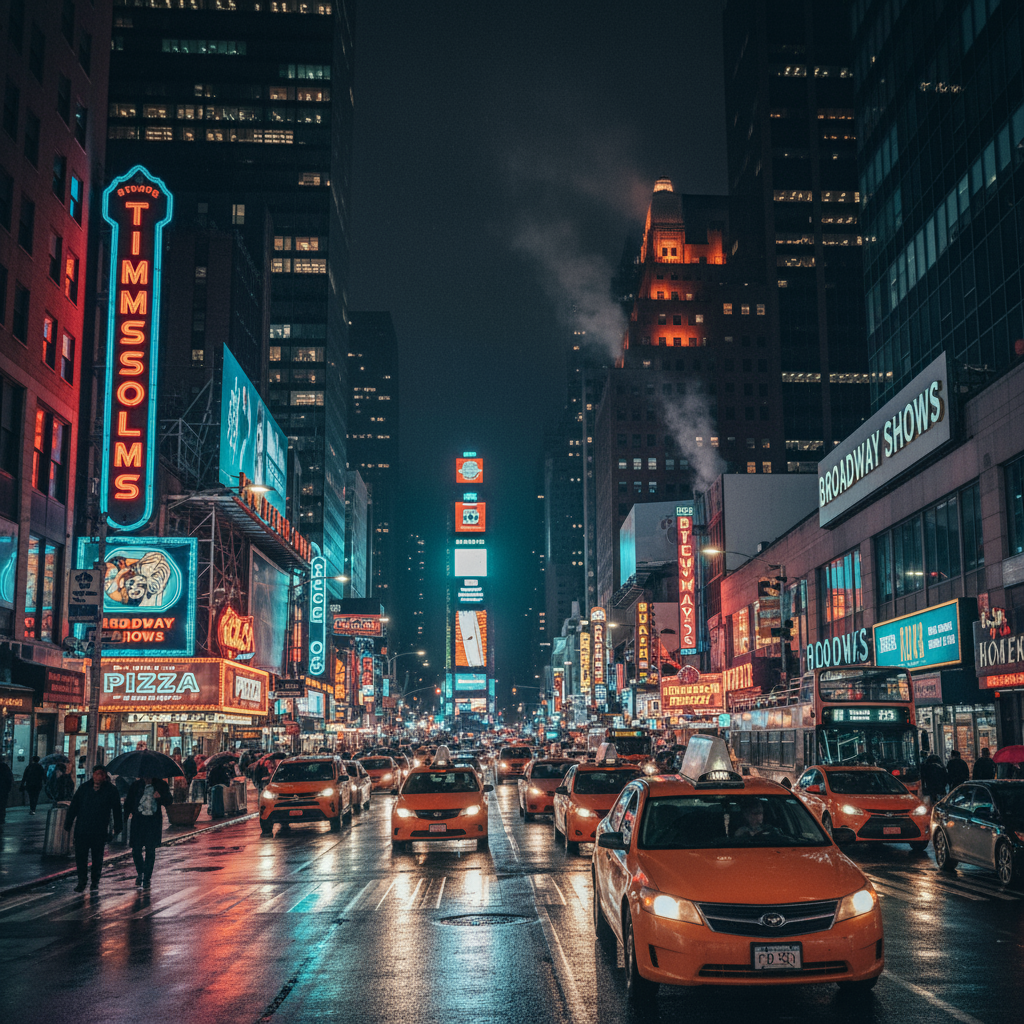
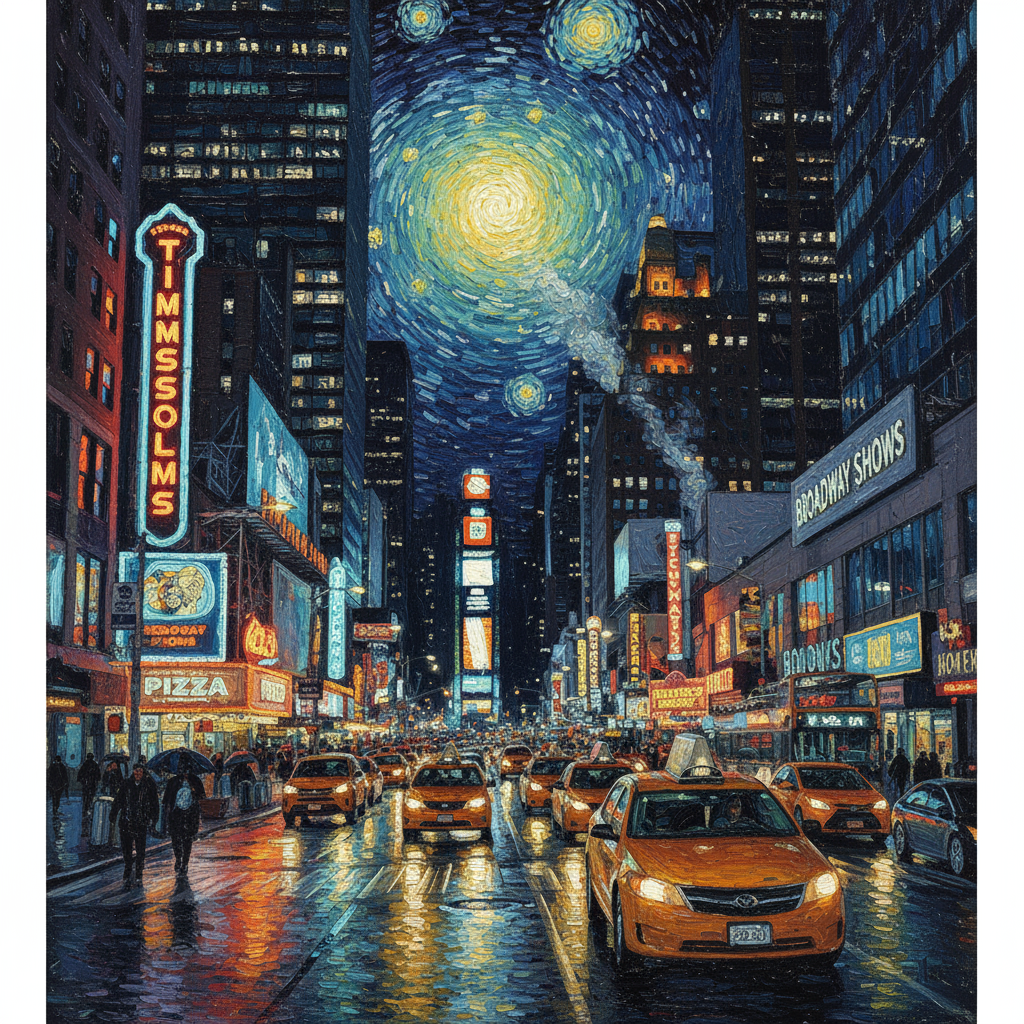
Nxitje
"Transform the provided photograph of a modern city street at night into the artistic style of Vincent van Gogh's 'Starry Night'. Preserve the original composition of buildings and cars, but render all elements with swirling, impasto brushstrokes and a dramatic palette of deep blues and bright yellows."
Python
from google import genai
from PIL import Image
import base64

client = genai.Client()

with open('/path/to/your/city.png', 'rb') as f:
    image_bytes = f.read()
text_input = """Transform the provided photograph of a modern city street at night into the artistic style of Vincent van Gogh's 'Starry Night'. Preserve the original composition of buildings and cars, but render all elements with swirling, impasto brushstrokes and a dramatic palette of deep blues and bright yellows."""

interaction = client.interactions.create(
    model="gemini-3.1-flash-image",
    input=[
        {
            "type": "image",
            "data": base64.b64encode(image_bytes).decode('utf-8'),
            "mime_type": "image/png"
        },
        {"type": "text", "text": text_input}
    ],
)

for step in interaction.steps:
    if step.type == "model_output":
        for content_block in step.content:
            if content_block.type == "text":
                print(content_block.text)
            elif content_block.type == "image":
                with open("city_style_transfer.png", "wb") as f:
                    f.write(base64.b64decode(content_block.data))
JavaScript
import { GoogleGenAI } from "@google/genai";
import * as fs from "node:fs";

async function main() {
  const ai = new GoogleGenAI({});
  const imageData = fs.readFileSync("/path/to/your/city.png");
  const base64Image = imageData.toString("base64");

  const interaction = await ai.interactions.create({
    model: "gemini-3.1-flash-image",
    input: [
      {
        type: "image",
        mime_type: "image/png",
        data: base64Image
      },
      { type: "text", text: "Transform the provided photograph of a modern city street at night into the artistic style of Vincent van Gogh's 'Starry Night'. Preserve the original composition of buildings and cars, but render all elements with swirling, impasto brushstrokes and a dramatic palette of deep blues and bright yellows." },
    ],
  });
  for (const step of interaction.steps) {
    if (step.type === "model_output") {
      for (const contentBlock of step.content) {
        if (contentBlock.type === "text") {
          console.log(contentBlock.text);
        } else if (contentBlock.type === "image") {
          const buffer = Buffer.from(contentBlock.data, "base64");
          fs.writeFileSync("city_style_transfer.png", buffer);
        }
      }
    }
  }
}

main();
PUSHTIM
curl -s -X POST \
  "https://generativelanguage.googleapis.com/v1beta/interactions" \
    -H "x-goog-api-key: $GEMINI_API_KEY" \
    -H 'Content-Type: application/json' \
    -d "{
      \"model\": \"gemini-3.1-flash-image\",
      \"input\": [
        {\"type\": \"image\", \"mime_type\":\"image/png\", \"data\": \"<BASE64_IMAGE_DATA>\"},
        {\"type\": \"text\", \"text\": \"Transform the provided photograph of a modern city street at night into the artistic style of Vincent van Gogh's 'Starry Night'. Preserve the original composition of buildings and cars, but render all elements with swirling, impasto brushstrokes and a dramatic palette of deep blues and bright yellows.\"}
      ]
    }"
Hyrje | Prodhimi |
 |  |
4. Kompozim i avancuar: Kombinimi i imazheve të shumëfishta
Jepni imazhe të shumta si kontekst për të krijuar një skenë të re, të përbërë. Kjo është perfekte për makete produktesh ose kolazhe krijuese.
Shabllon
Create a new image by combining the elements from the provided images. Take
the [element from image 1] and place it with/on the [element from image 2].
The final image should be a [description of the final scene].
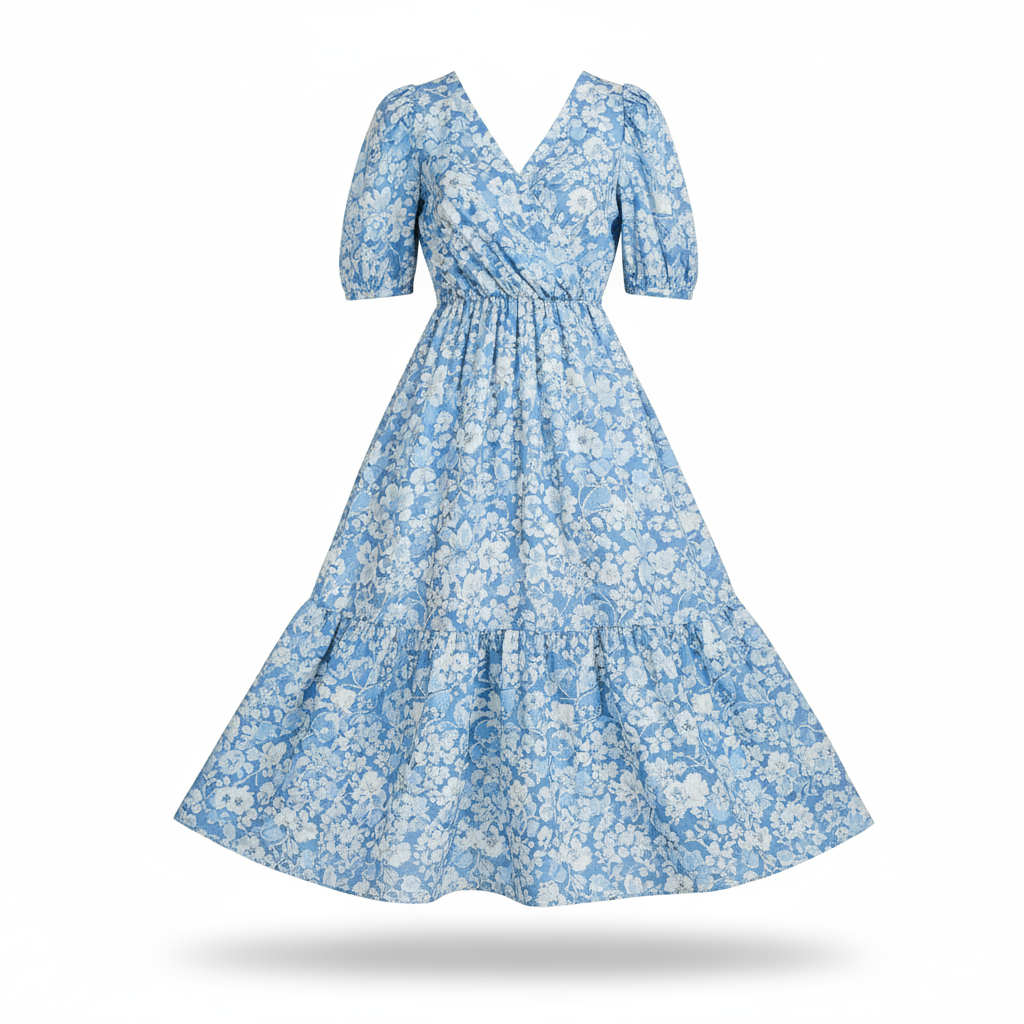
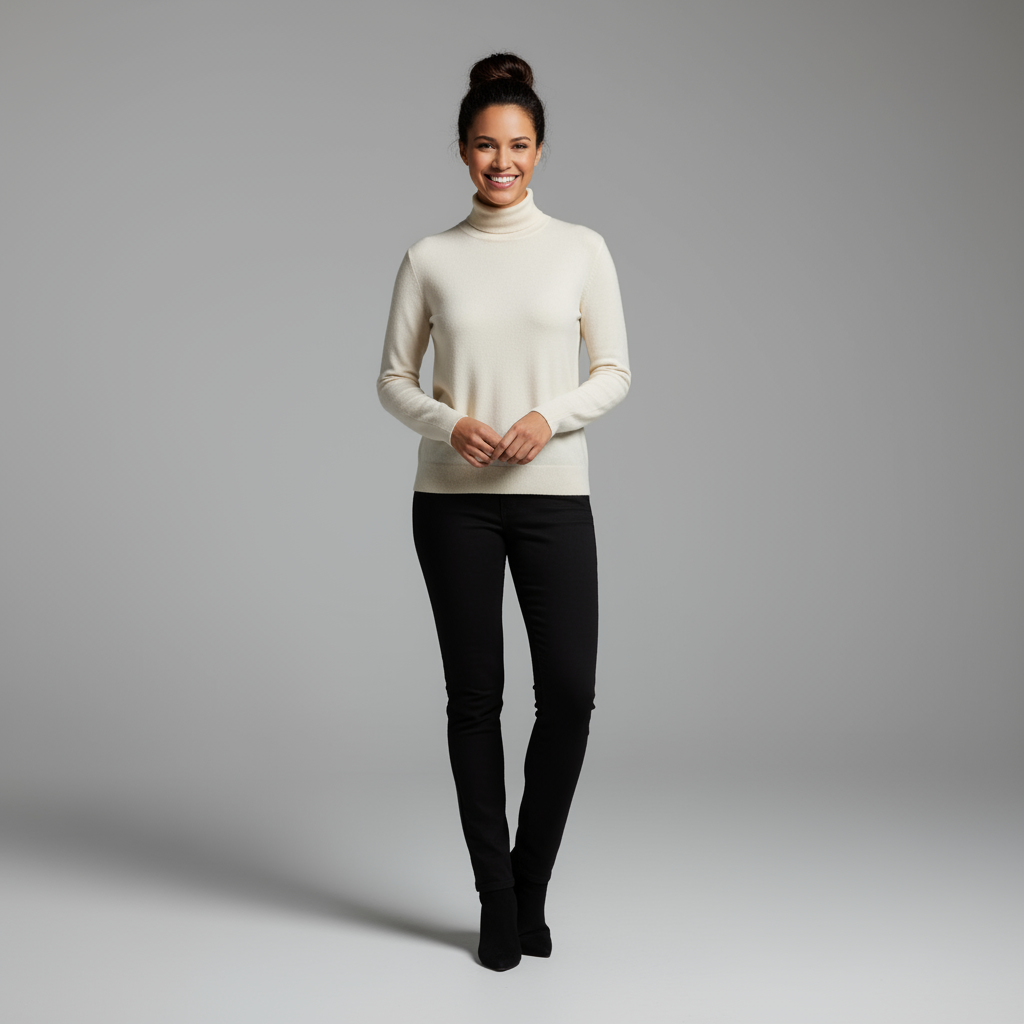
Nxitje
"Create a professional e-commerce fashion photo. Take the blue floral dress
from the first image and let the woman from the second image wear it.
Generate a realistic, full-body shot of the woman wearing the dress, with
the lighting and shadows adjusted to match the outdoor environment."
Python
from google import genai
from PIL import Image
import base64

client = genai.Client()

with open('/path/to/your/dress.png', 'rb') as f:
    dress_bytes = f.read()
with open('/path/to/your/model.png', 'rb') as f:
    model_bytes = f.read()
text_input = """Create a professional e-commerce fashion photo. Take the blue floral dress from the first image and let the woman from the second image wear it. Generate a realistic, full-body shot of the woman wearing the dress, with the lighting and shadows adjusted to match the outdoor environment."""

interaction = client.interactions.create(
    model="gemini-3.1-flash-image",
    input=[
        {
            "type": "image",
            "data": base64.b64encode(dress_bytes).decode('utf-8'),
            "mime_type": "image/png"
        },
        {
            "type": "image",
            "data": base64.b64encode(model_bytes).decode('utf-8'),
            "mime_type": "image/png"
        },
        {"type": "text", "text": text_input}
    ],
)

for step in interaction.steps:
    if step.type == "model_output":
        for content_block in step.content:
            if content_block.type == "text":
                print(content_block.text)
            elif content_block.type == "image":
                with open("fashion_ecommerce_shot.png", "wb") as f:
                    f.write(base64.b64decode(content_block.data))
JavaScript
import { GoogleGenAI } from "@google/genai";
import * as fs from "node:fs";

async function main() {
  const ai = new GoogleGenAI({});

  const imagePath1 = "/path/to/your/dress.png";
  const imageData1 = fs.readFileSync(imagePath1);
  const base64Image1 = imageData1.toString("base64");
  const imagePath2 = "/path/to/your/model.png";
  const imageData2 = fs.readFileSync(imagePath2);
  const base64Image2 = imageData2.toString("base64");

  const input = [
    {
      type: "image",
      mime_type: "image/png",
      data: base64Image1
    },
    {
      type: "image",
      mime_type: "image/png",
      data: base64Image2
    },
    { type: "text", text: "Create a professional e-commerce fashion photo. Take the blue floral dress from the first image and let the woman from the second image wear it. Generate a realistic, full-body shot of the woman wearing the dress, with the lighting and shadows adjusted to match the outdoor environment." },
  ];

  const interaction = await ai.interactions.create({
    model: "gemini-3.1-flash-image",
    input: input,
  });
  for (const step of interaction.steps) {
    if (step.type === "model_output") {
      for (const contentBlock of step.content) {
        if (contentBlock.type === "text") {
          console.log(contentBlock.text);
        } else if (contentBlock.type === "image") {
          const buffer = Buffer.from(contentBlock.data, "base64");
          fs.writeFileSync("fashion_ecommerce_shot.png", buffer);
        }
      }
    }
  }
}

main();
PUSHTIM
curl -s -X POST \
  "https://generativelanguage.googleapis.com/v1beta/interactions" \
    -H "x-goog-api-key: $GEMINI_API_KEY" \
    -H 'Content-Type: application/json' \
    -d "{
      \"model\": \"gemini-3.1-flash-image\",
      \"input\": [
            {\"type\": \"image\", \"mime_type\":\"image/png\", \"data\": \"<BASE64_IMAGE_DATA_1>\"},
            {\"type\": \"image\", \"mime_type\":\"image/png\", \"data\": \"<BASE64_IMAGE_DATA_2>\"},
            {\"type\": \"text\", \"text\": \"Create a professional e-commerce fashion photo. Take the blue floral dress from the first image and let the woman from the second image wear it. Generate a realistic, full-body shot of the woman wearing the dress, with the lighting and shadows adjusted to match the outdoor environment.\"}
      }]
    }"
Hyrja 1 | Hyrja 2 | Prodhimi |
 |  | 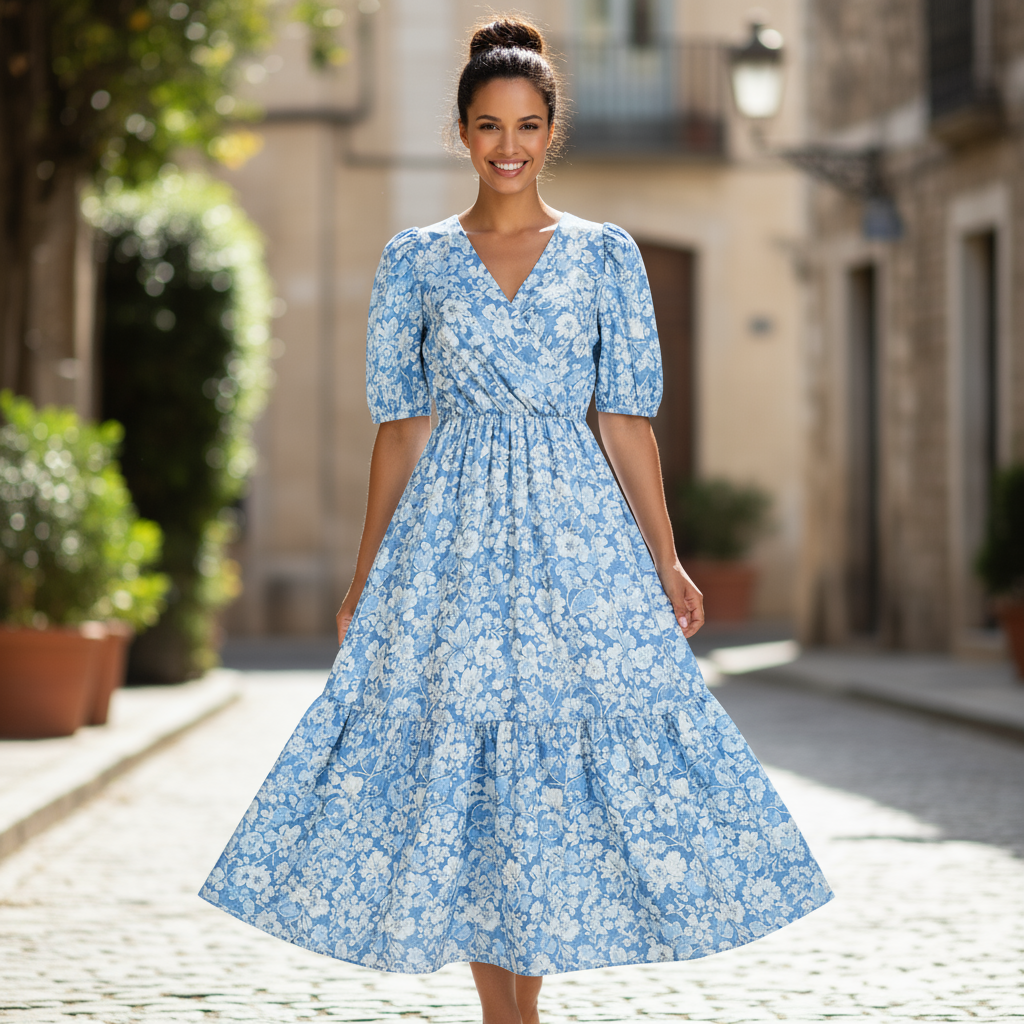 |
5. Ruajtja e detajeve me besnikëri të lartë
Për t'u siguruar që detajet kritike (si një fytyrë ose logo) ruhen gjatë një redaktimi, përshkruajini ato me shumë detaje së bashku me kërkesën tuaj për redaktim.
Shabllon
Using the provided images, place [element from image 2] onto [element from
image 1]. Ensure that the features of [element from image 1] remain
completely unchanged. The added element should [description of how the
element should integrate].
Nxitje
"Take the first image of the woman with brown hair, blue eyes, and a neutral
expression. Add the logo from the second image onto her black t-shirt.
Ensure the woman's face and features remain completely unchanged. The logo
should look like it's naturally printed on the fabric, following the folds
of the shirt."
Python
from google import genai
from PIL import Image
import base64

client = genai.Client()

with open('/path/to/your/woman.png', 'rb') as f:
    woman_bytes = f.read()
with open('/path/to/your/logo.png', 'rb') as f:
    logo_bytes = f.read()
text_input = """Take the first image of the woman with brown hair, blue eyes, and a neutral expression. Add the logo from the second image onto her black t-shirt. Ensure the woman's face and features remain completely unchanged. The logo should look like it's naturally printed on the fabric, following the folds of the shirt."""

interaction = client.interactions.create(
    model="gemini-3.1-flash-image",
    input=[
      {"type": "image", "mime_type":"image/png", "data": base64.b64encode(woman_bytes).decode('utf-8')},
      {"type": "image", "mime_type":"image/png", "data": base64.b64encode(logo_bytes).decode('utf-8')},
      {"type": "text", "text": text_input}
    ],
)

for step in interaction.steps:
    if step.type == "model_output":
        for content_block in step.content:
            if content_block.type == "text":
                print(content_block.text)
            elif content_block.type == "image":
                with open("woman_with_logo.png", "wb") as f:
                    f.write(base64.b64decode(content_block.data))
JavaScript
import { GoogleGenAI } from "@google/genai";
import * as fs from "node:fs";

async function main() {
  const ai = new GoogleGenAI({});

  const imagePath1 = "/path/to/your/woman.png";
  const imageData1 = fs.readFileSync(imagePath1);
  const base64Image1 = imageData1.toString("base64");
  const imagePath2 = "/path/to/your/logo.png";
  const imageData2 = fs.readFileSync(imagePath2);
  const base64Image2 = imageData2.toString("base64");

  const input = [
    {"type": "image", "mime_type":"image/png", "data": base64Image1},
    {"type": "image", "mime_type":"image/png", "data": base64Image2},
    {"type": "text", "text": "Take the first image of the woman with brown hair, blue eyes, and a neutral expression. Add the logo from the second image onto her black t-shirt. Ensure the woman's face and features remain completely unchanged. The logo should look like it's naturally printed on the fabric, following the folds of the shirt."},
  ];

  const interaction = await ai.interactions.create({
    model: "gemini-3.1-flash-image",
    input: input,
  });
  for (const step of interaction.steps) {
    if (step.type === "model_output") {
      for (const contentBlock of step.content) {
        if (contentBlock.type === "text") {
          console.log(contentBlock.text);
        } else if (contentBlock.type === "image") {
          const buffer = Buffer.from(contentBlock.data, "base64");
          fs.writeFileSync("woman_with_logo.png", buffer);
        }
      }
    }
  }
}

main();
PUSHTIM
curl -s -X POST \
  "https://generativelanguage.googleapis.com/v1beta/interactions" \
    -H "x-goog-api-key: $GEMINI_API_KEY" \
    -H 'Content-Type: application/json' \
    -d "{
      \"model\": \"gemini-3.1-flash-image\",
      \"input\": [
        {\"type\": \"image\", \"mime_type\":\"image/png\", \"data\": \"<BASE64_IMAGE_DATA_1>\"},
        {\"type\": \"image\", \"mime_type\":\"image/png\", \"data\": \"<BASE64_IMAGE_DATA_2>\"},
        {\"type\": \"text\", \"text\": \"Take the first image of the woman with brown hair, blue eyes, and a neutral expression. Add the logo from the second image onto her black t-shirt. Ensure the woman's face and features remain completely unchanged. The logo should look like it's naturally printed on the fabric, following the folds of the shirt.\"}
      ]
    }"
Hyrja 1 | Hyrja 2 | Prodhimi |
 |  |  |
6. Jepini jetë diçkaje
Ngarko një skicë ose vizatim të përafërt dhe kërkoji modelit ta rafinojë atë në një imazh të përfunduar.
Shabllon
Turn this rough [medium] sketch of a [subject] into a [style description]
photo. Keep the [specific features] from the sketch but add [new details/materials].
Nxitje
"Turn this rough pencil sketch of a futuristic car into a polished photo of the finished concept car in a showroom. Keep the sleek lines and low profile from the sketch but add metallic blue paint and neon rim lighting."
Python
from google import genai
from PIL import Image
import base64

client = genai.Client()

with open('/path/to/your/car_sketch.png', 'rb') as f:
    sketch_bytes = f.read()
text_input = """Turn this rough pencil sketch of a futuristic car into a polished photo of the finished concept car in a showroom. Keep the sleek lines and low profile from the sketch but add metallic blue paint and neon rim lighting."""

interaction = client.interactions.create(
    model="gemini-3.1-flash-image",
    input=[
      {"type": "image", "mime_type":"image/png", "data": base64.b64encode(sketch_bytes).decode('utf-8')},
      {"type": "text", "text": text_input}
    ],
)

for step in interaction.steps:
    if step.type == "model_output":
        for content_block in step.content:
            if content_block.type == "text":
                print(content_block.text)
            elif content_block.type == "image":
                with open("car_photo.png", "wb") as f:
                    f.write(base64.b64decode(content_block.data))
JavaScript
import { GoogleGenAI } from "@google/genai";
import * as fs from "node:fs";

async function main() {
  const ai = new GoogleGenAI({});

  const imagePath = "/path/to/your/car_sketch.png";
  const imageData = fs.readFileSync(imagePath);
  const base64Image = imageData.toString("base64");

  const input = [
    {"type": "image", "mime_type":"image/png", "data": base64Image},
    {"type": "text", "text": "Turn this rough pencil sketch of a futuristic car into a polished photo of the finished concept car in a showroom. Keep the sleek lines and low profile from the sketch but add metallic blue paint and neon rim lighting."},
  ];

  const interaction = await ai.interactions.create({
    model: "gemini-3.1-flash-image",
    input: input,
  });
  for (const step of interaction.steps) {
    if (step.type === "model_output") {
      for (const contentBlock of step.content) {
        if (contentBlock.type === "text") {
          console.log(contentBlock.text);
        } else if (contentBlock.type === "image") {
          const buffer = Buffer.from(contentBlock.data, "base64");
          fs.writeFileSync("car_photo.png", buffer);
        }
      }
    }
  }
}

main();
PUSHTIM
curl -s -X POST \
  "https://generativelanguage.googleapis.com/v1beta/interactions" \
    -H "x-goog-api-key: $GEMINI_API_KEY" \
    -H 'Content-Type: application/json' \
    -d "{
      \"model\": \"gemini-3.1-flash-image\",
      \"input\": [
        {\"type\": \"image\", \"mime_type\":\"image/png\", \"data\": \"<BASE64_IMAGE_DATA>\"},
        {\"type\": \"text\", \"text\": \"Turn this rough pencil sketch of a futuristic car into a polished photo of the finished concept car in a showroom. Keep the sleek lines and low profile from the sketch but add metallic blue paint and neon rim lighting.\"}
      ]
    }"
Hyrje | Prodhimi |
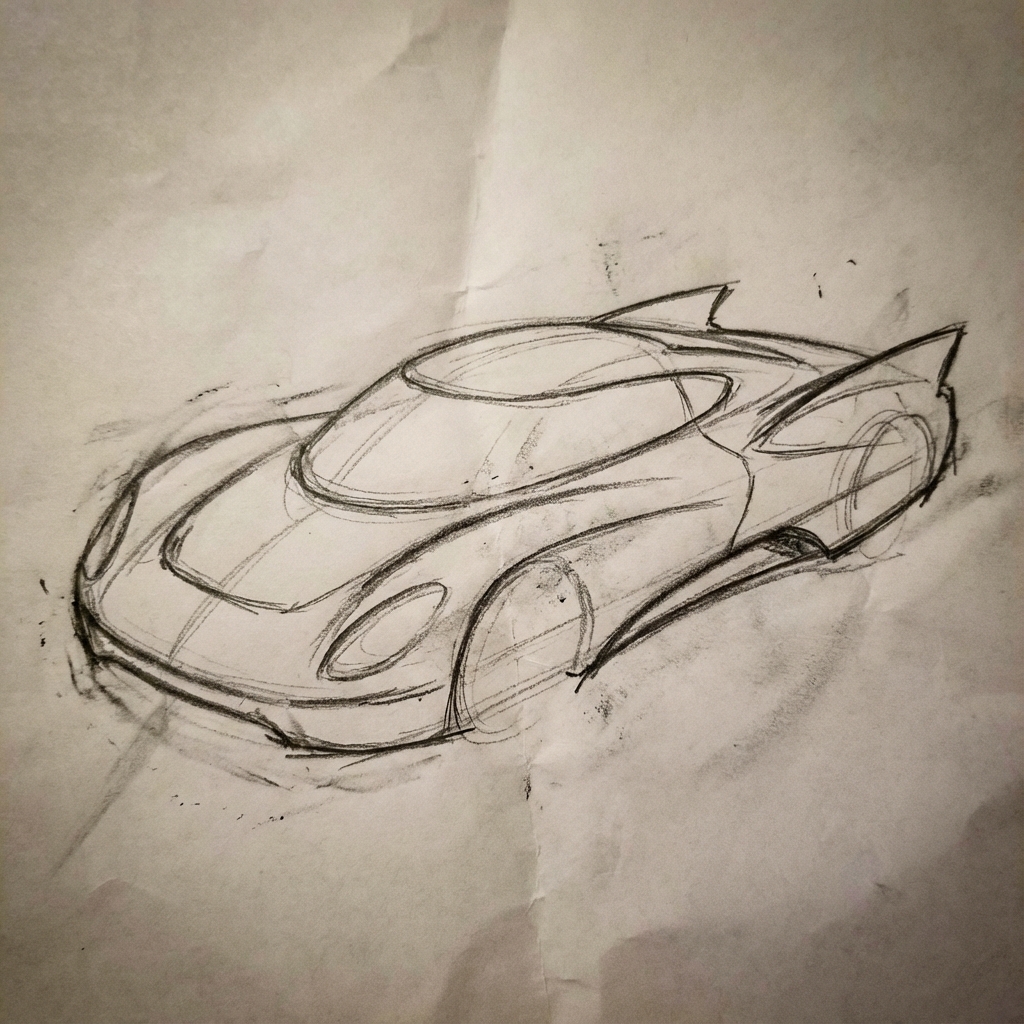 |  |
7. Konsistenca e personazheve: Pamje 360 gradë
Mund të gjeneroni pamje 360 gradë të një personazhi duke kërkuar në mënyrë iterative kënde të ndryshme. Për rezultate më të mira, përfshini imazhe të gjeneruara më parë në kërkesat pasuese për të ruajtur qëndrueshmërinë. Për poza komplekse, përfshini një imazh reference të pozës së zgjedhur.
Shabllon
A studio portrait of [person] against [background], [looking forward/in profile looking right/etc.]
Nxitje
A studio portrait of this man against white, in profile looking right
Python
from google import genai
from PIL import Image
import base64

client = genai.Client()

with open('/path/to/your/man_in_white_glasses.jpg', 'rb') as f:
    image_bytes = f.read()
text_input = """A studio portrait of this man against white, in profile looking right"""

interaction = client.interactions.create(
    model="gemini-3.1-flash-image",
    input={
      {"type": "text", "text": text_input},
      {"type": "image", "mime_type":"image/png", "data": base64.b64encode(image_bytes).decode('utf-8')}
    },
)

for step in interaction.steps:
    if step.type == "model_output":
        for content_block in step.content:
            if content_block.type == "text":
                print(content_block.text)
            elif content_block.type == "image":
                with open("man_right_profile.png", "wb") as f:
                    f.write(base64.b64decode(content_block.data))
Hyrje | Dalja 1 | Dalja 2 |
|  |  |
Praktikat më të Mira
Për t'i përmirësuar rezultatet tuaja nga të mira në të shkëlqyera, përfshini këto strategji profesionale në rrjedhën tuaj të punës.
- Ji hiper-specifik: Sa më shumë detaje të japësh, aq më shumë kontroll ke. Në vend të "armaturës fantazi", përshkruaje atë: "armaturë e zbukuruar me pllaka elfësh, e gdhendur me modele gjethesh argjendi, me një jakë të lartë dhe pauldronë në formën e krahëve të skifterit".
- Jepni kontekstin dhe qëllimin: Shpjegoni qëllimin e imazhit. Kuptimi i kontekstit nga modeli do të ndikojë në rezultatin përfundimtar. Për shembull, "Krijo një logo për një markë të nivelit të lartë dhe minimaliste të kujdesit për lëkurën" do të japë rezultate më të mira sesa thjesht "Krijo një logo".
- Përsëriteni dhe përsosni: Mos prisni një imazh perfekt që në provën e parë. Përdorni natyrën bisedore të modelit për të bërë ndryshime të vogla. Ndiqni me pyetje të tilla si: "Kjo është shumë mirë, por a mund ta bëni ndriçimin pak më të ngrohtë?" ose "Mbajeni gjithçka të njëjtë, por ndryshoni shprehjen e personazhit që të jetë më serioz".
- Përdorni udhëzime hap pas hapi: Për skena komplekse me shumë elementë, ndajeni kërkesën tuaj në hapa. "Së pari, krijoni një sfond të një pylli të qetë dhe me mjegull në agim. Pastaj, në plan të parë, shtoni një altar të lashtë prej guri të mbuluar me myshk. Së fundmi, vendosni një shpatë të vetme që ndriçon sipër altarit."
- Përdorni "Shtylla Semantike Negative": Në vend që të thoni "nuk ka makina", përshkruajeni skenën e synuar pozitivisht: "një rrugë e zbrazët, e shkretë pa shenja trafiku".
- Kontrolloni Kamerën: Përdorni gjuhë fotografike dhe kinematografike për të kontrolluar kompozimin. Terma si
wide-angle shot,macro shot,low-angle perspective.
Kufizime
- Për performancën më të mirë, përdorni gjuhët e mëposhtme: EN, ar-EG, de-DE, es-MX, fr-FR, hi-IN, id-ID, it-IT, ja-JP, ko-KR, pt-BR, ru-RU, ua-UA, vi-VN, zh-CN.
- Gjenerimi i imazheve nuk mbështet hyrjet audio. Hyrjet video mbështeten vetëm për Gemini 3.1 Flash Image.
- Modeli nuk do të ndjekë gjithmonë numrin e saktë të rezultateve të imazheve që përdoruesi kërkon në mënyrë të qartë.
-
gemini-2.5-flash-imagefunksionon më së miri me deri në 3 imazhe si të dhëna hyrëse, ndërsagemini-3-pro-imagembështet 5 imazhe me besueshmëri të lartë dhe deri në 14 imazhe në total.gemini-3.1-flash-imagembështet ngjashmërinë e personazheve deri në 4 personazhe dhe besnikërinë e deri në 10 objekteve në një rrjedhë të vetme pune. - Kur gjeneroni tekst për një imazh, Gemini funksionon më mirë nëse së pari gjeneroni tekstin dhe më pas kërkoni një imazh me tekstin.
-
gemini-3.1-flash-imageBazimi me Kërkimin Google nuk mbështet përdorimin e imazheve të botës reale të njerëzve nga kërkimi në internet për momentin. - Të gjitha imazhet e gjeneruara përfshijnë një filigran SynthID .
Konfigurime opsionale
Mund të konfiguroni opsionalisht formatin e daljes, raportin e aspektit dhe madhësinë e imazhit duke përdorur parametrin response_format .
Formati i daljes
Modeli, si parazgjedhje, kthen përgjigje si me tekst, ashtu edhe me imazh. Mund ta konfiguroni përgjigjen për të kthyer vetëm imazhet e gjeneruara (duke hequr tekstin e bisedës) duke specifikuar një format imazhi në parametrin response_format .
Për të kërkuar modalitete të shumëfishta (për shembull, si tekstin ashtu edhe imazhin e gjeneruar), kaloni një varg hyrjesh formati te response_format .
Python
interaction = client.interactions.create(
    model="gemini-3.1-flash-image",
    input="Write a short poem about a starry night and generate an image of it.",
    response_format=[
        {"type": "text"},
        {"type": "image"},
    ],
)
JavaScript
const interaction = await ai.interactions.create({
  model: "gemini-3.1-flash-image",
  input: "Write a short poem about a starry night and generate an image of it.",
  response_format: [
    { type: "text" },
    { type: "image" },
  ],
});
PUSHTIM
curl -s -X POST \
  "https://generativelanguage.googleapis.com/v1beta/interactions" \
  -H "x-goog-api-key: $GEMINI_API_KEY" \
  -H 'Content-Type: application/json' \
  -d '{
    "model": "gemini-3.1-flash-image",
    "input": "Write a short poem about a starry night and generate an image of it.",
    "response_format": [
      { "type": "text" },
      { "type": "image" }
    ]
  }'
Raportet e aspektit dhe madhësia e imazhit
Si parazgjedhje, modeli përputh madhësinë e imazhit të daljes me atë të imazhit tuaj hyrës, ose përndryshe gjeneron katrorë 1:1. Ju mund të kontrolloni raportin e aspektit dhe madhësinë e imazhit të daljes duke përdorur fushat aspect_ratio dhe image_size nën response_format kur type është vendosur në "image" .
Python
interaction = client.interactions.create(
    model="gemini-3.1-flash-image",
    input=prompt,
    response_format={
        "type": "image",
        "aspect_ratio": "16:9",
        "image_size": "2K",
    },
)
JavaScript
const interaction = await ai.interactions.create({
    model: "gemini-3.1-flash-image",
    input: prompt,
    response_format: {
      type: "image",
      aspect_ratio: "16:9",
      image_size: "2K",
    },
  });
PUSHTIM
curl -s -X POST \
  "https://generativelanguage.googleapis.com/v1beta/interactions" \
  -H "x-goog-api-key: $GEMINI_API_KEY" \
  -H 'Content-Type: application/json' \
  -d '{
    "model": "gemini-3.1-flash-image",
    "input": "Create a picture of a nano banana dish in a fancy restaurant with a Gemini theme",
    "response_format": {
      "type": "image",
      "aspect_ratio": "16:9",
      "image_size": "2K"
    }
  }'
Raportet e ndryshme të disponueshme dhe madhësia e imazhit të gjeneruar janë renditur në tabelat e mëposhtme:
3.1 Imazh i blicit
| Raporti i aspektit | Rezolucioni 512px | 0.5 mijë tokenë | Rezolucion 1K | 1 mijë tokena | Rezolucion 2K | 2 mijë tokena | Rezolucion 4K | 4K tokena |
|---|---|---|---|---|---|---|---|---|
| 1:1 | 512x512 | 747 | 1024x1024 | 1120 | 2048x2048 | 1120 | 4096x4096 | 2000 |
| 1:4 | 256x1024 | 747 | 512x2048 | 1120 | 1024x4096 | 1120 | 2048x8192 | 2000 |
| 1:8 | 192x1536 | 747 | 384x3072 | 1120 | 768x6144 | 1120 | 1536x12288 | 2000 |
| 2:3 | 424x632 | 747 | 848x1264 | 1120 | 1696x2528 | 1120 | 3392x5056 | 2000 |
| 3:2 | 632x424 | 747 | 1264x848 | 1120 | 2528x1696 | 1120 | 5056x3392 | 2000 |
| 3:4 | 448x600 | 747 | 896x1200 | 1120 | 1792x2400 | 1120 | 3584x4800 | 2000 |
| 4:1 | 1024x256 | 747 | 2048x512 | 1120 | 4096x1024 | 1120 | 8192x2048 | 2000 |
| 4:3 | 600x448 | 747 | 1200x896 | 1120 | 2400x1792 | 1120 | 4800x3584 | 2000 |
| 4:5 | 464x576 | 747 | 928x1152 | 1120 | 1856x2304 | 1120 | 3712x4608 | 2000 |
| 5:4 | 576x464 | 747 | 1152x928 | 1120 | 2304x1856 | 1120 | 4608x3712 | 2000 |
| 8:1 | 1536x192 | 747 | 3072x384 | 1120 | 6144x768 | 1120 | 12288x1536 | 2000 |
| 9:16 | 384x688 | 747 | 768x1376 | 1120 | 1536x2752 | 1120 | 3072x5504 | 2000 |
| 16:9 | 688x384 | 747 | 1376x768 | 1120 | 2752x1536 | 1120 | 5504x3072 | 2000 |
| 21:9 | 792x168 | 747 | 1584x672 | 1120 | 3168x1344 | 1120 | 6336x2688 | 2000 |
Imazh 3 Pro
| Raporti i aspektit | Rezolucion 1K | 1 mijë tokena | Rezolucion 2K | 2 mijë tokena | Rezolucion 4K | 4K tokena |
|---|---|---|---|---|---|---|
| 1:1 | 1024x1024 | 1120 | 2048x2048 | 1120 | 4096x4096 | 2000 |
| 2:3 | 848x1264 | 1120 | 1696x2528 | 1120 | 3392x5056 | 2000 |
| 3:2 | 1264x848 | 1120 | 2528x1696 | 1120 | 5056x3392 | 2000 |
| 3:4 | 896x1200 | 1120 | 1792x2400 | 1120 | 3584x4800 | 2000 |
| 4:3 | 1200x896 | 1120 | 2400x1792 | 1120 | 4800x3584 | 2000 |
| 4:5 | 928x1152 | 1120 | 1856x2304 | 1120 | 3712x4608 | 2000 |
| 5:4 | 1152x928 | 1120 | 2304x1856 | 1120 | 4608x3712 | 2000 |
| 9:16 | 768x1376 | 1120 | 1536x2752 | 1120 | 3072x5504 | 2000 |
| 16:9 | 1376x768 | 1120 | 2752x1536 | 1120 | 5504x3072 | 2000 |
| 21:9 | 1584x672 | 1120 | 3168x1344 | 1120 | 6336x2688 | 2000 |
Imazh Flash i Gemini 2.5
| Raporti i aspektit | Rezolucioni | Tokenat |
|---|---|---|
| 1:1 | 1024x1024 | 1290 |
| 2:3 | 832x1248 | 1290 |
| 3:2 | 1248x832 | 1290 |
| 3:4 | 864x1184 | 1290 |
| 4:3 | 1184x864 | 1290 |
| 4:5 | 896x1152 | 1290 |
| 5:4 | 1152x896 | 1290 |
| 9:16 | 768x1344 | 1290 |
| 16:9 | 1344x768 | 1290 |
| 21:9 | 1536x672 | 1290 |
Përzgjedhja e modelit
Zgjidhni modelin që i përshtatet më së miri rastit tuaj specifik të përdorimit.
Gemini 3.1 Flash Image (Nano Banana 2) duhet të jetë modeli juaj i preferuar për gjenerimin e imazheve, si performanca dhe inteligjenca më e mirë në të gjitha aspektet, si dhe balanca e kostos dhe vonesës. Shikoni faqen e çmimeve dhe aftësive të modelit për më shumë detaje.
Gemini 3 Pro Image (Nano Banana Pro) është projektuar për prodhimin profesional të aseteve dhe udhëzimeve komplekse. Ky model përmban tokëzim në botën reale duke përdorur Kërkimin në Google, një proces të parazgjedhur "Thinking" që përsos kompozimin para gjenerimit dhe mund të gjenerojë imazhe me rezolucion deri në 4K. Kontrolloni faqen e çmimeve dhe aftësive të modelit për më shumë detaje.
Imazh Flash Gemini 2.5 (Nano Banana) është projektuar për shpejtësi dhe efikasitet. Ky model është i optimizuar për detyra me volum të lartë dhe me vonesë të ulët dhe gjeneron imazhe me rezolucion 1024px. Kontrolloni faqen e çmimeve dhe aftësive të modelit për më shumë detaje.
Kur të përdoret Imagen
Përveç përdorimit të aftësive të integruara të gjenerimit të imazheve të Gemini, mund të hyni edhe në Imagen , modelin tonë të specializuar të gjenerimit të imazheve, përmes API-t Gemini. Planifikoni të migroni para datës së mbylljes.
Çfarë vjen më pas
- Shikoni udhëzuesin Veo për të mësuar se si të gjeneroni video me Gemini API.
- Për të mësuar më shumë rreth modeleve Gemini, shihni modelet Gemini .