

Gemini API מאפשר יצירה משולבת-אחזור (RAG) באמצעות הכלי File Search. התכונה 'חיפוש קבצים' מייבאת את הנתונים, מחלקת אותם לחלקים ויוצרת אינדקס כדי לאפשר שליפה מהירה של מידע רלוונטי על סמך הנחיה שסופקה. המידע הזה משמש כהקשר למודל, וכך הוא יכול לספק תשובות מדויקות ורלוונטיות יותר. חיפוש קבצים יכול גם לספק יכולות מולטי-מודאליות עם הטמעות טקסט שנתמכות על ידי gemini-embedding-001, והטמעות תמונות/מולטי-מודאליות שנתמכות על ידי gemini-embedding-2.
אחסון קבצים ויצירת הטמעה בזמן השאילתה הם בחינם, ותשלמו רק על יצירת הטמעות כשמבצעים אינדוקס לקבצים בפעם הראשונה, ועל העלות הרגילה של טוקנים של קלט / פלט במודל Gemini. המודל החדש הזה של חיוב מאפשר לבנות את הכלי לחיפוש קבצים ולהרחיב אותו בקלות ובעלות נמוכה יותר. פרטים נוספים מופיעים בקטע תמחור.
העלאה ישירה למאגר חיפוש קבצים
בדוגמה הזו אפשר לראות איך מעלים קובץ ישירות אל מאגר הקבצים לחיפוש:
Python
from google import genai
from google.genai import types
import time

client = genai.Client()

# File name will be visible in citations
file_search_store = client.file_search_stores.create(
    config={
        'display_name': 'your-fileSearchStore-name',
        'embedding_model': 'models/gemini-embedding-2'
    }
)

operation = client.file_search_stores.upload_to_file_search_store(
  file='sample.txt',
  file_search_store_name=file_search_store.name,
  config={
      'display_name' : 'display-file-name',
  }
)

while not operation.done:
    time.sleep(5)
    operation = client.operations.get(operation)

response = client.models.generate_content(
    model="gemini-3.8-flash",
    contents="""Can you tell me about [insert question]""",
    config=types.GenerateContentConfig(
        tools=[
            types.Tool(
                file_search=types.FileSearch(
                    file_search_store_names=[file_search_store.name]
                )
            )
        ]
    )
)

print(response.text)
JavaScript
const { GoogleGenAI } = require('@google/genai');

const ai = new GoogleGenAI({});

async function run() {
  // File name will be visible in citations
  const fileSearchStore = await ai.fileSearchStores.create({
    config: {
      displayName: 'your-fileSearchStore-name',
      embeddingModel: 'models/gemini-embedding-2'
    }
  });

  let operation = await ai.fileSearchStores.uploadToFileSearchStore({
    file: 'file.txt',
    fileSearchStoreName: fileSearchStore.name,
    config: {
      displayName: 'file-name',
    }
  });

  while (!operation.done) {
    await new Promise(resolve => setTimeout(resolve, 5000));
    operation = await ai.operations.get({ operation });
  }

  const response = await ai.models.generateContent({
    model: "gemini-3.8-flash",
    contents: "Can you tell me about [insert question]",
    config: {
      tools: [
        {
          fileSearch: {
            fileSearchStoreNames: [fileSearchStore.name]
          }
        }
      ]
    }
  });

  console.log(response.text);
}

run();
מידע נוסף זמין במאמרי העזרה של ה-API בנושא uploadToFileSearchStore.
ייבוא קבצים
אפשר גם להעלות קובץ קיים ולייבא אותו למאגר החיפוש של הקבצים:
Python
from google import genai
from google.genai import types
import time

client = genai.Client()

# File name will be visible in citations
sample_file = client.files.upload(file='sample.txt', config={'name': 'display_file_name'})

file_search_store = client.file_search_stores.create(
    config={
        'display_name': 'your-fileSearchStore-name',
        'embedding_model': 'models/gemini-embedding-2'
    }
)

operation = client.file_search_stores.import_file(
    file_search_store_name=file_search_store.name,
    file_name=sample_file.name
)

while not operation.done:
    time.sleep(5)
    operation = client.operations.get(operation)

response = client.models.generate_content(
    model="gemini-3.8-flash",
    contents="""Can you tell me about [insert question]""",
    config=types.GenerateContentConfig(
        tools=[
            types.Tool(
                file_search=types.FileSearch(
                    file_search_store_names=[file_search_store.name]
                )
            )
        ]
    )
)

print(response.text)
JavaScript
const { GoogleGenAI } = require('@google/genai');

const ai = new GoogleGenAI({});

async function run() {
  // File name will be visible in citations
  const sampleFile = await ai.files.upload({
    file: 'sample.txt',
    config: { name: 'file-name' }
  });

  const fileSearchStore = await ai.fileSearchStores.create({
    config: {
      displayName: 'your-fileSearchStore-name',
      embeddingModel: 'models/gemini-embedding-2'
    }
  });

  let operation = await ai.fileSearchStores.importFile({
    fileSearchStoreName: fileSearchStore.name,
    fileName: sampleFile.name
  });

  while (!operation.done) {
    await new Promise(resolve => setTimeout(resolve, 5000));
    operation = await ai.operations.get({ operation: operation });
  }

  const response = await ai.models.generateContent({
    model: "gemini-3.8-flash",
    contents: "Can you tell me about [insert question]",
    config: {
      tools: [
        {
          fileSearch: {
            fileSearchStoreNames: [fileSearchStore.name]
          }
        }
      ]
    }
  });

  console.log(response.text);
}

run();
מידע נוסף זמין במאמרי העזרה של ה-API בנושא importFile.
הגדרות חלוקה לחלקים
כשמייבאים קובץ למאגר חיפוש קבצים, הוא מפורק אוטומטית לחלקים, מוטמע, עובר אינדוקס ועולה למאגר חיפוש הקבצים. אם אתם צריכים שליטה רבה יותר על אסטרטגיית החלוקה לחלקים, אתם יכולים לציין הגדרה של chunking_config כדי להגדיר מספר מקסימלי של טוקנים לכל חלק ומספר מקסימלי של טוקנים חופפים.
Python
from google import genai
from google.genai import types
import time

client = genai.Client()

operation = client.file_search_stores.upload_to_file_search_store(
    file_search_store_name=file_search_store.name,
    file_name=sample_file.name,
    config={
        'chunking_config': {
          'white_space_config': {
            'max_tokens_per_chunk': 200,
            'max_overlap_tokens': 20
          }
        }
    }
)

while not operation.done:
    time.sleep(5)
    operation = client.operations.get(operation)

print("Custom chunking complete.")
JavaScript
const { GoogleGenAI } = require('@google/genai');

const ai = new GoogleGenAI({});

let operation = await ai.fileSearchStores.uploadToFileSearchStore({
  file: 'file.txt',
  fileSearchStoreName: fileSearchStore.name,
  config: {
    displayName: 'file-name',
    chunkingConfig: {
      whiteSpaceConfig: {
        maxTokensPerChunk: 200,
        maxOverlapTokens: 20
      }
    }
  }
});

while (!operation.done) {
  await new Promise(resolve => setTimeout(resolve, 5000));
  operation = await ai.operations.get({ operation });
}
console.log("Custom chunking complete.");
כדי להשתמש בחנות שלכם לחיפוש קבצים, צריך להעביר אותה ככלי לשיטה generateContent, כמו בדוגמאות של העלאה וייבוא.
איך זה עובד
חיפוש הקבצים משתמש בטכניקה שנקראת חיפוש סמנטי כדי למצוא מידע שרלוונטי להנחיה של המשתמש. בניגוד לחיפוש רגיל שמבוסס על מילות מפתח, חיפוש סמנטי מבין את המשמעות וההקשר של השאילתה.
כשמייבאים קובץ, הוא מומר לייצוגים מספריים שנקראים הטמעות, שמשקפים את המשמעות הסמנטית של התוכן שהועלה. ההטמעות האלה מאוחסנות במסד נתונים ייעודי של חיפוש קבצים. כשמבצעים שאילתה, היא מומרת גם להטמעה. לאחר מכן, המערכת מבצעת חיפוש בקובץ כדי למצוא את חלקי המסמך הדומים והרלוונטיים ביותר ממאגר החיפוש בקובץ.
אין אורך חיים (TTL) להטמעות. הן נשמרות עד למחיקה ידנית או עד שהמודל יוצא משימוש. אבל הקבצים נמחקים אחרי 48 שעות.
פירוט התהליך של שימוש ב-File Search
uploadToFileSearchStore API:
יצירת מאגר חיפוש קבצים: מאגר חיפוש קבצים מכיל את הנתונים המעובדים מהקבצים שלכם. זהו מאגר קבוע של ההטמעות שעליהן יפעל החיפוש הסמנטי.
העלאת קובץ וייבוא שלו למאגר של חיפוש קבצים: אפשר להעלות קובץ ולייבא את התוצאות למאגר של חיפוש קבצים בו-זמנית. הפעולה הזו יוצרת אובייקט
Fileזמני, שהוא הפניה למסמך הגולמי. הנתונים האלה מחולקים לחלקים, מומרים להטמעות של חיפוש קבצים ומתווספים לאינדקס. האובייקטFileיימחק אחרי 48 שעות, אבל הנתונים שיובאו למאגר של חיפוש הקבצים יישמרו ללא הגבלת זמן עד שתבחרו למחוק אותם.שאילתה עם חיפוש קבצים: לבסוף, משתמשים בכלי
FileSearchבקריאהgenerateContent. בהגדרת הכלי, מצייניםFileSearchRetrievalResourceשמפנה אלFileSearchStoreשרוצים לחפש. ההוראה הזו אומרת למודל לבצע חיפוש סמנטי במאגר הספציפי הזה של חיפושי קבצים כדי למצוא מידע רלוונטי שישמש בסיס לתשובה.
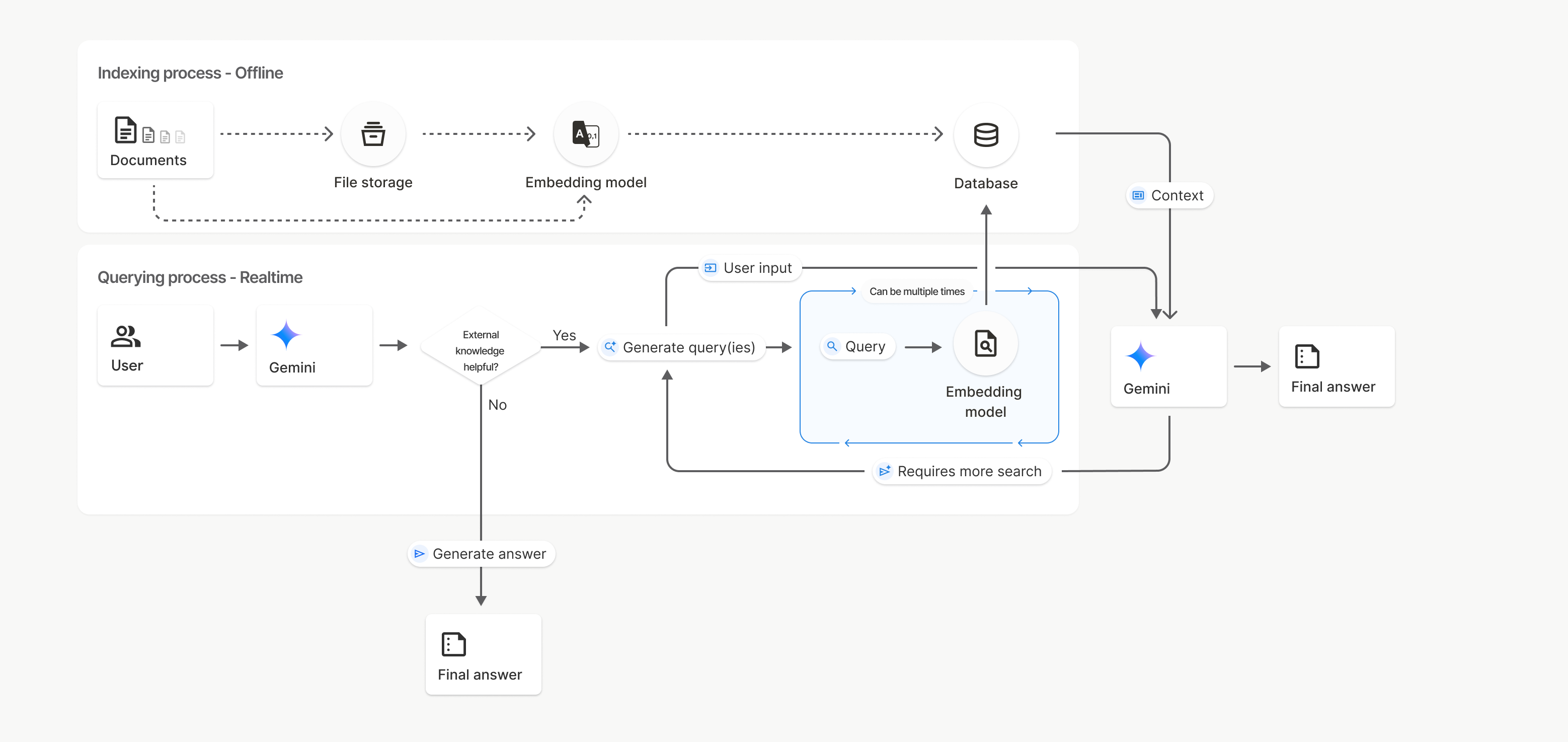
בתרשים הזה, הקו המקווקו מ-Documents אל Embedding model (באמצעות gemini-embedding-001) מייצג את uploadToFileSearchStore API (במעקף של File storage).
אחרת, שימוש ב-Files API כדי ליצור בנפרד ואז לייבא קבצים מעביר את תהליך יצירת האינדקס ממסמכים לאחסון קבצים ואז למודל הטמעה.
מאגרי חיפוש קבצים
מאגר חיפוש קבצים הוא מאגר להטמעות של המסמכים שלכם. קובצי נתונים גולמיים שהועלו דרך File API נמחקים אחרי 48 שעות, אבל הנתונים שיובאו למאגר של חיפוש קבצים נשמרים ללא הגבלת זמן עד שמבצעים מחיקה ידנית. אתם יכולים ליצור כמה מאגרי חיפוש קבצים כדי לארגן את המסמכים שלכם. FileSearchStore API מאפשר לכם ליצור, להציג, לקבל ולמחוק כדי לנהל את מאגרי החיפוש של הקבצים. שמות המאגרים של חיפוש הקבצים הם בהיקף גלובלי.
ריכזנו כאן כמה דוגמאות לניהול מאגרי חיפוש קבצים:
Python
file_search_store = client.file_search_stores.create(
    config={
        'display_name': 'my-file_search-store-123',
        'embedding_model': 'models/gemini-embedding-2'
    }
)

for file_search_store in client.file_search_stores.list():
    print(file_search_store)

my_file_search_store = client.file_search_stores.get(name='fileSearchStores/my-file_search-store-123')

client.file_search_stores.delete(name='fileSearchStores/my-file_search-store-123', config={'force': True})
JavaScript
const fileSearchStore = await ai.fileSearchStores.create({
  config: {
    displayName: 'my-file_search-store-123',
    embeddingModel: 'models/gemini-embedding-2'
  }
});

const fileSearchStores = await ai.fileSearchStores.list();
for await (const store of fileSearchStores) {
  console.log(store);
}

const myFileSearchStore = await ai.fileSearchStores.get({
  name: 'fileSearchStores/my-file_search-store-123'
});

await ai.fileSearchStores.delete({
  name: 'fileSearchStores/my-file_search-store-123',
  config: { force: true }
});
REST
curl -X POST "https://generativelanguage.googleapis.com/v1beta/fileSearchStores?key=${GEMINI_API_KEY}" \
    -H "Content-Type: application/json" \
    -d '{ "displayName": "My Store", "embedding_model": "models/gemini-embedding-2" }'

curl "https://generativelanguage.googleapis.com/v1beta/fileSearchStores?key=${GEMINI_API_KEY}" \

curl "https://generativelanguage.googleapis.com/v1beta/fileSearchStores/my-file_search-store-123?key=${GEMINI_API_KEY}"

curl -X DELETE "https://generativelanguage.googleapis.com/v1beta/fileSearchStores/my-file_search-store-123?key=${GEMINI_API_KEY}"
מסמכים בחיפוש קבצים
אתם יכולים לנהל מסמכים בודדים במאגרי הקבצים באמצעות File Search Documents API כדי list כל מסמך במאגר קבצים לחיפוש, get מידע על מסמך וdelete מסמך לפי שם.
Python
for document_in_store in client.file_search_stores.documents.list(parent='fileSearchStores/my-file_search-store-123'):
  print(document_in_store)

file_search_document = client.file_search_stores.documents.get(name='fileSearchStores/my-file_search-store-123/documents/my_doc')
print(file_search_document)

client.file_search_stores.documents.delete(name='fileSearchStores/my-file_search-store-123/documents/my_doc')
JavaScript
const documents = await ai.fileSearchStores.documents.list({
  parent: 'fileSearchStores/my-file_search-store-123'
});
for await (const doc of documents) {
  console.log(doc);
}

const fileSearchDocument = await ai.fileSearchStores.documents.get({
  name: 'fileSearchStores/my-file_search-store-123/documents/my_doc',
});

await ai.fileSearchStores.documents.delete({
  name: 'fileSearchStores/my-file_search-store-123/documents/my_doc'
});
REST
curl "https://generativelanguage.googleapis.com/v1beta/fileSearchStores/my-file_search-store-123/documents?key=${GEMINI_API_KEY}"

curl "https://generativelanguage.googleapis.com/v1beta/fileSearchStores/my-file_search-store-123/documents/my_doc?key=${GEMINI_API_KEY}"

curl -X DELETE "https://generativelanguage.googleapis.com/v1beta/fileSearchStores/my-file_search-store-123/documents/my_doc?key=${GEMINI_API_KEY}"
המטא-נתונים של הקבצים
אתם יכולים להוסיף מטא-נתונים מותאמים אישית לקבצים כדי לסנן אותם או לספק הקשר נוסף. מטא-נתונים הם קבוצה של צמדי מפתח/ערך.
Python
op = client.file_search_stores.import_file(
    file_search_store_name=file_search_store.name,
    file_name=sample_file.name,
    custom_metadata=[
        {"key": "author", "string_value": "Robert Graves"},
        {"key": "year", "numeric_value": 1934}
    ]
)
JavaScript
let operation = await ai.fileSearchStores.importFile({
  fileSearchStoreName: fileSearchStore.name,
  fileName: sampleFile.name,
  config: {
    customMetadata: [
      { key: "author", stringValue: "Robert Graves" },
      { key: "year", numericValue: 1934 }
    ]
  }
});
האפשרות הזו שימושית אם יש לכם כמה מסמכים במאגר של חיפוש קבצים ואתם רוצים לחפש רק בחלק מהם.
Python
response = client.models.generate_content(
    model="gemini-3.8-flash",
    contents="Tell me about the book 'I, Claudius'",
    config=types.GenerateContentConfig(
        tools=[
            types.Tool(
                file_search=types.FileSearch(
                    file_search_store_names=[file_search_store.name],
                    metadata_filter="author=Robert Graves",
                )
            )
        ]
    )
)

print(response.text)
JavaScript
const response = await ai.models.generateContent({
  model: "gemini-3.8-flash",
  contents: "Tell me about the book 'I, Claudius'",
  config: {
    tools: [
      {
        fileSearch: {
          fileSearchStoreNames: [fileSearchStore.name],
          metadataFilter: 'author="Robert Graves"',
        }
      }
    ]
  }
});

console.log(response.text);
REST
curl "https://generativelanguage.googleapis.com/v1beta/models/gemini-3.8-flash:generateContent?key=${GEMINI_API_KEY}" \
    -H 'Content-Type: application/json' \
    -X POST \
    -d '{
            "contents": [{
                "parts":[{"text": "Tell me about the book I, Claudius"}]
            }],
            "tools": [{
                "file_search": {
                    "file_search_store_names":["'$STORE_NAME'"],
                    "metadata_filter": "author = \"Robert Graves\""
                }
            }]
        }' 2> /dev/null > response.json

cat response.json
הנחיות להטמעת תחביר של מסנני רשימות ל-metadata_filter זמינות בכתובת google.aip.dev/160
חיפוש קבצים מרובה מצבים
חיפוש קבצים מולטימודאלי מאפשר לכם להטמיע ולחפש תמונות באופן מקורי, וכך ליצור אפליקציות RAG מולטימודאליות עשירות.
הגדרת מודל ההטמעה
כשיוצרים FileSearchStore, צריך להגדיר מודל הטמעה מרובה-אופנים במקום מודל ברירת המחדל להטמעה של טקסט בלבד. משתמשים ב-models/gemini-embedding-2 כדי לעבד טקסט ותמונות.
Python
store = client.file_search_stores.create(
    config={
        "display_name": "Multimodal Catalog",
        "embedding_model": "models/gemini-embedding-2",
    }
)
JavaScript
const fileSearchStore = await ai.fileSearchStores.create({
  config: {
    displayName: "Multimodal Catalog",
    embeddingModel: "models/gemini-embedding-2",
  },
});
REST
curl -X POST "https://generativelanguage.googleapis.com/v1beta/fileSearchStores?key=$GEMINI_API_KEY" \
    -H "Content-Type: application/json" \
    -d '{
      "display_name": "Multimodal Catalog",
      "embedding_model": "models/gemini-embedding-2"
    }'
העלאת תמונות
אחרי שיוצרים את המאגר באמצעות מודל הטמעה מולטימודאלי, אפשר להעלות קבצי תמונות ישירות באמצעות אותם ממשקי API להעלאה שמתוארים במאמרים העלאה ישירה למאגר של חיפוש קבצים או ייבוא קבצים.
הדרישות לגבי קובץ תמונה:
- קבצי התמונות צריכים להיות ברזולוציה של 4K x 4K פיקסלים לכל היותר.
- הפורמטים הנתמכים הם PNG ו-JPEG.
ציטוטים ביבליוגרפיים
כשמשתמשים בחיפוש קבצים, התשובה של המודל עשויה לכלול ציטוטים שמציינים אילו חלקים מהמסמכים שהועלו שימשו ליצירת התשובה. זה עוזר בבדיקת עובדות ובאימות.
אפשר לגשת לפרטי הציטוט דרך מאפיין grounding_metadata של התשובה.
Python
print(response.candidates[0].grounding_metadata)
JavaScript
console.log(JSON.stringify(response.candidates?.[0]?.groundingMetadata, null, 2));
מידע מפורט על המבנה של מטא-נתונים של ביסוס זמין בדוגמאות באוסף פתרונות בנושא חיפוש קבצים או בקטע בנושא עיגון באמצעות חיפוש Google.
מספרי דפים
כשמשתמשים בחיפוש קבצים עם מסמכים שיש להם דפים (כמו קובצי PDF), התשובה של המודל עשויה לכלול את מספר הדף שבו נמצא המידע.
אפשר לגשת למידע הזה דרך מאפיין page_number של התג retrieved_context.
Python
# Iterate through citations and check for page numbers
for chunk in response.grounding_metadata.grounding_chunks:
   if chunk.retrieved_context and chunk.retrieved_context.page_number:
       print(f"Cited Page: {chunk.retrieved_context.page_number}")
JavaScript
const groundingMetadata = response.candidates[0].groundingMetadata;
for (const chunk of groundingMetadata.groundingChunks) {
  if (chunk.retrievedContext && chunk.retrievedContext.pageNumber) {
    console.log(`Cited Page: ${chunk.retrievedContext.pageNumber}`);
  }
}
ציטוטים של מדיה
כשהמודל מתייחס לחלק של תמונה במהלך היצירה, ה-API מחזיר ציטוט במטא-נתוני ההארקה שכולל media_id. אפשר להשתמש במזהה הזה כדי להוריד את נתח התמונה המדויק שהמודל התייחס אליו. הערך הזה media_id נשמר בין כמה קריאות לחיפוש, כך שאפשר לאחזר את אותה תמונה באופן מהימן או לשמור אותה במטמון באמצעות המזהה.
קטע הקוד הבא הוא דוגמה לתגובת REST:
"groundingMetadata": {
  "groundingChunks": [
    {
      "retrievedContext": {
        "title": "product_image",
        "fileSearchStore": "fileSearchStores/my-store-123",
        "media_id": "fileSearchStores/my-store-123/media/BlobId-456"
      }
    }
  ]
}
קטעי הקוד הבאים מדגימים איך מאחזרים את media_id ומורידים את המדיה:
Python
# Iterate through citations and download media if present
for chunk in response.grounding_metadata.grounding_chunks:
   if chunk.retrieved_context and chunk.retrieved_context.media_id:
       print(f"Cited Media ID: {chunk.retrieved_context.media_id}")
       # Download the blob using the SDK
       blob_content = client.file_search_stores.download_media(
           media_id=chunk.retrieved_context.media_id
       )
       # Save blob_content to file...
JavaScript
const groundingMetadata = response.candidates[0].groundingMetadata;
for (const chunk of groundingMetadata.groundingChunks) {
  if (chunk.retrievedContext && chunk.retrievedContext.mediaId) {
    console.log(`Cited Media ID: ${chunk.retrievedContext.mediaId}`);
    const blobContent = await ai.fileSearchStores.downloadMedia(chunk.retrievedContext.mediaId);
    // Save blobContent to file...
  }
}
REST
curl -X GET "https://generativelanguage.googleapis.com/v1/fileSearchStores/my-store-123/media/BlobId-456" \
  -H "x-goog-api-key: $GEMINI_API_KEY"
מטא-נתונים בהתאמה אישית בנתוני ההארקה
אם הוספתם מטא-נתונים בהתאמה אישית לקבצים, תוכלו לגשת אליהם במטא-נתונים של ההארקה בתשובה של המודל. האפשרות הזו שימושית להעברת הקשר נוסף (כמו כתובות URL, מספרי דפים או מחברים) ממסמכי המקור ללוגיקה של האפליקציה. כל grounding_chunk ב-retrieved_context מכיל את המטא-נתונים המותאמים אישית האלה.
Python
response = client.models.generate_content(
    model="gemini-3.8-flash",
    contents="Tell me about [insert question]",
    config=types.GenerateContentConfig(
        tools=[
            types.Tool(
                file_search=types.FileSearch(
                    file_search_store_names=[file_search_store.name]
                )
            )
        ]
    )
)

for chunk in response.candidates[0].grounding_metadata.grounding_chunks:
    if chunk.retrieved_context:
        print(f"Text: {chunk.retrieved_context.text}")
        if chunk.retrieved_context.custom_metadata:
            for metadata in chunk.retrieved_context.custom_metadata:
                print(f"Metadata Key: {metadata.key}")
                print(f"Value: {metadata.string_value or metadata.numeric_value}")
JavaScript
const response = await ai.models.generateContent({
  model: "gemini-3.8-flash",
  contents: "Tell me about [insert question]",
  config: {
    tools: [
      {
        fileSearch: {
          fileSearchStoreNames: [fileSearchStore.name]
        }
      }
    ]
  }
});

const groundingMetadata = response.candidates[0].groundingMetadata;
groundingMetadata.groundingChunks.forEach((chunk) => {
  if (chunk.retrievedContext) {
    console.log(`Text: ${chunk.retrievedContext.text}`);
    if (chunk.retrievedContext.customMetadata) {
      chunk.retrievedContext.customMetadata.forEach((metadata) => {
        console.log(`Metadata Key: ${metadata.key}`);
        console.log(`Value: ${metadata.stringValue || metadata.numericValue}`);
      });
    }
  }
});
REST
{
  "candidates": [
    {
      "content": { ... },
      "grounding_metadata": {
        "grounding_chunks": [
          {
            "retrieved_context": {
              "text": "...",
              "title": "...",
              "uri": "...",
              "custom_metadata": [
                {
                  "key": "author",
                  "string_value": "Robert Graves"
                },
                {
                  "key": "year",
                  "numeric_value": 1934
                }
              ]
            }
          }
        ],
        "grounding_supports": [ ... ]
      }
    }
  ]
}
פלט מובנה
החל ממודלים של Gemini 3, אפשר לשלב את הכלי לחיפוש קבצים עם פלט מובנה.
Python
from pydantic import BaseModel, Field

class Money(BaseModel):
    amount: str = Field(description="The numerical part of the amount.")
    currency: str = Field(description="The currency of amount.")

response = client.models.generate_content(
    model="gemini-3.8-flash",
    contents="What is the minimum hourly wage in Tokyo right now?",
    config=types.GenerateContentConfig(
                tools=[
                    types.Tool(
                        file_search=types.FileSearch(
                            file_search_store_names=[file_search_store.name]
                        )
                    )
                ],
                response_format={"text": {"mime_type": "application/json", "schema": Money.model_json_schema()}}
      )
)
result = Money.model_validate_json(response.text)
print(result)
JavaScript
import { z } from "zod";

const moneySchema = z.object({
  amount: z.string().describe("The numerical part of the amount."),
  currency: z.string().describe("The currency of amount."),
});

async function run() {
  const response = await ai.models.generateContent({
    model: "gemini-3.8-flash",
    contents: "What is the minimum hourly wage in Tokyo right now?",
    config: {
      tools: [
        {
          fileSearch: {
            fileSearchStoreNames: [file_search_store.name],
          },
        },
      ],
      responseFormat: { text: { mimeType: "application/json", schema: z.toJSONSchema(moneySchema) } },
    },
  });

  const result = moneySchema.parse(JSON.parse(response.text));
  console.log(result);
}

run();
REST
curl "https://generativelanguage.googleapis.com/v1beta/models/gemini-3.8-flash:generateContent" \
  -H "x-goog-api-key: $GEMINI_API_KEY" \
  -H 'Content-Type: application/json' \
  -X POST \
  -d '{
    "contents": [{
      "parts": [{"text": "What is the minimum hourly wage in Tokyo right now?"}]
    }],
    "tools": [
      {
        "fileSearch": {
          "fileSearchStoreNames": ["$FILE_SEARCH_STORE_NAME"]
        }
      }
    ],
    "generationConfig": {
"responseFormat": {
  "text": {
    "mimeType": "application/json",
    "schema": {
            "type": "object",
            "properties": {
                "amount": {"type": "string", "description": "The numerical part of the amount."},
                "currency": {"type": "string", "description": "The currency of amount."}
  }
}
},
            "required": ["amount", "currency"]
        }
    }
  }'
מודלים נתמכים
המודלים הבאים תומכים בחיפוש קבצים:
| מודל | חיפוש קבצים |
|---|---|
| Gemini 3.8 Flash | ✔️ |
| Gemini 3.6 Flash | ✔️ |
| Gemini 3.5 Flash-Lite | ✔️ |
| Gemini 3.1 Pro Preview | ✔️ |
| Gemini 3.1 Flash-Lite | ✔️ |
| תצוגה מקדימה של Gemini 3 Flash | ✔️ |
| Gemini 2.5 Pro | ✔️ |
| Gemini 2.5 Flash-Lite | ✔️ |
שילובים נתמכים של כלים
מודלים של Gemini 3 תומכים בשילוב של כלים מובנים (כמו חיפוש קבצים) עם כלים מותאמים אישית (קריאה לפונקציה). מידע נוסף זמין בדף שילובים של כלים.
סוגי קבצים נתמכים
החיפוש בקבצים תומך במגוון רחב של פורמטים של קבצים, שמפורטים בקטעים הבאים.
סוגי קבצים של אפליקציות
application/dartapplication/ecmascriptapplication/jsonapplication/ms-javaapplication/mswordapplication/pdfapplication/sqlapplication/typescriptapplication/vnd.curlapplication/vnd.dartapplication/vnd.ibm.secure-containerapplication/vnd.jupyterapplication/vnd.ms-excelapplication/vnd.oasis.opendocument.textapplication/vnd.openxmlformats-officedocument.presentationml.presentationapplication/vnd.openxmlformats-officedocument.spreadsheetml.sheetapplication/vnd.openxmlformats-officedocument.wordprocessingml.documentapplication/vnd.openxmlformats-officedocument.wordprocessingml.templateapplication/x-cshapplication/x-hwpapplication/x-hwp-v5application/x-latexapplication/x-phpapplication/x-powershellapplication/x-shapplication/x-shellscriptapplication/x-texapplication/x-zshapplication/xmlapplication/zip
סוגים של קובצי טקסט
text/1d-interleaved-parityfectext/REDtext/SGMLtext/cache-manifesttext/calendartext/cqltext/cql-extensiontext/cql-identifiertext/csstext/csvtext/csv-schematext/dnstext/encaprtptext/enrichedtext/exampletext/fhirpathtext/flexfectext/fwdredtext/gff3text/grammar-ref-listtext/hl7v2text/htmltext/javascripttext/jcr-cndtext/jsxtext/markdowntext/mizartext/n3text/parameterstext/parityfectext/phptext/plaintext/provenance-notationtext/prs.fallenstein.rsttext/prs.lines.tagtext/prs.prop.logictext/raptorfectext/rfc822-headerstext/rtftext/rtp-enc-aescm128text/rtploopbacktext/rtxtext/sgmltext/shaclctext/shextext/spdxtext/stringstext/t140text/tab-separated-valuestext/texmacstext/trofftext/tsvtext/tsxtext/turtletext/ulpfectext/uri-listtext/vcardtext/vnd.DMClientScripttext/vnd.IPTC.NITFtext/vnd.IPTC.NewsMLtext/vnd.atext/vnd.abctext/vnd.ascii-arttext/vnd.curltext/vnd.debian.copyrighttext/vnd.dvb.subtitletext/vnd.esmertec.theme-descriptortext/vnd.exchangeabletext/vnd.familysearch.gedcomtext/vnd.ficlab.flttext/vnd.flytext/vnd.fmi.flexstortext/vnd.gmltext/vnd.graphviztext/vnd.hanstext/vnd.hgltext/vnd.in3d.3dmltext/vnd.in3d.spottext/vnd.latex-ztext/vnd.motorola.reflextext/vnd.ms-mediapackagetext/vnd.net2phone.commcenter.commandtext/vnd.radisys.msml-basic-layouttext/vnd.senx.warpscripttext/vnd.sositext/vnd.sun.j2me.app-descriptortext/vnd.trolltech.linguisttext/vnd.wap.sitext/vnd.wap.sltext/vnd.wap.wmltext/vnd.wap.wmlscripttext/vtttext/wgsltext/x-asmtext/x-bibtextext/x-bootext/x-ctext/x-c++hdrtext/x-c++srctext/x-cassandratext/x-chdrtext/x-coffeescripttext/x-componenttext/x-cshtext/x-csharptext/x-csrctext/x-cudatext/x-dtext/x-difftext/x-dsrctext/x-emacs-lisptext/x-erlangtext/x-gff3text/x-gotext/x-haskelltext/x-javatext/x-java-propertiestext/x-java-sourcetext/x-kotlintext/x-lilypondtext/x-lisptext/x-literate-haskelltext/x-luatext/x-moctext/x-objcsrctext/x-pascaltext/x-pcs-gcdtext/x-perltext/x-perl-scripttext/x-pythontext/x-python-scripttext/x-r-markdowntext/x-rsrctext/x-rsttext/x-ruby-scripttext/x-rusttext/x-sasstext/x-scalatext/x-schemetext/x-script.pythontext/x-scsstext/x-setexttext/x-sfvtext/x-shtext/x-siestatext/x-sostext/x-sqltext/x-swifttext/x-tcltext/x-textext/x-vbasictext/x-vcalendartext/xmltext/xml-dtdtext/xml-external-parsed-entitytext/yaml
מגבלות
- API פעיל: חיפוש קבצים לא נתמך בAPI הפעיל.
- אי-תאימות לכלי אחר: אי אפשר להשתמש בחיפוש קבצים בשילוב עם כלים אחרים, כמו עיגון באמצעות חיפוש Google, URL Context וכו'.
הגבלות קצב
כדי לשמור על יציבות השירות, יש מגבלות על File Search API:
- גודל קובץ מקסימלי / מגבלה לכל מסמך: 100MB
- הגודל הכולל של מאגרי חיפוש הקבצים בפרויקט (בהתאם לרמת המשתמש):
- בחינם: 1GB
- רמה 1: 10GB
- רמה 2: 100GB
- רמה 3: 1TB
- המלצה: כדי להבטיח חביון אופטימלי של אחזור נתונים, כדאי להגביל את הגודל של כל מאגר נתונים של חיפוש קבצים ל-20GB.
תמחור
- החיוב על הטמעות מתבצע בזמן יצירת האינדקס, על סמך תמחור ההטמעות הקיים.
- האחסון הוא בחינם.
- הטמעות של שאילתות בזמן אמת הן בחינם.
- האסימונים של המסמכים שאוחזרו מחויבים בתור אסימוני הקשר רגילים.
המאמרים הבאים
- אפשר לעיין במאמרי העזרה של ה-API בנושא מאגרי חיפוש קבצים ומסמכים של חיפוש קבצים.