

البحث عن الملفات
تتيح Gemini API ميزة "التوليد المعزّز بالاسترجاع" من خلال أداة "البحث في الملفات". تستورد ميزة "البحث عن الملفات" بياناتك وتقسّمها وتفهرسها لتتيح استرجاع المعلومات ذات الصلة بسرعة استنادًا إلى طلب مقدَّم. يتم بعد ذلك استخدام هذه المعلومات المسترجَعة كسياق للنموذج، ما يتيح له تقديم إجابات أكثر دقة وملاءمةً. تتوفّر أيضًا إمكانات متعدّدة الوسائط في ميزة "البحث عن الملفات"، وذلك من خلال تضمين النصوص باستخدام gemini-embedding-001، وتضمين الصور والوسائط المتعدّدة باستخدام gemini-embedding-2.
تكون عملية تخزين الملفات وإنشاء عمليات التضمين عند وقت طلب البحث مجانية، ولن تدفع إلا مقابل إنشاء عمليات التضمين عند فهرسة ملفاتك لأول مرة وتكلفة الرموز المميزة العادية الخاصة بمدخلات ومخرجات نموذج Gemini. يساهم نموذج الفوترة الجديد هذا في تسهيل عملية إنشاء "أداة البحث عن الملفات" وتوسيع نطاقها، كما يقلّل من تكلفتها. راجِع قسم الأسعار لمعرفة التفاصيل.
التحميل مباشرةً إلى متجر "بحث الملفات"
يوضّح المثال التالي كيفية تحميل ملف مباشرةً إلى مخزن البحث عن الملفات:
Python
from google import genai
from google.genai import types
import time

client = genai.Client()

file_search_store = client.file_search_stores.create(
    config={
        'display_name': 'your-fileSearchStore-name',
        'embedding_model': 'models/gemini-embedding-2'
    }
)

operation = client.file_search_stores.upload_to_file_search_store(
  file='sample.txt',
  file_search_store_name=file_search_store.name,
  config={
      'display_name' : 'display-file-name',
  }
)

while not operation.done:
    time.sleep(5)
    operation = client.operations.get(operation)

interaction = client.interactions.create(
    model="gemini-3.5-flash",
    input="Can you tell me about [insert question]",
    tools=[{
        "type": "file_search",
        "file_search_store_names": [file_search_store.name]
    }]
)

for step in interaction.steps:
    if step.type == "model_output":
        for content_block in step.content:
            if content_block.type == "text":
                print(content_block.text)
                if content_block.annotations:
                    print("\nSources:")
                    for annotation in content_block.annotations:
                        if annotation.type == "file_citation":
                            print(f"  - {annotation.file_name}: {annotation.source}")
JavaScript
const { GoogleGenAI } = require('@google/genai');

const ai = new GoogleGenAI({});

async function run() {
  const fileSearchStore = await ai.fileSearchStores.create({
    config: {
      displayName: 'your-fileSearchStore-name',
      embeddingModel: 'models/gemini-embedding-2'
    }
  });

  let operation = await ai.fileSearchStores.uploadToFileSearchStore({
    file: 'file.txt',
    fileSearchStoreName: fileSearchStore.name,
    config: {
      displayName: 'file-name',
    }
  });

  while (!operation.done) {
    await new Promise(resolve => setTimeout(resolve, 5000));
    operation = await ai.operations.get({ operation });
  }

  const interaction = await ai.interactions.create({
    model: "gemini-3.5-flash",
    input: "Can you tell me about [insert question]",
    tools: [{
      type: "file_search",
      file_search_store_names: [fileSearchStore.name]
    }]
  });

  for (const step of interaction.steps) {
    if (step.type === 'model_output') {
      for (const contentBlock of step.content) {
        if (contentBlock.type === 'text') {
          console.log(contentBlock.text);
          if (contentBlock.annotations) {
            console.log("\nSources:");
            for (const annotation of contentBlock.annotations) {
              if (annotation.type === 'file_citation') {
                console.log(`  - ${annotation.file_name}: ${annotation.source}`);
              }
            }
          }
        }
      }
    }
  }
}

run();
راجِع مرجع واجهة برمجة التطبيقات uploadToFileSearchStore للحصول على مزيد من المعلومات.
استيراد الملفات
بدلاً من ذلك، يمكنك تحميل ملف حالي واستيراده إلى متجر البحث عن الملفات باتّباع الخطوات التالية:
Python
from google import genai
from google.genai import types
import time

client = genai.Client()

sample_file = client.files.upload(file='sample.txt', config={'display_name': 'display_file_name'})

file_search_store = client.file_search_stores.create(
    config={
        'display_name': 'your-fileSearchStore-name',
        'embedding_model': 'models/gemini-embedding-2'
    }
)

operation = client.file_search_stores.import_file(
    file_search_store_name=file_search_store.name,
    file_name=sample_file.name
)

while not operation.done:
    time.sleep(5)
    operation = client.operations.get(operation)

interaction = client.interactions.create(
    model="gemini-3.5-flash",
    input="Can you tell me about [insert question]",
    tools=[{
        "type": "file_search",
        "file_search_store_names": [file_search_store.name]
    }]
)

for step in interaction.steps:
    if step.type == "model_output":
        for content_block in step.content:
            if content_block.type == "text":
                print(content_block.text)
JavaScript
const { GoogleGenAI } = require('@google/genai');

const ai = new GoogleGenAI({});

async function run() {
  const sampleFile = await ai.files.upload({
    file: 'sample.txt',
    config: { displayName: 'file-name' }
  });

  const fileSearchStore = await ai.fileSearchStores.create({
    config: {
      displayName: 'your-fileSearchStore-name',
      embeddingModel: 'models/gemini-embedding-2'
    }
  });

  let operation = await ai.fileSearchStores.importFile({
    fileSearchStoreName: fileSearchStore.name,
    fileName: sampleFile.name
  });

  while (!operation.done) {
    await new Promise(resolve => setTimeout(resolve, 5000));
    operation = await ai.operations.get({ operation: operation });
  }

  const interaction = await ai.interactions.create({
    model: "gemini-3.5-flash",
    input: "Can you tell me about [insert question]",
    tools: [{
      type: "file_search",
      file_search_store_names: [fileSearchStore.name]
    }]
  });

  for (const step of interaction.steps) {
    if (step.type === 'model_output') {
      for (const contentBlock of step.content) {
        if (contentBlock.type === 'text') {
          console.log(contentBlock.text);
        }
      }
    }
  }
}

run();
راجِع مرجع واجهة برمجة التطبيقات importFile للحصول على مزيد من المعلومات.
إعدادات التقسيم
عند استيراد ملف إلى مستودع "البحث عن الملفات"، يتم تقسيمه تلقائيًا إلى أجزاء، وتضمينه، وفهرسته، وتحميله إلى مستودع "البحث عن الملفات". إذا كنت بحاجة إلى المزيد من التحكّم في استراتيجية التقسيم، يمكنك تحديد إعداد chunking_config لضبط الحد الأقصى لعدد الرموز المميزة لكل جزء والحد الأقصى لعدد الرموز المميزة المتداخلة.
Python
from google import genai
from google.genai import types
import time

client = genai.Client()

operation = client.file_search_stores.upload_to_file_search_store(
    file_search_store_name=file_search_store.name,
    file='sample.txt',
    config={
        'chunking_config': {
          'white_space_config': {
            'max_tokens_per_chunk': 200,
            'max_overlap_tokens': 20
          }
        }
    }
)

while not operation.done:
    time.sleep(5)
    operation = client.operations.get(operation)

print("Custom chunking complete.")
JavaScript
const { GoogleGenAI } = require('@google/genai');

const ai = new GoogleGenAI({});

let operation = await ai.fileSearchStores.uploadToFileSearchStore({
  file: 'file.txt',
  fileSearchStoreName: fileSearchStore.name,
  config: {
    displayName: 'file-name',
    chunkingConfig: {
      whiteSpaceConfig: {
        maxTokensPerChunk: 200,
        maxOverlapTokens: 20
      }
    }
  }
});

while (!operation.done) {
  await new Promise(resolve => setTimeout(resolve, 5000));
  operation = await ai.operations.get({ operation });
}
console.log("Custom chunking complete.");
لاستخدام متجر "بحث الملفات"، مرِّره كأداة إلى طريقة interactions.create، كما هو موضّح في المثالَين تحميل واستيراد.
آلية العمل
تستخدم ميزة "البحث في الملفات" أسلوبًا يُعرف باسم البحث الدلالي للعثور على معلومات ذات صلة بطلب المستخدم. وعلى عكس البحث العادي المستند إلى الكلمات الرئيسية، يفهم البحث الدلالي معنى طلب البحث وسياقه.
عند استيراد ملف، يتم تحويله إلى تمثيلات رقمية تُعرف باسم التضمينات، وهي تلتقط المعنى الدلالي للمحتوى الذي تم تحميله. يتم تخزين هذه التضمينات في قاعدة بيانات متخصصة في "البحث عن الملفات". عند إجراء طلب بحث، يتم تحويله أيضًا إلى تضمين. بعد ذلك، يجري النظام عملية "البحث في الملفات" للعثور على أجزاء المستندات الأكثر تشابهًا وملاءمةً من مستودع "البحث في الملفات".
لا تتوفّر مدة بقاء (TTL) للتضمينات، بل تبقى متاحة إلى أن يتم حذفها يدويًا أو عند إيقاف النموذج نهائيًا، بينما يتم حذف الملفات بعد 48 ساعة.
في ما يلي تفصيل لعملية استخدام واجهة برمجة التطبيقات File Search
uploadToFileSearchStore:
إنشاء مستودع بحث في الملفات: يحتوي مستودع بحث في الملفات على البيانات المعالَجة من ملفاتك. وهي الحاوية الدائمة لعمليات التضمين التي سيتم إجراء البحث الدلالي عليها.
تحميل ملف واستيراده إلى مستودع "البحث عن الملفات": يمكنك تحميل ملف واستيراد النتائج إلى مستودع "البحث عن الملفات" في الوقت نفسه، ما يؤدي إلى إنشاء عنصر
Fileمؤقت، وهو مرجع إلى المستند الأولي. بعد ذلك، يتم تقسيم البيانات إلى أجزاء وتحويلها إلى تضمينات "البحث عن الملفات" وفهرستها. يتم حذف العنصرFileبعد 48 ساعة، بينما يتم تخزين البيانات التي تم استيرادها إلى مستودع "البحث عن الملفات" إلى أجل غير مسمى إلى أن تختار حذفها.طلب البحث باستخدام أداة "البحث في الملفات": أخيرًا، يمكنك استخدام أداة
FileSearchفي طلبgenerateContent. في إعدادات الأداة، يمكنك تحديدFileSearchRetrievalResource، الذي يشير إلىFileSearchStoreالذي تريد البحث فيه. يطلب ذلك من النموذج إجراء بحث دلالي في مخزن "البحث في الملفات" المحدّد للعثور على معلومات ذات صلة لتضمينها في الرد.
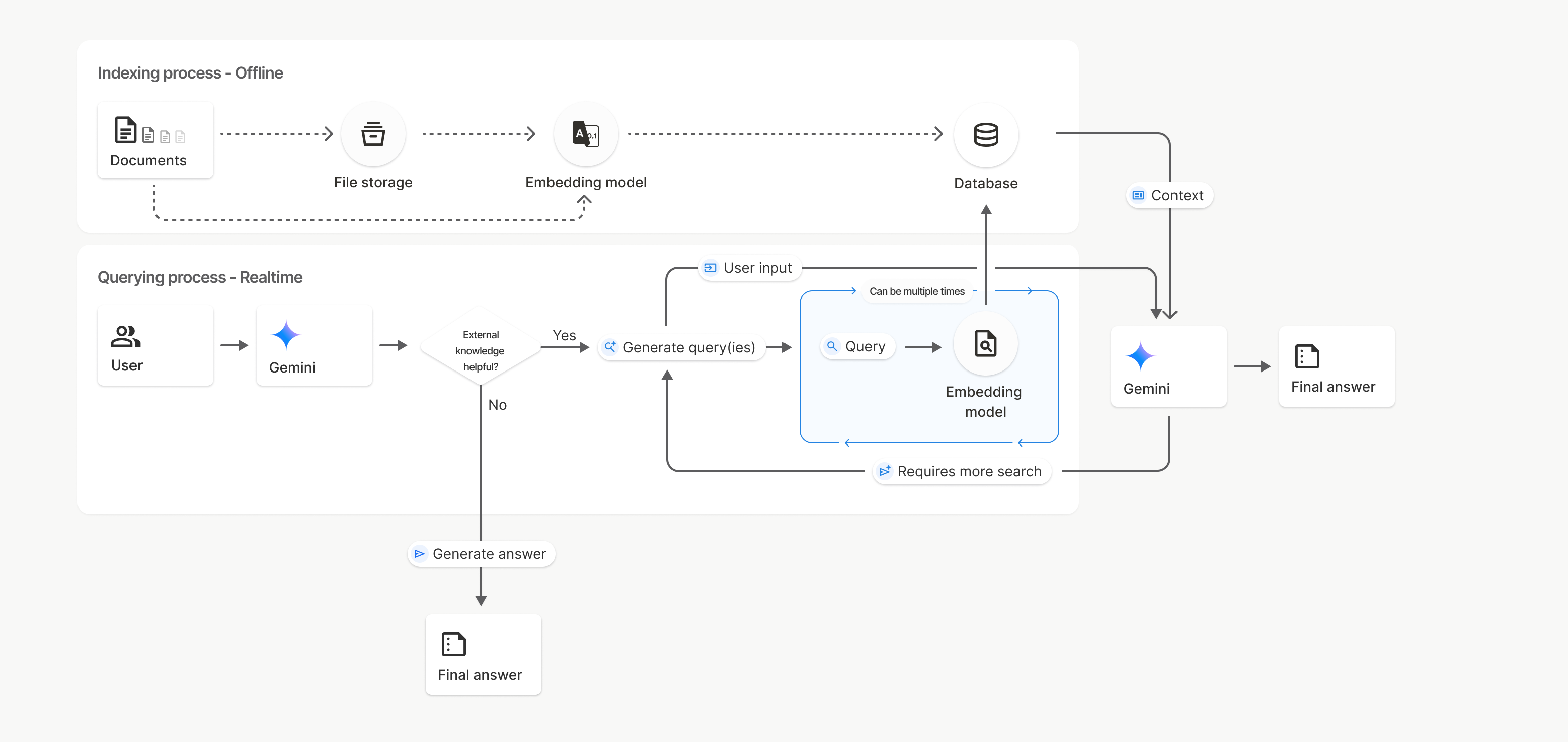
في هذا المخطط، يمثّل الخط المتقطّع من المستندات إلى نموذج التضمين (باستخدام gemini-embedding-001) واجهة برمجة التطبيقات uploadToFileSearchStore (مع تجاوز مساحة تخزين الملفات).
في ما عدا ذلك، يؤدي استخدام Files API لإنشاء الملفات بشكل منفصل ثم استيرادها إلى نقل عملية الفهرسة من المستندات إلى مساحة تخزين الملفات ثم إلى نموذج التضمين.
متاجر "بحث الملفات"
مستودع "البحث عن الملفات" هو حاوية لتضمينات المستندات. في حين يتم حذف الملفات الأولية التي تم تحميلها من خلال File API بعد 48 ساعة، يتم تخزين البيانات التي تم استيرادها إلى مستودع "بحث الملفات" إلى أجل غير مسمى إلى أن تحذفها يدويًا. يمكنك إنشاء عدة مستودعات بحث في الملفات لتنظيم مستنداتك. تتيح لك واجهة برمجة التطبيقات
FileSearchStore إنشاء قوائم بملفاتك وحذفها والبحث عنها وإدارتها. يتم تحديد نطاق أسماء متاجر "بحث الملفات" على مستوى العالم.
في ما يلي بعض الأمثلة على كيفية إدارة متاجر "بحث الملفات":
Python
file_search_store = client.file_search_stores.create(
    config={
        'display_name': 'my-file_search-store-123',
        'embedding_model': 'models/gemini-embedding-2'
    }
)

for file_search_store in client.file_search_stores.list():
    print(file_search_store)

my_file_search_store = client.file_search_stores.get(name='fileSearchStores/my-file_search-store-123')

client.file_search_stores.delete(name='fileSearchStores/my-file_search-store-123', config={'force': True})
JavaScript
const fileSearchStore = await ai.fileSearchStores.create({
  config: {
    displayName: 'my-file_search-store-123',
    embeddingModel: 'models/gemini-embedding-2'
  }
});

const fileSearchStores = await ai.fileSearchStores.list();
for await (const store of fileSearchStores) {
  console.log(store);
}

const myFileSearchStore = await ai.fileSearchStores.get({
  name: 'fileSearchStores/my-file_search-store-123'
});

await ai.fileSearchStores.delete({
  name: 'fileSearchStores/my-file_search-store-123',
  config: { force: true }
});
REST
curl -X POST "https://generativelanguage.googleapis.com/v1beta/fileSearchStores?key=${GEMINI_API_KEY}" \
    -H "Content-Type: application/json" \
    -d '{ "displayName": "My Store", "embedding_model": "models/gemini-embedding-2" }'

curl "https://generativelanguage.googleapis.com/v1beta/fileSearchStores?key=${GEMINI_API_KEY}" \

curl "https://generativelanguage.googleapis.com/v1beta/fileSearchStores/my-file_search-store-123?key=${GEMINI_API_KEY}"

curl -X DELETE "https://generativelanguage.googleapis.com/v1beta/fileSearchStores/my-file_search-store-123?key=${GEMINI_API_KEY}"
مستندات "البحث في الملفات"
يمكنك إدارة المستندات الفردية في مخازن الملفات باستخدام واجهة برمجة التطبيقات
File Search Documents من أجل list كل مستند
في مخزن بحث الملفات، وget معلومات حول مستند، وdelete مستند
حسب الاسم.
Python
for document_in_store in client.file_search_stores.documents.list(parent='fileSearchStores/my-file_search-store-123'):
  print(document_in_store)

file_search_document = client.file_search_stores.documents.get(name='fileSearchStores/my-file_search-store-123/documents/my_doc')
print(file_search_document)

client.file_search_stores.documents.delete(name='fileSearchStores/my-file_search-store-123/documents/my_doc', config={'force': True})
JavaScript
const documents = await ai.fileSearchStores.documents.list({
  parent: 'fileSearchStores/my-file_search-store-123'
});
for await (const doc of documents) {
  console.log(doc);
}

const fileSearchDocument = await ai.fileSearchStores.documents.get({
  name: 'fileSearchStores/my-file_search-store-123/documents/my_doc'
});

await ai.fileSearchStores.documents.delete({
  name: 'fileSearchStores/my-file_search-store-123/documents/my_doc'
});
REST
curl "https://generativelanguage.googleapis.com/v1beta/fileSearchStores/my-file_search-store-123/documents?key=${GEMINI_API_KEY}"

curl "https://generativelanguage.googleapis.com/v1beta/fileSearchStores/my-file_search-store-123/documents/my_doc?key=${GEMINI_API_KEY}"

curl -X DELETE "https://generativelanguage.googleapis.com/v1beta/fileSearchStores/my-file_search-store-123/documents/my_doc?key=${GEMINI_API_KEY}&force=true"
البيانات الوصفية للملف
يمكنك إضافة بيانات وصفية مخصّصة إلى ملفاتك للمساعدة في فلترتها أو تقديم سياق إضافي، والبيانات الوصفية هي مجموعة من أزواج المفتاح والقيمة.
Python
op = client.file_search_stores.import_file(
    file_search_store_name=file_search_store.name,
    file_name=sample_file.name,
    config={
        'custom_metadata': [
            {"key": "author", "string_value": "Robert Graves"},
            {"key": "year", "numeric_value": 1934}
        ]
    }
)
JavaScript
let operation = await ai.fileSearchStores.importFile({
  fileSearchStoreName: fileSearchStore.name,
  fileName: sampleFile.name,
  config: {
    customMetadata: [
      { key: "author", stringValue: "Robert Graves" },
      { key: "year", numericValue: 1934 }
    ]
  }
});
يكون هذا الإجراء مفيدًا عندما يكون لديك مستندات متعددة في مستودع "بحث الملفات" وتريد البحث في مجموعة فرعية منها فقط.
Python
interaction = client.interactions.create(
    model="gemini-3.5-flash",
    input="Tell me about the book 'I, Claudius'",
    tools=[{
        "type": "file_search",
        "file_search_store_names": [file_search_store.name],
        "metadata_filter": 'author="Robert Graves"',
    }]
)

for step in interaction.steps:
    if step.type == "model_output":
        for content_block in step.content:
            if content_block.type == "text":
                print(content_block.text)
JavaScript
const interaction = await ai.interactions.create({
  model: "gemini-3.5-flash",
  input: "Tell me about the book 'I, Claudius'",
  tools: [{
    type: "file_search",
    file_search_store_names: [fileSearchStore.name],
    metadata_filter: 'author="Robert Graves"',
  }]
});

for (const step of interaction.steps) {
  if (step.type === 'model_output') {
    for (const contentBlock of step.content) {
      if (contentBlock.type === 'text') {
        console.log(contentBlock.text);
      }
    }
  }
}
REST
curl "https://generativelanguage.googleapis.com/v1beta/interactions" \
    -H "x-goog-api-key: $GEMINI_API_KEY" \
    -H 'Content-Type: application/json' \
    -H "Api-Revision: 2026-05-20" \
    -X POST \
    -d '{
            "model": "gemini-3.5-flash",
            "input": [{"type": "text", "text": "Tell me about the book I, Claudius"}],
            "tools": [{
                "type": "file_search",
                "file_search_store_names": ["'$STORE_NAME'"],
                "metadata_filter": "author = \"Robert Graves\""
            }]
        }' 2> /dev/null > response.json

cat response.json
يمكن العثور على إرشادات حول تنفيذ بنية فلتر القائمة الخاصة بـ metadata_filter على الرابط google.aip.dev/160.
البحث المتعدّد الوسائط في الملفات
تتيح لك ميزة "البحث في الملفات" المتعدّد الوسائط تضمين الصور والبحث فيها بشكلٍ مدمج، ما يتيح إنشاء تطبيقات غنية ومتعدّدة الوسائط تستخدم "التوليد المعزّز بالاسترجاع".
ضبط نموذج التضمين
عند إنشاء FileSearchStore، عليك تجاهل نموذج التضمين التلقائي النصي فقط واستخدام نموذج متعدد الوسائط. استخدِم models/gemini-embedding-2 لمعالجة كل من النص والصور.
Python
store = client.file_search_stores.create(
    config={
        "display_name": "Multimodal Catalog",
        "embedding_model": "models/gemini-embedding-2",
    }
)
JavaScript
const fileSearchStore = await ai.fileSearchStores.create({
  config: {
    displayName: "Multimodal Catalog",
    embeddingModel: "models/gemini-embedding-2",
  },
});
REST
curl -X POST "https://generativelanguage.googleapis.com/v1beta/fileSearchStores?key=$GEMINI_API_KEY" \
    -H "Content-Type: application/json" \
    -d '{
      "display_name": "Multimodal Catalog",
      "embedding_model": "models/gemini-embedding-2"
    }'
تحميل صور
بعد إنشاء المتجر باستخدام نموذج التضمين المتعدّد الوسائط، يمكنك تحميل ملفات الصور مباشرةً باستخدام واجهات برمجة التطبيقات نفسها الموضّحة في التحميل مباشرةً إلى متجر "بحث الملفات" أو استيراد الملفات.
متطلبات ملف الصورة:
- يجب ألا تزيد دقة ملفات الصور عن 4K x 4K بكسل.
- التنسيقات المتوافقة هي PNG وJPEG.
الاقتباسات
عند استخدام "البحث في الملفات"، قد يتضمّن ردّ النموذج اقتباسات تحدّد الأجزاء من المستندات التي حمّلتها والتي تم استخدامها لإنشاء الإجابة، ما يساعد في التحقّق من صحة المعلومات.
يمكنك الوصول إلى معلومات الاقتباس من خلال السمة annotations داخل كتل content الخاصة بالخطوة model_output في الردّ.
Python
for step in interaction.steps:
    if step.type == 'model_output':
        for content in step.content:
            if content.type == 'text' and content.annotations:
                print(content.annotations)
JavaScript
for (const step of interaction.steps) {
  if (step.type === 'model_output') {
    for (const contentBlock of step.content) {
      if (contentBlock.type === 'text' && contentBlock.annotations) {
        console.log(JSON.stringify(contentBlock.annotations, null, 2));
      }
    }
  }
}
للحصول على معلومات تفصيلية حول بنية الاقتباسات، يُرجى الاطّلاع على مرجع واجهة برمجة التطبيقات للتفاعلات.
أرقام الصفحات
عند استخدام ميزة "البحث في الملفات" مع المستندات التي تتضمّن صفحات (مثل ملفات PDF)، قد يتضمّن ردّ النموذج رقم الصفحة التي تم العثور على المعلومات فيها.
يمكنك الوصول إلى هذه المعلومات من خلال السمة page_number الخاصة بالتعليق التوضيحي file_citation.
Python
for step in interaction.steps:
    if step.type == "model_output":
        for content in step.content:
            if content.type == "text" and content.annotations:
                for annotation in content.annotations:
                    if annotation.type == "file_citation" and annotation.page_number:
                        print(f"Cited Page: {annotation.page_number}")
JavaScript
for (const step of interaction.steps) {
  if (step.type === 'model_output') {
    for (const block of step.content) {
      if (block.type === 'text' && block.annotations) {
        for (const annotation of block.annotations) {
          if (annotation.type === 'file_citation' && annotation.pageNumber) {
            console.log(`Cited Page: ${annotation.pageNumber}`);
          }
        }
      }
    }
  }
}
اقتباسات من الوسائط
عندما يشير النموذج إلى جزء من صورة أثناء عملية الإنشاء، تعرض واجهة برمجة التطبيقات تعليقًا توضيحيًا من النوع file_citation في التعليقات التوضيحية يتضمّن media_id. يمكنك استخدام هذا المعرّف لتنزيل جزء الصورة الذي أشار إليه النموذج. يكون media_id هذا ثابتًا في طلبات البحث المتعددة، ما يتيح لك استرداد الصورة نفسها أو تخزينها مؤقتًا بشكل موثوق باستخدام المعرّف.
المقتطف التالي هو مثال على خطوة استجابة REST:
{
  "type": "model_output",
  "content": [
    {
      "type": "text",
      "text": "...",
      "annotations": [
        {
          "type": "file_citation",
          "file_name": "product_image",
          "media_id": "fileSearchStores/my-store-123/media/BlobId-456"
        }
      ]
    }
  ]
}
توضّح مقتطفات الرموز البرمجية التالية كيفية استرداد media_id وتنزيل الوسائط:
Python
for step in interaction.steps:
    if step.type == "model_output":
        for content in step.content:
            if content.type == "text" and content.annotations:
                for annotation in content.annotations:
                    if annotation.type == "file_citation" and annotation.media_id:
                        print(f"Cited Media ID: {annotation.media_id}")
                        blob_content = client.file_search_stores.download_media(
                            media_id=annotation.media_id
                        )
JavaScript
for (const step of interaction.steps) {
  if (step.type === 'model_output') {
    for (const block of step.content) {
      if (block.type === 'text' && block.annotations) {
        for (const annotation of block.annotations) {
          if (annotation.type === 'file_citation' && annotation.mediaId) {
            console.log(`Cited Media ID: ${annotation.mediaId}`);
            const blobContent = await ai.fileSearchStores.downloadMedia(annotation.mediaId);
          }
        }
      }
    }
  }
}
REST
curl -X GET "https://generativelanguage.googleapis.com/v1/fileSearchStores/my-store-123/media/BlobId-456" \
  -H "x-goog-api-key: $GEMINI_API_KEY"
البيانات الوصفية المخصّصة
إذا أضفت بيانات وصفية مخصّصة إلى ملفاتك، يمكنك الوصول إليها في التعليقات التوضيحية الخاصة برد النموذج. ويكون ذلك مفيدًا في تمرير سياق إضافي (مثل عناوين URL أو أرقام الصفحات أو المؤلّفين) من المستندات المصدر إلى منطق التطبيق. يحتوي كل تعليق توضيحي للاقتباس من النوع file_citation
على هذه البيانات الوصفية المخصّصة.
Python
interaction = client.interactions.create(
    model="gemini-3.5-flash",
    input="Tell me about [insert question]",
    tools=[{
        "type": "file_search",
        "file_search_store_names": [file_search_store.name]
    }]
)

for step in interaction.steps:
    if step.type == "model_output":
        for content_block in step.content:
            if content_block.annotations:
                for annotation in content_block.annotations:
                    print(annotation)
JavaScript
  const interaction = await ai.interactions.create({
    model: "gemini-3.5-flash",
    input: "Tell me about [insert question]",
    tools: [{
      type: "file_search",
      file_search_store_names: [fileSearchStore.name]
    }]
  });

  for (const step of interaction.steps) {
    if (step.type === 'model_output') {
      for (const contentBlock of step.content) {
        if (contentBlock.annotations) {
          contentBlock.annotations.forEach((annotation) => {
            console.log(annotation);
          });
        }
      }
    }
  }
REST
{
  "steps": [
    {
      "type": "model_output",
      "content": [
        {
          "type": "text",
          "text": "...",
          "annotations": [
            {
              "file_name": "...",
              "source": "...",
              "custom_metadata": [
                {
                  "key": "author",
                  "string_value": "Robert Graves"
                },
                {
                  "key": "year",
                  "numeric_value": 1934
                }
              ]
            }
          ]
        }
      ]
    }
  ]
}
ناتج منظَّم
بدءًا من طُرز Gemini 3، يمكنك دمج أداة البحث عن الملفات مع النتائج المنظَّمة.
Python
from pydantic import BaseModel, Field

class Money(BaseModel):
    amount: str = Field(description="The numerical part of the amount.")
    currency: str = Field(description="The currency of amount.")

interaction = client.interactions.create(
    model="gemini-3.5-flash",
    input="What is the minimum hourly wage in Tokyo right now?",
    tools=[{
        "type": "file_search",
        "file_search_store_names": [file_search_store.name]
    }],
    response_format={
        "type": "text",
        "mime_type": "application/json",
        "schema": Money.model_json_schema()
    },
)
result = Money.model_validate_json(interaction.output_text)
print(result)
JavaScript
import { z } from "zod";

const moneyJsonSchema = {
  type: "object",
  properties: {
    amount: { type: "string", description: "The numerical part of the amount." },
    currency: { type: "string", description: "The currency of amount." }
  },
  required: ["amount", "currency"]
};

const moneySchema = z.fromJSONSchema(moneyJsonSchema);

async function run() {
  const interaction = await ai.interactions.create({
    model: "gemini-3.5-flash",
    input: "What is the minimum hourly wage in Tokyo right now?",
    tools: [{
      type: "file_search",
      file_search_store_names: [fileSearchStore.name],
    }],
    response_format: {
      type: 'text',
      mime_type: 'application/json',
      schema: moneyJsonSchema
    },
  });

  const result = moneySchema.parse(JSON.parse(interaction.output_text));
  console.log(result);
}

run();
REST
curl "https://generativelanguage.googleapis.com/v1beta/interactions" \
  -H "x-goog-api-key: $GEMINI_API_KEY" \
  -H 'Content-Type: application/json' \
  -H "Api-Revision: 2026-05-20" \
  -X POST \
  -d '{
    "model": "gemini-3.5-flash",
    "input": "What is the minimum hourly wage in Tokyo right now?",
    "tools": [{
      "type": "file_search",
      "file_search_store_names": ["$FILE_SEARCH_STORE_NAME"]
    }],
    "response_format": {
      "type": "text",
      "mime_type": "application/json",
      "schema": {
        "type": "object",
        "properties": {
          "amount": {"type": "string", "description": "The numerical part of the amount."},
          "currency": {"type": "string", "description": "The currency of amount."}
        },
        "required": ["amount", "currency"]
      }
    }
  }'
النماذج المتوافقة
تتيح الطُرز التالية استخدام ميزة "البحث عن الملفات":
| الطراز | البحث عن الملفات |
|---|---|
| Gemini 3.5 Flash | ✔️ |
| إصدار تجريبي من Gemini 3.1 Pro | ✔️ |
| Gemini 3.1 Flash-Lite | ✔️ |
| معاينة Gemini 3 Flash | ✔️ |
| Gemini 2.5 Pro | ✔️ |
| Gemini 2.5 Flash-Lite | ✔️ |
مجموعات الأدوات المتوافقة
تتيح نماذج Gemini 3 الجمع بين الأدوات المضمّنة (مثل "البحث عن الملفات") والأدوات المخصّصة (استدعاء الدالة). يمكنك الاطّلاع على مزيد من المعلومات في صفحة مجموعات الأدوات.
أنواع الملفات المعتمدة
يتيح "بحث الملفات" مجموعة كبيرة من تنسيقات الملفات، والمدرَجة في الأقسام التالية.
أنواع ملفات التطبيقات
application/dartapplication/ecmascriptapplication/jsonapplication/ms-javaapplication/mswordapplication/pdfapplication/sqlapplication/typescriptapplication/vnd.curlapplication/vnd.dartapplication/vnd.ibm.secure-containerapplication/vnd.jupyterapplication/vnd.ms-excelapplication/vnd.oasis.opendocument.textapplication/vnd.openxmlformats-officedocument.presentationml.presentationapplication/vnd.openxmlformats-officedocument.spreadsheetml.sheetapplication/vnd.openxmlformats-officedocument.wordprocessingml.documentapplication/vnd.openxmlformats-officedocument.wordprocessingml.templateapplication/x-cshapplication/x-hwpapplication/x-hwp-v5application/x-latexapplication/x-phpapplication/x-powershellapplication/x-shapplication/x-shellscriptapplication/x-texapplication/x-zshapplication/xmlapplication/zip
أنواع الملفات النصية
text/1d-interleaved-parityfectext/REDtext/SGMLtext/cache-manifesttext/calendartext/cqltext/cql-extensiontext/cql-identifiertext/csstext/csvtext/csv-schematext/dnstext/encaprtptext/enrichedtext/exampletext/fhirpathtext/flexfectext/fwdredtext/gff3text/grammar-ref-listtext/hl7v2text/htmltext/javascripttext/jcr-cndtext/jsxtext/markdowntext/mizartext/n3text/parameterstext/parityfectext/phptext/plaintext/provenance-notationtext/prs.fallenstein.rsttext/prs.lines.tagtext/prs.prop.logictext/raptorfectext/rfc822-headerstext/rtftext/rtp-enc-aescm128text/rtploopbacktext/rtxtext/sgmltext/shaclctext/shextext/spdxtext/stringstext/t140text/tab-separated-valuestext/texmacstext/trofftext/tsvtext/tsxtext/turtletext/ulpfectext/uri-listtext/vcardtext/vnd.DMClientScripttext/vnd.IPTC.NITFtext/vnd.IPTC.NewsMLtext/vnd.atext/vnd.abctext/vnd.ascii-arttext/vnd.curltext/vnd.debian.copyrighttext/vnd.dvb.subtitletext/vnd.esmertec.theme-descriptortext/vnd.exchangeabletext/vnd.familysearch.gedcomtext/vnd.ficlab.flttext/vnd.flytext/vnd.fmi.flexstortext/vnd.gmltext/vnd.graphviztext/vnd.hanstext/vnd.hgltext/vnd.in3d.3dmltext/vnd.in3d.spottext/vnd.latex-ztext/vnd.motorola.reflextext/vnd.ms-mediapackagetext/vnd.net2phone.commcenter.commandtext/vnd.radisys.msml-basic-layouttext/vnd.senx.warpscripttext/vnd.sositext/vnd.sun.j2me.app-descriptortext/vnd.trolltech.linguisttext/vnd.wap.sitext/vnd.wap.sltext/vnd.wap.wmltext/vnd.wap.wmlscripttext/vtttext/wgsltext/x-asmtext/x-bibtextext/x-bootext/x-ctext/x-c++hdrtext/x-c++srctext/x-cassandratext/x-chdrtext/x-coffeescripttext/x-componenttext/x-cshtext/x-csharptext/x-csrctext/x-cudatext/x-dtext/x-difftext/x-dsrctext/x-emacs-lisptext/x-erlangtext/x-gff3text/x-gotext/x-haskelltext/x-javatext/x-java-propertiestext/x-java-sourcetext/x-kotlintext/x-lilypondtext/x-lisptext/x-literate-haskelltext/x-luatext/x-moctext/x-objcsrctext/x-pascaltext/x-pcs-gcdtext/x-perltext/x-perl-scripttext/x-pythontext/x-python-scripttext/x-r-markdowntext/x-rsrctext/x-rsttext/x-ruby-scripttext/x-rusttext/x-sasstext/x-scalatext/x-schemetext/x-script.pythontext/x-scsstext/x-setexttext/x-sfvtext/x-shtext/x-siestatext/x-sostext/x-sqltext/x-swifttext/x-tcltext/x-textext/x-vbasictext/x-vcalendartext/xmltext/xml-dtdtext/xml-external-parsed-entitytext/yaml
القيود
- واجهة برمجة التطبيقات المباشرة: لا تتوفّر ميزة "البحث عن الملفات" في واجهة برمجة التطبيقات المباشرة.
- عدم توافق الأداة: لا يمكن حاليًا استخدام "البحث عن ملف" مع أدوات أخرى، مثل تحديد المصدر من خلال "بحث Search" وسياق عنوان URL وغير ذلك.
حدود معدّل الاستخدام
تفرض واجهة برمجة التطبيقات "البحث عن الملفات" الحدود التالية لضمان استقرار الخدمة:
- الحدّ الأقصى لحجم الملف / الحدّ الأقصى لكل مستند: 100 ميغابايت
- إجمالي حجم مساحات تخزين "البحث عن الملفات" في المشروع (استنادًا إلى فئة المستخدم):
- الخطة المجانية: 1 غيغابايت
- المستوى 1: 10 غيغابايت
- المستوى 2: 100 غيغابايت
- المستوى 3: 1 تيرابايت
- اقتراح: يجب ألا يتجاوز حجم كل مستودع بيانات في "بحث الملفات" 20 غيغابايت لضمان أفضل أوقات استرجاع.
الأسعار
- يتم تحصيل رسوم منك مقابل التضمينات في وقت الفهرسة استنادًا إلى أسعار التضمينات الحالية.
- تتوفر مساحة التخزين بدون أي رسوم.
- إنّ تضمينات وقت طلب البحث مجانية.
- يتم تحصيل رسوم من الرموز المميزة للمستندات التي تم استرجاعها باعتبارها رموزًا مميزة للسياق عادية.
الخطوات التالية
- انتقِل إلى مرجع واجهة برمجة التطبيقات File Search Stores وDocuments في File Search.