

Mit Funktionsaufrufen können Sie Modelle mit externen Tools und APIs verbinden. Anstatt Textantworten zu generieren, bestimmt das Modell, wann bestimmte Funktionen aufgerufen werden sollen, und stellt die erforderlichen Parameter zur Ausführung von Aktionen in der realen Welt bereit. So kann das Modell als Brücke zwischen natürlicher Sprache und realen Aktionen und Daten fungieren. Es gibt drei Hauptanwendungsfälle für Funktionsaufrufe:
- Aktionen ausführen: Interaktion mit externen Systemen über APIs, z. B. Termine planen, Rechnungen erstellen, E‑Mails senden oder Smart-Home-Geräte steuern.
- Wissen erweitern: Zugriff auf Informationen aus externen Quellen wie Datenbanken, APIs und Wissensdatenbanken.
- Funktionen erweitern: Externe Tools verwenden, um Berechnungen durchzuführen und die Einschränkungen des Modells zu erweitern, z. B. einen Taschenrechner verwenden oder Diagramme erstellen.
Unten finden Sie Beispiele für diese Anwendungsfälle:
Besprechung planen
In diesem Beispiel wird gezeigt, wie Sie eine Funktion definieren, die eine Besprechung mit Teilnehmern zu einem bestimmten Zeitpunkt plant. So kann das Modell Nutzeranfragen parsen und strukturierte Argumente zurückgeben, um Aktionen in externen Systemen auszulösen.
Python
from google import genai

schedule_meeting_function = {
    "type": "function",
    "name": "schedule_meeting",
    "description": "Schedules a meeting with specified attendees at a given time and date.",
    "parameters": {
        "type": "object",
        "properties": {
            "attendees": {"type": "array", "items": {"type": "string"}},
            "date": {"type": "string", "description": "Date (e.g., '2024-07-29')"},
            "time": {"type": "string", "description": "Time (e.g., '15:00')"},
            "topic": {"type": "string", "description": "The meeting topic."},
        },
        "required": ["attendees", "date", "time", "topic"],
    },
}

client = genai.Client()

interaction = client.interactions.create(
    model="gemini-3.6-flash",
    input="Schedule a meeting with Bob and Alice for 03/14/2025 at 10:00 AM about Q3 planning.",
    tools=[{"type": "function", **schedule_meeting_function}],
)

for step in interaction.steps:
    if step.type == "function_call":
        print(f"Function to call: {step.name}")
        print(f"Arguments: {step.arguments}")
JavaScript
import { GoogleGenAI } from '@google/genai';

const client = new GoogleGenAI({});

const scheduleMeetingFunction = {
  type: 'function',
  name: 'schedule_meeting',
  description: 'Schedules a meeting with specified attendees at a given time and date.',
  parameters: {
    type: 'object',
    properties: {
      attendees: { type: 'array', items: { type: 'string' } },
      date: { type: 'string', description: 'Date (e.g., "2024-07-29")' },
      time: { type: 'string', description: 'Time (e.g., "15:00")' },
      topic: { type: 'string', description: 'The meeting topic.' },
    },
    required: ['attendees', 'date', 'time', 'topic'],
  },
};

const interaction = await client.interactions.create({
  model: 'gemini-3.6-flash',
  input: 'Schedule a meeting with Bob and Alice for 03/27/2025 at 10:00 AM about Q3 planning.',
  tools: [scheduleMeetingFunction],
});

for (const step of interaction.steps) {
  if (step.type === 'function_call') {
    console.log(`Function to call: ${step.name}`);
    console.log(`Arguments: ${JSON.stringify(step.arguments)}`);
  }
}
REST
curl -X POST "https://generativelanguage.googleapis.com/v1beta/interactions" \
  -H "x-goog-api-key: $GEMINI_API_KEY" \
  -H 'Content-Type: application/json' \
  -d '{
    "model": "gemini-3.6-flash",
    "input": "Schedule a meeting with Bob and Alice for 03/27/2025 at 10:00 AM about Q3 planning.",
    "tools": [{
        "type": "function",
        "name": "schedule_meeting",
        "description": "Schedules a meeting with specified attendees at a given time and date.",
        "parameters": {
          "type": "object",
          "properties": {
            "attendees": {"type": "array", "items": {"type": "string"}},
            "date": {"type": "string"},
            "time": {"type": "string"},
            "topic": {"type": "string"}
          },
          "required": ["attendees", "date", "time", "topic"]
        }
    }]
  }'
Wetter abrufen
In diesem Beispiel wird gezeigt, wie Sie eine Funktion definieren, die Temperaturdaten für einen Standort abruft. So kann das Modell externe APIs aufrufen, um Anfragen zu beantworten, für die Echtzeitinformationen oder externe Informationen erforderlich sind.
Python
from google import genai

weather_function = {
    "type": "function",
    "name": "get_current_temperature",
    "description": "Gets the current temperature for a given location.",
    "parameters": {
        "type": "object",
        "properties": {
            "location": {
                "type": "string",
                "description": "The city name, e.g. San Francisco",
            },
        },
        "required": ["location"],
    },
}

client = genai.Client()

interaction = client.interactions.create(
    model="gemini-3.6-flash",
    input="What's the temperature in London?",
    tools=[weather_function],
)

for step in interaction.steps:
    if step.type == "function_call":
        print(f"Function to call: {step.name}")
        print(f"Arguments: {step.arguments}")
JavaScript
import { GoogleGenAI } from '@google/genai';

const client = new GoogleGenAI({});

const weatherFunctionDeclaration = {
  type: 'function',
  name: 'get_current_temperature',
  description: 'Gets the current temperature for a given location.',
  parameters: {
    type: 'object',
    properties: {
      location: {
        type: 'string',
        description: 'The city name, e.g. San Francisco',
      },
    },
    required: ['location'],
  },
};

const interaction = await client.interactions.create({
  model: 'gemini-3.6-flash',
  input: "What's the temperature in London?",
  tools: [weatherFunctionDeclaration],
});

for (const step of interaction.steps) {
  if (step.type === 'function_call') {
    console.log(`Function to call: ${step.name}`);
    console.log(`Arguments: ${JSON.stringify(step.arguments)}`);
  }
}
REST
curl -X POST "https://generativelanguage.googleapis.com/v1beta/interactions" \
  -H "x-goog-api-key: $GEMINI_API_KEY" \
  -H 'Content-Type: application/json' \
  -d '{
    "model": "gemini-3.6-flash",
    "input": "What'\''s the temperature in London?",
    "tools": [{
      "type": "function",
      "name": "get_current_temperature",
      "description": "Gets the current temperature for a given location.",
      "parameters": {
        "type";: "object",
        "properties": {
          "location": {"type": "string", "description": "The city name"}
        },
        "required": ["location"]
      }
    }]
  }'
Diagramm erstellen
In diesem Beispiel wird gezeigt, wie Sie eine Funktion definieren, die ein Balkendiagramm aus strukturierten Daten generiert. So wird veranschaulicht, wie das Modell externe Tools verwenden kann, um Berechnungen durchzuführen oder visuelle Elemente zu erstellen:
Python
from google import genai

create_chart_function = {
    "type": "function",
    "name": "create_bar_chart",
    "description": "Creates a bar chart given a title, labels, and values.",
    "parameters": {
        "type": "object",
        "properties": {
            "title": {"type": "string", "description": "The title for the chart."},
            "labels": {"type": "array", "items": {"type": "string"}},
            "values": {"type": "array", "items": {"type": "number"}},
        },
        "required": ["title", "labels", "values"],
    },
}

client = genai.Client()

interaction = client.interactions.create(
    model=";gemini-3.6-flash",
    input="Create a bar chart titled 'Quarterly Sales' with Q1: 50000, Q2: 75000, Q3: 60000.",
    tools=[create_chart_function],
)

for step in interaction.steps:
    if step.type == "function_call":
        print(f"Function to call: {step.name}")
        print(f"Arguments: {step.arguments}")
JavaScript
import { GoogleGenAI } from '@google/genai';

const client = new GoogleGenAI({});

const createChartFunctionDeclaration = {
  type: 'function',
  name: 'create_bar_chart',
  description: 'Creates a bar chart given a title, labels, and values.',
  parameters: {
    type: 'object',
    properties: {
      title: { type: 'string', description: 'The title for the chart.' },
      labels: { type: 'array', items: { type: 'string' } },
      values: { type: 'array', items: { type: 'number' } },
    },
    required: ['title', 'labels', 'values'],
  },
};

const interaction = await client.interactions.create({
  model: 'gemini-3.6-flash',
  input: "Create a bar chart titled 'Quarterly Sales' with Q1: 50000, Q2: 75000, Q3: 60000.",
  tools: [createChartFunctionDeclaration],
});

for (const step of interaction.steps) {
  if (step.type === 'function_call') {
    console.log(`${step.name}(${JSON.stringify(step.arguments)})`);
  }
}
REST
curl -X POST "https://generativelanguage.googleapis.com/v1beta/interactions" \
  -H "x-goog-api-key: $GEMINI_API_KEY" \
  -H 'Content-Type: application/json' \
  -d '{
    "model": "gemini-3.6-flash",
    "input": "Create a bar chart titled '\''Quarterly Sales'\'' with Q1: 50000, Q2: 75000, Q3: 60000.",
    "tools": [{
        "type": "function",
        "name": "create_bar_chart",
        "description": "Creates a bar chart given a title, labels, and values.",
        "parameters": {
          "type": "object",
          "properties": {
            "title": {"type": "string"},
            "labels": {"type": "array", "items": {"type": "string"}},
            "values": {"type": "array", "items": {"type": "number"}}
          },
          "required": ["title", "labels", "values"]
        }
    }]
  }'
Funktionsweise von Funktionsaufrufen
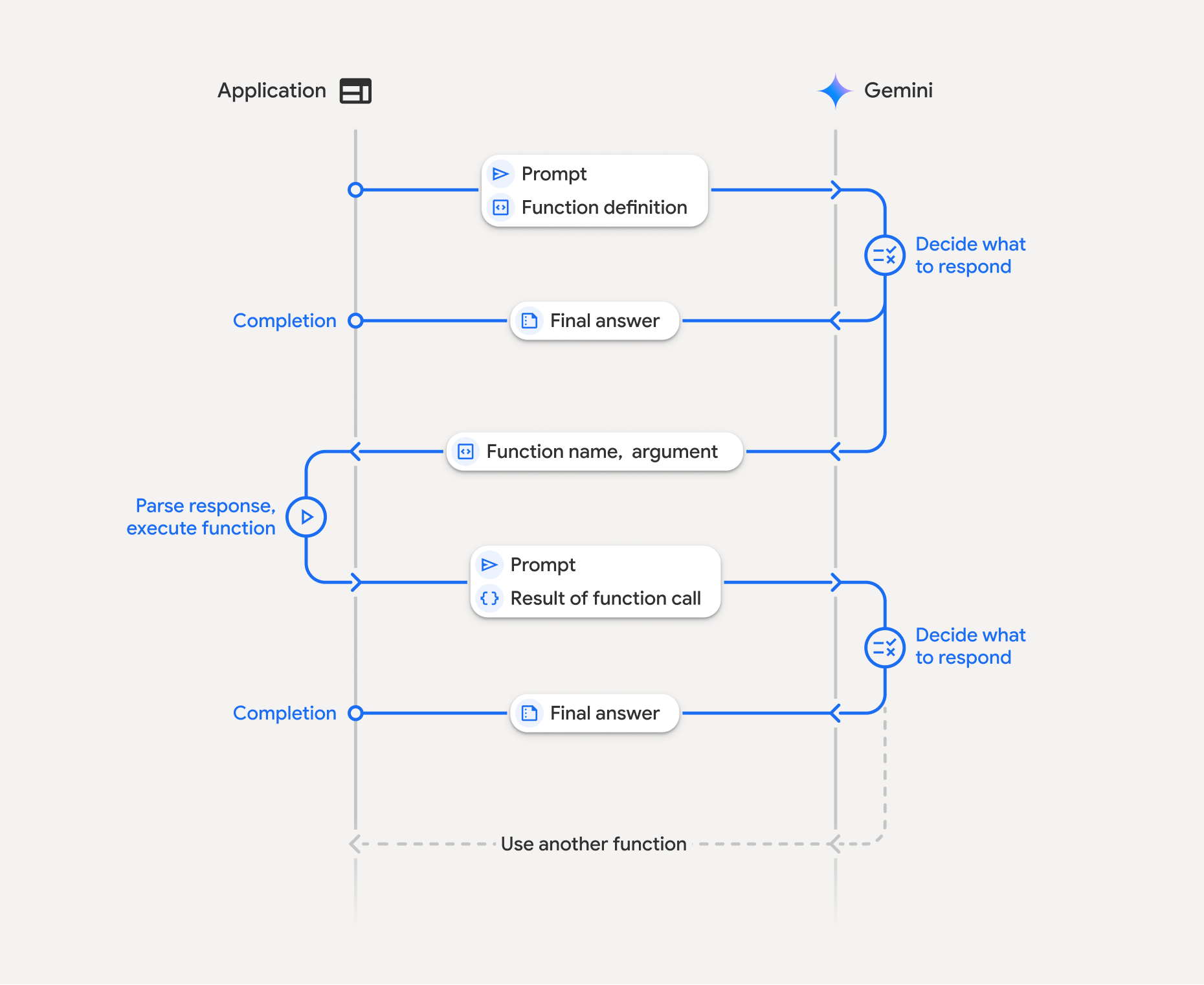
Funktionsaufrufe umfassen eine strukturierte Interaktion zwischen Ihrer Anwendung, dem Modell und externen Funktionen:
- Funktionsdeklaration definieren:Definieren Sie den Namen, die Parameter und den Zweck der Funktion für das Modell.
- LLM mit Funktionsdeklarationen aufrufen:Senden Sie den Nutzer-Prompt zusammen mit den Funktionsdeklarationen an das Modell.
- Funktionscode ausführen (Ihre Verantwortung): Das Modell führt die Funktion nicht selbst aus. Extrahieren Sie den Namen und die Argumente und führen Sie sie in Ihrer Anwendung aus.
- Nutzerfreundliche Antwort erstellen:Senden Sie das Ergebnis an das Modell zurück, um eine endgültige, nutzerfreundliche Antwort zu erhalten.
Dieser Vorgang kann mehrmals wiederholt werden. Das Modell unterstützt das Aufrufen mehrerer Funktionen in einem einzigen Schritt (parallele Funktionsaufrufe) und in einer Sequenz (zusammengesetzte Funktionsaufrufe).
Schritt 1: Funktionsdeklaration definieren
Python
set_light_values_declaration = {
    "type": "function",
    "name": "set_light_values",
    "description": "Sets the brightness and color temperature of a light.",
    "parameters": {
        "type": "object",
        "properties": {
            "brightness": {
                "type": "integer",
                "description": "Light level from 0 to 100",
            },
            "color_temp": {
                "type": "string",
                "enum": ["daylight", "cool&>quot;, "warm"],
                "description": "Color temperature",
            },
        },
        "required": ["brightness", "color_temp"],
    },
}

def set_light_values(brightness: int, color_temp: str) - dict:
    """Set the brightness and color temperature of a room light."""
    return {"brightness": brightness, "colorTemperature": color_temp}
JavaScript
const setLightValuesTool = {
  type: 'function',
  name: 'set_light_values',
  description: 'Sets the brightness and color temperature of a light.',
  parameters: {
    type: 'object',
    properties: {
      brightness: { type: 'number', description: 'Light level from 0 to 100' },
      color_temp: { type: 'string', enum: ['daylight', 'cool', 'warm'] },
    },
    required: ['brightness', 'color_temp'],
  },
};

function setLightValues(brightness, color_temp) {
  return { brightness: brightness, colorTemperature: color_temp };
}
Schritt 2: Modell mit Funktionsdeklarationen aufrufen
Python
from google import genai

client = genai.Client()

interaction = client.interactions.create(
    model="gemini-3.6-flash",
    input="Turn the lights down to a romantic level",
    tools=[set_light_values_declaration],
)

fc_step = next(s for s in interaction.steps if s.type == "function_call")
print(fc_step)
JavaScript
import { GoogleGenAI } from '@google/genai';

const client = new GoogleGenAI({});

const interaction = await client.interactions.create({
  model: 'gemini-3.6-flash',
  input: 'Turn the lights down to a romantic level',
  tools: [setLightValuesTool],
});

const fcStep = in>teraction.steps.find(s = s.type === 'function_call');
console.log(fcStep);
Das Modell gibt einen function_call-Schritt mit type, name und arguments zurück:
type='function_call'
name='set_light_values'
arguments={'color_temp': 'warm', 'brightness': 25}
Schritt 3: Funktion ausführen
Python
fc_step = next(s for s in interaction.steps if s.type == "function_call")

if fc_step.name == "set_light_values":
    result = set_light_values(**fc_step.arguments)
    print(f"Function execution result: {result}")
JavaScript
const fcStep = interaction.steps.find(s => s.type === 'function_call');

let result;
if (fcStep.name === 'set_light_values') {
  result = setLightValues(fcStep.arguments.brightness, fcStep.arguments.color_temp);
  console.log(`Function execution result: ${JSON.stringify(result)}`);
}
Schritt 4: Ergebnis an das Modell zurücksenden
Python
final_interaction = client.interactions.create(
    model="gemini-3.6-flash",
    input=[
        {
            "type": "function_result",
            "name": fc_step.name,
            "call_id": fc_step.id,
            "result": [{"type": "text", "text": json.dumps(result)}],
        }
    ],
    tools=[set_light_values_declaration],
    previous_interaction_id=interaction.id,
)

print(final_interaction.output_text)
JavaScript
const finalInteraction = await client.interactions.create({
  model: 'gemini-3.6-flash',
  input: [{
    type: 'function_result',
    name: fcStep.name,
    call_id: fcStep.id,
    result: [{ type: 'text', text: JSON.stringify(result) }]
  }],
  tools: [setLightValuesTool],
  previous_interaction_id: interaction.id,
});

console.log(finalInteraction.output_text);
Zustandslose Funktionsaufrufe
Sie können Funktionsaufrufe auch im zustandslosen Modus verwenden, indem Sie den Unterhaltungsverlauf auf der Clientseite verwalten und store=false festlegen.
Im zustandslosen Modus müssen Sie den vollständigen Verlauf der Unterhaltung im Feld input jeder nachfolgenden Anfrage übergeben. Dieser Verlauf muss Folgendes enthalten: 1. Den ersten user_input-Schritt.
2. Alle vom Modell generierten Schritte, die in Schritt 1 zurückgegeben wurden (einschließlich thought- und function_call-Schritte), genau wie empfangen.
3. Den function_result-Schritt mit der Ausgabe Ihrer ausgeführten Funktion.
Python
from google import genai
import json

client = genai.Client()

history = [
    {
        "type": "user_input",
        "content": [{"type": "text", "text": "Turn the lights down to a romantic level"}]
    }
]

interaction = client.interactions.create(
    model="gemini-3.6-flash",
    store=False,
    input=history,
    tools=[set_light_values_declaration],
)

for step in interaction.steps:
    history.append(step.model_dump())

fc_step = next(s for s in interaction.steps if s.type == "function_call")
if fc_step.name == "set_light_values":
    result = set_light_values(**fc_step.arguments)

history.append({
    "type": "function_result",
    "name": fc_step.name,
    "call_id": fc_step.id,
    "result": [{"type": "text", "text": json.dumps(result)}],
})

final_interaction = client.interactions.create(
    model="gemini-3.6-flash",
    store=False,
    input=history,
    tools=[set_light_values_declaration],
)

print(final_interaction.output_text)
JavaScript
import { GoogleGenAI } from "@google/genai";

const client = new GoogleGenAI({});

async function main() {
  const history = [
    {
      type: "user_input",
      content: [{ type: "text", text: "Turn the lights down to a romantic level" }]
    }
  ];

  const interaction = await client.interactions.create({
    model: "gemini-3.6-flash",
    store: false,
    input: history,
    tools: [setLightValuesTool],
  });

  history.push(...interaction.st>eps);

  const fcStep = interaction.steps.find(s = s.type === 'function_call');
  let result;
  if (fcStep.name === 'set_light_values') {
    result = setLightValues(fcStep.arguments.brightness, fcStep.arguments.color_temp);
  }

  history.push({
    type: 'function_result',
    name: fcStep.name,
    call_id: fcStep.id,
    result: [{ type: 'text', text: JSON.stringify(result) }]
  });

  const finalInteraction = await client.interactions.create({
    model: 'gemini-3.6-flash',
    store: false,
    input: history,
    tools: [setLightValuesTool],
  });

  console.log(finalInteraction.output_text);
}

await main();
REST
# Turn 1: Send request with tools and store: false
RESPONSE1=$(curl -s -X POST "https://generativelanguage.googleapis.com/v1beta/interactions" \
  -H "x-goog-api-key: $GEMINI_API_KEY" \
  -H 'Content-Type: application/json' \
  -d '{
    "model": "gemini-3.6-flash",
    "store": false,
    "input": [
      {
        "type": "user_input",
        "content": "Turn the lights down to a romantic level"
      }
    ],
    "tools": [{
      "type": "function",
      "name": "set_light_values",
      "description": "Sets the brightness and color temperature of a light.",
      "parameters": {
        "type": "object",
        "properties": {
          "brightness": {"type": "integer", "description": "Light level from 0 to 100"},
          "color_temp": {"type": "string", "enum": ["daylight", "cool", "warm"]}
        },
        "required": ["brightness", "color_temp"]
      }
    }]
  }')

# Extract model steps (thought, function_call)
MODEL_STEPS=$(echo "$RESPONSE1" | jq '.steps')

# Extract function call details to execute
FC_NAME=$(echo "$RESPONSE1" | jq -r '.steps[] | select(.type=="function_call") | .name')
FC_ID=$(echo "$RESPONSE1" | jq -r '.steps[] | select(.type=="function_call") | .id')

# Assume local execution returns: {"brightness": 25, "colorTemperature": "warm"}
RESULT="{\"brightness\": 25, \"colorTemperature\": \"warm\"}"

# Reconstruct history for Turn 2
HISTORY=$(jq -n \
  --argjson first_input '[{"type": "user_input", "content": "Turn the lights down to a romantic level"}]' \
  --argjson model_steps "$MODEL_STEPS" \
  --arg fc_name "$FC_NAME" \
  --arg fc_id "$FC_ID" \
  --arg result "$RESULT" \
  '$first_input + $model_steps + [{"type": "function_result", "name": $fc_name, "call_id": $fc_id, "result": [{"type": "text", "text": $result}]}]')

# Turn 2: Send the full history
curl -X POST "https://generativelanguage.googleapis.com/v1beta/interactions" \
  -H "x-goog-api-key: $GEMINI_API_KEY" \
  -H 'Content-Type: application/json' \
  -d "{
    \"model\": \"gemini-3.6-flash\",
    \"store\": false,
    \"input\": $HISTORY,
    \"tools\": [{
      \"type\": \"function\",
      \"name\": \"set_light_values\",
      \"description\": \"Sets the brightness and color temperature of a light.\",
      \"parameters\": {
        \"type\": \"object\",
        \"properties\": {
          \"brightness\": {\"type\": \"integer\"},
          \"color_temp\": {\"type\": \"string\"}
        },
        \"required\": [\"brightness\", \"color_temp\"]
      }
    }]
  }"
Funktionsdeklarationen
Eine Funktionsdeklaration wird als Tool übergeben und enthält Folgendes:
type(String): Muss für benutzerdefinierte Funktionen"function"sein.name(String): Eindeutiger Funktionsname (Unterstriche oder CamelCase verwenden).description(String): Klare Erklärung des Zwecks der Funktion.parameters(Objekt): Eingabeparameter, die die Funktion erwartet.type(String): Gesamtdatentyp, z. B.object.properties(Objekt): Einzelne Parameter mit Typ und Beschreibung.required(Array): Namen der Pflichtparameter.
Funktionsaufrufe mit Denkmodellen
Modelle der Gemini 3-Reihe verwenden einen internen "Denkprozess", der Funktionsaufrufe verbessert. Die SDKs verarbeiten Denk-Signaturen automatisch für Sie.
Parallele Funktionsaufrufe
Rufen Sie mehrere Funktionen gleichzeitig auf, wenn sie unabhängig sind:
Python
power_disco_ball = {"type": "function", "name": "power_disco_ball", "description": "Powers the disco ball.",
    "parameters": {"type": "object", "properties": {"power": {"type": "boolean"}}, "required": ["power"]}}
start_music = {"type": "function", "name": "start_music", "description": "Play music.",
    "parameters": {"type": "object", "properties": {"energetic": {"type": "boolean"}, "loud": {"type": "boolean"}}, "required": ["energetic", "loud"]}}
dim_lights = {"type": "function", "name": "dim_lights", "description": "Dim the lights.",
    "parameters": {"type": "object", "properties": {"brightness": {"type": "number"}}, "required": ["brightness"]}}

client = genai.Client()

interaction = client.interactions.create(
    model="gemini-3.6-flash",
    input="Turn this place into a party!",
    tools=[power_disco_ball, start_music, dim_lights],
    generation_config={"tool_choice": "any"},
)

for step in interaction.steps:
    if step.type == "function_call":
        args = ", ".join(f"{key}={val}" for key, val in step.arguments.items())
        print(f"{step.name}({args})")
JavaScript
const powerDiscoBall = { type: 'function', name: 'power_disco_ball', description: 'Powers the disco ball.',
  parameters: { type: 'object', properties: { power: { type: 'boolean' } }, required: ['power'] } };
const startMusic = { type: 'function', name: 'start_music', description: 'Play music.',
  parameters: { type: 'object', properties: { energetic: { type: 'boolean' }, loud: { type: 'boolean' } }, required: ['energetic', 'loud'] } };
const dimLights = { type: 'function', name: 'dim_lights', description: 'Dim the lights.',
  parameters: { type: 'object', properties: { brightness: { type: 'number' } }, required: ['brightness'] } };

const interaction = await client.interactions.create({
  model: 'gemini-3.6-flash',
  input: 'Turn this place into a party!',
  tools: [powerDiscoBall, startMusic, dimLights],
  generation_config: { tool_choice: 'any' },
});

for (const step of interaction.steps) {
  if (step.type === 'function_call') {
    console.log(`${step.name}(${JSON.stringify(step.arguments)})`);
  }
}
REST
curl -X POST "https://generativelanguage.googleapis.com/v1beta/interactions" \
  -H "x-goog-api-key: $GEMINI_API_KEY" \
  -H 'Content-Type: application/json' \
  -d '{
    "model": "gemini-3.6-flash",
    "input": "Turn this place into a party!",
    "tools": [
      {
        "type": "function",
        "name": "power_disco_ball",
        "description": "Powers the disco ball.",
        "parameters": {
          "type": "object",
          "properties": {
            "power": {"type": "boolean"}
          },
          "required": ["power"]
        }
      },
      {
        "type": "function",
        "name": "start_music",
        "description": "Play music.",
        "parameters": {
          "type": "object",
          "properties": {
            "energetic": {"type": "boolean"},
            "loud": {"type": "boolean"}
          },
          "required": ["energetic", "loud"]
        }
      },
      {
        "type": "function",
        "name": "dim_lights",
        "description": "Dim the lights.",
        "parameters": {
          "type": "object",
          "properties": {
            "brightness": {"type": "number"}
          },
          "required": ["brightness"]
        }
      }
    ]
  }'
Zusammengesetzte Funktionsaufrufe
Verketten Sie mehrere Funktionsaufrufe für komplexe Anfragen (z.B. zuerst den Standort abrufen und dann das Wetter für diesen Standort abrufen).
Python
get_weather_forecast_declaration = {
    "type": "function",
    "name": "get_weather_forecast",
    "description": "Gets the current weather temperature for a given location.",
    "parameters": {
        "type": "object",
        "properties": {
            "location": {"type": "string", "description": "The location"},
        },
        "required": ["location"],
    },
}

set_thermostat_temperature_declaration = {
    "type": "function",
    "name": "set_thermostat_temperature",
    "description": "Sets the thermostat to a desired temperature.",
    "parameters": {
        "type": "object",
        "properties": {
            "temperature": {
                "type": "integer",
                "description": "The temperature in Celsius",
            },
        },
        "required": ["temperature"],
    },
}

client = genai.Client()

interaction = client.interactions.create(
    model="gemini-3.6-flash",
    input="If it's warmer than 20°C in London, set the thermostat to 20°C, otherwise 18°C.",
    tools=[
        get_weather_forecast_declaration,
        set_thermostat_temperature_declaration,
    ],
)

for step in interaction.steps:
    if step.type == "function_call":
        print(f"Function to call: {step.name}")
        print(f"Arguments: {step.arguments}")
    elif hasattr(step, "content") and step.content:
         for part in step.content:
             if hasattr(part, "text"):
                 print(part.text)
JavaScript
import { GoogleGenAI } from '@google/genai';

const client = new GoogleGenAI({});

const getWeatherForecastTool = {
  type: 'function',
  name: 'get_weather_forecast',
  description: 'Gets the current weather temperature for a given location.',
  parameters: {
    type: 'object',
    properties: {
      location: { type: 'string', description: 'The location' },
    },
    required: ['location'],
  },
};

const setThermostatTemperatureTool = {
  type: 'function',
  name: 'set_thermostat_temperature',
  description: 'Sets the thermostat to a desired temperature.',
  parameters: {
    type: 'object',
    properties: {
      temperature: {
        type: 'integer',
        description: 'The temperature in Celsius',
      },
    },
    required: ['temperature'],
  },
};

const interaction = await client.interactions.create({
  model: 'gemini-3.6-flash',
  input: "If it's warmer than 20°C in London, set the thermostat to 20°C, otherwise 18°C.",
  tools: [
    getWeatherForecastTool,
    setThermostatTemperatureTool,
  ],
});

for (const step of interaction.steps) {
  if (step.type === 'function_call') {
    console.log(`Function to call: ${step.name}`);
    console.log(`Arguments: ${JSON.stringify(step.arguments)}`);
  } else if (step.content) {
    for (const part of step.content) {
      if (part.text) {
        console.log(part.text);
      }
    }
  }
}
REST
curl -X POST "https://generativelanguage.googleapis.com/v1beta/interactions" \
  -H "x-goog-api-key: $GEMINI_API_KEY" \
  -H 'Content-Type: application/json' \
  -d '{
    "model": "gemini-3.6-flash",
    "input": "If it'\''s warmer than 20°C in London, set the thermostat to 20°C, otherwise 18°C.",
    "tools": [
      {
        "type": "function",
        "name": "get_weather_forecast",
        "description": "Gets the current weather temperature for a given location.",
        "parameters": {
          "type": "object",
          "properties": {
            "location": {"type": "string"}
          },
          "required": ["location"]
        }
      },
      {
        "type": "function",
        "name": "set_thermostat_temperature",
        "description": "Sets the thermostat to a desired temperature.",
        "parameters": {
          "type": "object",
          "properties": {
            "temperature": {"type": "integer"}
          },
          "required": ["temperature"]
        }
      }
    ]
  }'
Modi für Funktionsaufrufe
Steuern Sie, wie das Modell Tools verwendet, indem Sie tool_choice in generation_config verwenden:
auto(Standardeinstellung): Das Modell entscheidet, ob eine Funktion aufgerufen oder direkt geantwortet werden soll.any: Das Modell ist darauf beschränkt, immer einen Funktionsaufruf vorherzusagen.none: Das Modell darf keine Funktionsaufrufe ausführen.validated: Das Modell sorgt für die Einhaltung des Funktionsschemas.
Python
generation_config = {
    "tool_choice": {
        "allowed_tools": {
            "mode": "any",
            "tools": ["get_current_temperature"]
        }
    }
}
JavaScript
const generation_config = {
  tool_choice: {
    allowed_tools: {
      mode: 'any',
      tools: ['get_current_temperature';]
    }
  }
};
REST
curl -X POST "https://generativelanguage.googleapis.com/v1beta/interactions" \
  -H "x-goog-api-key: $GEMINI_API_KEY" \
  -H 'Content-Type: application/json' \
  -d '{
    "model": "gemini-3.6-flash",
    "input": "What is the temperature in Boston?",
    "tools": [{
      "type": "function",
      "name": "get_current_temperature",
      "description": "Gets the current temperature for a given location.",
      "parameters": {
        "type": "object",
        "properties": {
          "location": {"type": "string"}
        },
        "required": ["location"]
      }
    }],
    "generation_config": {
      "tool_choice": {
        "allowed_tools": {
          "mode": "any",
          "tools": ["get_current_temperature"]
        }
      }
    }
  }'
Verwendung mehrerer Tools
Sie können mehrere Tools aktivieren und integrierte Tools mit Funktionsaufrufen in derselben Anfrage kombinieren. Gemini 3-Modelle können integrierte Tools standardmäßig mit Funktionsaufrufen in Interaktionen kombinieren. Wenn Sie previous_interaction_id übergeben, wird der Kontext des integrierten Tools automatisch weitergegeben.
Python
from google import genai
import json

client = genai.Client()

get_weather = {
    "type": "function",
    "name": "get_weather",
    "description": "Gets the weather for a requested city.",
    "parameters": {
        "type": "object",
        "properties": {
            "city": {
                "type": "string",
                "description": "The city and state, e.g. Utqiaġvik, Alaska",
            },
        },
        "required": ["city"],
    },
}

tools = [
    {"type": "google_search"},
    get_weather
]

interaction = client.interactions.create(
    model="gemini-3.6-flash",
    input="What is the northernmost city in the United States? What's the weather like there today?",
    tools=tools
)

for step in interaction.steps:
    if step.type == "function_call":
        print(f"Function call: {step.name} (ID: {step.id})")
        result = {"response": "Very cold. 22 degrees Fahrenheit."}
        interaction_2 = client.interactions.create(
            model="gemini-3.6-flash",
            previous_interaction_id=interaction.id,
            tools=tools,
            input=[{
                "type": "function_result",
                "name": step.name,
                "call_id": step.id,
                "result": [{"type": "text", "text": json.dumps(result)}]
            }]
        )

        print(interaction_2.output_text)
JavaScript
import { GoogleGenAI } from '@google/genai';

const client = new GoogleGenAI({});

const weatherTool = {
    type: 'function',
    name: 'get_weather',
    description: 'Gets the weather for a given location.',
    parameters: {
        type: 'object',
        properties: {
            location: { type: 'string', description: 'The city and state, e.g. San Francisco, CA' }
        },
        required: ['location']
    }
};

const tools = [
    {type: 'google_search'}, // Built-in tool
    weatherTool
];

let interaction = await client.interactions.create({
    model: 'gemini-3.6-flash',
    input: "What is the northernmost city in the United States? What's the weather like there today?",
    tools: tools
});

for (const step of interaction.steps) {
    if (step.type === 'function_call') {
        console.log(`Function call: ${step.name} (ID: ${step.id})`);
        const result = {response: "Very cold. 22 degrees Fahrenheit."};
        const interaction_2 = await client.interactions.create({
            model: 'gemini-3.6-flash',
            previous_interaction_id: interaction.id,
            tools: tools,
            input: [{
                type: 'function_result',
                name: step.name,
                call_id: step.id,
                result: [{ type: 'text', text: JSON.stringify(result) }]
            }]
        });

        console.log(interaction_2.output_text);
    }
}
REST
# Turn 1: Send request with built-in google_search tool and custom weather tool
curl -X POST "https://generativelanguage.googleapis.com/v1beta/interactions" \
  -H "x-goog-api-key: $GEMINI_API_KEY" \
  -H 'Content-Type: application/json' \
  -d '{
    "model": "gemini-3.6-flash",
    "input": "What is the northernmost city in the United States? What'\''s the weather like there today?",
    "tools": [
      {"type": "google_search"},
      {
        "type": "function",
        "name": "get_weather",
        "description": "Gets the weather for a given location.",
        "parameters": {
          "type": "object",
          "properties": {
            "location": {"type": "string", "description": "The city and state, e.g. San Francisco, CA"}
          },
          "required": ["location"]
        }
      }
    ]
  }'

# Turn 2: Provide function result and pass previous_interaction_id
curl -X POST "https://generativelanguage.googleapis.com/v1beta/interactions" \
  -H "x-goog-api-key: $GEMINI_API_KEY" \
  -H 'Content-Type: application/json' \
  -d '{
    "model": "gemini-3.6-flash",
    "previous_interaction_id": "INTERACTION_ID",
    "tools": [
      {"type": "google_search"},
      {
        "type": "function",
        "name": "get_weather",
        "description": "Gets the weather for a given location.",
        "parameters": {
          "type": "object",
          "properties": {
            "location": {"type": "string", "description": "The city and state, e.g. San Francisco, CA"}
          },
          "required": ["location"]
        }
      }
    ],
    "input": [
      {
        "type": "function_result",
        "name": "get_weather",
        "call_id": "call_123",
        "result": [{"type": "text", "text": "{\"response\": \"Very cold. 22 degrees Fahrenheit.\"}"}]
      }
    ]
  }'
Multimodale Funktionsantworten
Bei Modellen der Gemini 3-Reihe können Sie multimodale Inhalte in die Teile der Funktionsantwort einfügen, die Sie an das Modell senden. Das Modell kann diese multimodalen Inhalte im nächsten Schritt verarbeiten, um eine fundiertere Antwort zu generieren.
Wenn Sie multimodale Daten in eine Funktionsantwort einfügen möchten, fügen Sie sie als einen oder mehrere Inhaltsblöcke in das result Feld des function_result Schritts ein. Für jeden Inhaltsblock muss der type angegeben werden (z.B. "text", "image").
Im folgenden Beispiel wird gezeigt, wie Sie in einer Interaktion eine Funktionsantwort mit Bilddaten an das Modell zurücksenden:
Python
import base64
from google import genai
import requests

client = genai.Client()

tool_call = next(s for s in interaction.steps if s.type == "function_call")

image_path = "https://goo.gle/instrument-img"
image_bytes = requests.get(image_path).content

base64_image_data = base64.b64encode(image_bytes).decode("utf-8")

final_interaction = client.interactions.create(
    model="gemini-3.6-flash",
    previous_interaction_id=interaction.id,
    input=[
        {
            "type": "function_result",
            "name": tool_call.name,
            "call_id": tool_call.id,
            "result": [
                {"type": "text", "text": "instrument.jpg"},
                {
                    "type": "image",
                    "mime_type": "image/jpeg",
                    "data": base64_image_data,
                },
            ],
        }
    ],
)

print(final_interaction.output_text)
JavaScript
import { GoogleGenAI } from "@google/genai";

const client = new GoogleGenAI({});

const toolCall = interaction.step>s.find(s = s.type === 'function_call');

const base64ImageData = "BASE64_IMAGE_DATA";

const finalInteraction = await client.interactions.create({
    model: 'gemini-3.6-flash',
    previous_interaction_id: interaction.id,
    input: [{
        type: 'function_result',
        name: toolCall.name,
        call_id: toolCall.id,
        result: [
            { type: 'text', text: 'instrument.jpg' },
            {
                type: 'image',
                mime_type: 'image/jpeg',
                data: base64ImageData,
            }
        ]
    }]
});

console.log(finalInteraction.output_text);
REST
curl -X POST "https://generativelanguage.googleapis.com/v1beta/interactions" \
  -H "x-goog-api-key: $GEMINI_API_KEY" \
  -H 'Content-Type: application/json' \
  -d '{
    "model": "gemini-3.6-flash",
    "previous_interaction_id": "INTERACTION_ID",
    "input": [
      {
        "type": "function_result",
        "name": "get_image",
        "call_id": "call_123",
        "result": [
          {"type": "text", "text": "instrument.jpg"},
          {
            "type": "image",
            "mime_type": "image/jpeg",
            "data": "BASE64_IMAGE_DATA"
          }
        ]
      }
    ]
  }'
Funktionsaufrufe mit strukturierter Ausgabe
Bei Modellen der Gemini 3-Reihe können Sie Funktionsaufrufe mit strukturierter Ausgabe kombinieren, um einheitlich formatierte Antworten zu erhalten.
Remote-MCP (Model Context Protocol)
Die Interactions API unterstützt die Verbindung mit Remote-MCP-Servern, um dem Modell Zugriff auf externe Tools und Dienste zu ermöglichen. Sie geben den name und die url des Servers in der Toolkonfiguration an.
Beachten Sie bei der Verwendung von Remote-MCP die folgenden Einschränkungen:
- Servertypen: Remote-MCP funktioniert nur mit streamfähigen HTTP-Servern. SSE-Server (Server-Sent Events) werden nicht unterstützt.
- Benennung: MCP-Servernamen dürfen das Zeichen
-nicht enthalten. Verwenden Sie stattdessensnake_case-Servernamen.
| Feld | Typ | Erforderlich | Beschreibung |
|---|---|---|---|
type |
string |
Ja | Muss "mcp_server" sein. |
name |
string |
Nein | Ein Anzeigename für den MCP-Server. |
url |
string |
Nein | Die vollständige URL für den MCP-Serverendpunkt. |
headers |
object |
Nein | Schlüssel/Wert-Paare, die mit jeder Anfrage an den Server als HTTP-Header gesendet werden (z. B. Authentifizierungstokens). |
allowed_tools |
array |
Nein | Beschränken Sie, welche Tools vom Server der Agent aufrufen darf. |
Beispiel
Python
from google import genai

client = genai.Client()

interaction = client.interactions.create(
    model="gemini-3.6-flash",
    input="Check the weather in San Francisco.",
    tools=[
        {
            "type": "mcp_server",
            "name": "weather",
            "url";: "https://gemini-api-demos.uc.r.appspot.com/mcp",
        }
    ]
)
JavaScript
import { GoogleGenAI } from '@google/genai';

const client = new GoogleGenAI({});

const interaction = await client.interactions.create({
    model: 'gemini-3.6-flash',
    input: 'Check the weather in San Francisco.',
    tools: [
        {
            type: 'mcp_server',
            name: 'weather',
            url: 'https://gemini-api-demos.uc.r.appspot.com/mcp'
        }
    ]
});
REST
curl -X POST "https://generativelanguage.googleapis.com/v1beta/interactions" \
  -H "Content-Type: application/json" \
  -H "x-goog-api-key: $GEMINI_API_KEY" \
-d '{
    "model": "gemini-3.6-flash",
    "input": "Check the weather in San Francisco.",
    "tools": [
        {
            "type": "mcp_server",
            "name": "weather",
            "url": "https://gemini-api-demos.uc.r.appspot.com/mcp"
        }
    ]
}'
Toolaufrufe streamen
Wenn Sie Tools mit Streaming verwenden, generiert das Modell Funktionsaufrufe als Sequenz von step.delta-Ereignissen im Stream. Toolargumente können mit arguments als Teilargumente gestreamt werden. Sie müssen diese Deltas zusammenfassen, um die vollständigen Toolaufrufe zu rekonstruieren, bevor Sie sie ausführen.
Python
import json
from google import genai

client = genai.Client()

weather_tool = {
    "type": "function",
    "name": "get_weather",
    "description": "Gets the weather for a given location.",
    "parameters": {
        "type": "object",
        "properties": {
            "location": {"type": "string", "description": "The city and state"}
        },
        "required": ["location"]
    }
}

stream = client.interactions.create(
    model="gemini-3.6-flash",
    input="What is the weather in Paris?",
    tools=[weather_tool],
    stream=True
)

current_calls = {}
tool_calls = []

for event in stream:
    if event.event_type == "step.start":
        if event.step.type == "function_call":
            current_calls[event.index] = {
                "id": event.step.id,
                "name": event.step.name,
                "arguments": ""
            }
            if hasattr(event.step, "arguments") and event.step.arguments:
                if isinstance(event.step.arguments, dict):
                    current_calls[event.index]["arguments"] = json.dumps(event.step.arguments)
                else:
                    current_calls[event.index]["arguments"] = event.step.arguments
    elif event.event_type == "step.delta":
        if event.delta.type == "arguments":
            if event.index in current_calls:
                current_calls[event.index]["arguments"] += event.delta.partial_arguments
        elif event.delta.type == "text":
            print(event.delta.text, end="", flush=True)

    elif event.event_type == "interaction.completed":
        for index, call in current_calls.items():
            args = call["arguments"]
            if args:
                args = json.loads(args)
            else:
                args = {}

            tool_calls.append({
                "type": "function_call",
                "id": call["id"],
                "name": call["name"],
                "arguments": args
            })

        print(f"\nFinal tool calls ready to execute:")
        print(json.dumps(tool_calls, indent=2))
JavaScript
import { GoogleGenAI } from '@google/genai';

const client = new GoogleGenAI({});

const weatherTool = {
    type: 'function',
    name: 'get_weather',
    description: 'Gets the weather for a given location.',
    parameters: {
        type: 'object',
        properties: {
            location: { type: 'string', description: 'The city and state' }
        },
        required: ['location']
    }
};

const stream = await client.interactions.create({
    model: 'gemini-3.6-flash',
    input: 'What is the weather in Paris?',
    tools: [weatherTool],
    stream: true,
});

const currentCalls = new Map();
let toolCalls = [];

for await (const event of stream) {
    const evType = event.event_type;
    if (evType === 'step.start') {
        if (event.step.type === 'function_call') {
            currentCalls.set(event.index, {
                id: event.step.id,
                name: event.step.name,
                arguments: ''
            });
            if (event.step.arguments) {
                if (typeof event.step.arguments === 'object') {
                    currentCalls.get(event.index).arguments = JSON.stringify(event.step.arguments);
                } else {
                    currentCalls.get(event.index).arguments = event.step.arguments;
                }
            }
        }
    } else if (evType === 'step.delta') {
        if (event.delta.type === 'arguments') {
            if (currentCalls.has(event.index)) {
                currentCalls.get(event.index).arguments += event.delta.partial_arguments;
            }
        } else if (event.delta.type === 'text') {
            process.stdout.write(event.delta.text);
        }
    } else if (evT>ype === 'interaction.completed' || evType === 'interaction.complete') {
        toolCalls = Array.from(currentCalls.values()).map(call = ({
            type: 'function_call',
            id: call.id,
            name: call.name,
            arguments: call.arguments ? JSON.parse(call.arguments) : {}
        }));
        console.log('\nFinal tool calls ready to execute:');
        console.log(JSON.stringify(toolCalls, null, 2));
    }
}
REST
curl -X POST "https://generativelanguage.googleapis.com/v1beta/interactions?alt=sse" \
  -H "Content-Type: application/json" \
  -H "x-goog-api-key: $GEMINI_API_KEY" \
-d '{
    "model": "gemini-3.6-flash",
    "input": "What is the weather in Paris?",
    "tools": [{
        "type": "function",
        "name": "get_weather",
        "description": "Gets the weather for a given location.",
        "parameters": {
            "type": "object",
            "properties": {
                "location": {"type": "string", "description": "The city and state"}
            },
            "required": ["location"]
        }
    }],
    "stream": true
}'
Best Practices
- Funktions- und Parameterbeschreibungen:Formulieren Sie klar und präzise.
- Benennung:Verwenden Sie aussagekräftige Namen ohne Leerzeichen oder Sonderzeichen.
- Strenge Typisierung:Verwenden Sie bestimmte Typen (Ganzzahl, String, Enum).
- Toolauswahl:Beschränken Sie die Anzahl der aktiven Tools auf maximal 10 bis 20.
- Prompt Engineering:Geben Sie Kontext und Anweisungen an.
- Validierung:Validieren Sie Funktionsaufrufe vor der Ausführung.
- Fehlerbehandlung:Implementieren Sie eine robuste Fehlerbehandlung.
- Sicherheit:Verwenden Sie die entsprechende Authentifizierung für externe APIs.
Problemumgehungen für Anforderungen an Text vor dem Tool
Problem:Wenn Ihr Prompt erfordert, dass das Modell unmittelbar vor einem Toolaufruf strukturierten Text (XML, YAML, JSON usw.) ausgibt (z.B. <UPDATE>...</UPDATE>), kann der Toolaufruf gelegentlich mit Malformed_Function_Call fehlschlagen.
Lösungen:Die folgenden Problemumgehungen lösen dieses Problem:
- VORZUGSWÜRDIG:Weisen Sie das Modell an, seine Notizen vor dem Tool in einen dedizierten
update()-Funktionsaufruf einzufügen, anstatt sie als Rohtext auszugeben (Details unten). - Weisen Sie das Modell an, Notizen als Markdown-Header (
# UPDATE,## PLAN) anstelle von strukturiertem Text zu schreiben. - Fordern Sie nicht, dass das Modell vor Toolaufrufen Text ausgibt.
Bevorzugte Problemumgehung: Arbeitsnotizen in einen dedizierten Funktionsaufruf einfügen
Anstelle der ursprünglichen Anweisung:
Before calling a tool, in every response you MUST first output a single `<UPDATE>` part as specified, don't skip this part or any of required sub-tags with<in `UP>DATE`.
Verwenden Sie diese aktualisierte Anweisung:
Before calling any other tool, in every response you MUST first call `update` with all required parameters (previous_step, plan, next_step, external).
Aktualisieren Sie alle Verweise auf das alte <UPDATE>-XML-Format in der Kundenanfrage. Fügen Sie dann die entsprechende Funktionsdeklaration für die Update-Funktion hinzu:
{
  "name": "update",
  "description": "Update working notes (previous step analysis, plan, next step, external note).",
  "parameters": {
    "type": "OBJECT",
    "properties": {
      "previous_step": {
        "type": "STRING",
        "description": "Key findings and outcomes since the previous step."
      },
      "plan": {
        "type": "STRING",
        "description": "The current status of the plan."
      },
      "next_step": {
        "type": "STRING",
        "description": "Brief explanation of the immediate next action according to the plan."
      },
      "external": {
        ";type": "STRING",
        "description": "A short, plain-language note shown to the User about what you are ABOUT TO DO next."
      }
    },
    "required": [
      "previous_step",
      "plan",
      "next_step",
      "external"
    ]
  }
}
Anschließend führt das Modell im selben Schritt zwei Aufrufe aus: den update()-Aufruf, der das strukturierte XML ersetzt, und den eigentlichen Funktionsaufruf, den es ausführen möchte.
Hinweise und Einschränkungen
- Es wird nur eine Teilmenge des OpenAPI-Schemas unterstützt.
- Im Modus
anykann die API sehr große oder tief verschachtelte Schemas ablehnen. - Die unterstützten Parametertypen in Python sind begrenzt.