

Gọi hàm bằng Gemini API
Tính năng gọi hàm cho phép bạn kết nối các mô hình với các công cụ và API bên ngoài. Thay vì tạo phản hồi bằng văn bản, mô hình sẽ xác định thời điểm gọi các hàm cụ thể và cung cấp các tham số cần thiết để thực thi các hành động trong thế giới thực. Điều này cho phép mô hình đóng vai trò là cầu nối giữa ngôn ngữ tự nhiên và dữ liệu cũng như các hành động trong thế giới thực. Tính năng gọi hàm có 3 trường hợp sử dụng chính:
- Thực hiện hành động: Tương tác với các hệ thống bên ngoài bằng API, chẳng hạn như lên lịch hẹn, tạo hoá đơn, gửi email hoặc điều khiển các thiết bị nhà thông minh.
- Bổ sung kiến thức: Truy cập thông tin từ các nguồn bên ngoài như cơ sở dữ liệu, API và cơ sở kiến thức.
- Mở rộng khả năng: Sử dụng các công cụ bên ngoài để thực hiện phép tính và mở rộng các giới hạn của mô hình, chẳng hạn như sử dụng máy tính hoặc tạo biểu đồ.
Bạn có thể duyệt xem các ví dụ về những trường hợp sử dụng này bên dưới:
Lên lịch cuộc họp
Ví dụ này cho biết cách xác định một hàm lên lịch cuộc họp với những người tham dự vào một thời điểm cụ thể, cho phép mô hình phân tích cú pháp các yêu cầu của người dùng và trả về các đối số có cấu trúc để kích hoạt các hành động trong hệ thống bên ngoài.
Python
from google import genai

schedule_meeting_function = {
    "type": "function",
    "name": "schedule_meeting",
    "description": "Schedules a meeting with specified attendees at a given time and date.",
    "parameters": {
        "type": "object",
        "properties": {
            "attendees": {"type": "array", "items": {"type": "string"}},
            "date": {"type": "string", "description": "Date (e.g., '2024-07-29')"},
            "time": {"type": "string", "description": "Time (e.g., '15:00')"},
            "topic": {"type": "string", "description": "The meeting topic."},
        },
        "required": ["attendees", "date", "time", "topic"],
    },
}

client = genai.Client()

interaction = client.interactions.create(
    model="gemini-3-flash-preview",
    input="Schedule a meeting with Bob and Alice for 03/14/2025 at 10:00 AM about Q3 planning.",
    tools=[{"type": "function", **schedule_meeting_function}],
)

for step in interaction.steps:
    if step.type == "function_call":
        print(f"Function to call: {step.name}")
        print(f"Arguments: {step.arguments}")
JavaScript
import { GoogleGenAI } from '@google/genai';

const client = new GoogleGenAI({});

const scheduleMeetingFunction = {
  type: 'function',
  name: 'schedule_meeting',
  description: 'Schedules a meeting with specified attendees at a given time and date.',
  parameters: {
    type: 'object',
    properties: {
      attendees: { type: 'array', items: { type: 'string' } },
      date: { type: 'string', description: 'Date (e.g., "2024-07-29")' },
      time: { type: 'string', description: 'Time (e.g., "15:00")' },
      topic: { type: 'string', description: 'The meeting topic.' },
    },
    required: ['attendees', 'date', 'time', 'topic'],
  },
};

const interaction = await client.interactions.create({
  model: 'gemini-3-flash-preview',
  input: 'Schedule a meeting with Bob and Alice for 03/27/2025 at 10:00 AM about Q3 planning.',
  tools: [scheduleMeetingFunction],
});

for (const step of interaction.steps) {
  if (step.type === 'function_call') {
    console.log(`Function to call: ${step.name}`);
    console.log(`Arguments: ${JSON.stringify(step.arguments)}`);
  }
}
REST
curl -X POST "https://generativelanguage.googleapis.com/v1beta/interactions" \
  -H "x-goog-api-key: $GEMINI_API_KEY" \
  -H 'Content-Type: application/json' \
  -H "Api-Revision: 2026-05-20" \
  -d '{
    "model": "gemini-3-flash-preview",
    "input": "Schedule a meeting with Bob and Alice for 03/27/2025 at 10:00 AM about Q3 planning.",
    "tools": [{
        "type": "function",
        "name": "schedule_meeting",
        "description": "Schedules a meeting with specified attendees at a given time and date.",
        "parameters": {
          "type": "object",
          "properties": {
            "attendees": {"type": "array", "items": {"type": "string"}},
            "date": {"type": "string"},
            "time": {"type": "string"},
            "topic": {"type": "string"}
          },
          "required": ["attendees", "date", "time", "topic"]
        }
    }]
  }'
Xem thời tiết
Ví dụ này cho biết cách xác định một hàm truy xuất dữ liệu nhiệt độ cho một vị trí, cho phép mô hình gọi các API bên ngoài để trả lời các truy vấn yêu cầu thông tin theo thời gian thực hoặc thông tin bên ngoài.
Python
from google import genai

weather_function = {
    "type": "function",
    "name": "get_current_temperature",
    "description": "Gets the current temperature for a given location.",
    "parameters": {
        "type": "object",
        "properties": {
            "location": {
                "type": "string",
                "description": "The city name, e.g. San Francisco",
            },
        },
        "required": ["location"],
    },
}

client = genai.Client()

interaction = client.interactions.create(
    model="gemini-3-flash-preview",
    input="What's the temperature in London?",
    tools=[weather_function],
)

for step in interaction.steps:
    if step.type == "function_call":
        print(f"Function to call: {step.name}")
        print(f"Arguments: {step.arguments}")
JavaScript
import { GoogleGenAI } from '@google/genai';

const client = new GoogleGenAI({});

const weatherFunctionDeclaration = {
  type: 'function',
  name: 'get_current_temperature',
  description: 'Gets the current temperature for a given location.',
  parameters: {
    type: 'object',
    properties: {
      location: {
        type: 'string',
        description: 'The city name, e.g. San Francisco',
      },
    },
    required: ['location'],
  },
};

const interaction = await client.interactions.create({
  model: 'gemini-3-flash-preview',
  input: "What's the temperature in London?",
  tools: [weatherFunctionDeclaration],
});

for (const step of interaction.steps) {
  if (step.type === 'function_call') {
    console.log(`Function to call: ${step.name}`);
    console.log(`Arguments: ${JSON.stringify(step.arguments)}`);
  }
}
REST
curl -X POST "https://generativelanguage.googleapis.com/v1beta/interactions" \
  -H "x-goog-api-key: $GEMINI_API_KEY" \
  -H 'Content-Type: application/json' \
  -H "Api-Revision: 2026-05-20" \
  -d '{
    "model": "gemini-3-flash-preview",
    "input": "What'\''s the temperature in London?",
    "tools": [{
      "type": "function",
      "name": "get_current_temperature",
      "description": "Gets the current temperature for a given location.",
      "parameters": {
        "type": "object",
        "properties": {
          "location": {"type": "string", "description": "The city name"}
        },
        "required": ["location"]
      }
    }]
  }'
Tạo biểu đồ
Ví dụ này cho biết cách xác định một hàm tạo biểu đồ thanh từ dữ liệu có cấu trúc, minh hoạ cách mô hình có thể sử dụng các công cụ bên ngoài để thực hiện phép tính hoặc tạo tài sản trực quan:
Python
from google import genai

create_chart_function = {
    "type": "function",
    "name": "create_bar_chart",
    "description": "Creates a bar chart given a title, labels, and values.",
    "parameters": {
        "type": "object",
        "properties": {
            "title": {"type": "string", "description": "The title for the chart."},
            "labels": {"type": "array", "items": {"type": "string"}},
            "values": {"type": "array", "items": {"type": "number"}},
        },
        "required": ["title", "labels", "values"],
    },
}

client = genai.Client()

interaction = client.interactions.create(
    model="gemini-3-flash-preview",
    input="Create a bar chart titled 'Quarterly Sales' with Q1: 50000, Q2: 75000, Q3: 60000.",
    tools=[create_chart_function],
)

for step in interaction.steps:
    if step.type == "function_call":
        print(f"Function to call: {step.name}")
        print(f"Arguments: {step.arguments}")
JavaScript
import { GoogleGenAI } from '@google/genai';

const client = new GoogleGenAI({});

const createChartFunctionDeclaration = {
  type: 'function',
  name: 'create_bar_chart',
  description: 'Creates a bar chart given a title, labels, and values.',
  parameters: {
    type: 'object',
    properties: {
      title: { type: 'string', description: 'The title for the chart.' },
      labels: { type: 'array', items: { type: 'string' } },
      values: { type: 'array', items: { type: 'number' } },
    },
    required: ['title', 'labels', 'values'],
  },
};

const interaction = await client.interactions.create({
  model: 'gemini-3-flash-preview',
  input: "Create a bar chart titled 'Quarterly Sales' with Q1: 50000, Q2: 75000, Q3: 60000.",
  tools: [createChartFunctionDeclaration],
});

for (const step of interaction.steps) {
  if (step.type === 'function_call') {
    console.log(`${step.name}(${JSON.stringify(step.arguments)})`);
  }
}
REST
curl -X POST "https://generativelanguage.googleapis.com/v1beta/interactions" \
  -H "x-goog-api-key: $GEMINI_API_KEY" \
  -H 'Content-Type: application/json' \
  -H "Api-Revision: 2026-05-20" \
  -d '{
    "model": "gemini-3-flash-preview",
    "input": "Create a bar chart titled '\''Quarterly Sales'\'' with Q1: 50000, Q2: 75000, Q3: 60000.",
    "tools": [{
        "type": "function",
        "name": "create_bar_chart",
        "description": "Creates a bar chart given a title, labels, and values.",
        "parameters": {
          "type": "object",
          "properties": {
            "title": {"type": "string"},
            "labels": {"type": "array", "items": {"type": "string"}},
            "values": {"type": "array", "items": {"type": "number"}}
          },
          "required": ["title", "labels", "values"]
        }
    }]
  }'
Cách hoạt động của tính năng gọi hàm
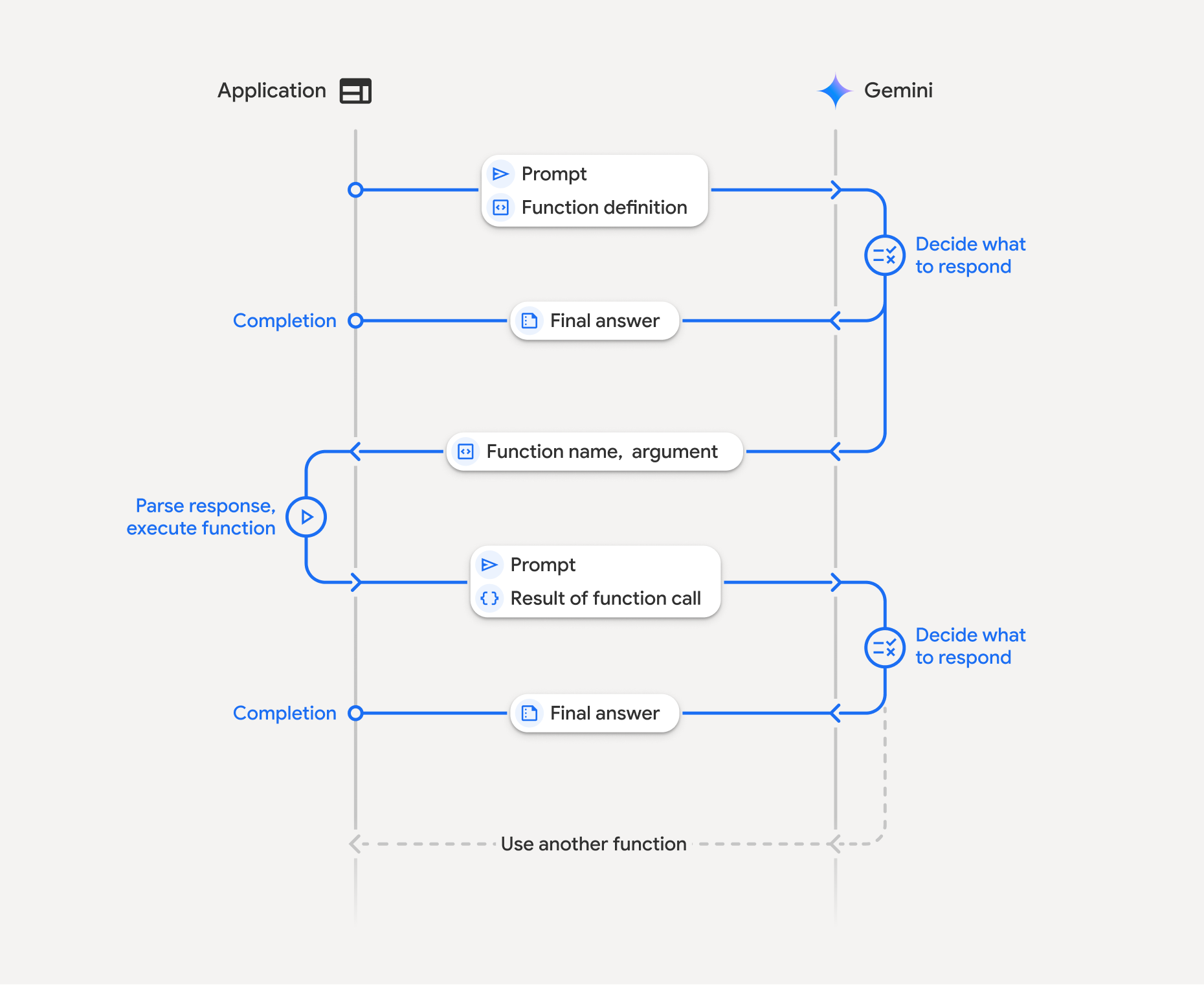
Tính năng gọi hàm liên quan đến hoạt động tương tác có cấu trúc giữa ứng dụng, mô hình và các hàm bên ngoài:
- Xác định nội dung khai báo hàm: Xác định tên, tham số và mục đích của hàm cho mô hình.
- Gọi mô hình ngôn ngữ lớn (LLM) bằng nội dung khai báo hàm: Gửi câu lệnh của người dùng cùng với (các) nội dung khai báo hàm đến mô hình.
- Thực thi mã hàm (Trách nhiệm của bạn): Mô hình không tự thực thi hàm. Trích xuất tên và đối số rồi thực thi trong ứng dụng của bạn.
- Tạo phản hồi thân thiện với người dùng: Gửi kết quả trở lại mô hình để có phản hồi cuối cùng, thân thiện với người dùng.
Bạn có thể lặp lại quy trình này nhiều lần. Mô hình hỗ trợ gọi nhiều hàm trong một lượt (gọi hàm song song) và theo trình tự (gọi hàm tổng hợp).
Bước 1: Xác định nội dung khai báo hàm
Python
set_light_values_declaration = {
    "type": "function",
    "name": "set_light_values",
    "description": "Sets the brightness and color temperature of a light.",
    "parameters": {
        "type": "object",
        "properties": {
            "brightness": {
                "type": "integer",
                "description": "Light level from 0 to 100",
            },
            "color_temp": {
                "type": "string",
                "enum": ["daylight", "cool", "warm"],
                "description": "Color temperature",
            },
        },
        "required": ["brightness", "color_temp"],
    },
}

def set_light_values(brightness: int, color_temp: str) -> dict:
    """Set the brightness and color temperature of a room light."""
    return {"brightness": brightness, "colorTemperature": color_temp}
JavaScript
const setLightValuesTool = {
  type: 'function',
  name: 'set_light_values',
  description: 'Sets the brightness and color temperature of a light.',
  parameters: {
    type: 'object',
    properties: {
      brightness: { type: 'number', description: 'Light level from 0 to 100' },
      color_temp: { type: 'string', enum: ['daylight', 'cool', 'warm'] },
    },
    required: ['brightness', 'color_temp'],
  },
};

function setLightValues(brightness, color_temp) {
  return { brightness: brightness, colorTemperature: color_temp };
}
Bước 2: Gọi mô hình bằng nội dung khai báo hàm
Python
from google import genai

client = genai.Client()

interaction = client.interactions.create(
    model="gemini-3-flash-preview",
    input="Turn the lights down to a romantic level",
    tools=[set_light_values_declaration],
)

fc_step = next(s for s in interaction.steps if s.type == "function_call")
print(fc_step)
JavaScript
import { GoogleGenAI } from '@google/genai';

const client = new GoogleGenAI({});

const interaction = await client.interactions.create({
  model: 'gemini-3-flash-preview',
  input: 'Turn the lights down to a romantic level',
  tools: [setLightValuesTool],
});

const fcStep = interaction.steps.find(s => s.type === 'function_call');
console.log(fcStep);
Mô hình trả về một bước function_call có type, name và arguments:
type='function_call'
name='set_light_values'
arguments={'color_temp': 'warm', 'brightness': 25}
Bước 3: Thực thi hàm
Python
fc_step = next(s for s in interaction.steps if s.type == "function_call")

if fc_step.name == "set_light_values":
    result = set_light_values(**fc_step.arguments)
    print(f"Function execution result: {result}")
JavaScript
const fcStep = interaction.steps.find(s => s.type === 'function_call');

let result;
if (fcStep.name === 'set_light_values') {
  result = setLightValues(fcStep.arguments.brightness, fcStep.arguments.color_temp);
  console.log(`Function execution result: ${JSON.stringify(result)}`);
}
Bước 4: Gửi kết quả trở lại mô hình
Python
final_interaction = client.interactions.create(
    model="gemini-3-flash-preview",
    input=[
        {
            "type": "function_result",
            "name": fc_step.name,
            "call_id": fc_step.id,
            "result": [{"type": "text", "text": json.dumps(result)}],
        }
    ],
    tools=[set_light_values_declaration],
    previous_interaction_id=interaction.id,
)

print(final_interaction.output_text)
JavaScript
const finalInteraction = await client.interactions.create({
  model: 'gemini-3-flash-preview',
  input: [{
    type: 'function_result',
    name: fcStep.name,
    call_id: fcStep.id,
    result: [{ type: 'text', text: JSON.stringify(result) }]
  }],
  tools: [setLightValuesTool],
  previous_interaction_id: interaction.id,
});

console.log(finalInteraction.output_text);
Gọi hàm không trạng thái
Bạn cũng có thể sử dụng tính năng gọi hàm ở chế độ không trạng thái bằng cách quản lý nhật ký cuộc trò chuyện ở phía máy khách và đặt store=false.
Ở chế độ không trạng thái, bạn phải truyền toàn bộ nhật ký cuộc trò chuyện trong trường input của mỗi yêu cầu tiếp theo. Nhật ký này phải bao gồm: 1. Bước user_input ban đầu.
2. Tất cả các bước do mô hình tạo được trả về trong Lượt 1 (bao gồm các bước thought và function_call) chính xác như đã nhận.
3. Bước function_result chứa đầu ra của hàm đã thực thi.
Python
from google import genai
import json

client = genai.Client()

history = [
    {
        "type": "user_input",
        "content": [{"type": "text", "text": "Turn the lights down to a romantic level"}]
    }
]

interaction = client.interactions.create(
    model="gemini-3-flash-preview",
    store=False,
    input=history,
    tools=[set_light_values_declaration],
)

for step in interaction.steps:
    history.append(step.model_dump())

fc_step = next(s for s in interaction.steps if s.type == "function_call")
if fc_step.name == "set_light_values":
    result = set_light_values(**fc_step.arguments)

history.append({
    "type": "function_result",
    "name": fc_step.name,
    "call_id": fc_step.id,
    "result": [{"type": "text", "text": json.dumps(result)}],
})

final_interaction = client.interactions.create(
    model="gemini-3-flash-preview",
    store=False,
    input=history,
    tools=[set_light_values_declaration],
)

print(final_interaction.output_text)
JavaScript
import { GoogleGenAI } from "@google/genai";

const client = new GoogleGenAI({});

async function main() {
  const history = [
    {
      type: "user_input",
      content: [{ type: "text", text: "Turn the lights down to a romantic level" }]
    }
  ];

  const interaction = await client.interactions.create({
    model: "gemini-3-flash-preview",
    store: false,
    input: history,
    tools: [setLightValuesTool],
  });

  history.push(...interaction.steps);

  const fcStep = interaction.steps.find(s => s.type === 'function_call');
  let result;
  if (fcStep.name === 'set_light_values') {
    result = setLightValues(fcStep.arguments.brightness, fcStep.arguments.color_temp);
  }

  history.push({
    type: 'function_result',
    name: fcStep.name,
    call_id: fcStep.id,
    result: [{ type: 'text', text: JSON.stringify(result) }]
  });

  const finalInteraction = await client.interactions.create({
    model: 'gemini-3-flash-preview',
    store: false,
    input: history,
    tools: [setLightValuesTool],
  });

  console.log(finalInteraction.output_text);
}

await main();
REST
# Turn 1: Send request with tools and store: false
RESPONSE1=$(curl -s -X POST "https://generativelanguage.googleapis.com/v1beta/interactions" \
  -H "x-goog-api-key: $GEMINI_API_KEY" \
  -H 'Content-Type: application/json' \
  -H "Api-Revision: 2026-05-20" \
  -d '{
    "model": "gemini-3-flash-preview",
    "store": false,
    "input": [
      {
        "type": "user_input",
        "content": "Turn the lights down to a romantic level"
      }
    ],
    "tools": [{
      "type": "function",
      "name": "set_light_values",
      "description": "Sets the brightness and color temperature of a light.",
      "parameters": {
        "type": "object",
        "properties": {
          "brightness": {"type": "integer", "description": "Light level from 0 to 100"},
          "color_temp": {"type": "string", "enum": ["daylight", "cool", "warm"]}
        },
        "required": ["brightness", "color_temp"]
      }
    }]
  }')

# Extract model steps (thought, function_call)
MODEL_STEPS=$(echo "$RESPONSE1" | jq '.steps')

# Extract function call details to execute
FC_NAME=$(echo "$RESPONSE1" | jq -r '.steps[] | select(.type=="function_call") | .name')
FC_ID=$(echo "$RESPONSE1" | jq -r '.steps[] | select(.type=="function_call") | .id')

# Assume local execution returns: {"brightness": 25, "colorTemperature": "warm"}
RESULT="{\"brightness\": 25, \"colorTemperature\": \"warm\"}"

# Reconstruct history for Turn 2
HISTORY=$(jq -n \
  --argjson first_input '[{"type": "user_input", "content": "Turn the lights down to a romantic level"}]' \
  --argjson model_steps "$MODEL_STEPS" \
  --arg fc_name "$FC_NAME" \
  --arg fc_id "$FC_ID" \
  --arg result "$RESULT" \
  '$first_input + $model_steps + [{"type": "function_result", "name": $fc_name, "call_id": $fc_id, "result": [{"type": "text", "text": $result}]}]')

# Turn 2: Send the full history
curl -X POST "https://generativelanguage.googleapis.com/v1beta/interactions" \
  -H "x-goog-api-key: $GEMINI_API_KEY" \
  -H 'Content-Type: application/json' \
  -H "Api-Revision: 2026-05-20" \
  -d "{
    \"model\": \"gemini-3-flash-preview\",
    \"store\": false,
    \"input\": $HISTORY,
    \"tools\": [{
      \"type\": \"function\",
      \"name\": \"set_light_values\",
      \"description\": \"Sets the brightness and color temperature of a light.\",
      \"parameters\": {
        \"type\": \"object\",
        \"properties\": {
          \"brightness\": {\"type\": \"integer\"},
          \"color_temp\": {\"type\": \"string\"}
        },
        \"required\": [\"brightness\", \"color_temp\"]
      }
    }]
  }"
Nội dung khai báo hàm
Nội dung khai báo hàm được truyền dưới dạng một công cụ và bao gồm:
type(chuỗi): Phải là"function"đối với các hàm tuỳ chỉnh.name(chuỗi): Tên hàm riêng biệt (sử dụng dấu gạch dưới hoặc camelCase).description(chuỗi): Giải thích rõ ràng về mục đích của hàm.parameters(đối tượng): Tham số đầu vào mà hàm mong đợi.type(chuỗi): Loại dữ liệu tổng thể, chẳng hạn nhưobject.properties(đối tượng): Các tham số riêng lẻ có loại và nội dung mô tả.required(mảng): Tên tham số bắt buộc.
Gọi hàm bằng các mô hình tư duy
Các mô hình thuộc dòng Gemini 3 và 2.5 sử dụng quy trình nội bộ "tư duy" giúp cải thiện tính năng gọi hàm. SDK sẽ tự động xử lý chữ ký tư duy cho bạn.
Gọi hàm song song
Gọi nhiều hàm cùng lúc khi các hàm này độc lập:
Python
power_disco_ball = {"type": "function", "name": "power_disco_ball", "description": "Powers the disco ball.",
    "parameters": {"type": "object", "properties": {"power": {"type": "boolean"}}, "required": ["power"]}}
start_music = {"type": "function", "name": "start_music", "description": "Play music.",
    "parameters": {"type": "object", "properties": {"energetic": {"type": "boolean"}, "loud": {"type": "boolean"}}, "required": ["energetic", "loud"]}}
dim_lights = {"type": "function", "name": "dim_lights", "description": "Dim the lights.",
    "parameters": {"type": "object", "properties": {"brightness": {"type": "number"}}, "required": ["brightness"]}}

client = genai.Client()

interaction = client.interactions.create(
    model="gemini-3-flash-preview",
    input="Turn this place into a party!",
    tools=[power_disco_ball, start_music, dim_lights],
    generation_config={"tool_choice": "any"},
)

for step in interaction.steps:
    if step.type == "function_call":
        args = ", ".join(f"{key}={val}" for key, val in step.arguments.items())
        print(f"{step.name}({args})")
JavaScript
const powerDiscoBall = { type: 'function', name: 'power_disco_ball', description: 'Powers the disco ball.',
  parameters: { type: 'object', properties: { power: { type: 'boolean' } }, required: ['power'] } };
const startMusic = { type: 'function', name: 'start_music', description: 'Play music.',
  parameters: { type: 'object', properties: { energetic: { type: 'boolean' }, loud: { type: 'boolean' } }, required: ['energetic', 'loud'] } };
const dimLights = { type: 'function', name: 'dim_lights', description: 'Dim the lights.',
  parameters: { type: 'object', properties: { brightness: { type: 'number' } }, required: ['brightness'] } };

const interaction = await client.interactions.create({
  model: 'gemini-3-flash-preview',
  input: 'Turn this place into a party!',
  tools: [powerDiscoBall, startMusic, dimLights],
  generation_config: { tool_choice: 'any' },
});

for (const step of interaction.steps) {
  if (step.type === 'function_call') {
    console.log(`${step.name}(${JSON.stringify(step.arguments)})`);
  }
}
Gọi hàm tổng hợp
Liên kết nhiều lệnh gọi hàm với nhau cho các yêu cầu phức tạp (ví dụ: trước tiên, hãy lấy vị trí, sau đó xem thời tiết cho vị trí đó).
Python
get_weather_forecast_declaration = {
    "type": "function",
    "name": "get_weather_forecast",
    "description": "Gets the current weather temperature for a given location.",
    "parameters": {
        "type": "object",
        "properties": {
            "location": {"type": "string", "description": "The location"},
        },
        "required": ["location"],
    },
}

set_thermostat_temperature_declaration = {
    "type": "function",
    "name": "set_thermostat_temperature",
    "description": "Sets the thermostat to a desired temperature.",
    "parameters": {
        "type": "object",
        "properties": {
            "temperature": {
                "type": "integer",
                "description": "The temperature in Celsius",
            },
        },
        "required": ["temperature"],
    },
}

client = genai.Client()

interaction = client.interactions.create(
    model="gemini-3-flash-preview",
    input="If it's warmer than 20°C in London, set the thermostat to 20°C, otherwise 18°C.",
    tools=[
        get_weather_forecast_declaration,
        set_thermostat_temperature_declaration,
    ],
)

for step in interaction.steps:
    if step.type == "function_call":
        print(f"Function to call: {step.name}")
        print(f"Arguments: {step.arguments}")
    elif hasattr(step, "content") and step.content:
         for part in step.content:
             if hasattr(part, "text"):
                 print(part.text)
Chế độ gọi hàm
Kiểm soát cách mô hình sử dụng các công cụ bằng tool_choice trong generation_config:
auto(Mặc định): Mô hình quyết định có gọi hàm hay phản hồi trực tiếp hay không.any: Mô hình bị hạn chế để luôn dự đoán lệnh gọi hàm.none: Mô hình bị cấm thực hiện lệnh gọi hàm.validated(Bản xem trước): Mô hình đảm bảo tuân thủ giản đồ hàm.
Python
generation_config = {
    "tool_choice": {
        "allowed_tools": {
            "mode": "any",
            "tools": ["get_current_temperature"]
        }
    }
}
JavaScript
const generation_config = {
  tool_choice: {
    allowed_tools: {
      mode: 'any',
      tools: ['get_current_temperature']
    }
  }
};
REST
curl -X POST "https://generativelanguage.googleapis.com/v1beta/interactions" \
  -H "x-goog-api-key: $GEMINI_API_KEY" \
  -H 'Content-Type: application/json' \
  -H "Api-Revision: 2026-05-20" \
  -d '{
    "model": "gemini-3-flash-preview",
    "input": "What is the temperature in Boston?",
    "tools": [{
      "type": "function",
      "name": "get_current_temperature",
      "description": "Gets the current temperature for a given location.",
      "parameters": {
        "type": "object",
        "properties": {
          "location": {"type": "string"}
        },
        "required": ["location"]
      }
    }],
    "generation_config": {
      "tool_choice": {
        "allowed_tools": {
          "mode": "any",
          "tools": ["get_current_temperature"]
        }
      }
    }
  }'
Sử dụng nhiều công cụ
Bạn có thể bật nhiều công cụ, kết hợp các công cụ tích hợp với tính năng gọi hàm trong cùng một yêu cầu. Các mô hình Gemini 3 có thể kết hợp các công cụ tích hợp với tính năng gọi hàm ngay trong Interactions. Việc truyền previous_interaction_id sẽ tự động lưu hành ngữ cảnh công cụ tích hợp.
Python
from google import genai
import json

client = genai.Client()

get_weather = {
    "type": "function",
    "name": "get_weather",
    "description": "Gets the weather for a requested city.",
    "parameters": {
        "type": "object",
        "properties": {
            "city": {
                "type": "string",
                "description": "The city and state, e.g. Utqiaġvik, Alaska",
            },
        },
        "required": ["city"],
    },
}

tools = [
    {"type": "google_search"},
    get_weather
]

interaction = client.interactions.create(
    model="gemini-3-flash-preview",
    input="What is the northernmost city in the United States? What's the weather like there today?",
    tools=tools
)

for step in interaction.steps:
    if step.type == "function_call":
        print(f"Function call: {step.name} (ID: {step.id})")
        result = {"response": "Very cold. 22 degrees Fahrenheit."}
        interaction_2 = client.interactions.create(
            model="gemini-3-flash-preview",
            previous_interaction_id=interaction.id,
            tools=tools,
            input=[{
                "type": "function_result",
                "name": step.name,
                "call_id": step.id,
                "result": [{"type": "text", "text": json.dumps(result)}]
            }]
        )

        print(interaction_2.output_text)
JavaScript
import { GoogleGenAI } from '@google/genai';

const client = new GoogleGenAI({});

const weatherTool = {
    type: 'function',
    name: 'get_weather',
    description: 'Gets the weather for a given location.',
    parameters: {
        type: 'object',
        properties: {
            location: { type: 'string', description: 'The city and state, e.g. San Francisco, CA' }
        },
        required: ['location']
    }
};

const tools = [
    {type: 'google_search'}, // Built-in tool
    weatherTool
];

let interaction = await client.interactions.create({
    model: 'gemini-3-flash-preview',
    input: "What is the northernmost city in the United States? What's the weather like there today?",
    tools: tools
});

for (const step of interaction.steps) {
    if (step.type === 'function_call') {
        console.log(`Function call: ${step.name} (ID: ${step.id})`);
        const result = {response: "Very cold. 22 degrees Fahrenheit."};
        const interaction_2 = await client.interactions.create({
            model: 'gemini-3-flash-preview',
            previous_interaction_id: interaction.id,
            tools: tools,
            input: [{
                type: 'function_result',
                name: step.name,
                call_id: step.id,
                result: [{ type: 'text', text: JSON.stringify(result) }]
            }]
        });

        console.log(interaction_2.output_text);
    }
}
Phản hồi hàm đa phương thức
Đối với các mô hình thuộc dòng Gemini 3, bạn có thể đưa nội dung đa phương thức vào các phần phản hồi hàm mà bạn gửi đến mô hình. Mô hình có thể xử lý nội dung đa phương thức này trong lượt tiếp theo để tạo phản hồi có nhiều thông tin hơn.
Để đưa dữ liệu đa phương thức vào phản hồi hàm, hãy đưa dữ liệu đó vào một hoặc nhiều khối nội dung trong trường result của bước function_result. Mỗi khối nội dung phải chỉ định type (ví dụ: "text", "image").
Ví dụ sau đây cho biết cách gửi phản hồi hàm chứa dữ liệu hình ảnh trở lại mô hình trong một hoạt động tương tác:
Python
import base64
from google import genai
import requests

client = genai.Client()

tool_call = next(s for s in interaction.steps if s.type == "function_call")

image_path = "https://goo.gle/instrument-img"
image_bytes = requests.get(image_path).content

base64_image_data = base64.b64encode(image_bytes).decode("utf-8")

final_interaction = client.interactions.create(
    model="gemini-3-flash-preview",
    previous_interaction_id=interaction.id,
    input=[
        {
            "type": "function_result",
            "name": tool_call.name,
            "call_id": tool_call.id,
            "result": [
                {"type": "text", "text": "instrument.jpg"},
                {
                    "type": "image",
                    "mime_type": "image/jpeg",
                    "data": base64_image_data,
                },
            ],
        }
    ],
)

print(final_interaction.output_text)
JavaScript
import { GoogleGenAI } from "@google/genai";

const ai = new GoogleGenAI({});

const toolCall = interaction.steps.find(s => s.type === 'function_call');

const base64ImageData = "BASE64_IMAGE_DATA";

const finalInteraction = await ai.interactions.create({
    model: 'gemini-3-flash-preview',
    previous_interaction_id: interaction.id,
    input: [{
        type: 'function_result',
        name: toolCall.name,
        call_id: toolCall.id,
        result: [
            { type: 'text', text: 'instrument.jpg' },
            {
                type: 'image',
                mime_type: 'image/jpeg',
                data: base64ImageData,
            }
        ]
    }]
});

console.log(finalInteraction.output_text);
REST
curl -X POST "https://generativelanguage.googleapis.com/v1beta/interactions" \
  -H "x-goog-api-key: $GEMINI_API_KEY" \
  -H 'Content-Type: application/json' \
  -H "Api-Revision: 2026-05-20" \
  -d '{
    "model": "gemini-3-flash-preview",
    "previous_interaction_id": "INTERACTION_ID",
    "input": [
      {
        "type": "function_result",
        "name": "get_image",
        "call_id": "call_123",
        "result": [
          {"type": "text", "text": "instrument.jpg"},
          {
            "type": "image",
            "mime_type": "image/jpeg",
            "data": "BASE64_IMAGE_DATA"
          }
        ]
      }
    ]
  }'
Gọi hàm bằng đầu ra có cấu trúc
Đối với các mô hình thuộc dòng Gemini 3, hãy kết hợp tính năng gọi hàm với đầu ra có cấu trúc để có các phản hồi được định dạng nhất quán.
MCP (Giao thức ngữ cảnh mô hình) từ xa
API Tương tác hỗ trợ kết nối với các máy chủ MCP từ xa để cấp cho mô hình quyền truy cập vào các công cụ và dịch vụ bên ngoài. Bạn cung cấp name và url của máy chủ trong cấu hình công cụ.
Khi sử dụng MCP từ xa, hãy lưu ý các ràng buộc sau:
- Loại máy chủ: MCP từ xa chỉ hoạt động với các máy chủ HTTP có thể truyền trực tuyến. Hệ thống không hỗ trợ các máy chủ SSE (Sự kiện được gửi bởi máy chủ).
- Hỗ trợ mô hình: MCP từ xa hiện không hoạt động với các mô hình Gemini 3. Chúng tôi sẽ sớm hỗ trợ Gemini 3.
- Đặt tên: Tên máy chủ MCP không được chứa ký tự
-. Thay vào đó, hãy sử dụng tên máy chủsnake_case.
| Trường | Loại | Bắt buộc | Mô tả |
|---|---|---|---|
type |
string |
Có | Phải là "mcp_server". |
name |
string |
Không | Tên hiển thị cho máy chủ MCP. |
url |
string |
Không | URL đầy đủ cho điểm cuối máy chủ MCP. |
headers |
object |
Không | Các cặp khoá-giá trị được gửi dưới dạng tiêu đề HTTP với mọi yêu cầu đến máy chủ (ví dụ: mã thông báo xác thực). |
allowed_tools |
array |
Không | Hạn chế các công cụ mà tác nhân có thể gọi từ máy chủ. |
Ví dụ
Python
from google import genai

client = genai.Client()

interaction = client.interactions.create(
    model="gemini-2.5-flash",
    input="Check the status of my last server deployment.",
    tools=[
        {
            "type": "mcp_server",
            "name": "Deployment Tracker",
            "url": "https://mcp.example.com/mcp",
            "headers": {"Authorization": "Bearer my-token"},
        }
    ]
)
JavaScript
import { GoogleGenAI } from '@google/genai';

const client = new GoogleGenAI({});

const interaction = await client.interactions.create({
    model: 'gemini-2.5-flash',
    input: 'Check the status of my last server deployment.',
    tools: [
        {
            type: 'mcp_server',
            name: 'Deployment Tracker',
            url: 'https://mcp.example.com/mcp',
            headers: { Authorization: 'Bearer my-token' }
        }
    ]
});
REST
curl -X POST "https://generativelanguage.googleapis.com/v1beta/interactions" \
  -H "Content-Type: application/json" \
  -H "x-goog-api-key: $GEMINI_API_KEY" \
  -H "Api-Revision: 2026-05-20" \
-d '{
    "model": "gemini-2.5-flash",
    "input": "Check the status of my last server deployment.",
    "tools": [
        {
            "type": "mcp_server",
            "name": "Deployment Tracker",
            "url": "https://mcp.example.com/mcp",
            "headers": {"Authorization": "Bearer my-token"}
        }
    ]
}'
Truyền trực tuyến lệnh gọi công cụ
Khi sử dụng các công cụ có tính năng truyền trực tuyến, mô hình sẽ tạo các lệnh gọi hàm dưới dạng một chuỗi các sự kiện step.delta trên luồng. Các đối số công cụ có thể được truyền trực tuyến dưới dạng đối số một phần bằng arguments. Bạn phải tổng hợp các delta này để tái cấu trúc các lệnh gọi công cụ hoàn chỉnh trước khi thực thi.
Python
import json
from google import genai

client = genai.Client()

weather_tool = {
    "type": "function",
    "name": "get_weather",
    "description": "Gets the weather for a given location.",
    "parameters": {
        "type": "object",
        "properties": {
            "location": {"type": "string", "description": "The city and state"}
        },
        "required": ["location"]
    }
}

stream = client.interactions.create(
    model="gemini-3-flash-preview",
    input="What is the weather in Paris?",
    tools=[weather_tool],
    stream=True
)

current_calls = {}
tool_calls = []

for event in stream:
    if event.event_type == "step.start":
        if event.step.type == "function_call":
            current_calls[event.index] = {
                "id": event.step.id,
                "name": event.step.name,
                "arguments": ""
            }
            if hasattr(event.step, "arguments") and event.step.arguments:
                if isinstance(event.step.arguments, dict):
                    current_calls[event.index]["arguments"] = json.dumps(event.step.arguments)
                else:
                    current_calls[event.index]["arguments"] = event.step.arguments
    elif event.event_type == "step.delta":
        if event.delta.type == "arguments":
            if event.index in current_calls:
                current_calls[event.index]["arguments"] += event.delta.partial_arguments
        elif event.delta.type == "text":
            print(event.delta.text, end="", flush=True)

    elif event.event_type == "interaction.completed":
        for index, call in current_calls.items():
            args = call["arguments"]
            if args:
                args = json.loads(args)
            else:
                args = {}

            tool_calls.append({
                "type": "function_call",
                "id": call["id"],
                "name": call["name"],
                "arguments": args
            })

        print(f"\nFinal tool calls ready to execute:")
        print(json.dumps(tool_calls, indent=2))
JavaScript
import { GoogleGenAI } from '@google/genai';

const client = new GoogleGenAI({});

const weatherTool = {
    type: 'function',
    name: 'get_weather',
    description: 'Gets the weather for a given location.',
    parameters: {
        type: 'object',
        properties: {
            location: { type: 'string', description: 'The city and state' }
        },
        required: ['location']
    }
};

const stream = await client.interactions.create({
    model: 'gemini-3-flash-preview',
    input: 'What is the weather in Paris?',
    tools: [weatherTool],
    stream: true,
});

const currentCalls = new Map();
let toolCalls = [];

for await (const event of stream) {
    const evType = event.event_type;
    if (evType === 'step.start') {
        if (event.step.type === 'function_call') {
            currentCalls.set(event.index, {
                id: event.step.id,
                name: event.step.name,
                arguments: ''
            });
            if (event.step.arguments) {
                if (typeof event.step.arguments === 'object') {
                    currentCalls.get(event.index).arguments = JSON.stringify(event.step.arguments);
                } else {
                    currentCalls.get(event.index).arguments = event.step.arguments;
                }
            }
        }
    } else if (evType === 'step.delta') {
        if (event.delta.type === 'arguments') {
            if (currentCalls.has(event.index)) {
                currentCalls.get(event.index).arguments += event.delta.partial_arguments;
            }
        } else if (event.delta.type === 'text') {
            process.stdout.write(event.delta.text);
        }
    } else if (evType === 'interaction.completed' || evType === 'interaction.complete') {
        toolCalls = Array.from(currentCalls.values()).map(call => ({
            type: 'function_call',
            id: call.id,
            name: call.name,
            arguments: call.arguments ? JSON.parse(call.arguments) : {}
        }));
        console.log('\nFinal tool calls ready to execute:');
        console.log(JSON.stringify(toolCalls, null, 2));
    }
}
REST
curl -X POST "https://generativelanguage.googleapis.com/v1beta/interactions?alt=sse" \
  -H "Content-Type: application/json" \
  -H "x-goog-api-key: $GEMINI_API_KEY" \
  -H "Api-Revision: 2026-05-20" \
-d '{
    "model": "gemini-3-flash-preview",
    "input": "What is the weather in Paris?",
    "tools": [{
        "type": "function",
        "name": "get_weather",
        "description": "Gets the weather for a given location.",
        "parameters": {
            "type": "object",
            "properties": {
                "location": {"type": "string", "description": "The city and state"}
            },
            "required": ["location"]
        }
    }],
    "stream": true
}'
Các phương pháp hay nhất
- Nội dung mô tả hàm và tham số: Rõ ràng và cụ thể.
- Đặt tên: Sử dụng tên mang tính mô tả mà không có dấu cách hoặc ký tự đặc biệt.
- Nhập mạnh: Sử dụng các loại cụ thể (số nguyên, chuỗi, enum).
- Chọn công cụ: Giữ tối đa 10 đến 20 công cụ đang hoạt động.
- Thiết kế câu lệnh: Cung cấp ngữ cảnh và hướng dẫn.
- Xác thực: Xác thực các lệnh gọi hàm trước khi thực thi.
- Xử lý lỗi: Triển khai biện pháp xử lý lỗi hữu ích.
- Bảo mật: Sử dụng phương thức xác thực thích hợp cho các API bên ngoài.
Các lưu ý và điểm hạn chế
- Chỉ một tập hợp con của giản đồ OpenAPI được hỗ trợ.
- Đối với chế độ
any, API có thể từ chối các giản đồ rất lớn hoặc được lồng sâu. - Các loại tham số được hỗ trợ trong Python bị hạn chế.