

فراخوانی تابع با API Gemini
فراخوانی تابع به شما امکان میدهد مدلها را به ابزارها و APIهای خارجی متصل کنید. به جای تولید پاسخهای متنی، مدل زمان فراخوانی توابع خاص را تعیین میکند و پارامترهای لازم را برای اجرای اقدامات دنیای واقعی فراهم میکند. این امر به مدل اجازه میدهد تا به عنوان پلی بین زبان طبیعی و اقدامات و دادههای دنیای واقعی عمل کند. فراخوانی تابع دارای ۳ مورد استفاده اصلی است:
- افزایش دانش: دسترسی به اطلاعات از منابع خارجی مانند پایگاههای داده، APIها و پایگاههای دانش.
- گسترش قابلیتها: از ابزارهای خارجی برای انجام محاسبات و گسترش محدودیتهای مدل، مانند استفاده از ماشین حساب یا ایجاد نمودار، استفاده کنید.
- اقدامات لازم: با استفاده از APIها با سیستمهای خارجی تعامل داشته باشید، مانند برنامهریزی قرار ملاقاتها، ایجاد فاکتورها، ارسال ایمیل یا کنترل دستگاههای خانه هوشمند.
پایتون
from google import genai

schedule_meeting_function = {
    "type": "function",
    "name": "schedule_meeting",
    "description": "Schedules a meeting with specified attendees at a given time and date.",
    "parameters": {
        "type": "object",
        "properties": {
            "attendees": {"type": "array", "items": {"type": "string"}},
            "date": {"type": "string", "description": "Date (e.g., '2024-07-29')"},
            "time": {"type": "string", "description": "Time (e.g., '15:00')"},
            "topic": {"type": "string", "description": "The meeting topic."},
        },
        "required": ["attendees", "date", "time", "topic"],
    },
}

client = genai.Client()

interaction = client.interactions.create(
    model="gemini-3-flash-preview",
    input="Schedule a meeting with Bob and Alice for 03/14/2025 at 10:00 AM about Q3 planning.",
    tools=[{"type": "function", **schedule_meeting_function}],
)

for step in interaction.steps:
    if step.type == "function_call":
        print(f"Function to call: {step.name}")
        print(f"Arguments: {step.arguments}")
جاوا اسکریپت
import { GoogleGenAI } from '@google/genai';

const client = new GoogleGenAI({});

const scheduleMeetingFunction = {
  type: 'function',
  name: 'schedule_meeting',
  description: 'Schedules a meeting with specified attendees at a given time and date.',
  parameters: {
    type: 'object',
    properties: {
      attendees: { type: 'array', items: { type: 'string' } },
      date: { type: 'string', description: 'Date (e.g., "2024-07-29")' },
      time: { type: 'string', description: 'Time (e.g., "15:00")' },
      topic: { type: 'string', description: 'The meeting topic.' },
    },
    required: ['attendees', 'date', 'time', 'topic'],
  },
};

const interaction = await client.interactions.create({
  model: 'gemini-3-flash-preview',
  input: 'Schedule a meeting with Bob and Alice for 03/27/2025 at 10:00 AM about Q3 planning.',
  tools: [scheduleMeetingFunction],
});

for (const step of interaction.steps) {
  if (step.type === 'function_call') {
    console.log(`Function to call: ${step.name}`);
    console.log(`Arguments: ${JSON.stringify(step.arguments)}`);
  }
}
استراحت
curl -X POST "https://generativelanguage.googleapis.com/v1beta/interactions" \
  -H "x-goog-api-key: $GEMINI_API_KEY" \
  -H 'Content-Type: application/json' \
  -H "Api-Revision: 2026-05-20" \
  -d '{
    "model": "gemini-3-flash-preview",
    "input": "Schedule a meeting with Bob and Alice for 03/27/2025 at 10:00 AM about Q3 planning.",
    "tools": [{
        "type": "function",
        "name": "schedule_meeting",
        "description": "Schedules a meeting with specified attendees at a given time and date.",
        "parameters": {
          "type": "object",
          "properties": {
            "attendees": {"type": "array", "items": {"type": "string"}},
            "date": {"type": "string"},
            "time": {"type": "string"},
            "topic": {"type": "string"}
          },
          "required": ["attendees", "date", "time", "topic"]
        }
    }]
  }'
نحوه فراخوانی تابع
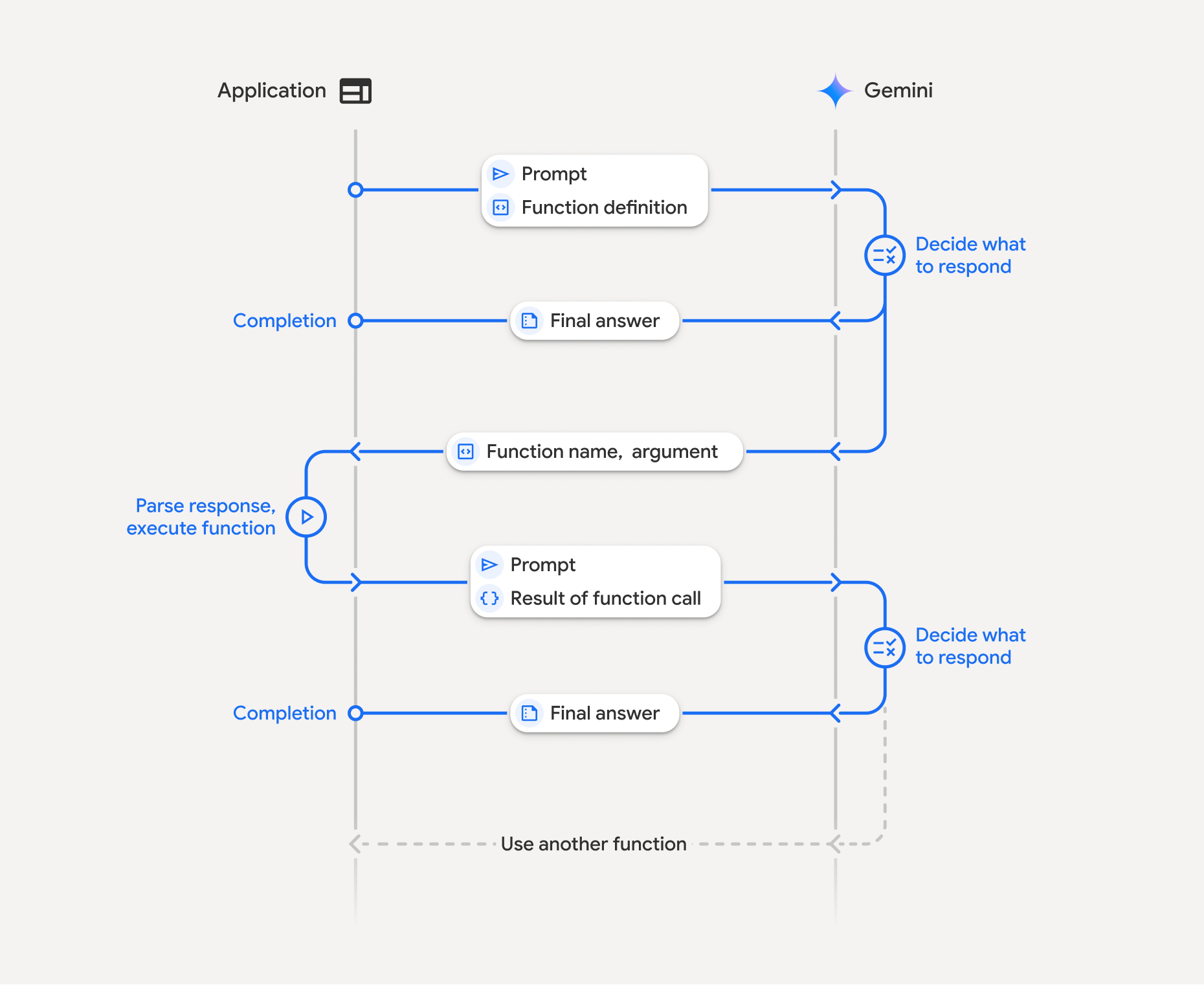
فراخوانی تابع شامل یک تعامل ساختاریافته بین برنامه شما، مدل و توابع خارجی است:
- تعریف اعلان تابع: نام، پارامترها و هدف تابع را برای مدل تعریف کنید.
- فراخوانی LLM با اعلان توابع: ارسال اعلان کاربر به همراه اعلان(های) تابع به مدل.
- اجرای کد تابع (مسئولیت شما): مدل خود تابع را اجرا نمیکند . نام و آرگومانها را استخراج کرده و در برنامه خود اجرا کنید.
- ایجاد پاسخ کاربرپسند: نتیجه را برای دریافت پاسخ نهایی و کاربرپسند به مدل ارسال کنید.
این فرآیند میتواند در چندین نوبت تکرار شود. این مدل از فراخوانی چندین تابع در یک نوبت ( فراخوانی تابع موازی ) و به ترتیب ( فراخوانی تابع ترکیبی ) پشتیبانی میکند.
مرحله ۱: تعریف یک تابع
پایتون
set_light_values_declaration = {
    "type": "function",
    "name": "set_light_values",
    "description": "Sets the brightness and color temperature of a light.",
    "parameters": {
        "type": "object",
        "properties": {
            "brightness": {
                "type": "integer",
                "description": "Light level from 0 to 100",
            },
            "color_temp": {
                "type": "string",
                "enum": ["daylight", "cool", "warm"],
                "description": "Color temperature",
            },
        },
        "required": ["brightness", "color_temp"],
    },
}

def set_light_values(brightness: int, color_temp: str) -> dict:
    """Set the brightness and color temperature of a room light."""
    return {"brightness": brightness, "colorTemperature": color_temp}
جاوا اسکریپت
const setLightValuesTool = {
  type: 'function',
  name: 'set_light_values',
  description: 'Sets the brightness and color temperature of a light.',
  parameters: {
    type: 'object',
    properties: {
      brightness: { type: 'number', description: 'Light level from 0 to 100' },
      color_temp: { type: 'string', enum: ['daylight', 'cool', 'warm'] },
    },
    required: ['brightness', 'color_temp'],
  },
};

function setLightValues(brightness, color_temp) {
  return { brightness: brightness, colorTemperature: color_temp };
}
مرحله ۲: فراخوانی مدل با اعلان توابع
پایتون
from google import genai

client = genai.Client()

interaction = client.interactions.create(
    model="gemini-3-flash-preview",
    input="Turn the lights down to a romantic level",
    tools=[set_light_values_declaration],
)

fc_step = next(s for s in interaction.steps if s.type == "function_call")
print(fc_step)
جاوا اسکریپت
import { GoogleGenAI } from '@google/genai';

const client = new GoogleGenAI({});

const interaction = await client.interactions.create({
  model: 'gemini-3-flash-preview',
  input: 'Turn the lights down to a romantic level',
  tools: [setLightValuesTool],
});

const fcStep = interaction.steps.find(s => s.type === 'function_call');
console.log(fcStep);
این مدل یک مرحله function_call به همراه type ، name و arguments را برمیگرداند:
type='function_call'
name='set_light_values'
arguments={'color_temp': 'warm', 'brightness': 25}
مرحله ۳: اجرای تابع
پایتون
fc_step = next(s for s in interaction.steps if s.type == "function_call")

if fc_step.name == "set_light_values":
    result = set_light_values(**fc_step.arguments)
    print(f"Function execution result: {result}")
جاوا اسکریپت
const fcStep = interaction.steps.find(s => s.type === 'function_call');

let result;
if (fcStep.name === 'set_light_values') {
  result = setLightValues(fcStep.arguments.brightness, fcStep.arguments.color_temp);
  console.log(`Function execution result: ${JSON.stringify(result)}`);
}
مرحله ۴: ارسال نتیجه به مدل
پایتون
final_interaction = client.interactions.create(
    model="gemini-3-flash-preview",
    input=[
        {
            "type": "function_result",
            "name": fc_step.name,
            "call_id": fc_step.id,
            "result": [{"type": "text", "text": json.dumps(result)}],
        }
    ],
    tools=[set_light_values_declaration],
    previous_interaction_id=interaction.id,
)

print(final_interaction.output_text)
جاوا اسکریپت
const finalInteraction = await client.interactions.create({
  model: 'gemini-3-flash-preview',
  input: [{
    type: 'function_result',
    name: fcStep.name,
    call_id: fcStep.id,
    result: [{ type: 'text', text: JSON.stringify(result) }]
  }],
  tools: [setLightValuesTool],
  previous_interaction_id: interaction.id,
});

console.log(finalInteraction.output_text);
فراخوانی تابع بدون وضعیت
همچنین میتوانید با مدیریت تاریخچه مکالمات در سمت کلاینت و تنظیم store=false ، از فراخوانی تابع در حالت بدون وضعیت (stateless) استفاده کنید.
در حالت بدون وضعیت، شما باید تاریخچه کامل مکالمه را در فیلد input هر درخواست بعدی ارسال کنید. این تاریخچه باید شامل موارد زیر باشد: ۱. مرحله اولیه user_input . ۲. تمام مراحل تولید شده توسط مدل که در نوبت ۱ (از جمله مراحل thought و function_call ) دقیقاً همانطور که دریافت شدهاند، برگردانده شوند. ۳. مرحله function_result که شامل خروجی تابع اجرا شده شما است.
پایتون
from google import genai
import json

client = genai.Client()

history = [
    {
        "type": "user_input",
        "content": [{"type": "text", "text": "Turn the lights down to a romantic level"}]
    }
]

interaction = client.interactions.create(
    model="gemini-3-flash-preview",
    store=False,
    input=history,
    tools=[set_light_values_declaration],
)

for step in interaction.steps:
    history.append(step.model_dump())

fc_step = next(s for s in interaction.steps if s.type == "function_call")
if fc_step.name == "set_light_values":
    result = set_light_values(**fc_step.arguments)

history.append({
    "type": "function_result",
    "name": fc_step.name,
    "call_id": fc_step.id,
    "result": [{"type": "text", "text": json.dumps(result)}],
})

final_interaction = client.interactions.create(
    model="gemini-3-flash-preview",
    store=False,
    input=history,
    tools=[set_light_values_declaration],
)

print(final_interaction.output_text)
جاوا اسکریپت
import { GoogleGenAI } from "@google/genai";

const client = new GoogleGenAI({});

async function main() {
  const history = [
    {
      type: "user_input",
      content: [{ type: "text", text: "Turn the lights down to a romantic level" }]
    }
  ];

  const interaction = await client.interactions.create({
    model: "gemini-3-flash-preview",
    store: false,
    input: history,
    tools: [setLightValuesTool],
  });

  history.push(...interaction.steps);

  const fcStep = interaction.steps.find(s => s.type === 'function_call');
  let result;
  if (fcStep.name === 'set_light_values') {
    result = setLightValues(fcStep.arguments.brightness, fcStep.arguments.color_temp);
  }

  history.push({
    type: 'function_result',
    name: fcStep.name,
    call_id: fcStep.id,
    result: [{ type: 'text', text: JSON.stringify(result) }]
  });

  const finalInteraction = await client.interactions.create({
    model: 'gemini-3-flash-preview',
    store: false,
    input: history,
    tools: [setLightValuesTool],
  });

  console.log(finalInteraction.output_text);
}

await main();
استراحت
# Turn 1: Send request with tools and store: false
RESPONSE1=$(curl -s -X POST "https://generativelanguage.googleapis.com/v1beta/interactions" \
  -H "x-goog-api-key: $GEMINI_API_KEY" \
  -H 'Content-Type: application/json' \
  -H "Api-Revision: 2026-05-20" \
  -d '{
    "model": "gemini-3-flash-preview",
    "store": false,
    "input": [
      {
        "type": "user_input",
        "content": "Turn the lights down to a romantic level"
      }
    ],
    "tools": [{
      "type": "function",
      "name": "set_light_values",
      "description": "Sets the brightness and color temperature of a light.",
      "parameters": {
        "type": "object",
        "properties": {
          "brightness": {"type": "integer", "description": "Light level from 0 to 100"},
          "color_temp": {"type": "string", "enum": ["daylight", "cool", "warm"]}
        },
        "required": ["brightness", "color_temp"]
      }
    }]
  }')

# Extract model steps (thought, function_call)
MODEL_STEPS=$(echo "$RESPONSE1" | jq '.steps')

# Extract function call details to execute
FC_NAME=$(echo "$RESPONSE1" | jq -r '.steps[] | select(.type=="function_call") | .name')
FC_ID=$(echo "$RESPONSE1" | jq -r '.steps[] | select(.type=="function_call") | .id')

# Assume local execution returns: {"brightness": 25, "colorTemperature": "warm"}
RESULT="{\"brightness\": 25, \"colorTemperature\": \"warm\"}"

# Reconstruct history for Turn 2
HISTORY=$(jq -n \
  --argjson first_input '[{"type": "user_input", "content": "Turn the lights down to a romantic level"}]' \
  --argjson model_steps "$MODEL_STEPS" \
  --arg fc_name "$FC_NAME" \
  --arg fc_id "$FC_ID" \
  --arg result "$RESULT" \
  '$first_input + $model_steps + [{"type": "function_result", "name": $fc_name, "call_id": $fc_id, "result": [{"type": "text", "text": $result}]}]')

# Turn 2: Send the full history
curl -X POST "https://generativelanguage.googleapis.com/v1beta/interactions" \
  -H "x-goog-api-key: $GEMINI_API_KEY" \
  -H 'Content-Type: application/json' \
  -H "Api-Revision: 2026-05-20" \
  -d "{
    \"model\": \"gemini-3-flash-preview\",
    \"store\": false,
    \"input\": $HISTORY,
    \"tools\": [{
      \"type\": \"function\",
      \"name\": \"set_light_values\",
      \"description\": \"Sets the brightness and color temperature of a light.\",
      \"parameters\": {
        \"type\": \"object\",
        \"properties\": {
          \"brightness\": {\"type\": \"integer\"},
          \"color_temp\": {\"type\": \"string\"}
        },
        \"required\": [\"brightness\", \"color_temp\"]
      }
    }]
  }"
اعلانهای تابع
یک اعلان تابع به عنوان یک ابزار ارسال میشود و شامل موارد زیر است:
-
type(رشته): برای توابع سفارشی باید"function"باشد. -
name(رشته): نام منحصر به فرد تابع (از زیرخط یا camelCase استفاده کنید). -
description(رشته): توضیح واضحی از هدف تابع. -
parameters(شیء): پارامترهای ورودی مورد انتظار تابع.-
type(رشته): نوع داده کلی، مانندobject. -
properties(شیء): پارامترهای منفرد به همراه نوع و توضیحات. -
required(آرایه): نام پارامترهای اجباری.
-
فراخوانی تابع با مدلهای تفکر
مدلهای سری ۳ و ۲.۵ جمینی از یک فرآیند «تفکر» داخلی استفاده میکنند که فراخوانی تابع را بهبود میبخشد. SDKها بهطور خودکار امضاهای فکری را برای شما مدیریت میکنند.
فراخوانی موازی توابع
وقتی چندین تابع مستقل هستند، آنها را همزمان فراخوانی کنید:
پایتون
power_disco_ball = {"type": "function", "name": "power_disco_ball", "description": "Powers the disco ball.",
    "parameters": {"type": "object", "properties": {"power": {"type": "boolean"}}, "required": ["power"]}}
start_music = {"type": "function", "name": "start_music", "description": "Play music.",
    "parameters": {"type": "object", "properties": {"energetic": {"type": "boolean"}, "loud": {"type": "boolean"}}, "required": ["energetic", "loud"]}}
dim_lights = {"type": "function", "name": "dim_lights", "description": "Dim the lights.",
    "parameters": {"type": "object", "properties": {"brightness": {"type": "number"}}, "required": ["brightness"]}}

client = genai.Client()

interaction = client.interactions.create(
    model="gemini-3-flash-preview",
    input="Turn this place into a party!",
    tools=[power_disco_ball, start_music, dim_lights],
    generation_config={"tool_choice": "any"},
)

for step in interaction.steps:
    if step.type == "function_call":
        args = ", ".join(f"{key}={val}" for key, val in step.arguments.items())
        print(f"{step.name}({args})")
جاوا اسکریپت
const powerDiscoBall = { type: 'function', name: 'power_disco_ball', description: 'Powers the disco ball.',
  parameters: { type: 'object', properties: { power: { type: 'boolean' } }, required: ['power'] } };
const startMusic = { type: 'function', name: 'start_music', description: 'Play music.',
  parameters: { type: 'object', properties: { energetic: { type: 'boolean' }, loud: { type: 'boolean' } }, required: ['energetic', 'loud'] } };
const dimLights = { type: 'function', name: 'dim_lights', description: 'Dim the lights.',
  parameters: { type: 'object', properties: { brightness: { type: 'number' } }, required: ['brightness'] } };

const interaction = await client.interactions.create({
  model: 'gemini-3-flash-preview',
  input: 'Turn this place into a party!',
  tools: [powerDiscoBall, startMusic, dimLights],
  generation_config: { tool_choice: 'any' },
});

for (const step of interaction.steps) {
  if (step.type === 'function_call') {
    console.log(`${step.name}(${JSON.stringify(step.arguments)})`);
  }
}
فراخوانی تابع ترکیبی
برای درخواستهای پیچیده، چندین تابع را به صورت زنجیرهای فراخوانی کنید (مثلاً ابتدا موقعیت مکانی را دریافت کنید، سپس آب و هوای آن مکان را دریافت کنید).
پایتون
get_weather_forecast_declaration = {
    "type": "function",
    "name": "get_weather_forecast",
    "description": "Gets the current weather temperature for a given location.",
    "parameters": {
        "type": "object",
        "properties": {
            "location": {"type": "string", "description": "The location"},
        },
        "required": ["location"],
    },
}

set_thermostat_temperature_declaration = {
    "type": "function",
    "name": "set_thermostat_temperature",
    "description": "Sets the thermostat to a desired temperature.",
    "parameters": {
        "type": "object",
        "properties": {
            "temperature": {
                "type": "integer",
                "description": "The temperature in Celsius",
            },
        },
        "required": ["temperature"],
    },
}

client = genai.Client()

interaction = client.interactions.create(
    model="gemini-3-flash-preview",
    input="If it's warmer than 20°C in London, set the thermostat to 20°C, otherwise 18°C.",
    tools=[
        get_weather_forecast_declaration,
        set_thermostat_temperature_declaration,
    ],
)

for step in interaction.steps:
    if step.type == "function_call":
        print(f"Function to call: {step.name}")
        print(f"Arguments: {step.arguments}")
    elif hasattr(step, "content") and step.content:
         for part in step.content:
             if hasattr(part, "text"):
                 print(part.text)
حالتهای فراخوانی تابع
نحوه استفاده مدل از ابزارها را با استفاده tool_choice در generation_config کنترل کنید:
-
auto(پیشفرض): مدل تصمیم میگیرد که آیا یک تابع را فراخوانی کند یا مستقیماً پاسخ دهد. -
any: مدل مقید است که همیشه یک فراخوانی تابع را پیشبینی کند. -
none: مدل از فراخوانی توابع منع شده است. validated(پیشنمایش): مدل، پایبندی به طرحواره تابع را تضمین میکند.
پایتون
generation_config = {
    "tool_choice": {
        "allowed_tools": {
            "mode": "any",
            "tools": ["get_current_temperature"]
        }
    }
}
جاوا اسکریپت
const generation_config = {
  tool_choice: {
    allowed_tools: {
      mode: 'any',
      tools: ['get_current_temperature']
    }
  }
};
استراحت
curl -X POST "https://generativelanguage.googleapis.com/v1beta/interactions" \
  -H "x-goog-api-key: $GEMINI_API_KEY" \
  -H 'Content-Type: application/json' \
  -H "Api-Revision: 2026-05-20" \
  -d '{
    "model": "gemini-3-flash-preview",
    "input": "What is the temperature in Boston?",
    "tools": [{
      "type": "function",
      "name": "get_current_temperature",
      "description": "Gets the current temperature for a given location.",
      "parameters": {
        "type": "object",
        "properties": {
          "location": {"type": "string"}
        },
        "required": ["location"]
      }
    }],
    "generation_config": {
      "tool_choice": {
        "allowed_tools": {
          "mode": "any",
          "tools": ["get_current_temperature"]
        }
      }
    }
  }'
استفاده چند ابزاری
شما میتوانید چندین ابزار را فعال کنید و ابزارهای داخلی را با فراخوانی تابع در یک درخواست ترکیب کنید. مدلهای Gemini 3 میتوانند ابزارهای داخلی را با فراخوانی تابع از پیش تعریف شده در Interactions ترکیب کنند. ارسال previous_interaction_id به طور خودکار زمینه ابزار داخلی را به گردش در میآورد.
پایتون
from google import genai
import json

client = genai.Client()

get_weather = {
    "type": "function",
    "name": "get_weather",
    "description": "Gets the weather for a requested city.",
    "parameters": {
        "type": "object",
        "properties": {
            "city": {
                "type": "string",
                "description": "The city and state, e.g. Utqiaġvik, Alaska",
            },
        },
        "required": ["city"],
    },
}

tools = [
    {"type": "google_search"},
    get_weather
]

interaction = client.interactions.create(
    model="gemini-3-flash-preview",
    input="What is the northernmost city in the United States? What's the weather like there today?",
    tools=tools
)

for step in interaction.steps:
    if step.type == "function_call":
        print(f"Function call: {step.name} (ID: {step.id})")
        result = {"response": "Very cold. 22 degrees Fahrenheit."}
        interaction_2 = client.interactions.create(
            model="gemini-3-flash-preview",
            previous_interaction_id=interaction.id,
            tools=tools,
            input=[{
                "type": "function_result",
                "name": step.name,
                "call_id": step.id,
                "result": [{"type": "text", "text": json.dumps(result)}]
            }]
        )

        print(interaction_2.output_text)
جاوا اسکریپت
import { GoogleGenAI } from '@google/genai';

const client = new GoogleGenAI({});

const weatherTool = {
    type: 'function',
    name: 'get_weather',
    description: 'Gets the weather for a given location.',
    parameters: {
        type: 'object',
        properties: {
            location: { type: 'string', description: 'The city and state, e.g. San Francisco, CA' }
        },
        required: ['location']
    }
};

const tools = [
    {type: 'google_search'}, // Built-in tool
    weatherTool
];

let interaction = await client.interactions.create({
    model: 'gemini-3-flash-preview',
    input: "What is the northernmost city in the United States? What's the weather like there today?",
    tools: tools
});

for (const step of interaction.steps) {
    if (step.type === 'function_call') {
        console.log(`Function call: ${step.name} (ID: ${step.id})`);
        const result = {response: "Very cold. 22 degrees Fahrenheit."};
        const interaction_2 = await client.interactions.create({
            model: 'gemini-3-flash-preview',
            previous_interaction_id: interaction.id,
            tools: tools,
            input: [{
                type: 'function_result',
                name: step.name,
                call_id: step.id,
                result: [{ type: 'text', text: JSON.stringify(result) }]
            }]
        });

        console.log(interaction_2.output_text);
    }
}
پاسخهای تابع چندوجهی
برای مدلهای سری Gemini 3، میتوانید محتوای چندوجهی را در بخشهای پاسخ تابعی که به مدل ارسال میکنید، بگنجانید. مدل میتواند این محتوای چندوجهی را در نوبت بعدی خود پردازش کند تا پاسخ آگاهانهتری تولید کند.
برای گنجاندن دادههای چندوجهی در پاسخ یک تابع، آن را به عنوان یک یا چند بلوک محتوا در فیلد result مرحله function_result قرار دهید. هر بلوک محتوا باید type خود را مشخص کند (مثلاً "text" ، "image" ).
مثال زیر نحوه ارسال پاسخ تابع حاوی دادههای تصویر به مدل در یک تعامل را نشان میدهد:
پایتون
import base64
from google import genai
import requests

client = genai.Client()

tool_call = next(s for s in interaction.steps if s.type == "function_call")

image_path = "https://goo.gle/instrument-img"
image_bytes = requests.get(image_path).content

base64_image_data = base64.b64encode(image_bytes).decode("utf-8")

final_interaction = client.interactions.create(
    model="gemini-3-flash-preview",
    previous_interaction_id=interaction.id,
    input=[
        {
            "type": "function_result",
            "name": tool_call.name,
            "call_id": tool_call.id,
            "result": [
                {"type": "text", "text": "instrument.jpg"},
                {
                    "type": "image",
                    "mime_type": "image/jpeg",
                    "data": base64_image_data,
                },
            ],
        }
    ],
)

print(final_interaction.output_text)
جاوا اسکریپت
import { GoogleGenAI } from "@google/genai";

const ai = new GoogleGenAI({});

const toolCall = interaction.steps.find(s => s.type === 'function_call');

const base64ImageData = "BASE64_IMAGE_DATA";

const finalInteraction = await ai.interactions.create({
    model: 'gemini-3-flash-preview',
    previous_interaction_id: interaction.id,
    input: [{
        type: 'function_result',
        name: toolCall.name,
        call_id: toolCall.id,
        result: [
            { type: 'text', text: 'instrument.jpg' },
            {
                type: 'image',
                mime_type: 'image/jpeg',
                data: base64ImageData,
            }
        ]
    }]
});

console.log(finalInteraction.output_text);
استراحت
curl -X POST "https://generativelanguage.googleapis.com/v1beta/interactions" \
  -H "x-goog-api-key: $GEMINI_API_KEY" \
  -H 'Content-Type: application/json' \
  -H "Api-Revision: 2026-05-20" \
  -d '{
    "model": "gemini-3-flash-preview",
    "previous_interaction_id": "INTERACTION_ID",
    "input": [
      {
        "type": "function_result",
        "name": "get_image",
        "call_id": "call_123",
        "result": [
          {"type": "text", "text": "instrument.jpg"},
          {
            "type": "image",
            "mime_type": "image/jpeg",
            "data": "BASE64_IMAGE_DATA"
          }
        ]
      }
    ]
  }'
فراخوانی تابع با خروجی ساختاریافته
برای مدلهای سری Gemini 3، فراخوانی تابع را با خروجی ساختاریافته ترکیب کنید تا پاسخهای با فرمت ثابتی داشته باشید.
MCP از راه دور (پروتکل زمینه مدل)
API تعاملات از اتصال به سرورهای MCP از راه دور پشتیبانی میکند تا به مدل امکان دسترسی به ابزارها و سرویسهای خارجی را بدهد. شما name و url سرور را در پیکربندی ابزارها ارائه میدهید.
هنگام استفاده از Remote MCP، از محدودیتهای زیر آگاه باشید:
- انواع سرور : Remote MCP فقط با سرورهای HTTP قابل پخش کار میکند. سرورهای SSE (رویدادهای ارسال شده از سرور) پشتیبانی نمیشوند.
- پشتیبانی مدل : در حال حاضر، MCP از راه دور با مدلهای Gemini 3 کار نمیکند. پشتیبانی از Gemini 3 به زودی ارائه خواهد شد.
- نامگذاری : نام سرورهای MCP نباید شامل کاراکتر
-باشد. به جای آن از نام سرورهایsnake_caseاستفاده کنید.
| میدان | نوع | مورد نیاز | توضیحات |
|---|---|---|---|
type | string | بله | باید "mcp_server" باشد. |
name | string | خیر | یک نام نمایشی برای سرور MCP. |
url | string | خیر | آدرس اینترنتی کامل برای نقطه پایانی سرور MCP. |
headers | object | خیر | جفتهای کلید-مقدار به عنوان هدرهای HTTP با هر درخواست به سرور ارسال میشوند (برای مثال، توکنهای احراز هویت). |
allowed_tools | array | خیر | ابزارهایی را که عامل میتواند از سرور فراخوانی کند، محدود کنید. |
مثال
پایتون
from google import genai

client = genai.Client()

interaction = client.interactions.create(
    model="gemini-2.5-flash",
    input="Check the status of my last server deployment.",
    tools=[
        {
            "type": "mcp_server",
            "name": "Deployment Tracker",
            "url": "https://mcp.example.com/mcp",
            "headers": {"Authorization": "Bearer my-token"},
        }
    ]
)
جاوا اسکریپت
import { GoogleGenAI } from '@google/genai';

const client = new GoogleGenAI({});

const interaction = await client.interactions.create({
    model: 'gemini-2.5-flash',
    input: 'Check the status of my last server deployment.',
    tools: [
        {
            type: 'mcp_server',
            name: 'Deployment Tracker',
            url: 'https://mcp.example.com/mcp',
            headers: { Authorization: 'Bearer my-token' }
        }
    ]
});
استراحت
curl -X POST "https://generativelanguage.googleapis.com/v1beta/interactions" \
  -H "Content-Type: application/json" \
  -H "x-goog-api-key: $GEMINI_API_KEY" \
  -H "Api-Revision: 2026-05-20" \
-d '{
    "model": "gemini-2.5-flash",
    "input": "Check the status of my last server deployment.",
    "tools": [
        {
            "type": "mcp_server",
            "name": "Deployment Tracker",
            "url": "https://mcp.example.com/mcp",
            "headers": {"Authorization": "Bearer my-token"}
        }
    ]
}'
فراخوانیهای ابزار را استریم کنید
هنگام استفاده از ابزارها با قابلیت استریمینگ، مدل فراخوانیهای تابع را به صورت دنبالهای از رویدادهای step.delta در استریم تولید میکند. آرگومانهای ابزار میتوانند به صورت آرگومانهای جزئی با استفاده arguments استریم شوند. شما باید این دلتاها را تجمیع کنید تا فراخوانیهای کامل ابزار را قبل از اجرای آنها بازسازی کنید.
پایتون
import json
from google import genai

client = genai.Client()

weather_tool = {
    "type": "function",
    "name": "get_weather",
    "description": "Gets the weather for a given location.",
    "parameters": {
        "type": "object",
        "properties": {
            "location": {"type": "string", "description": "The city and state"}
        },
        "required": ["location"]
    }
}

stream = client.interactions.create(
    model="gemini-3-flash-preview",
    input="What is the weather in Paris?",
    tools=[weather_tool],
    stream=True
)

current_calls = {}
tool_calls = []

for event in stream:
    if event.event_type == "step.start":
        if event.step.type == "function_call":
            current_calls[event.index] = {
                "id": event.step.id,
                "name": event.step.name,
                "arguments": ""
            }
            if hasattr(event.step, "arguments") and event.step.arguments:
                if isinstance(event.step.arguments, dict):
                    current_calls[event.index]["arguments"] = json.dumps(event.step.arguments)
                else:
                    current_calls[event.index]["arguments"] = event.step.arguments
    elif event.event_type == "step.delta":
        if event.delta.type == "arguments":
            if event.index in current_calls:
                current_calls[event.index]["arguments"] += event.delta.partial_arguments
        elif event.delta.type == "text":
            print(event.delta.text, end="", flush=True)

    elif event.event_type == "interaction.completed":
        for index, call in current_calls.items():
            args = call["arguments"]
            if args:
                args = json.loads(args)
            else:
                args = {}

            tool_calls.append({
                "type": "function_call",
                "id": call["id"],
                "name": call["name"],
                "arguments": args
            })

        print(f"\nFinal tool calls ready to execute:")
        print(json.dumps(tool_calls, indent=2))
جاوا اسکریپت
import { GoogleGenAI } from '@google/genai';

const client = new GoogleGenAI({});

const weatherTool = {
    type: 'function',
    name: 'get_weather',
    description: 'Gets the weather for a given location.',
    parameters: {
        type: 'object',
        properties: {
            location: { type: 'string', description: 'The city and state' }
        },
        required: ['location']
    }
};

const stream = await client.interactions.create({
    model: 'gemini-3-flash-preview',
    input: 'What is the weather in Paris?',
    tools: [weatherTool],
    stream: true,
});

const currentCalls = new Map();
let toolCalls = [];

for await (const event of stream) {
    const evType = event.event_type;
    if (evType === 'step.start') {
        if (event.step.type === 'function_call') {
            currentCalls.set(event.index, {
                id: event.step.id,
                name: event.step.name,
                arguments: ''
            });
            if (event.step.arguments) {
                if (typeof event.step.arguments === 'object') {
                    currentCalls.get(event.index).arguments = JSON.stringify(event.step.arguments);
                } else {
                    currentCalls.get(event.index).arguments = event.step.arguments;
                }
            }
        }
    } else if (evType === 'step.delta') {
        if (event.delta.type === 'arguments') {
            if (currentCalls.has(event.index)) {
                currentCalls.get(event.index).arguments += event.delta.partial_arguments;
            }
        } else if (event.delta.type === 'text') {
            process.stdout.write(event.delta.text);
        }
    } else if (evType === 'interaction.completed' || evType === 'interaction.complete') {
        toolCalls = Array.from(currentCalls.values()).map(call => ({
            type: 'function_call',
            id: call.id,
            name: call.name,
            arguments: call.arguments ? JSON.parse(call.arguments) : {}
        }));
        console.log('\nFinal tool calls ready to execute:');
        console.log(JSON.stringify(toolCalls, null, 2));
    }
}
استراحت
curl -X POST "https://generativelanguage.googleapis.com/v1beta/interactions?alt=sse" \
  -H "Content-Type: application/json" \
  -H "x-goog-api-key: $GEMINI_API_KEY" \
  -H "Api-Revision: 2026-05-20" \
-d '{
    "model": "gemini-3-flash-preview",
    "input": "What is the weather in Paris?",
    "tools": [{
        "type": "function",
        "name": "get_weather",
        "description": "Gets the weather for a given location.",
        "parameters": {
            "type": "object",
            "properties": {
                "location": {"type": "string", "description": "The city and state"}
            },
            "required": ["location"]
        }
    }],
    "stream": true
}'
بهترین شیوهها
- توضیحات تابع و پارامتر: واضح و مشخص باشد.
- نامگذاری: از نامهای توصیفی بدون فاصله یا کاراکترهای خاص استفاده کنید.
- تایپ قوی: از انواع خاص (عدد صحیح، رشته، شمارشی) استفاده کنید.
- انتخاب ابزار: حداکثر ۱۰ تا ۲۰ ابزار را فعال نگه دارید.
- مهندسی سریع: زمینه و دستورالعملها را ارائه دهید.
- اعتبارسنجی: قبل از اجرا، فراخوانیهای تابع را اعتبارسنجی کنید.
- مدیریت خطا: مدیریت خطای قوی را پیادهسازی کنید.
- امنیت: از احراز هویت مناسب برای APIهای خارجی استفاده کنید.
یادداشتها و محدودیتها
- فقط زیرمجموعهای از طرح OpenAPI پشتیبانی میشود.
- برای
anyحالتی، API ممکن است طرحوارههای بسیار بزرگ یا عمیقاً تودرتو را رد کند. - انواع پارامترهای پشتیبانی شده در پایتون محدود هستند.