

 Xem trên ai.google.dev Xem trên ai.google.dev
|
 Chạy trong Google Colab Chạy trong Google Colab
|
 Chạy trong Kaggle Chạy trong Kaggle
|
 Mở trong Vertex AI Mở trong Vertex AI
|
 Xem nguồn trên GitHub Xem nguồn trên GitHub
|
Hướng dẫn này minh hoạ cách tinh chỉnh FunctionGemma để gọi công cụ.
Mặc dù FunctionGemma có khả năng gọi các công cụ một cách tự nhiên. Tuy nhiên, khả năng thực sự đến từ hai kỹ năng riêng biệt: kiến thức cơ học về cách sử dụng một công cụ (cú pháp) và khả năng nhận thức để diễn giải lý do và thời điểm sử dụng công cụ đó (ý định).
Các mô hình, đặc biệt là các mô hình nhỏ hơn, có ít tham số hơn để duy trì khả năng hiểu ý định phức tạp. Đây là lý do chúng ta cần tinh chỉnh các chỉ số này
Các trường hợp sử dụng phổ biến để tinh chỉnh lệnh gọi công cụ bao gồm:
- Chưng cất mô hình: Tạo dữ liệu huấn luyện tổng hợp bằng một mô hình lớn hơn và tinh chỉnh một mô hình nhỏ hơn để sao chép quy trình làm việc cụ thể một cách hiệu quả.
- Xử lý các lược đồ không tiêu chuẩn: Khắc phục những khó khăn của mô hình cơ sở với các cấu trúc dữ liệu cũ, phức tạp hoặc định dạng độc quyền không có trong dữ liệu công khai, chẳng hạn như xử lý các thao tác cụ thể trên thiết bị di động theo miền.
- Tối ưu hoá việc sử dụng ngữ cảnh: "Nướng" các định nghĩa về công cụ vào trọng số của mô hình. Điều này cho phép bạn sử dụng nội dung mô tả ngắn gọn trong câu lệnh, giải phóng cửa sổ ngữ cảnh cho cuộc trò chuyện thực tế.
- Giải quyết sự mơ hồ khi lựa chọn: Điều chỉnh mô hình theo các chính sách cụ thể của doanh nghiệp, chẳng hạn như ưu tiên cơ sở kiến thức nội bộ hơn công cụ tìm kiếm bên ngoài.
Trong ví dụ này, chúng ta sẽ tập trung cụ thể vào việc quản lý sự mơ hồ khi chọn công cụ.
Thiết lập môi trường phát triển
Bước đầu tiên là cài đặt Thư viện Hugging Face, bao gồm TRL và các tập dữ liệu để tinh chỉnh mô hình mở, bao gồm nhiều kỹ thuật RLHF và kỹ thuật điều chỉnh.
# Install Pytorch & other libraries
%pip install torch tensorboard

# Install Hugging Face libraries
%pip install transformers datasets accelerate evaluate trl protobuf sentencepiece

# COMMENT IN: if you are running on a GPU that supports BF16 data type and flash attn, such as NVIDIA L4 or NVIDIA A100
#% pip install flash-attn
Lưu ý: Nếu đang sử dụng GPU có cấu trúc Ampere (chẳng hạn như NVIDIA L4) hoặc mới hơn, bạn có thể sử dụng cơ chế chú ý nhanh. Cơ chế Flash Attention là một phương pháp giúp tăng tốc đáng kể các phép tính và giảm mức sử dụng bộ nhớ từ bậc hai xuống bậc nhất theo độ dài chuỗi, dẫn đến việc tăng tốc quá trình huấn luyện lên đến 3 lần. Tìm hiểu thêm tại FlashAttention.
Trước khi bắt đầu huấn luyện, bạn phải đảm bảo rằng bạn đã chấp nhận điều khoản sử dụng đối với Gemma. Bạn có thể chấp nhận giấy phép trên Hugging Face bằng cách nhấp vào nút Đồng ý và nút truy cập kho lưu trữ trên trang mô hình tại: http://huggingface.co/google/functiongemma-270m-it
Sau khi chấp nhận giấy phép, bạn cần có một mã thông báo Hugging Face hợp lệ để truy cập vào mô hình. Nếu đang chạy trong Google Colab, bạn có thể sử dụng Hugging Face Token một cách an toàn bằng cách sử dụng các bí mật của Colab. Nếu không, bạn có thể đặt mã thông báo trực tiếp trong phương thức login. Đảm bảo mã thông báo của bạn cũng có quyền ghi, vì bạn sẽ đẩy mô hình của mình lên Hugging Face Hub sau khi tinh chỉnh.
# Login into Hugging Face Hub
from huggingface_hub import login
login()
Bạn có thể lưu giữ kết quả trên máy ảo cục bộ của Colab. Tuy nhiên, bạn nên lưu kết quả trung gian vào Google Drive. Điều này giúp đảm bảo kết quả huấn luyện của bạn an toàn và cho phép bạn dễ dàng so sánh cũng như chọn mô hình phù hợp nhất.
Ngoài ra, hãy điều chỉnh thư mục điểm kiểm tra và tốc độ học.
from google.colab import drive

mount_google_drive = False
checkpoint_dir = "functiongemma-270m-it-simple-tool-calling"

if mount_google_drive:
    drive.mount('/content/drive')
    checkpoint_dir = f"/content/drive/MyDrive/{checkpoint_dir}"

print(f"Checkpoints will be saved to {checkpoint_dir}")

base_model = "google/functiongemma-270m-it"
learning_rate = 5e-5
Checkpoints will be saved to functiongemma-270m-it-simple-tool-calling
Chuẩn bị tập dữ liệu tinh chỉnh
Bạn sẽ sử dụng tập dữ liệu ví dụ sau đây, trong đó có các cuộc trò chuyện mẫu yêu cầu lựa chọn giữa hai công cụ: search_knowledge_base và search_google.
Tập dữ liệu gọi công cụ đơn giản
Hãy xem xét câu hỏi: "Đâu là các phương pháp hay nhất để viết một hàm đệ quy đơn giản bằng Python?"
Công cụ phù hợp hoàn toàn phụ thuộc vào chính sách cụ thể của bạn. Mặc dù mô hình chung mặc định là search_google, nhưng ứng dụng doanh nghiệp thường cần kiểm tra search_knowledge_base trước.
Lưu ý về việc phân chia dữ liệu: Trong bản minh hoạ này, bạn sẽ sử dụng tỷ lệ phân chia 50/50 cho dữ liệu huấn luyện và dữ liệu kiểm thử. Mặc dù tỷ lệ phân chia 80/20 là tiêu chuẩn cho quy trình sản xuất, nhưng tỷ lệ phân chia ngang bằng này được chọn đặc biệt để làm nổi bật sự cải thiện hiệu suất của mô hình trên dữ liệu chưa từng thấy.
import json
from datasets import Dataset
from transformers.utils import get_json_schema

# --- Tool Definitions ---
def search_knowledge_base(query: str) -> str:
    """
    Search internal company documents, policies and project data.

    Args:
        query: query string
    """
    return "Internal Result"

def search_google(query: str) -> str:
    """
    Search public information.

    Args:
        query: query string
    """
    return "Public Result"


TOOLS = [get_json_schema(search_knowledge_base), get_json_schema(search_google)]

DEFAULT_SYSTEM_MSG = "You are a model that can do function calling with the following functions"

def create_conversation(sample):
  return {
      "messages": [
          {"role": "developer", "content": DEFAULT_SYSTEM_MSG},
          {"role": "user", "content": sample["user_content"]},
          {"role": "assistant", "tool_calls": [{"type": "function", "function": {"name": sample["tool_name"], "arguments": json.loads(sample["tool_arguments"])} }]},
      ],
      "tools": TOOLS
  }

dataset = Dataset.from_list(simple_tool_calling)
# You can also load the dataset from Hugging Face Hub
# dataset = load_dataset("bebechien/SimpleToolCalling", split="train")

# Convert dataset to conversational format
dataset = dataset.map(create_conversation, remove_columns=dataset.features, batched=False)

# Split dataset into 50% training samples and 50% test samples
dataset = dataset.train_test_split(test_size=0.5, shuffle=True)
Map: 0%| | 0/40 [00:00<?, ? examples/s]
Lưu ý quan trọng về việc phân phối tập dữ liệu
Khi sử dụng shuffle=False cho các tập dữ liệu tuỳ chỉnh của riêng bạn, hãy đảm bảo rằng dữ liệu nguồn của bạn đã được trộn sẵn. Nếu không biết hoặc đã sắp xếp phân phối, bạn nên sử dụng shuffle=True để đảm bảo mô hình học được một biểu diễn cân bằng của tất cả các công cụ trong quá trình huấn luyện.
Tinh chỉnh FunctionGemma bằng TRL và SFTTrainer
Giờ đây, bạn đã sẵn sàng tinh chỉnh mô hình của mình. SFTTrainer của Hugging Face TRL giúp bạn dễ dàng giám sát việc tinh chỉnh các LLM mở. SFTTrainer là một lớp con của Trainer trong thư viện transformers và hỗ trợ tất cả các tính năng tương tự,
Đoạn mã sau tải mô hình FunctionGemma và mã hoá từ từ Hugging Face.
import torch
from transformers import AutoTokenizer, AutoModelForCausalLM

# Load model and tokenizer
model = AutoModelForCausalLM.from_pretrained(
    base_model,
    dtype="auto",
    device_map="auto",
    attn_implementation="eager"
)
tokenizer = AutoTokenizer.from_pretrained(base_model)

print(f"Device: {model.device}")
print(f"DType: {model.dtype}")

# Print formatted user prompt
print("--- dataset input ---")
print(json.dumps(dataset["train"][0], indent=2))
debug_msg = tokenizer.apply_chat_template(dataset["train"][0]["messages"], tools=dataset["train"][0]["tools"], add_generation_prompt=False, tokenize=False)
print("--- Formatted prompt ---")
print(debug_msg)
Device: cuda:0
DType: torch.bfloat16
--- dataset input ---
{
  "messages": [
    {
      "content": "You are a model that can do function calling with the following functions",
      "role": "developer",
      "tool_calls": null
    },
    {
      "content": "What is the reimbursement limit for travel meals?",
      "role": "user",
      "tool_calls": null
    },
    {
      "content": null,
      "role": "assistant",
      "tool_calls": [
        {
          "function": {
            "arguments": {
              "query": "travel meal reimbursement limit policy"
            },
            "name": "search_knowledge_base"
          },
          "type": "function"
        }
      ]
    }
  ],
  "tools": [
    {
      "function": {
        "description": "Search internal company documents, policies and project data.",
        "name": "search_knowledge_base",
        "parameters": {
          "properties": {
            "query": {
              "description": "query string",
              "type": "string"
            }
          },
          "required": [
            "query"
          ],
          "type": "object"
        },
        "return": {
          "type": "string"
        }
      },
      "type": "function"
    },
    {
      "function": {
        "description": "Search public information.",
        "name": "search_google",
        "parameters": {
          "properties": {
            "query": {
              "description": "query string",
              "type": "string"
            }
          },
          "required": [
            "query"
          ],
          "type": "object"
        },
        "return": {
          "type": "string"
        }
      },
      "type": "function"
    }
  ]
}
--- Formatted prompt ---
<bos><start_of_turn>developer
You are a model that can do function calling with the following functions<start_function_declaration>declaration:search_knowledge_base{description:<escape>Search internal company documents, policies and project data.<escape>,parameters:{properties:{query:{description:<escape>query string<escape>,type:<escape>STRING<escape>} },required:[<escape>query<escape>],type:<escape>OBJECT<escape>} }<end_function_declaration><start_function_declaration>declaration:search_google{description:<escape>Search public information.<escape>,parameters:{properties:{query:{description:<escape>query string<escape>,type:<escape>STRING<escape>} },required:[<escape>query<escape>],type:<escape>OBJECT<escape>} }<end_function_declaration><end_of_turn>
<start_of_turn>user
What is the reimbursement limit for travel meals?<end_of_turn>
<start_of_turn>model
<start_function_call>call:search_knowledge_base{query:<escape>travel meal reimbursement limit policy<escape>}<end_function_call><start_function_response>
Trước khi tinh chỉnh
Kết quả đầu ra bên dưới cho thấy các chức năng có sẵn có thể không đủ cho trường hợp sử dụng này.
def check_success_rate():
  success_count = 0
  for idx, item in enumerate(dataset['test']):
    messages = [
        item["messages"][0],
        item["messages"][1],
    ]

    inputs = tokenizer.apply_chat_template(messages, tools=TOOLS, add_generation_prompt=True, return_dict=True, return_tensors="pt")

    out = model.generate(**inputs.to(model.device), pad_token_id=tokenizer.eos_token_id, max_new_tokens=128)
    output = tokenizer.decode(out[0][len(inputs["input_ids"][0]) :], skip_special_tokens=False)

    print(f"{idx+1} Prompt: {item['messages'][1]['content']}")
    print(f"  Output: {output}")

    expected_tool = item['messages'][2]['tool_calls'][0]['function']['name']
    other_tool = "search_knowledge_base" if expected_tool == "search_google" else "search_google"

    if expected_tool in output and other_tool not in output:
      print("  `-> ✅ correct!")
      success_count += 1
    elif expected_tool not in output:
      print(f"  -> ❌ wrong (expected '{expected_tool}' missing)")
    else:
      if output.startswith(f"<start_function_call>call:{expected_tool}"):
        print(f"  -> ⚠️ tool is correct {expected_tool}, but other_tool exists in output")
      else:
        print(f"  -> ❌ wrong (hallucinated '{other_tool}')")

  print(f"Success : {success_count} / {len(dataset['test'])}")

check_success_rate()
1 Prompt: How do I access my paystubs on the ADP portal?
  Output: I cannot assist with accessing or retrieving paystubs or other company documents on the ADP portal. My current capabilities are limited to assisting with searching internal company documents and knowledge base queries.<end_of_turn>
  -> ❌ wrong (expected 'search_knowledge_base' missing)
2 Prompt: What is the syntax for Python list comprehensions?
  Output: I cannot assist with programming or providing programming syntax information. My current capabilities are focused on searching internal company documents and project data.<end_of_turn>
  -> ❌ wrong (expected 'search_google' missing)
3 Prompt: Where can I find the floor plan for Building B?
  Output: <start_function_call>call:search_knowledge_base{query:<escape>Floor plan for Building B<escape>}<end_function_call><start_function_call>call:search_google{query:<escape>Floor plan for Building B<escape>}<end_function_call><start_function_response>
  -> ⚠️ tool is correct search_knowledge_base, but other_tool exists in output
4 Prompt: Check the latest stock price for Apple.
  Output: <start_function_call>call:search_google{query:<escape>AAPL stock price<escape>}<end_function_call><start_function_response>
  `-> ✅ correct!
5 Prompt: What is the procedure for reporting a phishing email?
  Output: I cannot assist with providing instructions or procedures for reporting phishing emails. My capabilities are limited to assisting with specific search and document management functions.<end_of_turn>
  -> ❌ wrong (expected 'search_knowledge_base' missing)
6 Prompt: Show me examples of using the useEffect hook in React.
  Output: I am sorry, but I cannot assist with providing examples of using the `useEffect` hook in React. My current capabilities are focused on assisting with searching and retrieving internal company documents and project data using the specified tools. I cannot generate or explain code examples related to React hooks.<end_of_turn>
  -> ❌ wrong (expected 'search_google' missing)
7 Prompt: Who are the direct reports for the VP of Engineering?
  Output: <start_function_call>call:search_knowledge_base{query:<escape>VP of Engineering<escape>}<end_function_call><start_function_call>call:search_google{query:<escape>VP of Engineering<escape>}<end_function_call><start_function_response>
  -> ⚠️ tool is correct search_knowledge_base, but other_tool exists in output
8 Prompt: How do I list open ports on a Linux server?
  Output: I cannot assist with listing or querying open ports on Linux servers. My current capabilities are limited to assisting with searching internal company documents and project data using the specified tools.<end_of_turn>
  -> ❌ wrong (expected 'search_google' missing)
9 Prompt: What is our Slack message retention policy?
  Output: I cannot assist with finding or recommending company policies or terms of service regarding Slack messaging retention. My current capabilities are focused on searching internal company documents and project data.<end_of_turn>
  -> ❌ wrong (expected 'search_knowledge_base' missing)
10 Prompt: Compare the features of iPhone 15 vs Samsung S24.
  Output: I cannot assist with comparing device features or specifications. My current capabilities are focused on assisting with searching and managing company knowledge. I cannot browse or compare external product information.<end_of_turn>
  -> ❌ wrong (expected 'search_google' missing)
11 Prompt: I need the expense code for team building events.
  Output: I can certainly assist with searching for expense codes. Could you please specify the exact query you would like to use for searching the company expense database?<end_of_turn>
  -> ❌ wrong (expected 'search_knowledge_base' missing)
12 Prompt: Best practices for writing a Dockerfile for Node.js.
  Output: I am sorry, but I cannot assist with recommending best practices for writing Dockerfiles for Node.js. My current capabilities are focused on searching company documents and project data using specific tools. I cannot recommend or provide expert advice on software development best practices.<end_of_turn>
  -> ❌ wrong (expected 'search_google' missing)
13 Prompt: How do I request a new monitor setup?
  Output: I cannot assist with recommending or requesting hardware setup or configurations. My current capabilities are limited to assisting with searching company documents and project data using the specified tools. I cannot provide technical advice or recommendations for hardware setup.<end_of_turn>
  -> ❌ wrong (expected 'search_knowledge_base' missing)
14 Prompt: What is the difference between VLOOKUP and XLOOKUP in Google Sheets?
  Output: I cannot assist with comparing or contrasting Google Sheets and VLOOKUP/XLOOKUP in specific technical terms. My current capabilities are limited to assisting with specific data management functions like searching internal company documents and searching public knowledge base. I cannot provide expert comparisons or explanations of Google Sheets and VLOOKUP/XLOOKUP.<end_of_turn>
  -> ❌ wrong (expected 'search_google' missing)
15 Prompt: Find the onboarding checklist for new engineering hires.
  Output: <start_function_call>call:search_knowledge_base{query:<escape>onboarding checklist for new engineering hires<escape>}<end_function_call><start_function_response>
  `-> ✅ correct!
16 Prompt: What are the latest release notes for the OpenAI API?
  Output: <start_function_call>call:search_knowledge_base{query:<escape>OpenAI API release notes latest<escape>}<end_function_call><start_function_response>
  -> ❌ wrong (expected 'search_google' missing)
17 Prompt: Do we have preferred hotel partners in Paris?
  Output: I apologize, but I cannot assist with finding hotel partner information. My current capabilities are focused on searching company documents and project data using specific keywords. I cannot connect with or query business databases for hotel partnerships.<end_of_turn>
  -> ❌ wrong (expected 'search_knowledge_base' missing)
18 Prompt: How to undo the last git commit but keep the changes?
  Output: I cannot assist with managing or undoing Git repositories. My current capabilities are limited to assisting with searching and managing organizational knowledge bases. I cannot provide specific instructions or assistance with technical issues related to software development or Git operations.<end_of_turn>
  -> ❌ wrong (expected 'search_google' missing)
19 Prompt: What is the process for creating a new Jira project?
  Output: I cannot assist with creating or managing Jira project processes. My current capabilities are limited to assisting with searching company documents and project data using the specified tools.<end_of_turn>
  -> ❌ wrong (expected 'search_knowledge_base' missing)
20 Prompt: Tutorial on SQL window functions.
  Output: I cannot assist with tutorials or programming advice regarding SQL window functions. My capabilities are limited to assisting with searching company documents and knowledge base information.<end_of_turn>
  -> ❌ wrong (expected 'search_google' missing)
Success : 2 / 20
Đào tạo
Trước khi bắt đầu quá trình huấn luyện, bạn cần xác định các siêu tham số mà bạn muốn sử dụng trong một phiên bản SFTConfig.
from trl import SFTConfig

torch_dtype = model.dtype

args = SFTConfig(
    output_dir=checkpoint_dir,              # directory to save and repository id
    max_length=512,                         # max sequence length for model and packing of the dataset
    packing=False,                          # Groups multiple samples in the dataset into a single sequence
    num_train_epochs=8,                     # number of training epochs
    per_device_train_batch_size=4,          # batch size per device during training
    gradient_checkpointing=False,           # Caching is incompatible with gradient checkpointing
    optim="adamw_torch_fused",              # use fused adamw optimizer
    logging_steps=1,                        # log every step
    #save_strategy="epoch",                  # save checkpoint every epoch
    eval_strategy="epoch",                  # evaluate checkpoint every epoch
    learning_rate=learning_rate,            # learning rate
    fp16=True if torch_dtype == torch.float16 else False,   # use float16 precision
    bf16=True if torch_dtype == torch.bfloat16 else False,  # use bfloat16 precision
    lr_scheduler_type="constant",            # use constant learning rate scheduler
    push_to_hub=True,                        # push model to hub
    report_to="tensorboard",                 # report metrics to tensorboard
)
Giờ đây, bạn đã có mọi thành phần cơ bản cần thiết để tạo SFTTrainer nhằm bắt đầu huấn luyện mô hình của mình.
from trl import SFTTrainer

# Create Trainer object
trainer = SFTTrainer(
    model=model,
    args=args,
    train_dataset=dataset['train'],
    eval_dataset=dataset['test'],
    processing_class=tokenizer,
)
Tokenizing train dataset:   0%|          | 0/20 [00:00<?, ? examples/s]
Truncating train dataset:   0%|          | 0/20 [00:00<?, ? examples/s]
Tokenizing eval dataset:   0%|          | 0/20 [00:00<?, ? examples/s]
Truncating eval dataset:   0%|          | 0/20 [00:00<?, ? examples/s]
The model is already on multiple devices. Skipping the move to device specified in `args`.
Bắt đầu huấn luyện bằng cách gọi phương thức train().
# Start training, the model will be automatically saved to the Hub and the output directory
trainer.train()

# Save the final model again to the Hugging Face Hub
trainer.save_model()
The tokenizer has new PAD/BOS/EOS tokens that differ from the model config and generation config. The model config and generation config were aligned accordingly, being updated with the tokenizer's values. Updated tokens: {'bos_token_id': 2, 'pad_token_id': 0}.
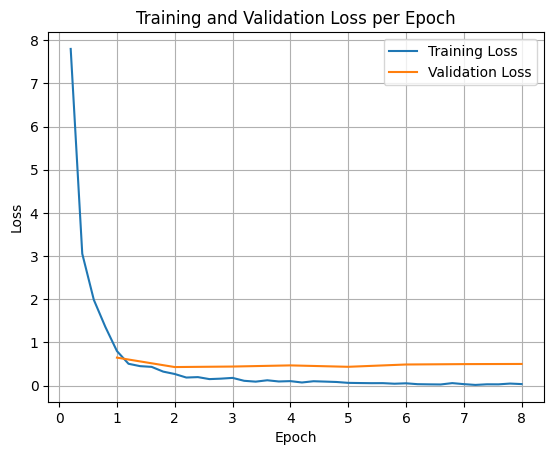
Để vẽ biểu đồ tổn thất trong quá trình huấn luyện và xác thực, bạn thường sẽ trích xuất các giá trị này từ đối tượng TrainerState hoặc nhật ký được tạo trong quá trình huấn luyện.
Sau đó, bạn có thể dùng các thư viện như Matplotlib để trực quan hoá những giá trị này qua các bước hoặc giai đoạn huấn luyện. Trục x sẽ biểu thị các bước hoặc số lượt huấn luyện, còn trục y sẽ biểu thị các giá trị tổn thất tương ứng.
import matplotlib.pyplot as plt

# Access the log history
log_history = trainer.state.log_history

# Extract training / validation loss
train_losses = [log["loss"] for log in log_history if "loss" in log]
epoch_train = [log["epoch"] for log in log_history if "loss" in log]
eval_losses = [log["eval_loss"] for log in log_history if "eval_loss" in log]
epoch_eval = [log["epoch"] for log in log_history if "eval_loss" in log]

# Plot the training loss
plt.plot(epoch_train, train_losses, label="Training Loss")
plt.plot(epoch_eval, eval_losses, label="Validation Loss")
plt.xlabel("Epoch")
plt.ylabel("Loss")
plt.title("Training and Validation Loss per Epoch")
plt.legend()
plt.grid(True)
plt.show()
Suy luận mô hình kiểm thử
Sau khi quá trình huấn luyện hoàn tất, bạn nên đánh giá và kiểm thử mô hình. Bạn có thể tải các mẫu khác nhau từ tập dữ liệu kiểm thử và đánh giá mô hình trên các mẫu đó.
check_success_rate()
1 Prompt: How do I access my paystubs on the ADP portal?
  Output: <start_function_call>call:search_knowledge_base{query:<escape>paystubs API portal access codes<escape>}<end_function_call><start_function_response>
  `-> ✅ correct!
2 Prompt: What is the syntax for Python list comprehensions?
  Output: <start_function_call>call:search_google{query:<escape>Python list comprehensions syntax<escape>}<end_function_call><start_function_response>
  `-> ✅ correct!
3 Prompt: Where can I find the floor plan for Building B?
  Output: <start_function_call>call:search_knowledge_base{query:<escape>floor plan Building B floor plan<escape>}<end_function_call><start_function_response>
  `-> ✅ correct!
4 Prompt: Check the latest stock price for Apple.
  Output: <start_function_call>call:search_google{query:<escape>latest stock price Apple<escape>}<end_function_call><start_function_response>
  `-> ✅ correct!
5 Prompt: What is the procedure for reporting a phishing email?
  Output: <start_function_call>call:search_knowledge_base{query:<escape>phishing email procedure reporting policy<escape>}<end_function_call><start_function_response>
  `-> ✅ correct!
6 Prompt: Show me examples of using the useEffect hook in React.
  Output: <start_function_call>call:search_knowledge_base{query:<escape>useEffect hook examples React<escape>}<end_function_call><start_function_response>
  -> ❌ wrong (expected 'search_google' missing)
7 Prompt: Who are the direct reports for the VP of Engineering?
  Output: <start_function_call>call:search_knowledge_base{query:<escape>VP of Engineering direct reports<escape>}<end_function_call><start_function_response>
  `-> ✅ correct!
8 Prompt: How do I list open ports on a Linux server?
  Output: <start_function_call>call:search_google{query:<escape>open ports Linux server equivalents<escape>}<end_function_call><start_function_response>
  `-> ✅ correct!
9 Prompt: What is our Slack message retention policy?
  Output: <start_function_call>call:search_knowledge_base{query:<escape>slack message retention policy policy excerpt<escape>}<end_function_call><start_function_response>
  `-> ✅ correct!
10 Prompt: Compare the features of iPhone 15 vs Samsung S24.
  Output: <start_function_call>call:search_google{query:<escape>iPhone 15 vs Samsung S24 feature comparison<escape>}<end_function_call><start_function_response>
  `-> ✅ correct!
11 Prompt: I need the expense code for team building events.
  Output: <start_function_call>call:search_knowledge_base{query:<escape>expense code team building events<escape>}<end_function_call><start_function_response>
  `-> ✅ correct!
12 Prompt: Best practices for writing a Dockerfile for Node.js.
  Output: <start_function_call>call:search_knowledge_base{query:<escape>Docker file best practices Node.js<escape>}<end_function_call><start_function_response>
  -> ❌ wrong (expected 'search_google' missing)
13 Prompt: How do I request a new monitor setup?
  Output: <start_function_call>call:search_knowledge_base{query:<escape>new monitor setup request procedure<escape>}<end_function_call><start_function_response>
  `-> ✅ correct!
14 Prompt: What is the difference between VLOOKUP and XLOOKUP in Google Sheets?
  Output: <start_function_call>call:search_google{query:<escape>VLOOKUP vs XLOOKUP difference Google Sheets中<escape>}<end_function_call><start_function_response>
  `-> ✅ correct!
15 Prompt: Find the onboarding checklist for new engineering hires.
  Output: <start_function_call>call:search_knowledge_base{query:<escape>engineering hire onboarding checklist New hires.<escape>}<end_function_call><start_function_response>
  `-> ✅ correct!
16 Prompt: What are the latest release notes for the OpenAI API?
  Output: <start_function_call>call:search_google{query:<escape>latest OpenAI API release notes latest version<escape>}<end_function_call><start_function_response>
  `-> ✅ correct!
17 Prompt: Do we have preferred hotel partners in Paris?
  Output: <start_function_call>call:search_knowledge_base{query:<escape>preferred hotel partners in Paris<escape>}<end_function_call><start_function_response>
  `-> ✅ correct!
18 Prompt: How to undo the last git commit but keep the changes?
  Output: <start_function_call>call:search_knowledge_base{query:<escape>undo git commit last commit<escape>}<end_function_call><start_function_response>
  -> ❌ wrong (expected 'search_google' missing)
19 Prompt: What is the process for creating a new Jira project?
  Output: <start_function_call>call:search_knowledge_base{query:<escape>Jira project creation process<escape>}<end_function_call><start_function_response>
  `-> ✅ correct!
20 Prompt: Tutorial on SQL window functions.
  Output: <start_function_call>call:search_knowledge_base{query:<escape>SQL window functions tutorial<escape>}<end_function_call><start_function_response>
  -> ❌ wrong (expected 'search_google' missing)
Success : 16 / 20
Tóm tắt và các bước tiếp theo
Bạn đã tìm hiểu cách tinh chỉnh FunctionGemma để giải quyết sự mơ hồ trong việc chọn công cụ, một trường hợp mà mô hình phải chọn giữa các công cụ trùng lặp (ví dụ: tìm kiếm nội bộ so với tìm kiếm bên ngoài) dựa trên các chính sách cụ thể của doanh nghiệp. Bằng cách sử dụng thư viện TRL của Hugging Face và SFTTrainer, hướng dẫn này đã trình bày quy trình chuẩn bị một tập dữ liệu, định cấu hình siêu tham số và thực thi một vòng lặp tinh chỉnh có giám sát.
Kết quả cho thấy sự khác biệt quan trọng giữa một mô hình cơ sở "có khả năng" và một mô hình được tinh chỉnh "sẵn sàng cho sản xuất":
- Trước khi tinh chỉnh: Mô hình cơ sở gặp khó khăn trong việc tuân thủ chính sách cụ thể, thường không gọi được công cụ hoặc chọn sai công cụ, dẫn đến tỷ lệ thành công thấp (ví dụ: 2/20).
- Sau khi tinh chỉnh: Sau khi được huấn luyện trong 8 giai đoạn, mô hình đã học được cách phân biệt chính xác giữa các cụm từ tìm kiếm yêu cầu search_knowledge_base so với search_google, giúp cải thiện tỷ lệ thành công (ví dụ: 16/20).
Giờ đây, khi bạn đã có một mô hình được tinh chỉnh, hãy cân nhắc các bước sau để chuyển sang giai đoạn phát hành công khai:
- Mở rộng tập dữ liệu: Tập dữ liệu hiện tại là một tập dữ liệu nhỏ, được phân chia tổng hợp (50/50) dùng cho mục đích minh hoạ. Đối với một ứng dụng doanh nghiệp mạnh mẽ, hãy tuyển chọn một tập dữ liệu lớn hơn và đa dạng hơn, bao gồm các trường hợp đặc biệt và các trường hợp ngoại lệ hiếm gặp về chính sách.
- Đánh giá bằng RAG: Tích hợp mô hình được tinh chỉnh vào quy trình Tạo tăng cường truy xuất (RAG) để xác minh rằng các lệnh gọi công cụ
search_knowledge_basethực sự truy xuất các tài liệu có liên quan và đưa ra câu trả lời cuối cùng chính xác.
Hãy xem các tài liệu sau đây: