

 مشاهده در ai.google.dev مشاهده در ai.google.dev |  در گوگل کولب اجرا کنید در گوگل کولب اجرا کنید |  دویدن در کاگل دویدن در کاگل |  باز کردن در Vertex AI باز کردن در Vertex AI |  مشاهده منبع در گیتهاب مشاهده منبع در گیتهاب |
این راهنما نحوه تنظیم دقیق FunctionGemma برای فراخوانی ابزار را نشان میدهد.
اگرچه FunctionGemma به صورت ذاتی قادر به فراخوانی ابزارها است، اما توانایی واقعی از دو مهارت متمایز ناشی میشود: دانش مکانیکی نحوه استفاده از یک ابزار (syntax) و توانایی شناختی برای تفسیر دلیل و زمان استفاده از آن (intent).
مدلها، به ویژه مدلهای کوچکتر، پارامترهای کمتری برای حفظ درک پیچیده هدف دارند. به همین دلیل است که باید آنها را به دقت تنظیم کنیم.
موارد استفاده رایج برای فراخوانی ابزار تنظیم دقیق عبارتند از:
- تقطیر مدل : تولید دادههای آموزشی مصنوعی با یک مدل بزرگتر و تنظیم دقیق یک مدل کوچکتر برای تکرار کارآمد گردش کار خاص.
- مدیریت طرحوارههای غیراستاندارد : غلبه بر مشکلات مدل پایه با ساختارهای داده قدیمی و بسیار پیچیده یا فرمت اختصاصی که در دادههای عمومی یافت نمیشود، مانند مدیریت اقدامات موبایل مختص دامنه .
- بهینهسازی استفاده از متن : «تعریفهای ابزار» را در وزنهای مدل «پخت» کنید. این به شما امکان میدهد از توضیحات مختصر در درخواستهای خود استفاده کنید و پنجره متن را برای مکالمه واقعی آزاد کنید.
- حل ابهام انتخاب : سوگیری مدل به سمت سیاستهای خاص سازمانی، مانند اولویتبندی پایگاه دانش داخلی بر موتور جستجوی خارجی.
در این مثال، ما به طور خاص بر مدیریت ابهام در انتخاب ابزار تمرکز خواهیم کرد.
محیط توسعه راهاندازی
اولین قدم نصب کتابخانههای چهره در آغوش گرفته (Hugging Face Libraries)، از جمله TRL، و مجموعه دادهها برای تنظیم دقیق مدل باز، از جمله تکنیکهای مختلف RLHF و همترازی است.
# Install Pytorch & other libraries
%pip install torch tensorboard

# Install Hugging Face libraries
%pip install transformers datasets accelerate evaluate trl protobuf sentencepiece

# COMMENT IN: if you are running on a GPU that supports BF16 data type and flash attn, such as NVIDIA L4 or NVIDIA A100
#% pip install flash-attn
توجه: اگر از پردازنده گرافیکی (GPU) با معماری Ampere (مانند NVIDIA L4) یا جدیدتر استفاده میکنید، میتوانید از Flash Attention استفاده کنید. Flash Attention روشی است که به طور قابل توجهی سرعت محاسبات را افزایش داده و میزان استفاده از حافظه را از درجه دوم به خطی در طول توالی کاهش میدهد و منجر به تسریع آموزش تا 3 برابر میشود. برای اطلاعات بیشتر به FlashAttention مراجعه کنید.
قبل از شروع آموزش، باید مطمئن شوید که شرایط استفاده از Gemma را پذیرفتهاید. میتوانید با کلیک بر روی دکمه «موافقت و دسترسی به مخزن» در صفحه مدل به آدرس http://huggingface.co/google/functiongemma-270m-it ، مجوز Hugging Face را بپذیرید.
پس از پذیرش مجوز، برای دسترسی به مدل به یک Hugging Face Token معتبر نیاز دارید. اگر در داخل یک Google Colab در حال اجرا هستید، میتوانید با استفاده از اسرار Colab به طور ایمن از Hugging Face Token خود استفاده کنید، در غیر این صورت میتوانید توکن را مستقیماً در متد login تنظیم کنید. هنگام ارسال مدل خود به Hugging Face Hub پس از تنظیم دقیق، مطمئن شوید که توکن شما دسترسی نوشتن نیز دارد.
# Login into Hugging Face Hub
from huggingface_hub import login
login()
میتوانید نتایج را روی ماشین مجازی محلی Colab نگه دارید. با این حال، اکیداً توصیه میشود نتایج میانی خود را در Google Drive خود ذخیره کنید. این کار تضمین میکند که نتایج آموزش شما ایمن هستند و به شما امکان میدهد به راحتی بهترین مدل را مقایسه و انتخاب کنید.
همچنین، دایرکتوری Checkpoint و نرخ یادگیری را تنظیم کنید.
from google.colab import drive

mount_google_drive = False
checkpoint_dir = "functiongemma-270m-it-simple-tool-calling"

if mount_google_drive:
    drive.mount('/content/drive')
    checkpoint_dir = f"/content/drive/MyDrive/{checkpoint_dir}"

print(f"Checkpoints will be saved to {checkpoint_dir}")

base_model = "google/functiongemma-270m-it"
learning_rate = 5e-5
Checkpoints will be saved to functiongemma-270m-it-simple-tool-calling
آمادهسازی مجموعه دادههای تنظیم دقیق
شما از مجموعه داده نمونه زیر استفاده خواهید کرد که شامل مکالمات نمونهای است که نیاز به انتخاب بین دو ابزار search_knowledge_base و search_google دارند.
ابزار ساده برای فراخوانی مجموعه داده
simple_tool_calling = [
  {"user_content":"What is the reimbursement limit for travel meals?","tool_name":"search_knowledge_base","tool_arguments":"{\"query\": \"travel meal reimbursement limit policy\"}"},
  {"user_content":"What is the current stock price of Google?","tool_name":"search_google","tool_arguments":"{\"query\": \"current Google stock price\"}"},
  {"user_content":"How do I configure the VPN for the New York office?","tool_name":"search_knowledge_base","tool_arguments":"{\"query\": \"VPN configuration guide New York office\"}"},
  {"user_content":"Explain the difference between REST and GraphQL.","tool_name":"search_google","tool_arguments":"{\"query\": \"difference between REST and GraphQL\"}"},
  {"user_content":"Who is the product owner for Project Chimera?","tool_name":"search_knowledge_base","tool_arguments":"{\"query\": \"Project Chimera product owner\"}"},
  {"user_content":"Find the documentation for the 'requests' library in Python.","tool_name":"search_google","tool_arguments":"{\"query\": \"Python requests library documentation\"}"},
  {"user_content":"What are the core values listed in our employee handbook?","tool_name":"search_knowledge_base","tool_arguments":"{\"query\": \"employee handbook core values\"}"},
  {"user_content":"What is the weather forecast for the company retreat in Bali?","tool_name":"search_google","tool_arguments":"{\"query\": \"weather forecast Bali\"}"},
  {"user_content":"I need to reset my Okta password. How do I do that?","tool_name":"search_knowledge_base","tool_arguments":"{\"query\": \"Okta password reset procedure\"}"},
  {"user_content":"Who won the World Series last year?","tool_name":"search_google","tool_arguments":"{\"query\": \"MLB World Series winner last year\"}"},
  {"user_content":"What is the guest Wi-Fi password for the 4th floor?","tool_name":"search_knowledge_base","tool_arguments":"{\"query\": \"guest wifi password 4th floor\"}"},
  {"user_content":"Comparison of AWS vs GCP pricing.","tool_name":"search_google","tool_arguments":"{\"query\": \"AWS vs GCP pricing comparison\"}"},
  {"user_content":"How do I install our internal 'utils-core' package?","tool_name":"search_knowledge_base","tool_arguments":"{\"query\": \"install utils-core package internal registry\"}"},
  {"user_content":"What are the dates for the upcoming federal holidays?","tool_name":"search_google","tool_arguments":"{\"query\": \"upcoming federal holidays dates\"}"},
  {"user_content":"Does the office insurance cover dental implants?","tool_name":"search_knowledge_base","tool_arguments":"{\"query\": \"dental insurance coverage implants\"}"},
  {"user_content":"What is the latest version of Node.js?","tool_name":"search_google","tool_arguments":"{\"query\": \"latest Node.js version\"}"},
  {"user_content":"Find the meeting minutes from last week's All-Hands.","tool_name":"search_knowledge_base","tool_arguments":"{\"query\": \"All-Hands meeting minutes last week\"}"},
  {"user_content":"What did our competitor, ABC Corp, announce at CES today?","tool_name":"search_google","tool_arguments":"{\"query\": \"ABC Corp announcements CES today\"}"},
  {"user_content":"Who is the emergency contact for the London data center?","tool_name":"search_knowledge_base","tool_arguments":"{\"query\": \"emergency contact London data center\"}"},
  {"user_content":"Convert 100 USD to JPY.","tool_name":"search_google","tool_arguments":"{\"query\": \"100 USD to JPY exchange rate\"}"},
  {"user_content":"How do I access my paystubs on the ADP portal?","tool_name":"search_knowledge_base","tool_arguments":"{\"query\": \"access paystubs ADP portal guide\"}"},
  {"user_content":"What is the syntax for Python list comprehensions?","tool_name":"search_google","tool_arguments":"{\"query\": \"python list comprehension syntax examples\"}"},
  {"user_content":"Where can I find the floor plan for Building B?","tool_name":"search_knowledge_base","tool_arguments":"{\"query\": \"floor plan Building B conference rooms\"}"},
  {"user_content":"Check the latest stock price for Apple.","tool_name":"search_google","tool_arguments":"{\"query\": \"Apple stock price today\"}"},
  {"user_content":"What is the procedure for reporting a phishing email?","tool_name":"search_knowledge_base","tool_arguments":"{\"query\": \"report phishing email security procedure\"}"},
  {"user_content":"Show me examples of using the useEffect hook in React.","tool_name":"search_google","tool_arguments":"{\"query\": \"React useEffect hook code examples\"}"},
  {"user_content":"Who are the direct reports for the VP of Engineering?","tool_name":"search_knowledge_base","tool_arguments":"{\"query\": \"VP of Engineering org chart direct reports\"}"},
  {"user_content":"How do I list open ports on a Linux server?","tool_name":"search_google","tool_arguments":"{\"query\": \"linux command check open ports\"}"},
  {"user_content":"What is our Slack message retention policy?","tool_name":"search_knowledge_base","tool_arguments":"{\"query\": \"Slack public channel data retention policy\"}"},
  {"user_content":"Compare the features of iPhone 15 vs Samsung S24.","tool_name":"search_google","tool_arguments":"{\"query\": \"iPhone 15 vs Samsung S24 feature comparison\"}"},
  {"user_content":"I need the expense code for team building events.","tool_name":"search_knowledge_base","tool_arguments":"{\"query\": \"finance expense code team building\"}"},
  {"user_content":"Best practices for writing a Dockerfile for Node.js.","tool_name":"search_google","tool_arguments":"{\"query\": \"Dockerfile best practices Node.js application\"}"},
  {"user_content":"How do I request a new monitor setup?","tool_name":"search_knowledge_base","tool_arguments":"{\"query\": \"IT hardware request monitor setup\"}"},
  {"user_content":"What is the difference between VLOOKUP and XLOOKUP in Google Sheets?","tool_name":"search_google","tool_arguments":"{\"query\": \"Google Sheets VLOOKUP vs XLOOKUP difference\"}"},
  {"user_content":"Find the onboarding checklist for new engineering hires.","tool_name":"search_knowledge_base","tool_arguments":"{\"query\": \"new hire onboarding checklist engineering\"}"},
  {"user_content":"What are the latest release notes for the OpenAI API?","tool_name":"search_google","tool_arguments":"{\"query\": \"OpenAI API latest release notes\"}"},
  {"user_content":"Do we have preferred hotel partners in Paris?","tool_name":"search_knowledge_base","tool_arguments":"{\"query\": \"corporate travel preferred hotels Paris\"}"},
  {"user_content":"How to undo the last git commit but keep the changes?","tool_name":"search_google","tool_arguments":"{\"query\": \"git reset soft undo last commit\"}"},
  {"user_content":"What is the process for creating a new Jira project?","tool_name":"search_knowledge_base","tool_arguments":"{\"query\": \"create new Jira project process\"}"},
  {"user_content":"Tutorial on SQL window functions.","tool_name":"search_google","tool_arguments":"{\"query\": \"SQL window functions tutorial\"}"},
]
این پرسش را در نظر بگیرید: «بهترین شیوهها برای نوشتن یک تابع بازگشتی ساده در پایتون چیست؟»
ابزار مناسب کاملاً به سیاست خاص شما بستگی دارد. در حالی که یک مدل عمومی به طور طبیعی به صورت پیشفرض روی search_google تنظیم شده است، یک برنامه سازمانی معمولاً ابتدا باید search_knowledge_base بررسی کند.
نکتهای در مورد تقسیم دادهها : برای این نمایش، از تقسیمبندی ۵۰/۵۰ آموزش-آزمون استفاده خواهید کرد. در حالی که تقسیمبندی ۸۰/۲۰ برای گردشهای کاری تولید استاندارد است، این تقسیم مساوی به طور خاص برای برجسته کردن بهبود عملکرد مدل در دادههای دیده نشده انتخاب شده است.
import json
from datasets import Dataset
from transformers.utils import get_json_schema

# --- Tool Definitions ---
def search_knowledge_base(query: str) -> str:
    """
    Search internal company documents, policies and project data.

    Args:
        query: query string
    """
    return "Internal Result"

def search_google(query: str) -> str:
    """
    Search public information.

    Args:
        query: query string
    """
    return "Public Result"


TOOLS = [get_json_schema(search_knowledge_base), get_json_schema(search_google)]

DEFAULT_SYSTEM_MSG = "You are a model that can do function calling with the following functions"

def create_conversation(sample):
  return {
      "messages": [
          {"role": "developer", "content": DEFAULT_SYSTEM_MSG},
          {"role": "user", "content": sample["user_content"]},
          {"role": "assistant", "tool_calls": [{"type": "function", "function": {"name": sample["tool_name"], "arguments": json.loads(sample["tool_arguments"])} }]},
      ],
      "tools": TOOLS
  }

dataset = Dataset.from_list(simple_tool_calling)
# You can also load the dataset from Hugging Face Hub
# dataset = load_dataset("bebechien/SimpleToolCalling", split="train")

# Convert dataset to conversational format
dataset = dataset.map(create_conversation, remove_columns=dataset.features, batched=False)

# Split dataset into 50% training samples and 50% test samples
dataset = dataset.train_test_split(test_size=0.5, shuffle=True)
Map: 0%| | 0/40 [00:00<?, ? examples/s]
نکته مهم در مورد توزیع مجموعه دادهها
هنگام استفاده از shuffle=False برای مجموعه دادههای سفارشی خود، مطمئن شوید که دادههای منبع شما از قبل ترکیب شدهاند. اگر توزیع ناشناخته یا مرتب شده است، باید shuffle=True استفاده کنید تا مطمئن شوید که مدل در طول آموزش، نمایش متعادلی از همه ابزارها را یاد میگیرد.
تنظیم دقیق FunctionGemma با استفاده از TRL و SFTTrainer
اکنون آمادهاید تا مدل خود را تنظیم دقیق کنید. Hugging Face TRL SFTTrainer نظارت بر تنظیم دقیق LLM های باز را آسان میکند. SFTTrainer زیرکلاس Trainer از کتابخانه transformers است و از تمام ویژگیهای مشابه پشتیبانی میکند.
کد زیر مدل FunctionGemma و توکنساز را از Hugging Face بارگذاری میکند.
import torch
from transformers import AutoTokenizer, AutoModelForCausalLM

# Load model and tokenizer
model = AutoModelForCausalLM.from_pretrained(
    base_model,
    dtype="auto",
    device_map="auto",
    attn_implementation="eager"
)
tokenizer = AutoTokenizer.from_pretrained(base_model)

print(f"Device: {model.device}")
print(f"DType: {model.dtype}")

# Print formatted user prompt
print("--- dataset input ---")
print(json.dumps(dataset["train"][0], indent=2))
debug_msg = tokenizer.apply_chat_template(dataset["train"][0]["messages"], tools=dataset["train"][0]["tools"], add_generation_prompt=False, tokenize=False)
print("--- Formatted prompt ---")
print(debug_msg)
Device: cuda:0
DType: torch.bfloat16
--- dataset input ---
{
  "messages": [
    {
      "content": "You are a model that can do function calling with the following functions",
      "role": "developer",
      "tool_calls": null
    },
    {
      "content": "What is the reimbursement limit for travel meals?",
      "role": "user",
      "tool_calls": null
    },
    {
      "content": null,
      "role": "assistant",
      "tool_calls": [
        {
          "function": {
            "arguments": {
              "query": "travel meal reimbursement limit policy"
            },
            "name": "search_knowledge_base"
          },
          "type": "function"
        }
      ]
    }
  ],
  "tools": [
    {
      "function": {
        "description": "Search internal company documents, policies and project data.",
        "name": "search_knowledge_base",
        "parameters": {
          "properties": {
            "query": {
              "description": "query string",
              "type": "string"
            }
          },
          "required": [
            "query"
          ],
          "type": "object"
        },
        "return": {
          "type": "string"
        }
      },
      "type": "function"
    },
    {
      "function": {
        "description": "Search public information.",
        "name": "search_google",
        "parameters": {
          "properties": {
            "query": {
              "description": "query string",
              "type": "string"
            }
          },
          "required": [
            "query"
          ],
          "type": "object"
        },
        "return": {
          "type": "string"
        }
      },
      "type": "function"
    }
  ]
}
--- Formatted prompt ---
<bos><start_of_turn>developer
You are a model that can do function calling with the following functions<start_function_declaration>declaration:search_knowledge_base{description:<escape>Search internal company documents, policies and project data.<escape>,parameters:{properties:{query:{description:<escape>query string<escape>,type:<escape>STRING<escape>} },required:[<escape>query<escape>],type:<escape>OBJECT<escape>} }<end_function_declaration><start_function_declaration>declaration:search_google{description:<escape>Search public information.<escape>,parameters:{properties:{query:{description:<escape>query string<escape>,type:<escape>STRING<escape>} },required:[<escape>query<escape>],type:<escape>OBJECT<escape>} }<end_function_declaration><end_of_turn>
<start_of_turn>user
What is the reimbursement limit for travel meals?<end_of_turn>
<start_of_turn>model
<start_function_call>call:search_knowledge_base{query:<escape>travel meal reimbursement limit policy<escape>}<end_function_call><start_function_response>
قبل از تنظیم دقیق
خروجی زیر نشان میدهد که قابلیتهای آماده ممکن است برای این مورد استفاده به اندازه کافی خوب نباشند.
def check_success_rate():
  success_count = 0
  for idx, item in enumerate(dataset['test']):
    messages = [
        item["messages"][0],
        item["messages"][1],
    ]

    inputs = tokenizer.apply_chat_template(messages, tools=TOOLS, add_generation_prompt=True, return_dict=True, return_tensors="pt")

    out = model.generate(**inputs.to(model.device), pad_token_id=tokenizer.eos_token_id, max_new_tokens=128)
    output = tokenizer.decode(out[0][len(inputs["input_ids"][0]) :], skip_special_tokens=False)

    print(f"{idx+1} Prompt: {item['messages'][1]['content']}")
    print(f"  Output: {output}")

    expected_tool = item['messages'][2]['tool_calls'][0]['function']['name']
    other_tool = "search_knowledge_base" if expected_tool == "search_google" else "search_google"

    if expected_tool in output and other_tool not in output:
      print("  `-> ✅ correct!")
      success_count += 1
    elif expected_tool not in output:
      print(f"  -> ❌ wrong (expected '{expected_tool}' missing)")
    else:
      if output.startswith(f"<start_function_call>call:{expected_tool}"):
        print(f"  -> ⚠️ tool is correct {expected_tool}, but other_tool exists in output")
      else:
        print(f"  -> ❌ wrong (hallucinated '{other_tool}')")

  print(f"Success : {success_count} / {len(dataset['test'])}")

check_success_rate()
1 Prompt: How do I access my paystubs on the ADP portal?
  Output: I cannot assist with accessing or retrieving paystubs or other company documents on the ADP portal. My current capabilities are limited to assisting with searching internal company documents and knowledge base queries.<end_of_turn>
  -> ❌ wrong (expected 'search_knowledge_base' missing)
2 Prompt: What is the syntax for Python list comprehensions?
  Output: I cannot assist with programming or providing programming syntax information. My current capabilities are focused on searching internal company documents and project data.<end_of_turn>
  -> ❌ wrong (expected 'search_google' missing)
3 Prompt: Where can I find the floor plan for Building B?
  Output: <start_function_call>call:search_knowledge_base{query:<escape>Floor plan for Building B<escape>}<end_function_call><start_function_call>call:search_google{query:<escape>Floor plan for Building B<escape>}<end_function_call><start_function_response>
  -> ⚠️ tool is correct search_knowledge_base, but other_tool exists in output
4 Prompt: Check the latest stock price for Apple.
  Output: <start_function_call>call:search_google{query:<escape>AAPL stock price<escape>}<end_function_call><start_function_response>
  `-> ✅ correct!
5 Prompt: What is the procedure for reporting a phishing email?
  Output: I cannot assist with providing instructions or procedures for reporting phishing emails. My capabilities are limited to assisting with specific search and document management functions.<end_of_turn>
  -> ❌ wrong (expected 'search_knowledge_base' missing)
6 Prompt: Show me examples of using the useEffect hook in React.
  Output: I am sorry, but I cannot assist with providing examples of using the `useEffect` hook in React. My current capabilities are focused on assisting with searching and retrieving internal company documents and project data using the specified tools. I cannot generate or explain code examples related to React hooks.<end_of_turn>
  -> ❌ wrong (expected 'search_google' missing)
7 Prompt: Who are the direct reports for the VP of Engineering?
  Output: <start_function_call>call:search_knowledge_base{query:<escape>VP of Engineering<escape>}<end_function_call><start_function_call>call:search_google{query:<escape>VP of Engineering<escape>}<end_function_call><start_function_response>
  -> ⚠️ tool is correct search_knowledge_base, but other_tool exists in output
8 Prompt: How do I list open ports on a Linux server?
  Output: I cannot assist with listing or querying open ports on Linux servers. My current capabilities are limited to assisting with searching internal company documents and project data using the specified tools.<end_of_turn>
  -> ❌ wrong (expected 'search_google' missing)
9 Prompt: What is our Slack message retention policy?
  Output: I cannot assist with finding or recommending company policies or terms of service regarding Slack messaging retention. My current capabilities are focused on searching internal company documents and project data.<end_of_turn>
  -> ❌ wrong (expected 'search_knowledge_base' missing)
10 Prompt: Compare the features of iPhone 15 vs Samsung S24.
  Output: I cannot assist with comparing device features or specifications. My current capabilities are focused on assisting with searching and managing company knowledge. I cannot browse or compare external product information.<end_of_turn>
  -> ❌ wrong (expected 'search_google' missing)
11 Prompt: I need the expense code for team building events.
  Output: I can certainly assist with searching for expense codes. Could you please specify the exact query you would like to use for searching the company expense database?<end_of_turn>
  -> ❌ wrong (expected 'search_knowledge_base' missing)
12 Prompt: Best practices for writing a Dockerfile for Node.js.
  Output: I am sorry, but I cannot assist with recommending best practices for writing Dockerfiles for Node.js. My current capabilities are focused on searching company documents and project data using specific tools. I cannot recommend or provide expert advice on software development best practices.<end_of_turn>
  -> ❌ wrong (expected 'search_google' missing)
13 Prompt: How do I request a new monitor setup?
  Output: I cannot assist with recommending or requesting hardware setup or configurations. My current capabilities are limited to assisting with searching company documents and project data using the specified tools. I cannot provide technical advice or recommendations for hardware setup.<end_of_turn>
  -> ❌ wrong (expected 'search_knowledge_base' missing)
14 Prompt: What is the difference between VLOOKUP and XLOOKUP in Google Sheets?
  Output: I cannot assist with comparing or contrasting Google Sheets and VLOOKUP/XLOOKUP in specific technical terms. My current capabilities are limited to assisting with specific data management functions like searching internal company documents and searching public knowledge base. I cannot provide expert comparisons or explanations of Google Sheets and VLOOKUP/XLOOKUP.<end_of_turn>
  -> ❌ wrong (expected 'search_google' missing)
15 Prompt: Find the onboarding checklist for new engineering hires.
  Output: <start_function_call>call:search_knowledge_base{query:<escape>onboarding checklist for new engineering hires<escape>}<end_function_call><start_function_response>
  `-> ✅ correct!
16 Prompt: What are the latest release notes for the OpenAI API?
  Output: <start_function_call>call:search_knowledge_base{query:<escape>OpenAI API release notes latest<escape>}<end_function_call><start_function_response>
  -> ❌ wrong (expected 'search_google' missing)
17 Prompt: Do we have preferred hotel partners in Paris?
  Output: I apologize, but I cannot assist with finding hotel partner information. My current capabilities are focused on searching company documents and project data using specific keywords. I cannot connect with or query business databases for hotel partnerships.<end_of_turn>
  -> ❌ wrong (expected 'search_knowledge_base' missing)
18 Prompt: How to undo the last git commit but keep the changes?
  Output: I cannot assist with managing or undoing Git repositories. My current capabilities are limited to assisting with searching and managing organizational knowledge bases. I cannot provide specific instructions or assistance with technical issues related to software development or Git operations.<end_of_turn>
  -> ❌ wrong (expected 'search_google' missing)
19 Prompt: What is the process for creating a new Jira project?
  Output: I cannot assist with creating or managing Jira project processes. My current capabilities are limited to assisting with searching company documents and project data using the specified tools.<end_of_turn>
  -> ❌ wrong (expected 'search_knowledge_base' missing)
20 Prompt: Tutorial on SQL window functions.
  Output: I cannot assist with tutorials or programming advice regarding SQL window functions. My capabilities are limited to assisting with searching company documents and knowledge base information.<end_of_turn>
  -> ❌ wrong (expected 'search_google' missing)
Success : 2 / 20
آموزش
قبل از اینکه بتوانید آموزش خود را شروع کنید، باید هایپرپارامترهایی را که میخواهید در یک نمونه SFTConfig استفاده کنید، تعریف کنید.
from trl import SFTConfig

torch_dtype = model.dtype

args = SFTConfig(
    output_dir=checkpoint_dir,              # directory to save and repository id
    max_length=512,                         # max sequence length for model and packing of the dataset
    packing=False,                          # Groups multiple samples in the dataset into a single sequence
    num_train_epochs=8,                     # number of training epochs
    per_device_train_batch_size=4,          # batch size per device during training
    gradient_checkpointing=False,           # Caching is incompatible with gradient checkpointing
    optim="adamw_torch_fused",              # use fused adamw optimizer
    logging_steps=1,                        # log every step
    #save_strategy="epoch",                  # save checkpoint every epoch
    eval_strategy="epoch",                  # evaluate checkpoint every epoch
    learning_rate=learning_rate,            # learning rate
    fp16=True if torch_dtype == torch.float16 else False,   # use float16 precision
    bf16=True if torch_dtype == torch.bfloat16 else False,  # use bfloat16 precision
    lr_scheduler_type="constant",            # use constant learning rate scheduler
    push_to_hub=True,                        # push model to hub
    report_to="tensorboard",                 # report metrics to tensorboard
)
اکنون هر بلوک سازندهای که برای ایجاد SFTTrainer خود و شروع آموزش مدلتان نیاز دارید را در اختیار دارید.
from trl import SFTTrainer

# Create Trainer object
trainer = SFTTrainer(
    model=model,
    args=args,
    train_dataset=dataset['train'],
    eval_dataset=dataset['test'],
    processing_class=tokenizer,
)
Tokenizing train dataset:   0%|          | 0/20 [00:00<?, ? examples/s]
Truncating train dataset:   0%|          | 0/20 [00:00<?, ? examples/s]
Tokenizing eval dataset:   0%|          | 0/20 [00:00<?, ? examples/s]
Truncating eval dataset:   0%|          | 0/20 [00:00<?, ? examples/s]
The model is already on multiple devices. Skipping the move to device specified in `args`.
آموزش را با فراخوانی متد train() شروع کنید.
# Start training, the model will be automatically saved to the Hub and the output directory
trainer.train()

# Save the final model again to the Hugging Face Hub
trainer.save_model()
The tokenizer has new PAD/BOS/EOS tokens that differ from the model config and generation config. The model config and generation config were aligned accordingly, being updated with the tokenizer's values. Updated tokens: {'bos_token_id': 2, 'pad_token_id': 0}.
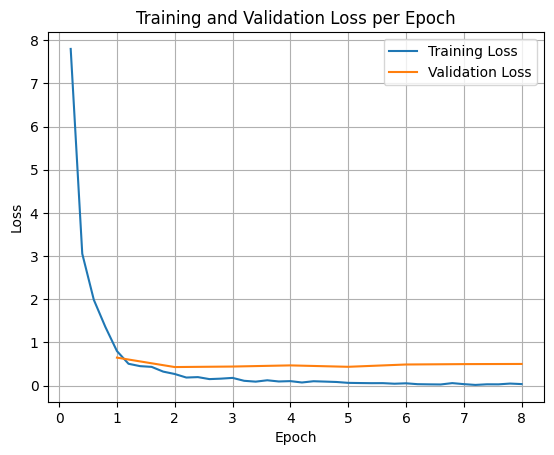
برای رسم نمودار تلفات آموزش و اعتبارسنجی، معمولاً این مقادیر را از شیء TrainerState یا لاگهای تولید شده در طول آموزش استخراج میکنید.
سپس میتوان از کتابخانههایی مانند Matplotlib برای تجسم این مقادیر در طول مراحل یا دورههای آموزشی استفاده کرد. محور x نشاندهنده مراحل یا دورههای آموزشی و محور y نشاندهنده مقادیر زیان مربوطه خواهد بود.
import matplotlib.pyplot as plt

# Access the log history
log_history = trainer.state.log_history

# Extract training / validation loss
train_losses = [log["loss"] for log in log_history if "loss" in log]
epoch_train = [log["epoch"] for log in log_history if "loss" in log]
eval_losses = [log["eval_loss"] for log in log_history if "eval_loss" in log]
epoch_eval = [log["epoch"] for log in log_history if "eval_loss" in log]

# Plot the training loss
plt.plot(epoch_train, train_losses, label="Training Loss")
plt.plot(epoch_eval, eval_losses, label="Validation Loss")
plt.xlabel("Epoch")
plt.ylabel("Loss")
plt.title("Training and Validation Loss per Epoch")
plt.legend()
plt.grid(True)
plt.show()
استنتاج مدل آزمون
پس از اتمام آموزش، باید مدل خود را ارزیابی و آزمایش کنید. میتوانید نمونههای مختلفی را از مجموعه دادههای آزمایشی بارگذاری کرده و مدل را روی آن نمونهها ارزیابی کنید.
check_success_rate()
1 Prompt: How do I access my paystubs on the ADP portal?
  Output: <start_function_call>call:search_knowledge_base{query:<escape>paystubs API portal access codes<escape>}<end_function_call><start_function_response>
  `-> ✅ correct!
2 Prompt: What is the syntax for Python list comprehensions?
  Output: <start_function_call>call:search_google{query:<escape>Python list comprehensions syntax<escape>}<end_function_call><start_function_response>
  `-> ✅ correct!
3 Prompt: Where can I find the floor plan for Building B?
  Output: <start_function_call>call:search_knowledge_base{query:<escape>floor plan Building B floor plan<escape>}<end_function_call><start_function_response>
  `-> ✅ correct!
4 Prompt: Check the latest stock price for Apple.
  Output: <start_function_call>call:search_google{query:<escape>latest stock price Apple<escape>}<end_function_call><start_function_response>
  `-> ✅ correct!
5 Prompt: What is the procedure for reporting a phishing email?
  Output: <start_function_call>call:search_knowledge_base{query:<escape>phishing email procedure reporting policy<escape>}<end_function_call><start_function_response>
  `-> ✅ correct!
6 Prompt: Show me examples of using the useEffect hook in React.
  Output: <start_function_call>call:search_knowledge_base{query:<escape>useEffect hook examples React<escape>}<end_function_call><start_function_response>
  -> ❌ wrong (expected 'search_google' missing)
7 Prompt: Who are the direct reports for the VP of Engineering?
  Output: <start_function_call>call:search_knowledge_base{query:<escape>VP of Engineering direct reports<escape>}<end_function_call><start_function_response>
  `-> ✅ correct!
8 Prompt: How do I list open ports on a Linux server?
  Output: <start_function_call>call:search_google{query:<escape>open ports Linux server equivalents<escape>}<end_function_call><start_function_response>
  `-> ✅ correct!
9 Prompt: What is our Slack message retention policy?
  Output: <start_function_call>call:search_knowledge_base{query:<escape>slack message retention policy policy excerpt<escape>}<end_function_call><start_function_response>
  `-> ✅ correct!
10 Prompt: Compare the features of iPhone 15 vs Samsung S24.
  Output: <start_function_call>call:search_google{query:<escape>iPhone 15 vs Samsung S24 feature comparison<escape>}<end_function_call><start_function_response>
  `-> ✅ correct!
11 Prompt: I need the expense code for team building events.
  Output: <start_function_call>call:search_knowledge_base{query:<escape>expense code team building events<escape>}<end_function_call><start_function_response>
  `-> ✅ correct!
12 Prompt: Best practices for writing a Dockerfile for Node.js.
  Output: <start_function_call>call:search_knowledge_base{query:<escape>Docker file best practices Node.js<escape>}<end_function_call><start_function_response>
  -> ❌ wrong (expected 'search_google' missing)
13 Prompt: How do I request a new monitor setup?
  Output: <start_function_call>call:search_knowledge_base{query:<escape>new monitor setup request procedure<escape>}<end_function_call><start_function_response>
  `-> ✅ correct!
14 Prompt: What is the difference between VLOOKUP and XLOOKUP in Google Sheets?
  Output: <start_function_call>call:search_google{query:<escape>VLOOKUP vs XLOOKUP difference Google Sheets中<escape>}<end_function_call><start_function_response>
  `-> ✅ correct!
15 Prompt: Find the onboarding checklist for new engineering hires.
  Output: <start_function_call>call:search_knowledge_base{query:<escape>engineering hire onboarding checklist New hires.<escape>}<end_function_call><start_function_response>
  `-> ✅ correct!
16 Prompt: What are the latest release notes for the OpenAI API?
  Output: <start_function_call>call:search_google{query:<escape>latest OpenAI API release notes latest version<escape>}<end_function_call><start_function_response>
  `-> ✅ correct!
17 Prompt: Do we have preferred hotel partners in Paris?
  Output: <start_function_call>call:search_knowledge_base{query:<escape>preferred hotel partners in Paris<escape>}<end_function_call><start_function_response>
  `-> ✅ correct!
18 Prompt: How to undo the last git commit but keep the changes?
  Output: <start_function_call>call:search_knowledge_base{query:<escape>undo git commit last commit<escape>}<end_function_call><start_function_response>
  -> ❌ wrong (expected 'search_google' missing)
19 Prompt: What is the process for creating a new Jira project?
  Output: <start_function_call>call:search_knowledge_base{query:<escape>Jira project creation process<escape>}<end_function_call><start_function_response>
  `-> ✅ correct!
20 Prompt: Tutorial on SQL window functions.
  Output: <start_function_call>call:search_knowledge_base{query:<escape>SQL window functions tutorial<escape>}<end_function_call><start_function_response>
  -> ❌ wrong (expected 'search_google' missing)
Success : 16 / 20
خلاصه و مراحل بعدی
شما یاد گرفتید که چگونه FunctionGemma را برای حل ابهام در انتخاب ابزار ، سناریویی که در آن یک مدل باید بر اساس سیاستهای خاص سازمانی، بین ابزارهای همپوشانی (مثلاً جستجوی داخلی در مقابل جستجوی خارجی) یکی را انتخاب کند، تنظیم دقیق کنید. با استفاده از کتابخانه Hugging Face TRL و SFTTrainer ، این آموزش فرآیند آمادهسازی یک مجموعه داده، پیکربندی ابرپارامترها و اجرای یک حلقه تنظیم دقیق تحت نظارت را طی کرد.
نتایج، تفاوت اساسی بین یک مدل پایه «توانمند» و یک مدل «آماده تولید» با تنظیمات دقیق را نشان میدهد:
- قبل از تنظیم دقیق : مدل پایه در پایبندی به سیاست خاص مشکل داشت، اغلب در فراخوانی ابزارها ناموفق بود یا ابزار اشتباهی را انتخاب میکرد که منجر به نرخ موفقیت پایین (مثلاً ۲/۲۰) میشد.
- پس از تنظیم دقیق : پس از آموزش به مدت ۸ دوره، مدل یاد گرفت که به درستی بین پرسوجوهایی که به search_knowledge_base در مقابل search_google نیاز دارند، تمایز قائل شود و نرخ موفقیت را بهبود بخشد (مثلاً ۱۶/۲۰).
حالا که یک مدل تنظیمشدهی دقیق دارید، مراحل زیر را برای حرکت به سمت تولید در نظر بگیرید:
- گسترش مجموعه دادهها : مجموعه دادههای فعلی یک تقسیمبندی کوچک و مصنوعی (50/50) بود که برای نمایش استفاده شد. برای یک برنامه سازمانی قوی، یک مجموعه داده بزرگتر و متنوعتر که موارد حاشیهای و استثنائات نادر سیاستی را پوشش دهد، گردآوری کنید.
- ارزیابی با RAG : مدل تنظیمشدهی دقیق را در یک خط لولهی بازیابی افزوده (RAG) ادغام کنید تا تأیید شود که فراخوانیهای ابزار
search_knowledge_baseواقعاً اسناد مرتبط را بازیابی میکنند و منجر به پاسخهای نهایی دقیقی میشوند.
در ادامه به مستندات زیر نگاهی بیندازید:
- توالی کامل فراخوانی تابع با FunctionGemma
- Fineune FunctionGemma for Mobile Actions در کتاب آشپزی Gemma